
Learn more

A reflection: 2023 Data and AdTech Trends

On January 13, 2023, we made our own attempt at “predictive AI” by forecasting the digital landscape for the year. Now, with the unveiling of our AI Essentials Playbook, it’s the perfect moment to ask: How accurate were our digital crystal ball’s predictions?

As we sift through 2023, let’s rewind and reevaluate our initial bets. Attribution, activation, and the ever-growing emphasis on user privacy shaped our focus. At the same time, tools and platforms like CDPs emerged as the unsung heroes, eliminating data silos.

Original ‘Data and AdTech Trends – 2023’ Post

Attribution, activation, and respect for user privacy have been key issues for companies with regard to data. Meanwhile, new tools, technologies, and platforms like CDPs have emerged to help pool data in one place and avoid silos.

2023 is full of many opportunities and trends. Let’s dig into those we’ve identified as being most impactful. 

Data & AdTech Essentials for 2023

Let’s start with some of the less obvious recommendations:

  • Predictive Models: Consumers are offering up less and less of their data these days. Predictive models will help us to have better conversions. For example, through Google Ads’ Value-Based Bidding, we have the opportunity to improve campaign profitability by increasing Customer Lifetime Value.
  • BigQuery: This Google tool offers more enhanced analytics capabilities – all right in the Cloud. Google Cloud now offers the use of BigQuery, a serverless, multi-cloud enterprise data warehouse so you can continue to improve your data-driven strategy. BigQuery integrates Machine Learning for advanced analytics, allows you to share valuable information across your organization, and helps you make business decisions based on data.
  • Server-Side Tagging: We recommend moving measurement and advertising tags from your website to a secure server container. This helps protect your customers by restricting access to their information and increasing conversion rates on your site by reducing page load times. Server-side tagging is now supported in products from Google Ads and Google Marketing Platform, including Campaign Manager 360, Display & Video 360 y Search Ads 360.
  • Marketing Mix Modeling (MMM): Start distributing your budgets based on more advanced models. MMM for example is a statistical modeling technique that identifies the relationship between marketing spending in each channel and the results obtained by it. This allows you to discover what is the optimal investment in each channel to maximize your sales.
  • Connected TV: Otherwise known as the evolution of digital advertising. Connected TV is any television connected to the Internet where users stream video content. This technology provides advertisers with a new means to deliver measurable and personalized advertising. According to a study about Connected TV carried out by IAB Spain in 2022, 82% of Internet users between the ages of 16 and 75 internet streaming services. Connected TV allows for cross-device strategies. It also allows us to identify and impact users with our ads through different devices, thus measuring their effectiveness and how they have influenced the conversion process of said user. Another benefit of Connected TV campaigns is the possibility of being able to segment audiences and control frequencies, which can help lower costs.

And, a few solutions that you’ve surely heard of before:

  • Privacy planning: Having a privacy plan for your company is essential (it has been now for many years). Privacy protection regulations and the demand for greater transparency from users about how companies use their data continue to increase. If we build a privacy-centric strategy, we can continue developing our advertising activity with total normality. At Making Science we opted for the implementation of solutions such as Consent Mode, Enhanced Conversions, GA4, and Facebook CAPI, which allow us to “catch up” in the privacy race. We are also committed to the use and activation of First-Party Data, an option that is increasingly accepted by organizations due to the disappearance of third-party cookies.
  • GA4: All data capture, measurement, and activation technologies are becoming privacy-first. So, it’s a no-brainer to implement them. One excellent technology is Google Analytics 4 (GA4). It is a tool that will be crucial for measuring our results. It offers many new functionalities, with which we will be able to extract greater insights from our data. It will also make our measurement much more reliable.
  • Hyper-personalization and AI projects: Users are demanding better and better experiences that are adapted to their reality and needs. In short, personalization was essential in 2022, but in 2023 we will have to work even harder to continue surprising them. We should look to implement AI based on the activity of our users, so that we can design and develop better products, services, messages, and, ultimately, better ways to reach our audiences.
  • First-Party Data Activation: In a cookieless environment, how can we continue to impact our users in the same way as in the past? Thanks to First-Party Data, we can nurture our campaigns without putting our activity at risk. First-party data is an optimal, reliable, scalable data strategy. This activation and exploitation can be done either by CDPs or any platform that helps to manage data.

Want to learn more about our predictions for 2024? Be sure to follow our Podcast!

Listen here

Get ready for the new SA360 interface: Key migration details and new features

Google has announced that at the beginning of 2024, the Search Ads 360 (SA360) interface that we all know (one of the most popular tools of the Google Marketing Platform [GMP] marketing suite) will cease to exist for good and be replaced by a new SA360 interface. Google created the new interface to improve the experience for advertisers and to help achieve better results with better management of search campaigns across multiple channels.

While it may seem straightforward, not migrating to the new interface can negatively affect advertisers. Keep reading to find out how to avoid potential conflicts.

What conflicts can arise from not migrating to the new SA360 interface?

If advertisers do not migrate, there are several issues that will arise:

  • Disconnection of the SA360 API with reporting platforms
  • The loss of custom columns
  • Misconfiguration of conversion goals and Smart Bidding
  • Involuntary synchronization issues with search engines

What are the differences between the current and new SA360 interface?

With a modern infrastructure, the new Search Ads 360 offers better support across multiple advertising channels and search engines, including third-party partners. This means advertisers can access more features from other search engines.

  • Current Search Ads 360 has limited search engine functionality, conversion goal setting at the bid strategy level, and automatic daily search engine synchronization with manual forcing for instant updating.
  • The new Search Ads 360 interface offers expanded coverage of other search engine features, campaign/account level conversion targeting and actions, and the ability to create rules to adjust the value of conversions. In addition, it will allow us to differentiate between campaign conversion targeting, bidding strategies, and budgeting strategies and automatically synchronize real-time changes to search engines.

Additionally, there are new user roles in SA360, allowing for more granular control of access.

When should you migrate to the new interface?

Before you consider this migration, we recommend that you take a look at Google’s timeline:

  • Up until January 2024, we recommend scheduling the migration of your bidding and budget management strategies to the new Search Ads 360 experience.
  • During February 2024, we recommend to proceed with the migration to ensure continuity of service.
  • Between February and April 2024, the old Search Ads 360 interface will no longer be available to all users. Google will notify all advertisers at least 60 days in advance.

Ready to move forward?

Making Science is uniquely poised to assist you in planning your migration to the new SA360 interface. As a Google Marketing Platform partner, we’ve helped over 100 companies across a variety of industries with GMP-related projects. Don’t hesitate to reach out! Or, click here for additional details about the change.

 Get in touch

Google Customer Match for Black Friday 2023

With Black Friday and Cyber Monday quickly approaching, retail brands are looking for the best strategies to connect with the most relevant audiences that will drive revenue during this holiday season. 

CPMs continue to explode around the holidays, with spending returning to the more typical and predictable pre-pandemic levels of growth. Last year, Black Friday US retail sales (excluding auto) increased 12% YoY. Retail e-commerce sales grew by 14% YoY and interestingly, in-store traffic increased by 2.9%–more than it has in years–resulting in 12% YoY in-store sales growth. A surprising 67% of consumers planned to participate in Black Friday via brick-and-mortar shops last year (Insider Intelligence, 2022). This momentum will likely continue through this year’s holiday season, meaning it’s as important as ever for retailers to establish (or iterate on) effective audience strategies that connect them with their target consumers both online and, when applicable, in-store.

One effective and accessible way to leverage both online and offline customer data is via Google’s Customer Match. Customer Match (available within Google Ads) helps you to deepen existing customer relationships—or build new ones—across all of Google’s properties in a privacy-safe way by joining online marketing data with offline user-consented data (i.e. CRM). It will enhance your marketing strategies by allowing you to directly target individuals who have already interacted with your business, making your campaigns more relevant and likely to drive conversions. 

Recommended uses of Customer Match this Black Friday

Re-engage online with customers who shop in-store before (and during) Black Friday and share their contact information (e.g. email) at checkout. Additionally, any new and returning online users who consent to sharing their contact information while making a purchase, creating an account, signing up for your newsletter, or joining your loyalty program can also be uploaded via an audience list and targeted through Customer Match. A unique advantage to Customer Match is the ability to combine this user-provided contact information with the powerful consumer behavior data available via Google. Using Customer Match you can retarget users across each of Google’s properties (Search, YouTube, Shopping, Display, and Gmail) based on their interactions with your ads (via Google Ads) and website (via Google Analytics). 

  • Create personalized Gmail campaigns for your customers who share their Gmail email addresses with you. 
  • Reach your customers with relevant Black Friday promotions on YouTube to drive in-store and online sales. 
  • Show up higher in Search results for customers with the highest conversion likeliness.
  • Remarket to existing customers with Black Friday deals based on their previous purchase history.
  • Retarget users who have maybe not yet converted but continue to show high intent and have a high likelihood of conversion but require a reminder or two to bring them over the finish line.

Notable changes to Customer Match (2023)

In the current privacy-centric consumer environment, we know reaching the right audiences at the right time has become more of a challenge and has shifted focus more toward first-party data audience strategies, like Customer Match. With this year’s expected increase in online and offline Black Friday traffic and sales, it’ll be crucial for marketers to tap into these resources to target relevant customers with tailored promotions, with the goal of higher engagement and increased sales. Leveraging this first-party data via Customer Match will enable you to personalize marketing, allocate resources efficiently, and enhance customer experiences. 

With privacy in mind, there have been some recent changes to Customer Match to make it a more durable, privacy-safe solution. The main takeaway from the updates is that Customer Match targeting is transitioning to an entirely automated solution. This means that Customer Match is no longer available for manual bidding (i.e. campaigns not using Smart Bidding). Additionally, Similar Segments (formerly Similar Audiences) for Customer Match, and all audiences, has been completely automated as well.

It’s no longer possible to manually apply Similar Audience lists, however, ​​Smart Bidding-enabled campaigns now automatically include all Customer Match lists to boost ad campaign performance for your goals, like conversions. As long as the account is opted in, uploading Customer Match audience lists, and using Smart Bidding, Google AI will automatically target users similar to the users in the lists you upload via Customer Match while optimizing overall campaign performance. Ultimately, these updates mean really leaning into Google’s AI and automation in order to get the most out of your customer data on relevant Google-owned properties, such as Google Shopping, for this coming Black Friday. 

You can review the latest updates to Customer Match in the Google Ads Help Center here.

In Conclusion

Maximize the 2023 Black Friday by leveraging the renewed and enhanced Google Customer Match. Embrace the integration of AI and automation for a superior, targeted, and efficient marketing campaign, ensuring you reach the right audiences at the right time. Not sure how to get started? Our team would be happy to help!

Get in touch

Universal Analytics vs. Google Analytics 4 Implementation: Compare them automatically in our dashboard

Numerous organizations, ranging from large corporations to small enterprises, are embarking on the transition from Universal Analytics (UA) to Google Analytics 4 (GA4) for their reporting needs. Whenever the topic of migrating or transitioning within an analytics platform arises, you might find yourself pondering several questions such as:

  • What are the key similarities and differences between these platforms?
  • Why are there discrepancies in the data points?
  • How can I maintain consistency in reporting metrics during the transition?
  • What potential challenges might arise in the new data interpretations?

Unveiling a Seamless Solution with Making Science

Fear not, as Making Science has simplified this transition for many clients. To make this process even smoother, we’ve introduced an automatic feature to assist you.

Now, with just a click on the “submit” button at the end of this page, you can instantly view a side-by-side comparison of your own GA4 and UA data, absolutely free. This feature helps you resolve doubts between the two different platforms, offering a clear picture of the metrics across both platforms.

Guiding Stakeholders through Platform Differences

Making Science has successfully assisted many clients with platform transitions. With GA4, the transition process and aligning your stakeholders have become even smoother.

  • Understanding and communicating the differences in the platforms from the start enables you to guide your stakeholders and teams more effectively, ensuring a hassle-free transition. It’s not ideal to only address these nuances after the debut of your GA4 report, only to subsequently highlight issues with the new process.
  • For example, the shift in GA4’s approach from capturing pageviews to unique views, which are naturally fewer than in UA, should be communicated promptly to maintain trust. Why? User privacy concerns have led to shifts in regulations prompting Google to update the way it tracks site visitor data.
  • Moreover, differences in setup might appear. A developer, for instance, might miss a datalayer glitch until it surfaces during the rollout of a fresh GA4 capability.

Such scenarios can be stressful for teams. However, leveraging dashboards and automation speeds up stakeholder communication, giving analysts peace of mind. At Making Science, our experience with a range of clients provides us with insight into expected variations.

Visually Comparing UA with GA4

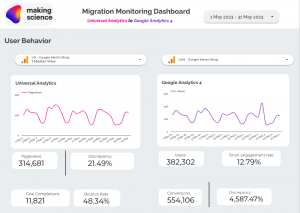
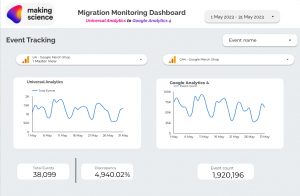
Illustrated below is a comparison of key metrics across the two implementations, providing insight into disparities and analyzing trends to gauge whether variations are evolving over time. This serves as our primary level of investigation, aiming to ensure consistency or at least provide reasons for any discrepancies. Discrepancies might stem from differing metric calculation methodologies or implementation-specific complications.

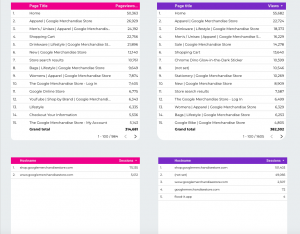
Furthermore, we delve into device categories, pages, events, and channel data to unravel potential sources of discrepancy. Automated reporting frees up your team to delve deeper into the “why”, reducing the time spent on data collection and consolidation for the platform.


Following industry standards, we recommend a thorough comparison of every metric and dimension, facilitated by automation. Our approach to reporting usually includes custom metrics, dimensions, and events to ensure alignment between platforms. This aspect often improves validation efforts as implementation grows more comprehensive over time.

Conclusion

Embarking on the transition from UA to GA4 can be made significantly less daunting with Making Science. Whether you choose automated reporting through Making Science or opt for an in-house approach, having a foundation of summary metrics will prove beneficial.

Remember, a treasure trove of insights awaits you, and it’s just a click away. Hit the “submit” button at the end of this page to explore a world of data insights, offering a seamless transition experience, entirely free of charge!

Compare them automatically in our dashboard

Lifetime Value (LTV) in GA4: Analysis and Reports

Today, let’s dive into Customer Lifetime Value (LTV), a critical metric for evaluating user behavior and value. We’ve broached this topic before, but today we’ll focus on utilizing LTV in Google Analytics 4 (GA4) to maximize its potential.

LTV serves as both a measure to calculate a customer’s economic value and a strategy for customer management. Harnessing LTV aids us in multiple ways:

  1. Crafting retention and loyalty strategies: LTV tracks the customer journey from the point of conversion to the end of their lifecycle – when they cease being our customers.
  2. Driving active acquisition campaigns: These campaigns leverage predictive measures to forecast purchasing probability, churn rate, or higher average values per user purchase.
  3. Gaining unique user data: It provides a wealth of information, such as user interactions with our brand, their latest interaction or purchase, their last active moment, user ID-based deduplication, predictive metrics that learn from user behaviors, and more.

Continuous tracking and analysis of LTV over time enable us to detect trends and alterations in customer behavior. This valuable insight allows us to refine strategies and make clear decisions to boost your business’s profitability and overall performance. And all this is made possible with Google Analytics 4.

However, when calculating LTV, we need to consider the following:

  • The calculation of LTV can fluctuate depending on the type of business and the industry sector. For instance, in sectors where recurring purchases are less frequent, like car sales, LTV is calculated over a longer period, perhaps several years.
  • It’s crucial to understand that there’s a limit to LTV because obtaining client data before August 15, 2020, is impossible.

Connection to Google Analytics (GA4)

Accessing Google Analytics (GA4) provides a powerful toolkit for analyzing and understanding user behavior. Along with LTV, GA4 furnishes invaluable insights into the customer journey, conversion events, audience segmentation, and much more, allowing a more comprehensive and detailed view of customer activity.
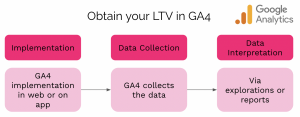
Graphic showing 3 steps to obtain Lifetime Value in GA4, including implementation, data collection, and data interpretation.

To access this rich data, we need a connection to GA4 from our website or app to collect and interpret them via explorations and reports.

Where to find the Lifetime Value reports in GA4
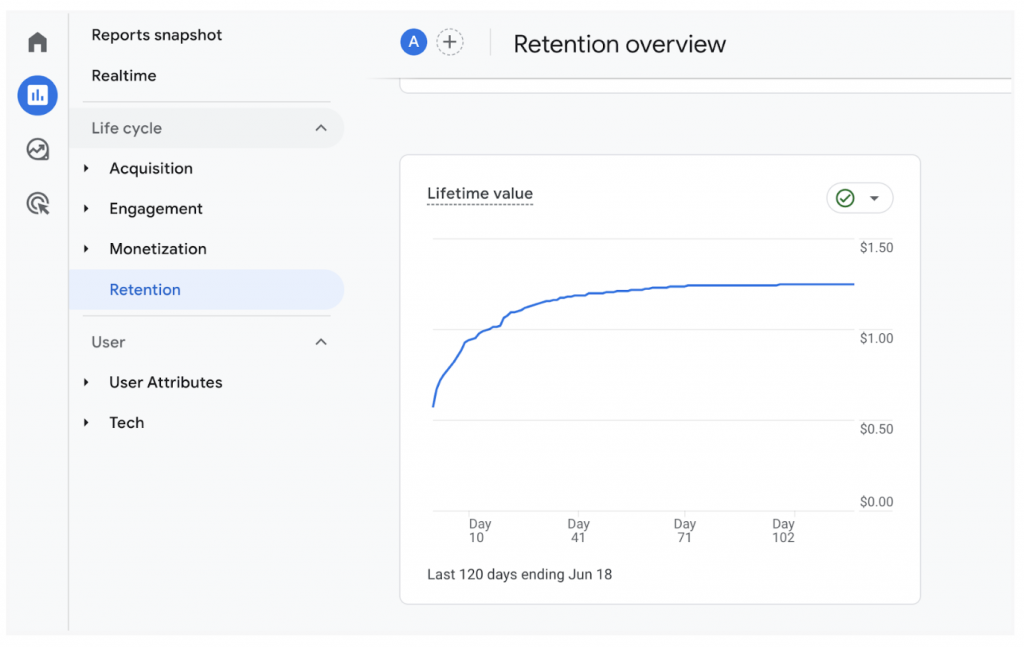
Screenshot showing where to find Lifetime Value reports in GA4, under reports snapshot via retention overview

You can find LTV reports in GA4 in various ways:

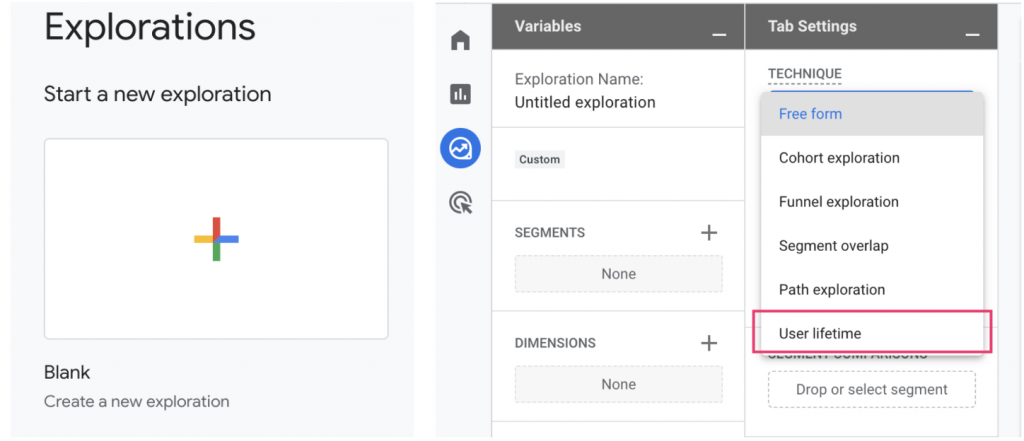
  • Directly starting a new exploration.
  • From a blank report.
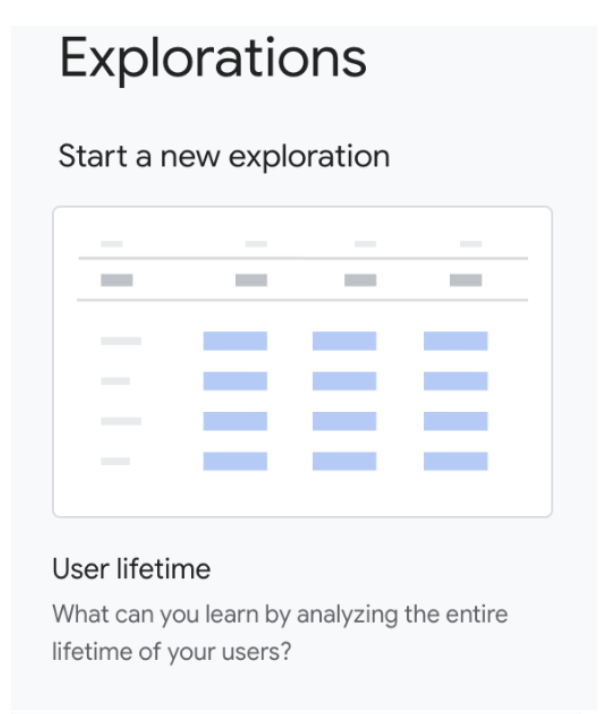
  • By selecting Technique → User Lifetime.Image showing that under "start a new exploration", you can select "user lifetime" to see a report of user lifetime value.

Two methods for user identification and reporting

  1. User ID and device: This method employs more accurate data to identify the user and unify all related events in the reports and analysis. Analytics uses a device ID to identify the user if no user ID is collected.
  2. Device ID: It uses the device ID to identify the user via the client_id event of GA cookies for the web and the instance ID for the app.

At Making Science, we strongly recommend using the User ID option for more accurate results.

Are you eager to learn more about Conversion Rate Optimization (CRO), optimizing the user journey, or simply analyzing which tools are best suited for your business? Our team is ready to help. Don’t hesitate to reach out. 🚀

[button color=”accent-color” hover_text_color_override=”#fff” size=”large” url=”www.makingscience.co.uk/contact” text=”Contact our team of experts” color_override=”#f0076f”]

Or, check out our other Google Marketing Platform solutions.
The Future of Universal Analytics Data Post-Sunset: What You Need to Know

The transition from Universal Analytics (UA) to GA4 is in full swing. GA4 is no longer just the future—it’s the present. This shift places many in a conundrum: what becomes of the extensive data amassed in UA? Fortunately, Google, along with our team at Making Science, has anticipated this concern.

Universal Analytics officially sunset on July 31, 2023. But the good news is Google understands the value of the data stored in UA and has made provisions for exporting this data until the year’s end. For those using Universal Analytics 360, the sunset period has been extended to July 2024.

What’s Next for Your Universal Analytics Data?

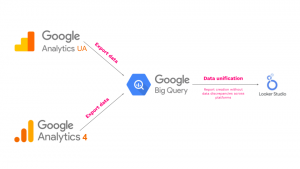
  • 360 Users: While the sunset may seem distant, it’s best to act swiftly. We at Making Science offer a solution that not only lets you export this historical data but enhances data processing as well. The key lies in BigQuery. Integrated more and more with GA4 daily, BigQuery, combined with UA, will elevate your digital data management. However, it’s exclusive to UA 360 accounts due to its unique integration capabilities with BigQuery.
  • Non-360 Users: If you’re without a 360 account, fret not. While you lack direct BigQuery linkage, solutions still abound. Making Science is eager to assist with data export, even if you’re without a Cloud account. In fact, Making Science has created a proprietary solution called Argon. This is capable of making the call to Universal Analytics via API to extract all the data from existing accounts. Get in touch with us to learn more! Other alternatives exist as highlighted in these Google Support articles: “Export and share reports” and “Use the Google Analytics Reporting API to export data.”

Exporting to BigQuery—How and Why:

Before diving in, you’ll need a Cloud account. If you’re account-less, we can help you establish and configure i. The journey is designed to be hassle-free. We manage all necessary setups across platforms. Remember, BigQuery requires specific permissions and configurations to allow UA data migration. Plus, specific choices must be made during data export. We’ll handle these intricacies for you.

One salient advantage of this solution is its automated historical data extraction capability. Other methods demand manual selection of data and reports for export. With BigQuery, such worries are obsolete. Every bit of your UA history finds a new home in the cloud. However, while BigQuery does impose storage fees, they’re minimal and justified by the platform’s robust capabilities.

Visualizing Your UA Data:

BigQuery’s role in digital analysis grows daily. Google’s recent enhancements allow BigQuery to integrate with both free and 360 GA4 accounts. This union means a seamless fusion of historical UA data with fresh GA4 insights, all beautifully presented in a Looker Studio dashboard. As in this blog post, we’ve always advocated for linking GA4 with BigQuery to create reports in Looker Studio, minimizing quota consumption.

But the central concern remains: the potential loss of painstakingly collected UA data. Rest easy. Not only will you retain this data, but we’ve also crafted a solution allowing you to integrate it with GA4 seamlessly. At Making Science, we’re poised to guide you through the entire UA to GA4 data migration.

Ready to navigate the future of analytics with us?

Reach out here!

Real-time Anomaly Detection in Your Website’s Sales Funnel – Gauss Data Quality

Today’s marketing and business intelligence teams demand tools that allow them to understand what’s happening in their business environments; insights into aspects like web traffic, the number of customers, user behaviors, among others.

Thus, this no longer serves as a comparative advantage against your competitors since they too will possess systems capable of generating these business insights, thanks to analytics tools and the like. A potential distinguishing feature that emerges is the immediacy of data.

Immediate access to data is becoming a highly sought-after characteristic for companies. It allows them to preemptively address potential business issues, providing quick and accurate responses to challenges like webpage downtimes or significant drops in page visits.

The closer in time this information is received, the more valuable it becomes. That’s why there’s a growing need to use more proactive tools than traditional dashboards when dealing with critical business information.

To address these needs, Making Science has developed Gauss Data Quality and its alert functionality, a solution that sends real-time notifications if the predefined conditions are met.

Gauss Data Quality and its alert system offer a fully customizable solution. Clients decide which metrics they want to set alarms for, under which specific conditions, and at what intervals.

Some use cases for this solution

  • Website Metric Anomalies: Setting alerts to detect unusual trends in website visits, like decreased page views, changes in visitor browsers, or any other site navigation metrics.
  • Data Consistency or Quality: Establishing alerts to measure metric calculations’ consistency and reporting from various analysis tools (e.g., analytics systems, CRMs). This way, you can identify discrepancies in these platforms’ measurements.
  • Tracking Business Metrics: Setting alerts to actively and promptly detect any unusual trends in the sales funnel regarding visits, conversions, changes in ROPO patterns, etc.

In essence, thanks to these alert configurations, you’ll gain a clearer understanding of your business. The real-time data that powers these alerts can clarify if the measurements from various platforms are consistent and if the crucial business metrics follow the expected trend.

In today’s fast-paced digital landscape, staying ahead requires not just data but real-time, actionable insights. Gauss Data Quality alerts empower businesses with timely notifications, ensuring no critical anomaly goes unnoticed.

Don’t let unexpected changes disrupt your business flow. To truly harness the power of real-time data and keep a vigilant eye on your web sales funnel, reach out to us. Discover how our advanced solutions can transform your decision-making processes.

Get in touch

Server Side and Facebook CAPI: Data Governance and Accuracy of Collected Data

Accurate data is essential for precise marketing strategy decisions. Server Side tracking and the Facebook Conversion API (CAPI) offer many advantages that can significantly enhance your marketing performance. Yet, there are nuances between these two methods…

What is Server Side Tracking?

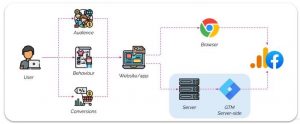
Server Side is a data collection method that sends tracking information from your website’s server to advertising platforms, instead of directly from the user’s browser. This ensures more accurate data collection and sidesteps issues like ad-blockers and browser restrictions.

Server side tracking in a nutshell

Benefits of Server Side Tracking

  • Data Accuracy: Up to 30% more accurate data as ad-blockers and ITP/ETP technologies can’t block server-side tracking. When combined with CAPI, you get more comprehensive and reliable data, guiding smarter marketing decisions.
  • Load Time: Improved website load times.
  • Security: Enhanced security via the GTM server within cloud projects.
  • Data Privacy: Strengthened user data protection. Direct data transfer from your server gives you more control over processing and storage.
  • Data Governance: Better data control and management. Data is collected on the Google Cloud platform and distributed from there.
  • Real-Time: Enhanced real-time data activation using the GTM cloud server.
  • Quick Implementation: Utilizes the existing dataLayer, eliminating the need for new code.

What is the Facebook Conversion API (CAPI)?

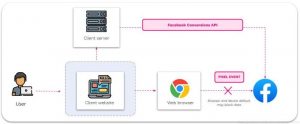
Facebook’s CAPI is a powerful tool that sends conversion events directly from your server to Facebook. It complements the traditional Facebook pixel, capturing data when the pixel can’t, like mobile app purchases or conversions by users with cookies turned off. CAPI ensures more robust data collection, providing a clearer view of your Facebook ad performance.

When Facebook gets a server event, it checks for a corresponding browser event. If the browser event is blocked (e.g., by ad-blockers), the server event is used instead.

CAPI supports various event types and parameters, giving businesses flexibility in tracking many conversion actions and customizing the data they send to Facebook.

Facebook CAPI in a nutshell

Benefits of FB CAPI

  • Data Control & Measurement: Greater control over data sharing and enhanced performance measurement throughout the customer journey.
  • Full Path Visibility: CAPI sends more detailed information than the pixel, such as CRM data or lower funnel events, targeting ads to those more likely to take desired actions.
  • Stronger Data Flow: CAPI data is less affected by browser loading errors, connectivity issues, and ad blockers.

Ready to harness the power of Server Side and Facebook CAPI?

Our expert team can tailor solutions to your needs. Don’t hesitate to get in touch!

Contact us


Deep Links in GA4

The digital world is constantly evolving, leading to new forms of navigation and mobile app use. Today, users access different sections and specific content of apps and websites through deep links. So, we will tell you what deep links are and how they can be measured in our new favorite analytics tool: GA4.

What are Deep Links?

Deep links are links that allow users to directly access a specific section of an app (or website) instead of landing on the app’s main page. This lets users quickly and easily reach the information they need.

One example might be a link in a web article that directs us to a product within an e-commerce app.

Why are Deep Links Important?

Deep links enhance the user experience by providing direct access to needed content. They can also improve app visibility and rankings in search results, potentially increasing download numbers and traffic.

How Are Deep Links Measured in GA4?

First, set up a custom event for the deep link and then a custom parameter for the deep link URL.

Once the custom events and parameters are set, deep links can be measured through GA4’s event reports. These reports show how many times a deep link has been clicked and provide information about traffic sources and user behavior.

How Can They Be Improved?

Improving deep links involves optimizing them for both users and search engines. This means including relevant keywords in the deep link URL, as well as in the description and title of the page accessed.

Ensure deep links work properly and are not broken. A non-functional deep link can negatively impact user experience and reduce app visibility.

Deep links can be an effective tool in a mobile marketing strategy. They can direct users to particular offers or promotions within an app, which can increase conversion rates and sales. They can also be used in mobile ads to guide users directly to a specific section of an app, enhancing ad effectiveness and user experience.

Our Vision

Deep links are crucial for improving user experience and increasing app visibility and rankings in search results. Implementing deep linking in GA4 involves configuring the landing page, adding deep link parameters, and setting up a custom event.

Learn more by contacting our team today!

Get in touch

Or, check out some related posts:

4 attribution tools to resolve web-app tracking and attribution discrepancies

With the growing use of mobile apps and increased web traffic, attribution and tracking have become crucial factors for businesses.

Here, we explore how to address common web-app tracking and attribution discrepancies in Google Analytics 4 and Firebase using tools like Adjust, Appflyers, Singular, and Branch.

What types of discrepancies are most common?

  • Different attribution models: Google Analytics 4 and Firebase use different default attribution models, which can cause data discrepancies.
  • Incorrect tracking setup: Event and conversion tracking may not be correctly set up on Google Analytics 4 and/or Firebase, leading to data discrepancies.
  • Different user identifiers: Using different user identifiers on the app and web can make it challenging to match data across channels, causing attribution data discrepancies.
  • Varying processing times: Google Analytics 4 and Firebase process data differently and at different speeds, which can lead to discrepancies if compared at different times.
  • Data synchronization issues: If app and web data aren’t properly synced, it can cause attribution data discrepancies.

When should you use Adjust, Appflyers, Singular, and Branch to improve your app and website performance?

These third-party attribution tools help with:

  • Multichannel attribution tracking: They can track and correctly attribute app installs and conversions from various channels, such as Facebook, Google, and Twitter.
  • Precise user identification: They can help address issues related to identifying unique users on mobile apps and websites, allowing for more accurate performance measurement.
  • Custom event and conversion tracking: They provide more flexibility in tracking custom events and conversions, useful for monitoring specific events on websites and mobile apps.

In conclusion, external attribution tools like Adjust, AppFlyer, Singular, and Branch offer greater flexibility and accuracy in conversion and event attribution, as well as advanced analytics and data security features. Depending on a business’s specific needs, incorporating these tools can improve ad campaign effectiveness and data-driven decision-making.

Have you noticed web-app tracking and attribution discrepancies? Our team of experts can help. Don’t hesitate to write to us, we’re waiting for you!

Get in touch