
Learn more

Lifetime Value (LTV) in GA4: Analysis and Reports

Today, let’s dive into Customer Lifetime Value (LTV), a critical metric for evaluating user behavior and value. We’ve broached this topic before, but today we’ll focus on utilizing LTV in Google Analytics 4 (GA4) to maximize its potential.

LTV serves as both a measure to calculate a customer’s economic value and a strategy for customer management. Harnessing LTV aids us in multiple ways:

  1. Crafting retention and loyalty strategies: LTV tracks the customer journey from the point of conversion to the end of their lifecycle – when they cease being our customers.
  2. Driving active acquisition campaigns: These campaigns leverage predictive measures to forecast purchasing probability, churn rate, or higher average values per user purchase.
  3. Gaining unique user data: It provides a wealth of information, such as user interactions with our brand, their latest interaction or purchase, their last active moment, user ID-based deduplication, predictive metrics that learn from user behaviors, and more.

Continuous tracking and analysis of LTV over time enable us to detect trends and alterations in customer behavior. This valuable insight allows us to refine strategies and make clear decisions to boost your business’s profitability and overall performance. And all this is made possible with Google Analytics 4.

However, when calculating LTV, we need to consider the following:

  • The calculation of LTV can fluctuate depending on the type of business and the industry sector. For instance, in sectors where recurring purchases are less frequent, like car sales, LTV is calculated over a longer period, perhaps several years.
  • It’s crucial to understand that there’s a limit to LTV because obtaining client data before August 15, 2020, is impossible.

Connection to Google Analytics (GA4)

Accessing Google Analytics (GA4) provides a powerful toolkit for analyzing and understanding user behavior. Along with LTV, GA4 furnishes invaluable insights into the customer journey, conversion events, audience segmentation, and much more, allowing a more comprehensive and detailed view of customer activity.
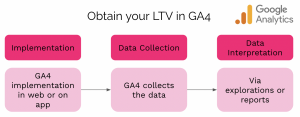
Graphic showing 3 steps to obtain Lifetime Value in GA4, including implementation, data collection, and data interpretation.

To access this rich data, we need a connection to GA4 from our website or app to collect and interpret them via explorations and reports.

Where to find the Lifetime Value reports in GA4
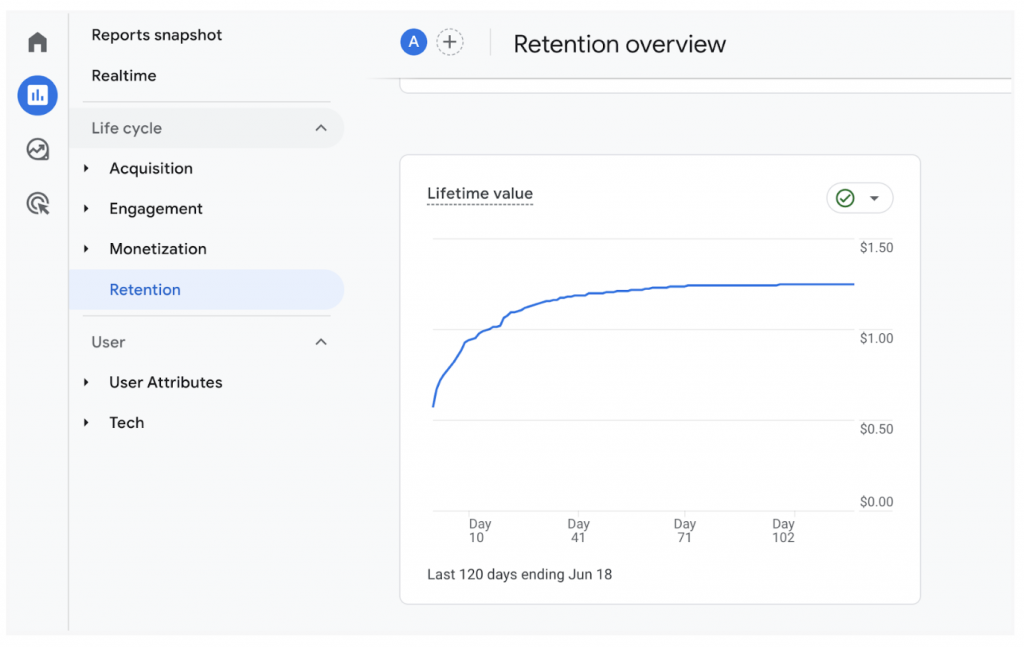
Screenshot showing where to find Lifetime Value reports in GA4, under reports snapshot via retention overview

You can find LTV reports in GA4 in various ways:

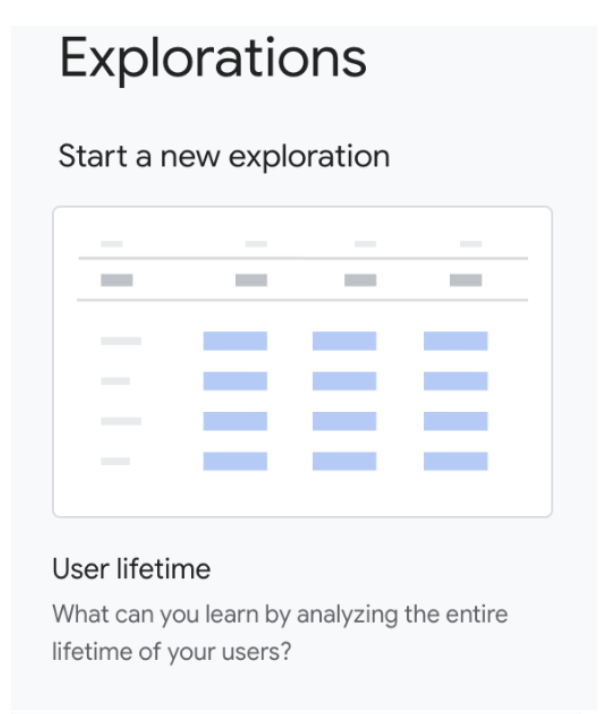
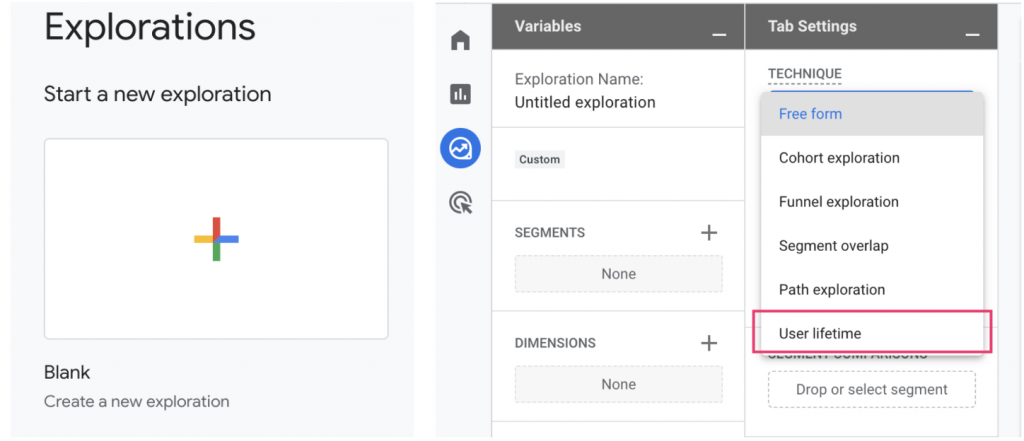
  • Directly starting a new exploration.
  • From a blank report.
  • By selecting Technique → User Lifetime.Image showing that under "start a new exploration", you can select "user lifetime" to see a report of user lifetime value.

Two methods for user identification and reporting

  1. User ID and device: This method employs more accurate data to identify the user and unify all related events in the reports and analysis. Analytics uses a device ID to identify the user if no user ID is collected.
  2. Device ID: It uses the device ID to identify the user via the client_id event of GA cookies for the web and the instance ID for the app.

At Making Science, we strongly recommend using the User ID option for more accurate results.

Are you eager to learn more about Conversion Rate Optimization (CRO), optimizing the user journey, or simply analyzing which tools are best suited for your business? Our team is ready to help. Don’t hesitate to reach out. 🚀

[button color=”accent-color” hover_text_color_override=”#fff” size=”large” url=”www.makingscience.co.uk/contact” text=”Contact our team of experts” color_override=”#f0076f”]

Or, check out our other Google Marketing Platform solutions.

Preserve your data with GA4! Discover the benefits of the platform

In the constantly evolving digital landscape, data analysis plays a crucial role in understanding user behavior, optimizing business strategies, and providing personalized experiences. Google Analytics 4 (GA4) is a revolutionary analytics platform that gives businesses advanced insights and a comprehensive understanding of their audience.

GA4 represents a paradigm shift in the field of data analysis, offering businesses a range of powerful features. Its unified data model, multi-platform tracking capabilities, machine learning-based insights, simplified analysis, and reporting, as well as powerful audience segmentation, make it a formidable tool for businesses seeking to fully understand their audience and optimize their digital strategies.

Here are some of the benefits of GA4:

Unified data model and event-based approach

GA4 presents a unified data model that goes beyond traditional page view tracking and focuses on events. With this event-focused approach, businesses can collect data from different touchpoints, such as app installations, in-app actions, interactions with the website, and many more. This provides a global view of user engagement. This unified data model eliminates the need for multiple tracking codes, simplifying implementation and enabling businesses to obtain information across different platforms seamlessly.

Enhanced analysis of the user journey

Understanding user behavior and their journey across multiple devices and platforms has become more complex in today’s interconnected world. GA4 tackles this challenge by offering improved multi-platform tracking capabilities. By unifying data from websites and apps, it enables businesses to track users as they move from one device to another, thus developing a complete understanding of the customer journey. This feature allows businesses to optimize marketing efforts, identify conversion paths, and provide consistent experiences across different touchpoints.

Machine Learning-based insights

GA4 leverages the power of machine learning to provide valuable insights that go beyond basic metrics. GA4 enables businesses to discover hidden patterns, identify audience segments, and predict user behavior by applying advanced analysis techniques, such as predictive modeling and clustering. This AI-based approach helps businesses make data-driven decisions, personalize marketing campaigns, and optimize their websites or apps to enhance user experience.

Simplified analysis and reporting

GA4 simplifies data analysis and report creation thanks to an intuitive interface and user-friendly reporting tools. The platform offers predefined templates and customized reports allowing businesses to visualize data, monitor key indicators, and track performance. The advanced exploration feature allows for in-depth analysis, enabling businesses to discover the information they need quickly. Plus, GA4’s integration with Google BigQuery facilitates the export of raw data for deeper analysis, meeting the needs of data-savvy organizations.

Powerful audience segmentation

GA4’s audiences offer more targeted segments for marketing campaigns. In the new version, GA4 allows you to create segments based on events and time. You can thus group your users based on interactions and the time elapsed between events rather than based on arbitrary device or platform categories. By focusing on these more powerful metrics, marketers can create precise audiences. They paint a valuable picture of your website users and how they engage with content. This creates endless opportunities to optimize conversions and sales.

Making Science is a Google partner; we rely on their tools as well as the power of the Google Analytics platform. From July 1, 2023, standard properties of Universal Analytics (UA) will stop processing data and will be replaced by Google Analytics 4 (GA4).
If you have not already done so, switch to GA4 now, it’s important!

Adopting GA4 drives businesses towards data-driven success in an increasingly competitive digital landscape… Join the GA4 revolution with us today!

Contact us

Hyper-personalization Strategy: Build Stronger Relationships with Your Customers and Boost Your Sales

Customers demand experiences where they are treated as unique individuals. And, they want to engage with brands, products, and entities that understand and empathize with their realities and daily challenges.

It’s a reality that the numbers confirm:

  • 71% of customers express frustration when their experience with a product or service, from first contact to acquisition, isn’t personalized.
  • 80% of customers consider the experience a company provides as important as the product or service itself.
  • 64% of the time, a customer switches brands due to the former’s lack of relevance to their behavior.
  • 67% of consumers would pay more for a superior brand experience.
  • Entities with even a minimally personalized strategy can achieve a 33% increase in customer loyalty.

How to meet this customer need?

Simple! By providing unique experiences to our customers: hyper-personalized experiences. Increasing consumer expectations, parity among products, and prices have prompted the personalization of the user experience (CX) to reach new heights.

Hyper-personalization relies on data, advanced analytics, and artificial intelligence, offering insights and new scenarios where interactions can be tailored to customers’ realities to better meet their expectations. Today, an optimal CX relies on hyper-personalizing all brand interactions, from e-commerce platforms to after-sales service.

In the physical world, hyper-personalization is the unique and personalized attention each customer receives. In digital channels, according to McKinsey, “brands must meet a new standard: the care of one, where all decisions the brand makes aim to cater to each customer and their unique needs independently.”

Advances in technology now allow brands to transform their operating models while reducing CX costs.

To maintain competitiveness in the current consumption scenario, brands must adopt hyper-personalization in their marketing strategies by exploiting data and using advanced analytics and artificial intelligence, all applied in their customers’ journeys to improve their CX and consequently their engagement.

What does a hyper-personalization strategy achieve?

  • Increases conversion: By offering customers products, services, or content that are of genuine interest to them, a brand significantly enhances its conversion rates.
  • Improves customer loyalty: A well-implemented hyper-personalized strategy makes the customer feel valued and understood, which in turn fosters their commitment to the brand.
  • Reduces customer churn: When a customer feels their needs are being met and expectations surpassed, they’re less likely to switch to a competing brand.
  • Enhances the brand’s reputation: Customers who enjoy a personalized experience are more likely to recommend the brand to others, which helps to boost its reputation and expand its reach.

Implementing hyper-personalization as a core component of a brand’s strategy can seem overwhelming, but the investment in time, resources, and technology can reap significant benefits in the long run. As consumers continue to demand personalized experiences, brands must rise to the challenge and provide the level of service that keeps their customers coming back.

Remember, successful hyper-personalization isn’t just about using data and technology, it’s also about understanding and respecting each customer’s unique journey and meeting them where they are. By doing this, brands can create truly meaningful connections that result in long-term, loyal customer relationships.

What does a hyper-personalization project look like?

A hyper-personalization project is a continuous process, with information and insights gathered fueling each phase of the methodology.

The methodology of such a project passes through 3 stages:

  1. Emotional: We understand how our customers relate to us, contextualize, and understand all the technical aspects and assets that participate in the user experience.
  2. Intelligent: This stage determines how we will identify our customers in different digital assets thanks to deep data analysis. By applying machine learning processes to this step, we can integrate all the insights obtained from our customers and exploit them in real time during future interactions with them.
  3. Activation: Various hyper-personalized experiments are deployed with the help of artificial intelligence, which allows us to sift through user data in real time and thus provide an immediate response to each of them and their needs, eliminating possible barriers in their journey.

Any hyper-personalization project should allow us to measure our actions so that they serve as a learning opportunity within the project itself.

It’s not enough to just collect data about our current or potential customers and segment them based on that data, as was the case in the past. We need to activate the data.

Data activation involves exploiting our customer data through insights and, at the same time, converting these insights into actionable measures: getting a complete view of the user to improve their experience across all channels and interactions with the brand or product.

What does data activation consist of?

  1. Collection: Gather data from any point and transfer it to a centralized platform where it can be aggregated in real-time.
  2. Exploitation: Analyze the data to understand its true value and apply it to marketing actions.
  3. Hyper-personalization: This is the most complex stage and involves integrating all the data into a common environment where actions can be developed to efficiently link users with a brand or product and thus achieve better performance.

At Making Science, we offer end-to-end content deployments for brands and entities, allowing them to provide unique browsing experiences, just like their consumers. Get in touch with our team today to learn how you can use data to hyper-personalize your customer journeys.

Get in touch

Keep Your Google Universal Analytics History Using BigQuery

GA4 is now the present of Analytics, emphasizing full implementation. But, what about the Universal Analytics work and data? Both Google and we ensure you won’t lose your Universal Analytics historical data.

UA will sunset in July 2023, but Google allows data export till year-end. Also, the sunset for Universal Analytics 360 accounts is postponed to July 2024.

How to handle Universal Analytics data?

360 Users should act promptly despite the extended sunset. We at Making Science offer a solution to export and enhance data processing via BigQuery, a pivotal tool in GA4. Linking both will elevate your digital asset data processing. This is applicable only for Universal Analytics 360 accounts.

What if I don’t have a 360 account? Can I still recover my Universal Analytics data?

Non-360 account holders, there are solutions for accounts without BigQuery access. At Making Science, we can assist with data export even without a Cloud account, as per these Google Support articles:

For the 360 users, here’s our solution; BigQuery export.

Requirements for Data Export to BigQuery?

Start by creating a Cloud account, if you don’t have one. Don’t worry, we can set it up for you. To simplify the process, we’ll handle all the necessary configuration on both platforms. Be aware, in BigQuery certain permissions and configurations need to be in place for Universal Analytics to send data to Cloud. This includes specific export settings. Rest assured, we manage all.
This solution stands out as it extracts all historical data automatically, unlike other manual solutions. With BigQuery, you don’t need to select data or reports to export, as all your Universal Analytics history will be stored in the cloud.

Note, BigQuery charges for storage, but these costs are manageable, given the significance of preserving Universal Analytics data.

How can I view my Universal Analytics data?

BigQuery’s role in digital analysis is growing, hence Google now connects BigQuery with GA4 for free and 360 accounts. This means BigQuery unifies Universal Analytics history with GA4 data, displayed in a Looker Studio dashboard. Check this article for linking GA4 with BigQuery to generate Looker Studio reports, conserving quota.

Benefits of BigQuery Export?

Let’s delve deeper into BigQuery export benefits:

  1. Preserve historical data: Linking BigQuery with UA ensures all historical data remains intact.
  2. Data unification: BigQuery’s GA4 connection allows combining historical and new GA4 data for improved comparison and comprehensive reports.
  3. Automated process: Data export is fully automated, eliminating manual exports or other forms of automation.
  4. Enhanced data processing and visualization: With BigQuery and Looker Studio, data processing and visualization surpass UA capabilities.

At Making Science, we provide guidance and solutions for any challenges. Our proposed solution for the Universal Analytics sunset is BigQuery data export, which helps maintain, process, and visualize your data. Don’t hesitate to contact us for assistance with this or any other issue. We’re here to help!
Remember, prepare for the sunset—don’t get caught unready!

Unlock Smarter Marketing with Advanced Marketing Analytics (AMA)

Predictive Analytics, Machine Learning, Data Science, and Marketing are terms that we hear more and more. This reflects the idea that technology drives marketing to deliver better results and gives it the power to optimize and automate.

With this in mind, traditional marketing data analysis constantly evolves, and we are now in a more advanced stage where technology, along with marketing, stands as a key element to provide calculation, tracking, and prediction that was previously unattainable. In other words, Advanced Marketing Analytics (AMA), the fusion of technology and marketing, has arrived to help us optimize, predict, and better analyze our digital activity.

Advanced Marketing Analytics helps marketing specialists automate and optimize an increasing number of marketing decisions and processes.

Relying on statistical techniques and machine learning models, we can detect patterns and relationships within our data to predict consumer behavior and optimize our activity. Leveraging cloud technologies from major tech partners such as Google Cloud, we always personalize the message or content based on the user’s preferences or needs.

But, how do we get started in the world of Advanced Marketing Analytics? What are its advantages? How can we include this in our own projects?

First of all, we need to clean our data, which must be vast and diverse, to use Advanced Marketing Analytics techniques. Our results will only be as good as the data we provide.

Once this preliminary step is completed, we can use different techniques depending on the case. Here are the most current ones:

Customer Lifetime Value

Predicting a list of users with a propensity to buy can be crucial for our business. However, determining which leads are the most valuable will help even more. The goal is to predict a customer’s expected Customer Lifetime Value based on a brief transaction history. This helps you minimize spend on unprofitable customers, optimize acquisition channels, and reactivate customers with a high probability of being profitable.

Marketing Attribution

Attribution enables us to identify the most effective channels within the customer journey, and using reliable data, we can allocate more or less investment accordingly. This approach optimizes our budget and strategy, focusing on the channels that resonate with our customers and drive conversions.

Clustering

Segmenting prospects and customers into clusters or groups with similarities among them (due to their activity) can help us differentiate the messages we send according to the group. Once these clusters are identified, automated communications should be sent so that the messages vary depending on the group, promoting conversion.

Conversion Prediction

Identifying users with characteristics or behavior indicating a high probability of conversion can help us improve profit margins, as we can direct the right message to users with a higher propensity to buy. Factors like age, gender, location, or device type can help us detect these users. This technique can also identify which factors have the greatest impact on conversion.

Anomaly Detection

Real-time marketing can cause anomalies to appear unpredictably, requiring constant attention to all campaigns and activities. Real-time anomaly detection technology can be crucial for business, allowing us to react quickly and fix the issue affecting our activity.

Forecasting

By analyzing the historical data we have, we can predict trends or anomalies that may affect us in the future, allowing us to react in time and avoid them. When it comes to marketing campaigns, this technique can help us adjust certain parameters to achieve better benefits.

Maximizing Results with AMA Techniques

Thanks to these Advanced Marketing Analytics techniques, we can activate the data collected by our company. Then, we can improve and optimize both budget and processes while achieving greater benefits.

Implementing these techniques was quite difficult in the past, but now there are different technological solutions in the market to carry them out. However, an important point is the prior knowledge and research of these techniques and their needs, so as not to rely on unsuitable tools that end up not helping us solve our business problems.

At Making Science, we have extensive experience implementing these techniques for a multitude of clients, each with completely different requirements and objectives, but always with the common thread of betting on technology to improve marketing activity.

If you are interested in implementing any of these techniques, don’t hesitate to discuss your case with us get in touch by clicking the button below. Or, check out this article to learn about workshops run by Google to help improve your results.

Get in touch

What advantages does predictive analytics offer to your business?

In predictive analysis, an analyst collects and organizes data, selects the most suitable mathematical model, and draws essential conclusions based on the results. In other words, predictive analysis uses mathematical modeling tools for decision-making about unknown facts, characteristics, or events.

Now, you might wonder, what advantages can this type of analytics have for my business? Below, I outline the benefits of predictive analytics to help you confidently embrace it.

Optimize decision-making capabilities

With predictive analysis, companies or organizations can discover patterns in customer purchasing or interaction behavior, assess which methods promote or hinder the benefits of these patterns, and decide which measures to choose to improve the organization’s success.

Strengthen risk management

Each sector faces a degree of risk in its daily operations. Proper risk management allows businesses to grow and do so in an appropriate manner. Predictive analysis can analyze large volumes of data to anticipate and prevent fraud, identify weak points, and avoid significant financial losses.

Companies that use predictive data analysis can learn from their failures and create a more prosperous future.

Boost customer loyalty

Before customers begin their journey, we must understand their desires and behaviors. Thus, we can offer them a unique alternative. With predictive analytics, you can create customer profiles that anticipate individual needs and address their “whys” by combining existing data.

Analytics has allowed businesses to provide a more personalized and trustworthy customer experience, opening the doors to new customer habits. It’s what’s been called a “predictive analysis customer retention strategy”.

Refine targeting and segmentation

A good segmentation strategy is essential for retaining existing customers and acquiring new potential customers. Both brands and customers benefit from segmentation, as it improves marketing strategy and audience experiences while increasing brand awareness and customer loyalty. Extensive use of predictive analysis techniques helps target markets based on accurate perceptions and indications about customer interests regarding what the company offers. Therefore, you can make data-driven decisions for every element of your organization using these predictive analysis practices, which will allow you to recognize entire markets that you were previously unaware of.

Reduce costs and maximize budget efficiency

Predictive analysis allows you to save money by optimizing your budget.

For example, companies can now make personnel selections based on a predictive algorithm. It also saves money by detecting risks and directing resources effectively to address them.

Predictive analytics also reduces costs through fraud detection and prevention. Historically used by banks and credit card companies, other businesses now benefit from it. Organizations can identify fraud patterns and prevent exploitation using predictive analysis.

Do you want to learn more about predictive analytics and how to properly activate your data? Our experts can help you! Contact us and tell us about your specific case. We look forward to hearing from you! 🚀

Contact us

Efficiently maintaining serverless data lakes in Google BigQuery

Google’s BigQuery serverless data warehouse makes life so much easier and so much safer in terms of having all the data in one location however, the house-keeping and data governance are left for you to administer and manage.

At Making Science we work with numerous Google BigQuery customers, some small, some large and some very large corporate groups.  Most of our experience shows that customers are rolling out data governance tools but most of our customers are typically still offering the “SQL knowledgeable/connected” departments direct access to BigQuery. This all in the spirit of self-service analytics moving their business to be more data-driven.

Even with the advances in Google’s data catalog and data governance capabilities, the data administrators are left with challenges keeping data lakes and data warehouses operating efficiently.

The Making Science teams are always looking for ways to make themselves more effective at performing their work with the construction of methodologies and tools.  Making Science has tools specifically for Data Quality projects, Data Discovery and a most recent addition is BigQuery Intelligence.  The tool offers value to the roles presented in the data governance model below:[image_with_animation image_url=”48047″ animation=”Fade In” hover_animation=”none” alignment=”center” border_radius=”none” box_shadow=”none” image_loading=”default” max_width=”100%” max_width_mobile=”default”]The BigQuery Intelligence tool was built to help the data warehouse/lake architects/administrators/custodians manage house-keeping activities regarding datasets, tables and views and optimize these same objects.  Many of our larger and very large customers have 100’s of datasets and 100’s of tables and 100s of views within each dataset making it very challenging to keep on-top of house-keeping activities.

BigQuery provides data lake administrators with a simple visual interface for listing datasets, tables, and views.  The BigQuery explorer panel interface allows you to collapse tables and views under their given dataset simplifying the visualization.[image_with_animation image_url=”48053″ animation=”Fade In” hover_animation=”none” alignment=”center” border_radius=”none” box_shadow=”none” image_loading=”default” max_width=”100%” max_width_mobile=”default”]But the BigQuery Explorer does not offer data lake administrators a simple visual interface to understand usage statistics regarding datasets, tables and views; this is where BigQuery intelligence collects underlying data previously collected by the GCP + BigQuery environment and offers visualizations to understand the usage patterns across the nodes in the data warehouse.

The Data Scientists and Data Engineers at Making Science had a look and found that GCP offers a tremendous amount of data lake usage statistics. But, there was no easy way to retrieve the data and visualize the usage patterns in the data lake. The team chose to use Sankey visualizations, built with Python and D3, to better understand the usage patterns between the nodes (datasets, tables, views and jobs/queries) in the data warehouse. [image_with_animation image_url=”48059″ animation=”Fade In” hover_animation=”none” alignment=”center” border_radius=”none” box_shadow=”none” image_loading=”default” max_width=”100%” max_width_mobile=”default”]As the team worked with some very large data lakes they quickly found it necessary to allow data custodians to apply filters to limit views of the data lake to make the Sankey diagram more readable.  Most typically they would select logical groupings of datasets to give a complete view but without making the visualization undecipherable.  BigQuery Intelligence actually allows filtering both on datasets and tables.[image_with_animation image_url=”48104″ animation=”Fade In” hover_animation=”none” alignment=”center” border_radius=”none” box_shadow=”none” image_loading=”default” max_width=”100%” max_width_mobile=”default”]The team also found that by including the possibility to define color based on criteria; by default, the color criteria is “dataset” so that each dataset is distinguished by a specific color in the Sankey visualization.[image_with_animation image_url=”48073″ animation=”Fade In” hover_animation=”none” alignment=”” border_radius=”none” box_shadow=”none” image_loading=”default” max_width=”100%” max_width_mobile=”default”]The team decided to include a “change color criteria” filter, where we can choose between additional criteria including bytes, jobs, inherited jobs, recency, and inherited recency. With this kind of plot, we can check if there exist inefficient nodes in the data lake.[image_with_animation image_url=”48079″ animation=”Fade In” hover_animation=”none” alignment=”center” border_radius=”none” box_shadow=”none” image_loading=”default” max_width=”100%” max_width_mobile=”default”]

HotSpots

A couple of use cases helped by changing the color criteria is the location of “hot spots”, i.e. those nodes which process too many bytes or have too many jobs, and “cold spots” or those nodes that have not been used in a long time and hence could be removed/deleted from the data lake.  In the following screenshot, we can see that the color indicates the volume of data each node has processed. Red indicates too much, and green indicates a reasonable volume. Grey indicates that we don’t have information about this particular node. It is interesting to see nodes that have a deep level and are very red. This usually means that those nodes could be optimized by creating aggregated/intermediate tables.[image_with_animation image_url=”48085″ animation=”Fade In” hover_animation=”none” alignment=”center” border_radius=”none” box_shadow=”none” image_loading=”default” max_width=”100%” max_width_mobile=”default”]

Unused nodes

If we change the color criteria to “inherited recency”, we can search for nodes that have not received any query/job in a long time. The meaning of “inherited” is that we take the smallest recency among one node and its children, given that if one child node receives a job, in some way, the parent node also receives that job. Here, red indicates very high inherited recency and green indicates very small inherited recency. Grey, indicates that we have no info about the particular node. We could analyze the plot to search for unused nodes (red and grey) and clean the data lake.[image_with_animation image_url=”48091″ animation=”Fade In” hover_animation=”none” alignment=”center” border_radius=”none” box_shadow=”none” image_loading=”default” max_width=”100%” max_width_mobile=”default”]

Metrics

The team included a mouse-over capability to display relevant metrics of a node, as you can see in the following screenshot:[image_with_animation image_url=”48097″ animation=”Fade In” hover_animation=”none” alignment=”center” border_radius=”none” box_shadow=”none” image_loading=”default” max_width=”100%” max_width_mobile=”default”]

The Conclusion

Making Science teams, acting as Data Custodians for some of our customers, have found that conversations with Data Business Owners/Stewards regarding optimizations and housekeeping are greatly facilitated by the use of the BigQuery Intelligence tool.  Sitting down with the Data Steward with data and visualizations in hand enables a transparent, data-driven conversation.

The value to the business from a tool such as BigQuery Intelligence comes in the form of improved performance for systems accessing/consuming the data and ensures a reduced GCP operating costs.

The Making Science team members have feature additions already in the works and we will share some of the use cases and the corresponding benefits as they are available.

Handling attribution issues

Currently, a major issue faced in e-commerce is correctly measuring and attributing the conversions of our digital assets. Who or what channel has made our users decide to buy our product? How can we assign or attribute that sale and to which channel?

Today we bring you some solutions to the attribution problem. But for this, we must first ask ourselves what factors are causing this problem. Let’s dive in!

Cookies and AdBlockers

Cookies are currently in the spotlight because many browsers are stacked against them. Safari, for example, blocks third-party cookies and limits first-party cookies. Other platforms, such as Google Chrome, also are fighting to eliminate them. Added to this are the adblockers that are installed by default on many of our computers. These can limit any script that we insert into a page.

How can we solve this problem?

Although certain digital analytics tools work without cookies, they provide us with very limited information. For this reason, we recommend working with the usual measurement tools such as Adobe or Google Analytics 4.

If you are using Google Analytics 4, we suggest integrating it with Google Consent Mode. This solution will allow us to work without cookies. In other words, if a user does not accept cookies, Google Analytics will continue to receive pings without the user’s personal information. However, it can still model this data to identify users and sessions. In this way, we can continue measuring even those users who did not accept cookies.

Another way to overcome the limitations associated with adblockers is to think about solutions such as server-side tagging, for example, Google Tag Manager server containers. They will prevent the blocking of the scripts or hits that we send since they will be sent to our own domain.

Transaction transfer

On many occasions we’ve seen that the transactions (or purchases) made are not being sent. With tools like Google Analytics, we must insert a tracking code on the thank you page. However, in some scenarios, these transactions are not reported.

The reasons are diverse. Many times the user is redirected to a point-of-sale (POS) to make the payment, thus leaving our website. The problem is that many times the POS never returns the user to the thank you page or the user directly closes the browser before reaching it. As a consequence, the transaction is never reported and Google Analytics does not show it in its reports.

How can we solve this problem?

Our recommendation would be to send the transactions from server to server. To do this, Google Analytics 4 offers us the measurement protocol, through which we can send the transaction directly from our e-commerce platform. In this way, even if the user does not reach the thank you page, at the time they report to the e-commerce platform, we can automatically send it to Google Analytics 4 and view it in our reports.

Attribution models

The third problem we commonly encounter is related to the attribution models we use. We typically work with a last-click attribution model that attributes all credit for the conversion to the last channel the user interacts with. This model prevents us from being able to attribute said conversion to the channels that presented the brand to the user or that participated in the different steps of the conversion funnel.

How can we solve this problem?

In order to go one step beyond last click, we suggest a data-driven attribution model. This model is already available in Google Analytics 4, although previously we also found it in the Universal Analytics 360 version.

With this model, we can analyze and understand the collaborative nature of our channels. That is, it allows us to assign part of the credit for the conversion to all the channels that had a relevant participation in said conversion.

We also suggest using your own attribution model, for example with BigQuery. With it, we can create our own attribution model in order to add the value of the contribution to final conversions.

After having analyzed the different factors that cause attribution issues and its different solutions, we can say that by following these tips you will improve the way you measure and attribute your conversions while always respecting current regulations. Do you need help with the implementation? Our team of experts can help you. Do not hesitate to contact us!

Get in touch

Google Enhanced Conversions: greater precision + more privacy

Within the new, increasingly private digital ecosystem, advertisers and agencies must adapt their strategies by adopting the most appropriate technology. This will allow them to continue carrying out their advertising campaigns. And, it will allow them to continue to measure, analyze, and activate their data similar to how they have in the past. Today we’re talking about Google Enhanced Conversions. This is a Google new feature that makes it easier to manage ad campaigns and improves the accuracy of conversion tracking while respecting user privacy. This is accomplished through the use of conversion modeling.

Enhanced Conversions lets you see conversions across Google Ads campaigns, even if the interactions occur across devices or via email. It allows companies to properly track the results of their campaigns while respecting the privacy of consumers.

With Enhanced Conversions, you can maintain high visibility of your data, making it easier to personalize campaigns in the future. But how does it work?

How Enhanced Conversions works

When a customer completes a conversion on your website, you receive their data (such as email address, name, home address, and/or phone number). This data can be captured via conversion tracking tags, sent to Google in its encrypted form, and then used to improve your conversion measurement.

Depending on the type of Enhanced Conversions we use, the hashed data will be used in different ways to improve measurement. The main types of Enhanced Conversions are for the web (online sales), and for leads (for offline sales). In the table below, we describe the differences between the two:

Enhanced Conversions for web Enhanced Conversions for leads
Relevant for advertisers who want to track sales and events that occur on a website. Relevant for advertisers who want to track sales that happen outside of a website (for example, by phone or email) that start as website leads.
Improves measurement of online conversions. Improves the measurement of offline transactions that come from a potential customer or website visitor.
Allows you to send user-provided source hashes from your website when a user converts. The data is then used to match your customers with Google accounts (the ones they logged into when they interacted with one of your ads). Allows you to use encrypted, first-party user-provided data from your website’s lead forms for offline lead measurement. When we upload our leads, the encrypted information provided is used to attribute it to Google’s advertising campaign.

Enhanced Conversions for web

With Enhanced Conversions for your website, customers’ own data, such as email address, name, home address, or phone number, is captured in your conversion tracking tags, encoded, and sent to Google in their encrypted form. Then, they are used to link your customers with their Google accounts, which they logged into when they interacted with one of your ads.

Its main benefits include

  • Recovering conversions that otherwise would not have been measured
  • Improving the optimization of offers through better data
  • Protecting privacy by hashing your own customer data

Enhanced Conversions for leads

With this functionality, you can upload or import conversion data into Google Ads using customer data from your website’s lead forms.

Unlike standard offline conversion imports, Enhanced Conversions for Leads doesn’t require you to modify your lead forms or customer relationship management (CRM) systems to receive a Google Click ID (GCLID). Instead, it uses information that’s already been captured about your leads, like email addresses, to measure conversions.

Its main benefits include

  • Ease of configuration: you can configure the measurement directly from your Google Ads account.
  • Better performance: you will be able to optimize your campaigns for sales and transactions that occur outside of your website.
  • Flexibility: you can implement it using Google tags or with Google Tag Manager.

Enhanced Conversions can help you better monitor the performance of your campaigns. It also facilitates the administration of Google Ads campaigns, all while respecting the privacy of the users. This represents a great advance in the use and activation of data correctly and respecting current regulations. Do you want to implement Enhanced Conversions? 🚀

Get in touch