
Enhancing Customer Service Efficiency with Einstein Bots

Delivering exceptional customer service is not just a competitive advantage; it is a prerequisite for long-term success. Technology streamlines operations in today’s business landscape, while human interaction injects vitality. Yet, bridging human expertise and availability can prove challenging. Enter ChatBot Technology is revolutionizing client engagement by leveraging AI and natural language processing. It’s the go-to for companies aiming to enhance communication and customer experiences. Let’s explore what makes Einstein ChatBot exceptional and the industry’s top choice!

Salesforce Einstein ChatBot harnessing Salesforce’s AI capabilities, empowers businesses to integrate chatbots into diverse real-time customer engagement processes. With its advanced Natural Language Processing (NLP) and machine learning, the chatbot comprehends customer requests and delivers relevant responses. Enabling Einstein ChatBot via native Salesforce settings eliminates integration complexities.

Furthermore, seamless integration with Salesforce’s CRM tools enhances customer experiences. Einstein bots excel in aiding customers, addressing queries, and augmenting customer support representatives’ insights. They analyze data, predict outcomes, suggest optimal actions, and streamline automation across tasks.

Understanding customer expectations is pivotal and Salesforce chatbots delve into backend systems to guide agent actions. Complex issues trigger seamless transfers to available Live Agents. Subsequently, agents can review bot-customer interactions for adequate support provision. Einstein ChatBot revolutionizes customer engagement through its dynamic AI-powered assistance and deep integration with Salesforce’s ecosystem.

Why Should You Use an Einstein Bot?

Consider these points when considering the adoption of Salesforce Einstein Bot:

  • Faster Responses: Unlike email, text, calls, or social media, it delivers faster responses to frequently asked questions, bolstering customer engagement.
  • Time Efficiency: Einstein Bot’s intelligent solutions save customers and support reps time, enabling agents to focus on strategic aspects of their roles.
  • Reduced Cases: Addressing a wide array of questions curtails the need for cases to escalate to live agents, thus lowering case volumes.
  • Intelligent Functionality: Leveraging Natural Language Understanding (NLU), Einstein bots continuously learn and evolve, enhancing their intelligence and capabilities.
  • Rapid Query Resolution via Knowledge Articles: Einstein ChatBot harnesses Salesforce’s knowledge base to provide accurate responses, leveraging NLP to match customer queries with relevant articles. This enhances the customer experience through quick and precise answers derived from a product, service, and standard issue information repository.

Looking Ahead: The Future of Customer Engagement with AI

Salesforce Einstein ChatBot represents a significant leap forward in customer service, blending AI efficiency with the nuanced understanding of human agents. Its ability to deliver swift responses, manage time effectively, and reduce case loads while continually learning from interactions makes it an invaluable asset for any forward-thinking business.

At Making Science, we specialize in harnessing such cutting-edge technologies to not only meet current demands but to anticipate future needs. Our approach is to partner with you to ensure these tools are integrated smoothly and effectively, empowering your business to deliver exceptional customer experiences.
What is the Best Speech-to-Text foundational model ?

A Benchmark of Models for a Call Center Analytics use case

Call centers are one of the main communication channels between customers and companies. The calls to/from the call center contain a gold-mine of valuable information about the customer and its relationship with the companies. At Making Science we are helping customers leverage this value in the business delivering significant ROI on conversational analytics projects.

Before the advent of the modern speech-to-text models, it was almost impossible to process these calls on an industrial scale, since it was a manual process. A very resource-intensive one.

Modern speech-to-text models allow companies to convert call audio records into text, and analyze them to extract valuable insights. With this technology, transcribing a single call can take as little as 4 seconds. However, in-production systems have many challenges:

  1. PII(personally identifying information) data in call center audios: these calls may contain several pieces of sensitive information (names, addresses, credit card numbers, etc.). If the transcripted calls are stored without PII remotion, this may lead to a potential data leakage.
  2. Audio records caveats: depending on the call center setup, the records may be stored as mono or stereo audio files. In terms of this particular use case, this has a deep impact. If the audio is stored as a mono file, the recording from the call center operator and the recording from the caller are in the same audio channel; they aren’t separated. In this case, besides the speech-to-text model, an additional diarization step must be included to separate the parts of the audio that belong to each speaker.

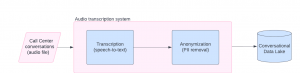
From the previous discussion, it is possible to conclude that an in-production audio transcription system must have two core components: the transcription module itself (the one that converts the audio into text) and an anonymization module (to remove all the sensitive data from the transcripts). The following image shows a high-level architecture for this solution.

Figure 1. High-level architecture for an audio transcription module.

Implementing an end-to-end speech-to-text system for call center records is the first step required to extract value for the transcripts by adding other features on top of it. Some of these features are:

  1. Topic modeling. To know which are the topics discussed in every single conversation.
  2. Sentiment analysis. To know the client’s sentiment regarding the brand and/or about the outcome of the call.
  3. Script monitoring. To validate if the call center operator is following the script and analyze the impact of script variations in the communication output.

From audio to text on an industrial scale – the current landscape

To convert audio to text, there are many different speech-to-text models. At Making Science, we compared several models to see which one performs better. The benchmark dataset we used is the Gridspace-Stanford Harper Valley speech dataset, which contains 1446 call center conversations manually transcribed. These recordings are divided into two audio files, one for the call center operator and the other for the caller. Because of that, no diarization is required.

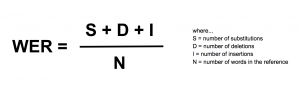
The metric used to evaluate the model’s performance is WER (Word Error Rate). This metric quantifies the mistakes made by the model, taking into account the substitutions, the mistaken insertions, and the deletions done by it. The lower the WER is, the better the model performance is. Since the WER can be greater than one, it isn’t a transcription accuracy percentage. The WER metric is defined as:

Besides how the WER is, there are also other relevant metrics to evaluate which model is the best one for an industrial-scale application. For example, a few relevant dimensions to take into account for this decision are:
  • How much does it cost to translate a minute of audio?
  • The latency if your use case requires rapid translation and analytics; how long does it take for the model to transcribe audio?
  • Parallelism if your use case has a large number of users waiting for “intelligence”; how many API requests per unit of time can the model provider handle?
  • The Privacy; How does the model provider handle our data? Is it possible to deploy a private instance of the model?

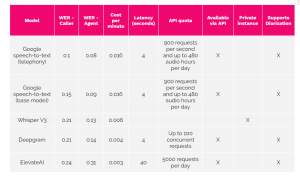
For this benchmark, we considered several models from different providers. Also, we tried models that allow the user to deploy a private instance of it and models that are available via a public API. The results we obtained are available in Table 1.

Table 1: benchmark results for speech-to-text task.
Key takeaways:

  1. Google speech-to-text models are the best-performing models at the time of this benchmark(lower WER) for both agent and caller transcriptions.
  2. In general, the models tend to transcribe better the agent audio than the caller audio. This is an expected behavior because, in general, the audio quality for the agent audio is better.
  3. Whisper V3 has quite good performance, especially for the caller audio. However, the Whisper model doesn’t support diarization. Because of that, to use it in a production environment when audios can be mono audios, a diarization module should be developed (using, for example, pyannote).

Keeping Pace with Speech-to-Text Advancements

In the fast-paced world of speech-to-text technology, it’s crucial to keep pace with innovation. The performance benchmarks we rely on today may shift as advancements continue.

At Making Science, we understand the importance of adaptability and regularly update our approach to ensure we harness the best tools for unlocking customer insights. Stay informed, stay agile, and stay ahead with us as your analytics ally.

Making Science brings its proprietary technology ad-machina to Google Cloud Marketplace

With Google Cloud Marketplace, Making Science will be able to bring this innovative solution to new customers worldwide who want to optimize their Google Ads campaigns.

Madrid, February 13, 2024 – Making Science, a Premier Partner of Google Cloud, is strengthening its commitment to excellence by bringing  for the first time its proprietary technology ad-machina in the Google Cloud Marketplace. Further reaffirming the technological consultancy’s expertise and abilities in using Google Cloud solutions, this long-term agreement also offers companies a tool for personalizing and optimizing Google Ads campaigns with Generative Artificial Intelligence (GenAI).

Through this agreement, any global Google Cloud customer can benefit from fast and efficient access to ad-machina. This multilingual technology, developed by Making Science, adapts to the market’s needs and can generate unique and personalized ads for each user based on their behavior, which translates into an improvement in the effectiveness of advertising campaigns.

Personalization and AI: The Key to Multiplying Conversion Rates in Response to New Market Needs

ad-machina is powered by Artificial Intelligence to learn continuously in real-time, which increases the efficiency in detecting and adapting to changes in consumer buying behavior.

On the other hand, its innovative technology allows ads to be modulated to the company’s commercial strategies, such as offers, internal policies, or social programs so that it generates new ads automatically during the periods of validity of the same.

The milestone further strengthens Making Science’s partnership with Google Cloud for advanced cloud-based solutions that drive digital transformation and advertising effectiveness.

“At Making Science, we are delighted to continue enhancing our strong alliance with Google Cloud by incorporating a tool like ad-machina into its Marketplace for the first time. Without a doubt, a tool that adds value to those companies that operate their Google Ads campaigns and want to optimize the functioning of their algorithms” explains Eduardo Sarciat, ad-machina Managing Director at Making Science.

Google Cloud Marketplace: Consolidating a Long-Term Relationship

The collaboration is founded on a solid relationship between the two companies, with over 90 Google Cloud certifications and specializations in areas such as Infrastructure, Marketing Analytics, and Machine Learning. Google Cloud Marketplace provides enterprise-grade cloud solutions integrated with Google Cloud Platform, making it easy to find, buy, and deploy third-party software.

“Bringing Making Science to Google Cloud Marketplace will help customers quickly deploy, manage, and grow ad-machina on Google Cloud’s trusted, global infrastructure,” said Dai Vu, Managing Director, Marketplace & ISV GTM Programs at Google Cloud. “Making Science can now securely scale and support customers on their digital transformation journeys.”

About Making Science

Making Science has a team of over 1,200 experts across 15 markets, including Spain, Portugal, Mexico, Colombia, France, Italy, the UK, Ireland, Sweden, Denmark, Norway, Finland, Germany, Georgia, and the USA. As a proud consulting partner of Local Planet — the world’s premier network of independent media agencies — we deliver a suite of digital, technology, and performance marketing services to a global clientele. Our expertise spans digital marketing and MarTech, software and cloud solutions, artificial intelligence, and SaaS, all underscored by a relentless pursuit of innovation.

As part of its commitment to innovation, Making Science offers its clients end-to-end capabilities required for consulting, development, integration, and maintenance of advanced IT solutions. Our global network of delivery hubs not only fosters job growth but also serves as an incubator for cultivating top-tier tech talent, fueling projects that accelerate transformation and modernisation.

Committed to making a positive impact, Making Science actively engages in various ESG initiatives. We’ve joined forces with the Climate Pledge, the United Nations Global Compact, and Pledge1%, dedicating resources and efforts to support non-profit organisations. Through these endeavours, we are committed to driving meaningful change for a brighter, more sustainable future.

Accelerate Your Digital Business with Google Marketing Platform (GMP)

In today’s fast-paced digital landscape, having a robust marketing strategy is crucial for the success of any business. One powerful tool that can help you supercharge your digital marketing efforts is Google Marketing Platform (GMP). In this blog post, we’ll take a closer look at GMP and how it can accelerate your digital business.

What is Google Marketing Platform?

Google Marketing Platform is a suite of marketing tools and products offered by Google designed to help businesses manage their digital marketing activities more effectively and efficiently. It combines several popular marketing tools under one unified platform, making it easier for companies to plan, execute, measure, and optimise their online marketing campaigns.

GMP consists of several integrated products, including:

  1. Google Analytics 4: A powerful web analytics tool that provides in-depth insights into website performance, user behaviour, and campaign tracking. It helps businesses understand their audience and measure the impact of their marketing efforts.
  2. Search Ads 360: A comprehensive online advertising platform that allows businesses to create, manage, and optimise online ads across Google’s network, including search, display, video, and app campaigns. It helps businesses reach their target audience and drive relevant website or app traffic.
  3. Campaign Manager 360: Is an ad management and measurement system that offers a centralized tool for managing digital campaigns across the internet’s ecosystem. Campaign Manager 360 includes a robust set of features for ad trafficking, Reporting, and Verification in order to upload creatives, measure performance, and ensure your ads are serving correctly.
  4. Display & Video 360: A comprehensive programmatic advertising platform that allows businesses to plan, execute, and measure display and video campaigns across multiple channels, including production, video, TV, and audio. It helps companies to reach their audience with engaging ads and measure the impact of their campaigns.
  5. Looker Studio: A data visualisation and reporting tool that allows businesses to create custom dashboards and reports using data from multiple sources, including Google Analytics, Google Ads, and other third-party data. It helps companies to gain insights from their data and make data-driven decisions.
  6. Campaign Manager 360: web-based ad management system for advertisers and agencies. It helps you manage your digital campaigns across websites and mobile. This includes robust features for ad serving, targeting, verification, and reporting.

How GMP Can Accelerate Your Digital Business

  1. Comprehensive Data Insights: With Google Marketing Platform, you can gain valuable insights into your website or app performance, user behaviour, and campaign effectiveness through Google Analytics 4. This data can help you make informed decisions about your marketing strategies, optimise your campaigns, and identify new opportunities to drive growth
  2. Integrated Advertising Solutions: GMP provides seamless integration between Google Ads and other tools within the platform, allowing you to create, manage, and optimise your online advertising campaigns more effectively. You can leverage the power of Google Ads to target your audience, drive relevant traffic to your website or app, and achieve your marketing goals.
  3. Custom Reporting and Visualisation: GMP offers Looker Studio, which enables you to create custom dashboards and reports using data from multiple sources. You can visualise your marketing data meaningfully, gain insights, and share reports with stakeholders, making data-driven decision-making more accessible across your organisation.
  4. Programmatic Advertising: Display & Video 360 provides a comprehensive programmatic advertising platform that allows you to plan, execute, and measure display and video campaigns across multiple channels. You can reach your audience with engaging ads and measure the impact of your campaigns, enabling you to optimise your ad spend and achieve better ROI.
  5. Collaboration and Efficiency: GMP provides a unified platform. 

In conclusion, Google Marketing Platform (GMP) is a powerful suite of marketing tools that can help accelerate your digital business. From comprehensive data insights and integrated advertising solutions to website optimisation, custom reporting, programmatic advertising, and improved collaboration, GMP offers robust features that can enhance your digital marketing efforts and drive better business results. 

If you want to take your digital marketing to the next level, consider leveraging the power of Google Marketing Platform to supercharge your efforts and achieve accelerated growth for your business. Today, Making Science has over +100 clients, cases and +300 certified professionals operating in GMP. Get in touch with our GMP experts to start your project!

[button color=”accent-color” hover_text_color_override=”#fff” size=”large” url=”https://www.makingscience.com/contact/” text=”GET IN TOUCH” color_override=”#f0076f”]

Accelerate Your Digital Business with Google Marketing Platform (GMP)

In today’s fast-paced digital landscape, having a robust marketing strategy is crucial for the success of any business. One powerful tool that can help you supercharge your digital marketing efforts is Google Marketing Platform (GMP). In this blog post, we’ll examine GMP and how it can accelerate your digital business.

What is Google Marketing Platform?

Google Marketing Platform is a suite of marketing tools and products offered by Google designed to help businesses manage their digital marketing activities more effectively and efficiently. It combines several popular marketing tools under one unified platform, making it easier for companies to plan, execute, measure, and optimize their online marketing campaigns.

GMP consists of several integrated products, including:

    1. Google Analytics 360: A powerful web analytics tool that provides in-depth insights into website performance, user behavior, and campaign tracking. It helps businesses understand their audience and measure the impact of their marketing efforts.
    2. Search Ads 360: A comprehensive online advertising platform that allows businesses to create, manage, and optimize online ads across Google’s network, including search, display, video, and app campaigns. It helps companies to reach their target audience and drive relevant website or app traffic.
    3. Campaign Manager 360: This is an ad management and measurement system that offers a centralized tool for managing digital campaigns across the internet’s ecosystem. Campaign Manager 360 includes robust features for ad trafficking, Reporting, and Verification to upload creatives, measure performance, and ensure your ads are serving correctly.
    4. Display & Video 360: A comprehensive programmatic advertising platform that allows businesses to plan, execute, and measure display and video campaigns across multiple channels, including production, video, TV, and audio. It helps companies to reach their audience with engaging ads and measure the impact of their campaigns.
    5. Google Data Studio: A data visualization and reporting tool that allows businesses to create custom dashboards and reports using data from multiple sources, including Google Analytics, Google Ads, and other third-party data. It helps companies to gain insights from their data and make data-driven decisions.
    6. Campaign Manager 360: web-based ad management system for advertisers and agencies. It helps you manage your digital campaigns across websites and mobile. This includes robust features for ad serving, targeting, verification, and reporting.

[image_with_animation animation =”fade-in” image_url=”https://www.makingscience.co.uk/wp-content/uploads/2023/04/MS-Infografia-GMP-transparente_Mesa-de-trabajo-1-1-e1673882857811.png” delay=””] [/image_with_animation]

How GMP Can Accelerate Your Digital Business

  1. Comprehensive Data Insights: With Google Marketing Platform, you can gain valuable insights into your website or app performance, user behavior, and campaign effectiveness through Google Analytics 360. This data can help you make informed decisions about your marketing strategies, optimize your campaigns, and identify new opportunities to drive growth.
  2. Integrated Advertising Solutions: GMP provides seamless integration between Google Ads and other tools within the platform, allowing you to create, manage, and optimize your online advertising campaigns more effectively. You can leverage the power of Google Ads to target your audience, drive relevant traffic to your website or app, and achieve your marketing goals.
  3. Website Optimisation: Google Optimize allows you to create and run experiments to optimize your website or app performance. You can test different variations of your website or app content, layout, and design to identify what resonates best with your audience and drives higher conversions. This helps create a more user-friendly and engaging experience, ultimately improving business results.
  4. Custom Reporting and Visualisation: GMP offers Google Data Studio, which enables you to create custom dashboards and reports using data from multiple sources. You can visualize your marketing data meaningfully, gain insights, and share reports with stakeholders, making data-driven decision-making more accessible across your organization.
  5. Programmatic Advertising: Display & Video 360 provides a comprehensive programmatic advertising platform that allows you to plan, execute, and measure display and video campaigns across multiple channels. You can reach your audience with engaging ads and measure the impact of your campaigns, enabling you to optimize your ad spend and achieve better ROI.
  6. Collaboration and Efficiency: GMP provides a unified platform.

In conclusion, Google Marketing Platform (GMP) is a powerful suite of marketing tools that can help accelerate your digital business. From comprehensive data insights and integrated advertising solutions to website optimization, custom reporting, programmatic advertising, and improved collaboration, GMP offers robust features that can enhance your digital marketing efforts and drive better business results. 

If you want to take your digital marketing to the next level, consider leveraging the power of Google Marketing Platform to supercharge your efforts and achieve accelerated growth for your business. Today, Making Science has over +100 clients, cases and +300 certified professionals operating in GMP. 

[button open_new_tab=”true” color=”accent-color” hover_text_color_override=”#fff” size=”medium” url=”www.makingscience.com/contact” text=”Get in touch to start your project!” color_override=””]

Maximize your sales with Marketing Mix Modeling

What is Marketing Mix Modeling?

According to the paper “Challenges and Opportunities in Media Mix Modeling” by Chan, D., & Perry, M. (2017),

Marketing Mix Modeling (MMM) refers to statistical models used by advertisers to measure the effectiveness of their advertising investments and have existed in various forms since the 1960s. MMMs, as we will call them from now on, use aggregated historical time series data to model sales outcomes based on advertising variables, other marketing variables, and control variables such as weather, seasonality, and market competition.

Metrics like the return on ad spend (ROAS) and optimized advertising budget allocations are derived from these models, relying on the assumption that they provide valid causal results.

In other words, MMMs attempt to answer causal questions for advertisers. For example:

  • What was my ROAS on television last year?
  • What would my sales be if more or less money were spent next year?
  • How should my media budgets be allocated to maximize sales?

What does Marketing Mix Modeling bring to our business?

With MMM, we will achieve two different things:

  1. Attribution: We will obtain an analysis of all variables that influence the client’s business results, and we will know which are the most relevant to enhance them. The advantage over user-level models is that this model doesn’t only talk about digital data, but by using aggregated data, it can incorporate offline investment data, types of offers, seasonality, and more.
  2. Predictions: We will be able to discover the most relevant variables in the analyzed period; an MMM will indicate how to enhance each variable and predict how the results will change in each proposed scenario.

We can only carry out high-value activations for decision-making, and for this, an analyst will be needed to interpret the data. However, since aggregated data is used, users are not identified, so an MMM cannot be used to activate audiences or optimize campaign algorithms.

Choosing the best model for our business

In an MMM project, we will work on and create different types of models, and the initial goal will be to choose the one that best suits our business:

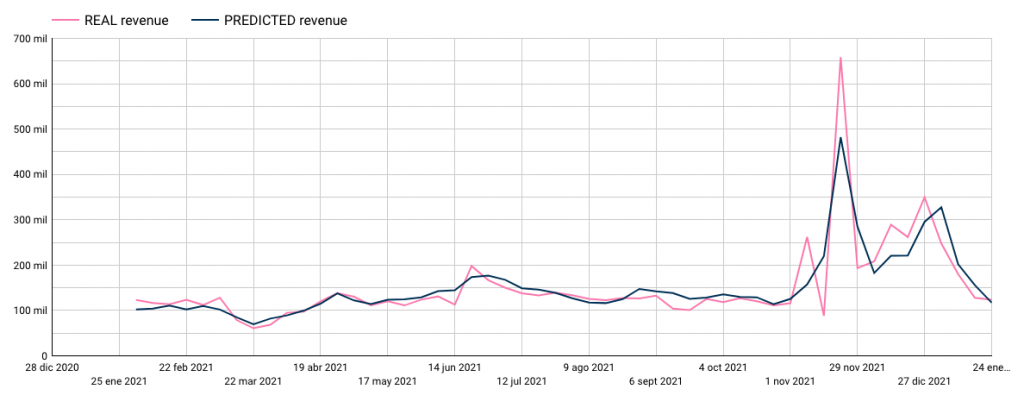
Below, we can see the client’s actual sales history (pink line) and how this model has predicted that period (blue line).

In the end, we will choose the model that best fits the client’s sales trend and peaks.

What insights can we extract from our MMM?

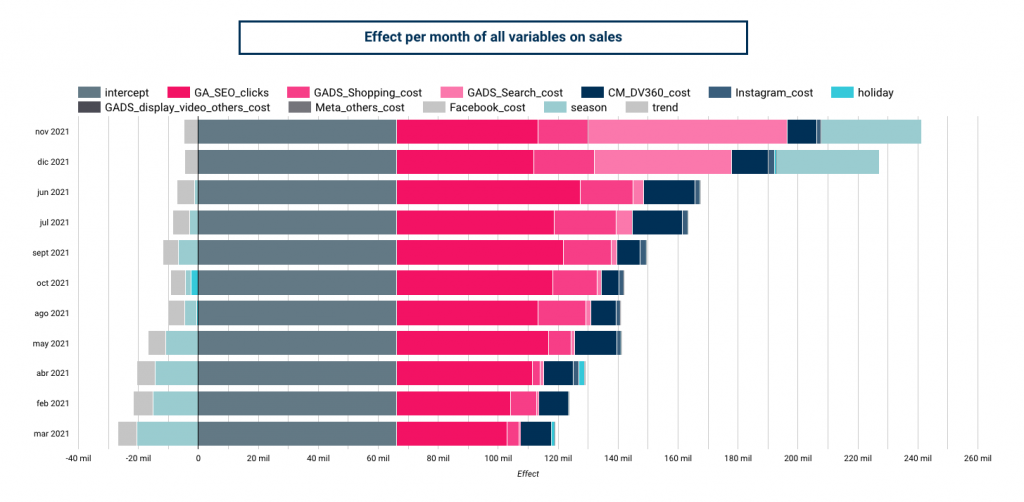
horizontal bar graph which demonstrates effect per month of all variables on sales to show how much each making channel contributes to sales

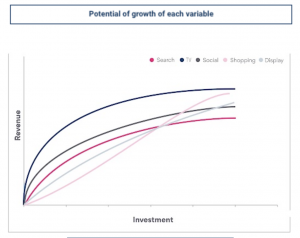
  • Prediction of potential sales increase:  This graph shows all campaigns or actions included in the model. The dots represent the investment and actual sales of that campaign, and thanks to the trend lines, we can see the sales potential of each campaign as we increase the investment.

  • ROI of campaigns and variables: In the graph, we can see in dark blue the percentage weight of total sales that a campaign or action has had (calculated by the model). In light blue, we can see the weight that action has had on the total investment (data we give to the model). Lastly, the orange dots show us the ROI of each action, identifying which are the most profitable for our business.

Do you want to know more about what Marketing Mix Modeling can bring to your business? Don’t hesitate to contact our team of experts. We are waiting for you! 🚀

Get in touch

Integrating Google Analytics attribution reports in Google Data Studio

One of the main advantages of Google Data Studio as a reporting tool is its native integration with other Google tools. One of the most widely used integrations is the Google Analytics connector. Data Studio can collect data directly from the platform.

With this integration, we can see and edit reports similar to audiences, acquisition, behavior and conversions, for Universal Analytics or GA4.

We do not have the same luck, however, with the MCF (Multi-Channel Funnels) reports, since these are calculated differently, and are not available from the same API.

Here, we’ll discuss setting up a Multi-Channel Attribution Funnel. Read on to learn more.

Integrating Attribution Reports in Google Data Studio

MCF reports are located under the “Conversions” section of Universal Analytics. They include assisted conversion data, top conversion paths, or path length or time.

These reports can be used to answer questions like 

  • How many times did search campaigns help in conversions?
  • Which channel is most valuable when it is the last interaction?
  • How many days/touchpoints does it take for the average customer to convert?

Learn more about multi-channel funnels

Data for channel starters, helpers, and finishers

In the future, we may be able to create them automatically. Until then, to view attribution reports, you can use the following steps.

Note: This integration is exclusively for Universal Analytics properties.

Integration Steps

  1. Install the Google Analytics extension for Google Sheets

This Sheets plugin takes analytics reporting a step further. It offers the capabilities of the Google Analytics API combined with data manipulation in Google spreadsheets.

The API that we will call from here will be the one that will return the data you need. More advanced details of the extension.

  1. Connect a report through the extension via API

Once the plugin is installed, you will have to launch it from the Extensions menu: in the top bar -> Google Analytics -> Create new report.

Once you do, you’ll need to give the report a name, and select the account, property, and view to apply these settings to.

Leave the rest of the fields empty.

Now you will have a series of fields available, for each of the rows, in which you’ll be able to request information from Analytics.

Start by typing mcf for Report Type, to indicate the Multi-Channel Funnels API.

The minimum fields you will need are:

  • Report Name
  • View ID
  • Start Date
  • End Date
  • Limit
  • Report Type
  • Metrics
  • Dimensions

You should already have the first 5 ready.

  1. Choose the appropriate dimensions and metrics and add them to the report

In our custom report, we will need to indicate that the request is to the MCF Reporting API, using the appropriate dimensions and metrics.

To do this, we have to go beyond the ones available in the drop-down list (that’s why we didn’t fill them in before) and look for the ones we’re looking for within all dimensions and metrics available.

Note: These fields, in addition to not being in the drop-down list of the extension, are also not found in the UA dimensions and metrics explorer.

Copy and paste all the searched metrics and dimensions, separated with a comma and without spaces.

Some important dimensions you can use:

  • mcf:basicChannelGrouping: Basic channel grouping, automatic from Google Analytics.
  • mcf:timeLagInDaysHistogram: Length of conversion paths in number of days. In other words, the days needed to achieve each conversion.
  • mcf:pathLengthInInteractionsHistogram: Length of conversion paths in number of interactions. That is, the number of touchpoints needed on each channel to result in a conversion.
  • mcf:basicChannelGroupingPath: Sequence of most successful channels along conversion paths.

And some important metrics:

  • mcf:totalConversions: Total conversions. Including goal achievements and transactions.
  • mcf:totalConversionValue: Total value of conversions. This metric includes goal achievements and transactions.
  • mcf:firstInteractionConversions: Number of conversions in which the channel has appeared in the first interaction.
  • mcf:lastInteractionConversions: Number of conversions in which this channel has appeared in the last interaction of the conversion. This metric includes goal achievements and transactions.

Launch the report

We can run the reports from the Google Analytics extension menu -> run reports. If all is well, a new tab will be created with the name you have chosen.

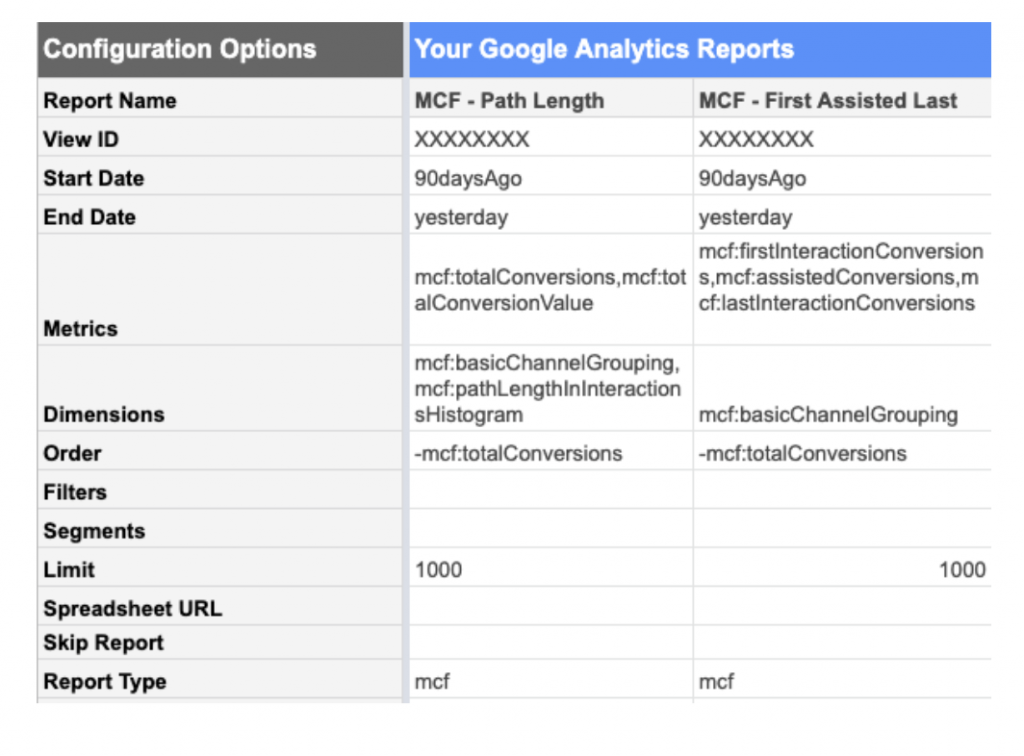
For example, with the following metrics and dimensions we will have the following reports:

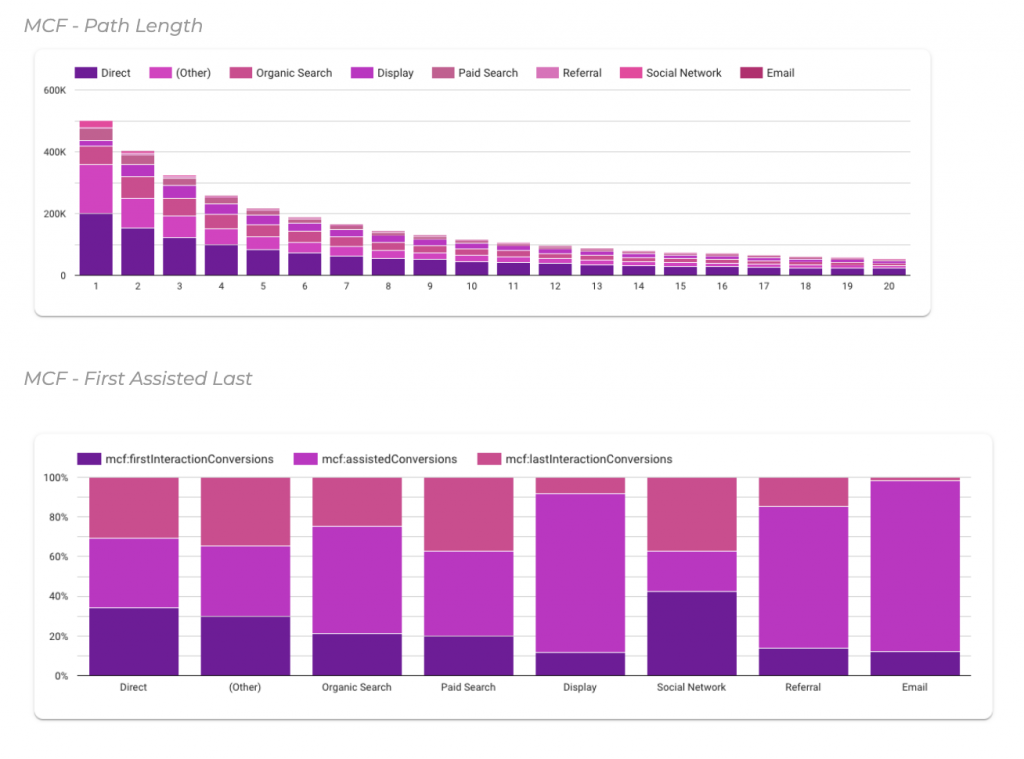
  • MCF – Path Length: Example report of the length of touchpoints per channel
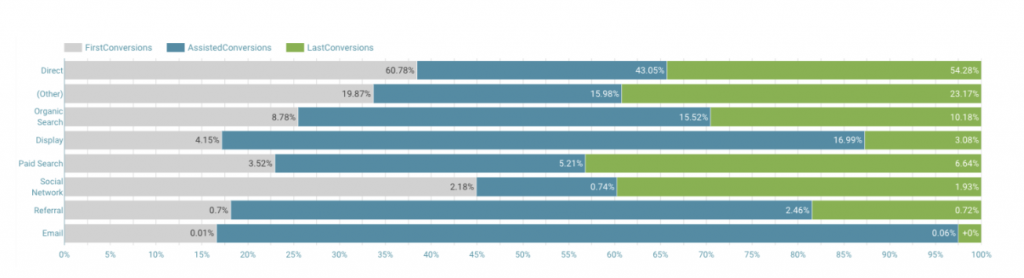
  • MCF – First Assisted Last: Example report of the conversions of each channel as initiator, assistant and finisher

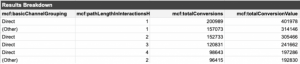
In the first example, we’d see information like this:

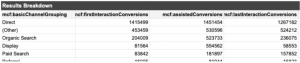
And in the second example, we’d see information like this:

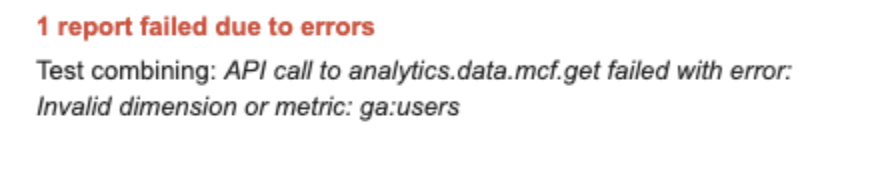
Note: MCF reports can only be run with mcf dimensions and metrics. If we combine these with standard metrics or dimensions, the report will give an error like the following:

Connect the reports with Data Studio

To connect the reports and view the information from Google Data Studio, it is as easy as creating a new report, or opening an existing one, and connecting a data source from Google Sheets.

First, find the report you have created. Then, connect each of the tabs (reports) that you have requested to the Google Analytics API.

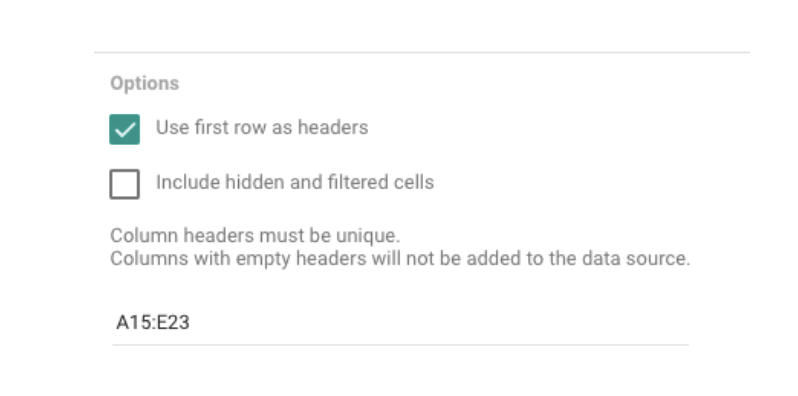
Note: the reports do not appear in the first row, so you must choose a specific range in the options to connect the document and view the information (example: A15:D1015).

Following the previous examples, these are the visualizations that we could create with the previous information:

Updating and scheduling reports

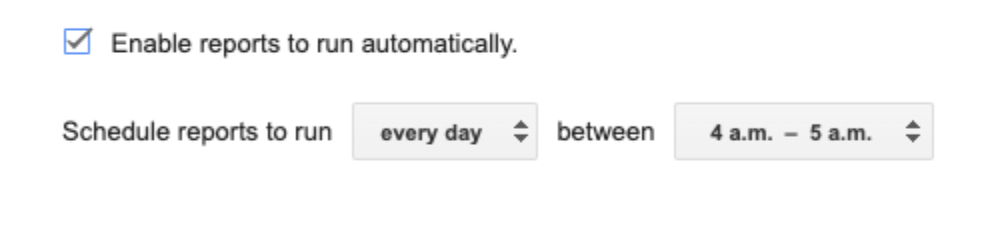
Whenever you want to run the report again, you can do it manually. But the extension also allows you to schedule reports to run automatically, so your data is always up to date.

To do this, just go to the Google Analytics extension menu -> Schedule reports. Here you’ll choose the interval of the execution.

Change existing reports

If we want to edit an existing report (for example, change from the last 30 to 90 days, or add a new metric), we must do it by editing the reports table directly.

Now you know how to connect attribution reports in Data Studio! Enjoy and take advantage of this functionality to get useful information from all your campaigns.

Bookmark these links to finish

Need help getting started?

If you need help implementing reports in Google Data Studio (or, let’s be honest, ANY type of data-based reporting) don’t hesitate to reach out to our team.

Get in touch