

Maximizing Your Data with GA4 Measurement Protocol: A Comprehensive Guide

In our current digital age, the necessity for precise and dependable data is paramount when crafting an informed marketing strategy. This is where the GA4 Measurement Protocol (MP) comes into play as an influential instrument. The MP is an ensemble of rules that facilitate the direct transmission of raw data to the GA4 property from either the client or the server side. Utilizing the measurement protocol enables us to relay any kind of interaction happening online or offline into the scope of GA4.

How does the Measurement Protocol work?

The Measurement Protocol of Google Analytics 4 (GA4) operates by dispatching HTTP requests via the measurement API. These requests carry specific parameters that encapsulate the details of the event you aim to monitor. The application of the Measurement Protocol happens through the creation and dispatching of these HTTP requests, which is carried out in the following manner:

  1. Formulating the request: Initially, an HTTP POST or GET request has to be crafted that includes the essential parameters to delineate the event you intend to monitor. These parameters encapsulate data such as the GA4 Tracking ID (Measurement ID), the event type, dimensions, metrics, and any other supplementary data you wish to incorporate.
  2. Dispatching the request: After formulating the request with the required parameters, it must be dispatched to the GA4 data collection URL, which is “https://www.google-analytics.com/mp/collect”.
  3. Processing the request: Upon arrival at the Google Analytics server, the request is processed and the event’s details are logged. Google Analytics employs this data to construct reports and conduct analyses.

What parameters are required to dispatch an event via MP?

To guarantee the accurate recording of events in your Google Analytics account, it’s vital to ensure that both the parameters and request structures adhere to the GA4 Measurement Protocol standards.

In aid of this, Google Analytics offers the Event Builder, a tool designed to assist you in determining the necessary fields when formulating each event. The fundamental ones are:

  1. API_secret: This represents a confidential, unique alphanumeric string that’s used for authentication within the measurement API. Its function is to validate that the requests made to the Google Analytics server are genuine and originate from an authorized source. To locate it, navigate to Admin / DataStreams / Measurement Protocol API Secrets and create it.
  2. Measurement_id: This pertains to the ID of the stream where you’re intending to send the information.
  3. Client_id: This aligns with the _ga cookie and enables GA4 to associate the information dispatched via MP with what is transmitted through a data layer.
  4. Session_id: Suppose you aim to, for instance, dispatch the purchase event via the measurement protocol and wish to “link it” with the pushes that have transpired through a data layer. In that case, we also suggest transmitting the session_id to prevent session disruption.

Additional parameters will fluctuate based on the specific type of event you wish to dispatch via the Measurement Protocol.

How to Confirm an Event Has Been Successfully Dispatched via MP?

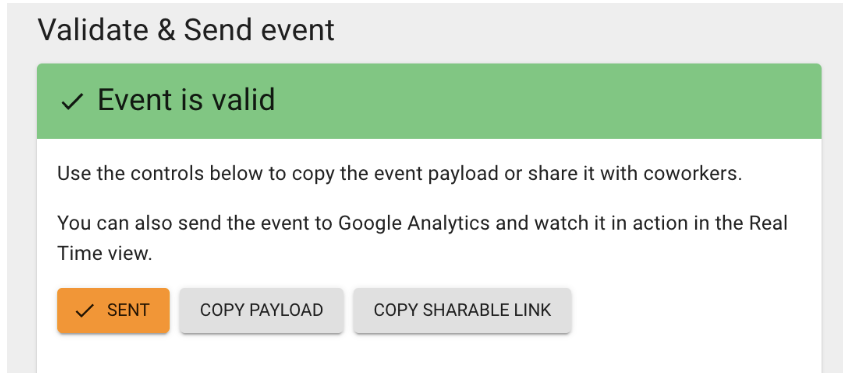
The Event Builder tool is available to facilitate testing. This tool helps you validate events and dispatch them to GA, ensuring that all the information transmitted is correctly collected.
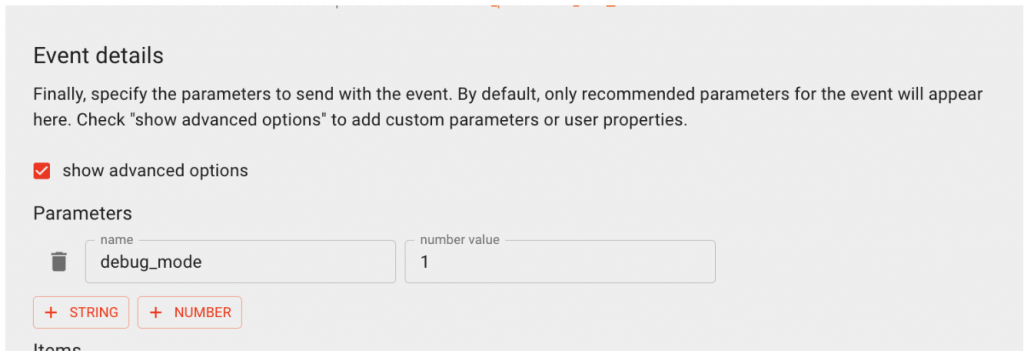
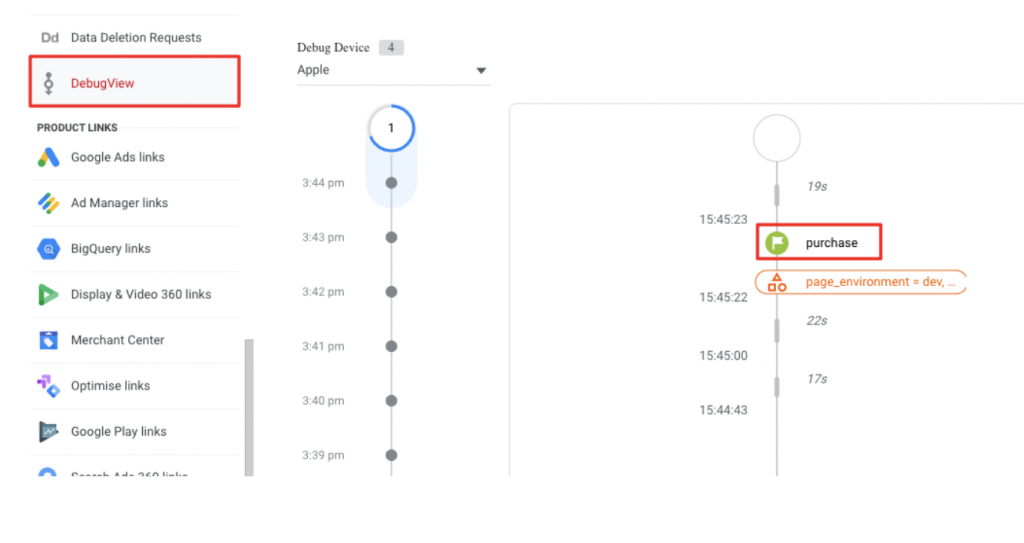
Additionally, by including the “debug_mode” parameter as numeric, you can verify the said event in GA4’s “DebugView”. The process is straightforward:
Once you verify and send the event, you will be able to view it in GA4:
In conclusion, using GA4’s Measurement Protocol to send events is a potent way to maximize the use of your data. By recording significant actions and transmitting customized parameters, you’ll gain a comprehensive understanding of your users’ behavior, enabling you to make more informed decisions.

Take note: it’s crucial to correctly set up custom events, assign suitable parameters, and use the correct tracking code to fully leverage GA4’s capabilities and send events via the Measurement Protocol.

If you’re feeling overwhelmed or simply want an expert to guide you, our team is ready to assist. With a deep understanding of GA4 and the Measurement Protocol, we can help you set up custom events, correctly assign parameters, and ensure you’re utilizing the appropriate tracking code. Don’t miss out on the opportunity to fully leverage the capabilities of GA4.
Get in touch

Unlocking the Power of Data with Google’s Looker Studio and Data Studio Integration

In October, 2022, Google announced the imminent integration between its BI tool, Looker, and Data Studio, its dashboarding and reporting tool. They took the best of each product to create Looker Studio (formerly Data Studio), a tool capable of unleashing the power of your data with interactive and visually attractive dashboards that enable you to make smarter business decisions.

This is not the first time we have talked about Looker Studio on the Making Science blog, and it won’t be the last. Google is enhancing this BI tool to enable businesses to utilize data for efficient and scalable growth. The recent release of Looker Studio Pro, the paid version, offers enhanced business features and technical support.

Today, we will delve into both versions of Looker Studio, exploring which one best caters to specific business needs. Let’s get started! 🚀

Looker Studio (formerly Data Studio)

With the free version, you can explore the tool’s features and unlock its potential:

  • Unlock the full value of your data: Looker Studio enables you to capitalize on your data by creating interactive dashboards and reports from a myriad of sources, facilitating smarter business decisions.
  • Looker Studio API: This feature lets organizations using Google Workspace or Cloud Identity automate the management and migration of Looker Studio resources, streamlining the process.
  • Unrestricted connection with your data sources: Exactly as it sounds! You have access to a plethora of data sources via more than 600 partner connectors, allowing instantaneous connection to almost any data type, no coding or software necessary.
  • Share reports with your team: Collaborate in real time on reports and share them with anyone, or integrate them into your website or intranet.

Looker Studio Pro

As hinted earlier, Looker Studio Pro is the premium version of Looker Studio. Besides encompassing all the features of Looker Studio, it sets itself apart with a few crucial functionalities:

  • Customizable access management: Looker Studio Pro allows you to conveniently control access to your reports and data sources at scale using two new additions: group workspaces and linking to a Google Cloud project.
  • Group workspaces: These spaces let Looker Studio Pro users manage access and share Looker Studio content as per team collaboration needs. Your team will have automatic access to the content, and you can allocate specific workspace permissions based on each member’s role: administrator, content manager, or collaborator.
  • Linking Looker to a Google Cloud project: This allows your organization to control Looker Studio Pro resources via a linked Google Cloud project. The reports and data sources under Looker Studio Pro belong to the organization, not individual users. Therefore, key resources remain operational even if their creator leaves the company. Additionally, Cloud administrators can configure project-level permissions using identity and access management to regulate access to these resources.
  • Cloud Customer Care: Looker Studio Pro users get access to Google Cloud Customer Care’s scalable and flexible support services.

Product updates

On April 17, 2023, Google released a product update to further improve Looker’s capabilities. Enhancements include:

  • Sparklines that show historical trends for a scorecard value over time, give you a dynamic visual of your data’s progress.
  • Progress visuals illustrate the advancement of a scorecard value towards a predefined goal, making goal tracking a breeze.
  • The comparison feature allows you to juxtapose the scorecard metric with a specific time period, target value, or another metric, allowing for nuanced performance evaluation.

See more product details here.

Want to maximize Looker Studio’s potential? Tell us about your specific case, and our team of experts will be happy to help you. Write to us, or learn more about our Data, Analytics & AdTech services! 🚀🚀

Contact here

Deep Links in GA4

The digital world is constantly evolving, leading to new forms of navigation and mobile app use. Today, users access different sections and specific content of apps and websites through deep links. So, we will tell you what deep links are and how they can be measured in our new favorite analytics tool: GA4.

What are Deep Links?

Deep links are links that allow users to directly access a specific section of an app (or website) instead of landing on the app’s main page. This lets users quickly and easily reach the information they need.

One example might be a link in a web article that directs us to a product within an e-commerce app.

Why are Deep Links Important?

Deep links enhance the user experience by providing direct access to needed content. They can also improve app visibility and rankings in search results, potentially increasing download numbers and traffic.

How Are Deep Links Measured in GA4?

First, set up a custom event for the deep link and then a custom parameter for the deep link URL.

Once the custom events and parameters are set, deep links can be measured through GA4’s event reports. These reports show how many times a deep link has been clicked and provide information about traffic sources and user behavior.

How Can They Be Improved?

Improving deep links involves optimizing them for both users and search engines. This means including relevant keywords in the deep link URL, as well as in the description and title of the page accessed.

Ensure deep links work properly and are not broken. A non-functional deep link can negatively impact user experience and reduce app visibility.

Deep links can be an effective tool in a mobile marketing strategy. They can direct users to particular offers or promotions within an app, which can increase conversion rates and sales. They can also be used in mobile ads to guide users directly to a specific section of an app, enhancing ad effectiveness and user experience.

Our Vision

Deep links are crucial for improving user experience and increasing app visibility and rankings in search results. Implementing deep linking in GA4 involves configuring the landing page, adding deep link parameters, and setting up a custom event.

Learn more by contacting our team today!

Get in touch

Or, check out some related posts:

Data Quality: A solution to ensure the quality of your data

In the digital analytics environment, we handle a multitude of platforms that offer countless metrics that we must monitor for each of our digital assets. For proper decision-making, we must understand the measurement peculiarities of each of these tools. At some point, we’ve all felt the disquiet of seeing how, despite having the best technical team and carrying out a flawless implementation on the measurement platforms, we obtain data or metrics that present certain discrepancies. If this is your case, this article may be useful to you!

First, let’s discuss some common causes of data deviations:

  • The tracking code is not present on all pages of the site. This typically occurs on very large sites, or those with complex architecture.
  • Incorrect application of data filters. The most basic could be, for example, not excluding internal IP addresses.
  • Inadequate identification of referrals, including self-referrals, spam bots, etc.
  • Different criteria for conversion assignment, for example, when the attribution model we choose in one tool does not match the one defined in another platform.
  • User rejection of 3rd party cookies. According to Webtrends, between 12% and 18% of users block them.
  • Misinterpretation errors. Given the immense number of metrics available on each platform, if we don’t understand the real meaning of our metrics, the collection method, and the business context in which they should be analyzed, supposed inconsistencies may arise. If we add to this the fact that various analytics providers may define apparently identical metrics in vastly different ways, or give a variety of names to similar reports covering things like visits, visitors, unique visitors, and conversions. This inevitably leads to misunderstanding.
  • Traffic sampling.
  • Adblocks. These are on the rise due to the increasing level of advertising saturation users are experiencing.
  • Insufficient campaign tagging.

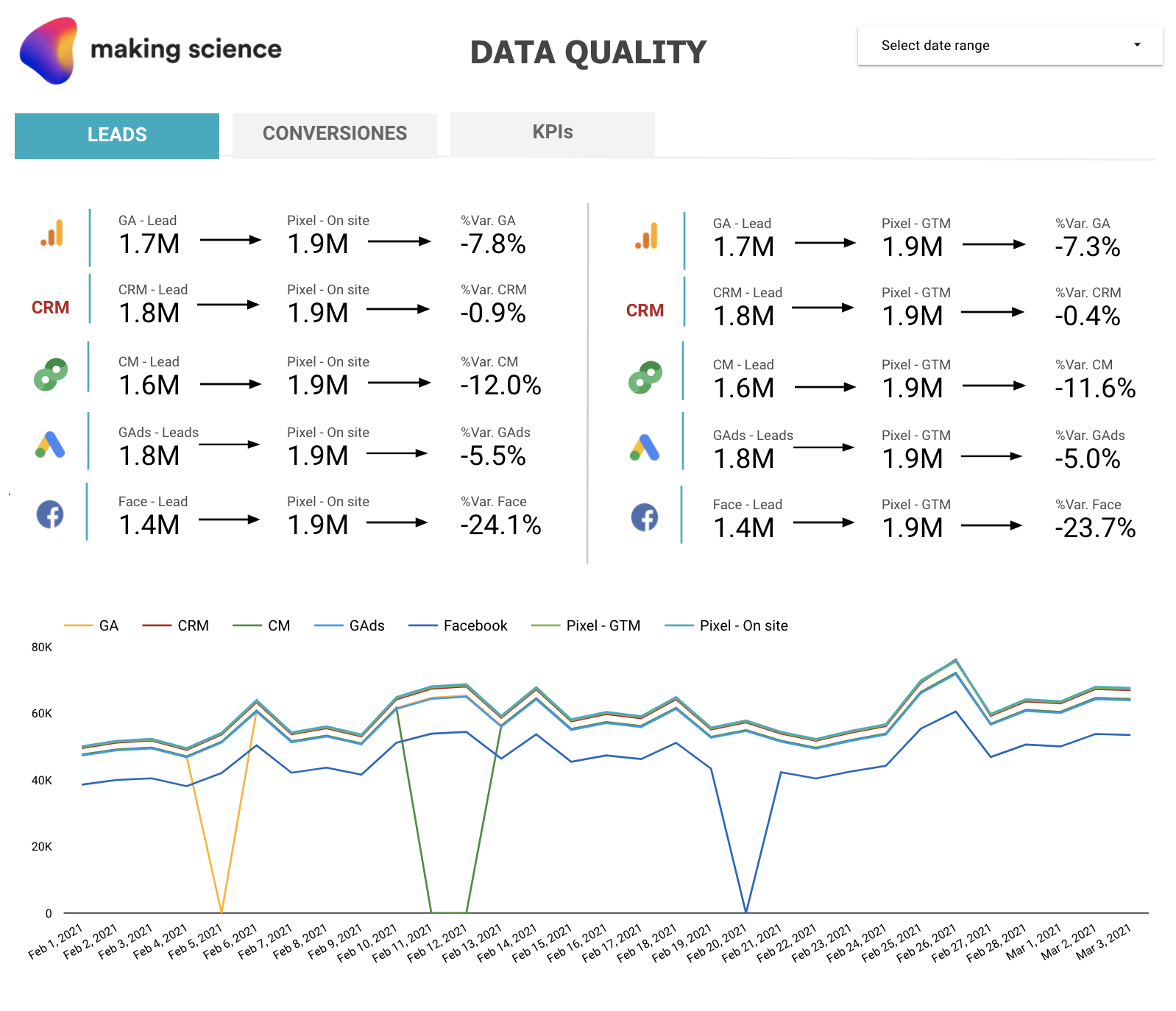
At Making Science, we have developed an AI Solution called Data Quality. This tool swiftly identifies and resolves data discrepancies between measurement and advertising platforms, detects possible trend changes, and analyzes the influence of changes on the web.

How Data Quality Works

The general operation would be as follows:

  1. We select the measurement and advertising platforms that we want to include in the comparison as well as the key indicators to monitor. The system allows contrasting information from any platform that can export data to  BigQuery.
  2. Simply implement the Making Science Data Quality pixel on your website and in the Tag Manager.  This enables the monitoring of the tracking and measurement of any event, interaction, or conversion of interest.
  3. All information will be analyzed in BigQuery. When there is a significant discrepancy between the parameters, the system will generate an email alert to help you take corrective measures. We will have an automated dashboard in Data Studio to have complete visibility of all the key KPIs of our business.

Defining the right oversight processes and implementing strategies for complete transparency of primary business parameters across various measurement platforms allows us to track the performance of our assets comprehensively and avert potential issues. Our continuous goal is to optimize investment and make prompt, effective decisions to reduce these discrepancies. This is best achieved by monitoring the progression of crucial business metrics. Solutions like ours, which generate automatic alerts upon detecting specific trend shifts, are indispensable for any analyst or business manager’s daily operations. For further details about the Data Quality Solution, please feel free to reach out to Making Science and consult with our team of experts.

Get in touch

4 attribution tools to resolve web-app tracking and attribution discrepancies

With the growing use of mobile apps and increased web traffic, attribution and tracking have become crucial factors for businesses.

Here, we explore how to address common web-app tracking and attribution discrepancies in Google Analytics 4 and Firebase using tools like Adjust, Appflyers, Singular, and Branch.

What types of discrepancies are most common?

  • Different attribution models: Google Analytics 4 and Firebase use different default attribution models, which can cause data discrepancies.
  • Incorrect tracking setup: Event and conversion tracking may not be correctly set up on Google Analytics 4 and/or Firebase, leading to data discrepancies.
  • Different user identifiers: Using different user identifiers on the app and web can make it challenging to match data across channels, causing attribution data discrepancies.
  • Varying processing times: Google Analytics 4 and Firebase process data differently and at different speeds, which can lead to discrepancies if compared at different times.
  • Data synchronization issues: If app and web data aren’t properly synced, it can cause attribution data discrepancies.

When should you use Adjust, Appflyers, Singular, and Branch to improve your app and website performance?

These third-party attribution tools help with:

  • Multichannel attribution tracking: They can track and correctly attribute app installs and conversions from various channels, such as Facebook, Google, and Twitter.
  • Precise user identification: They can help address issues related to identifying unique users on mobile apps and websites, allowing for more accurate performance measurement.
  • Custom event and conversion tracking: They provide more flexibility in tracking custom events and conversions, useful for monitoring specific events on websites and mobile apps.

In conclusion, external attribution tools like Adjust, AppFlyer, Singular, and Branch offer greater flexibility and accuracy in conversion and event attribution, as well as advanced analytics and data security features. Depending on a business’s specific needs, incorporating these tools can improve ad campaign effectiveness and data-driven decision-making.

Have you noticed web-app tracking and attribution discrepancies? Our team of experts can help. Don’t hesitate to write to us, we’re waiting for you!

Get in touch


Three GA4 Data Loss Solutions

On July 1, 2023, Universal Analytics will be officially replaced by Google Analytics 4 (GA4) (read more here). This transition will bring significant changes to the platform, including a refreshed interface, a new data model, and the incorporation of machine learning capabilities.

GA4’s ability to merge both observed and modeled (unobserved) data is crucial due to evolving browser cookie policies and GDPR regulations. These changes increasingly restrict traditional tracking and analysis methods, making GA4 data loss solutions essential.

To adapt, analytics tools must address missing data. With three key GA4 data loss solutions— data-driven attribution, predictive metrics, and modeled behavioral data— users can effectively compensate for this loss of information.

Data-Driven Attribution

The Data-driven attribution model employs a statistical approach to assess the significance of a channel’s contribution to a conversion. For instance, GA4’s top acquisition reports might attribute 5,000 purchases to the SEO channel, but prior touchpoints from channels like Paid Search could have influenced the user’s decision to buy.

Hence, the statistical model analyzes user behavior and conversion paths to determine the appropriate weight for various touchpoints. Instead of attributing the entire conversion to the SEO channel, the model assigns percentages to all contributing channels based on their impact on the user’s transaction. 

Predictive Metrics

Currently, this feature is exclusively applicable to e-commerce and revenue metrics, which may include purchase probability, cancellation likelihood, projected income, and the chance of users revisiting the website or app in the near future. GA4 relies on historical user activity for its predictive data, which can be utilized beyond Analytics. By creating audiences and segments to distinguish between potential or improbable buyers, this data can be leveraged in Google Ads for remarketing purposes.

Modeled behavioral data

This feature involves integrating GA4 with a cookie consent management tool, allowing Google Analytics to gather anonymous data from users who have not granted tracking consent. This information is not linked to a cookie or any user identifier.

The behavior of observed users (those who have opted out of tracking) is utilized to train a machine-learning model, which then estimates the behavior of users who have chosen not to be tracked.

By harnessing these three innovative GA4 data loss solutions, you can improve your analytics and optimize campaigns to boost your business KPIs significantly. If you need assistance with Analytics and GA4, our expert team is ready to help. Don’t hesitate to contact us!

Get in touch

Data and AdTech Trends: 2023

As we kick off 2023, there’s no better time to reflect on our digital activity from last year. 

Attribution, activation, and respect for user privacy have been key issues for companies with regard to data. Meanwhile, new tools, technologies, and platforms like CDPs have emerged to help pool data in one place and avoid silos.

2023 is full of many opportunities and trends. Let’s dig into those we’ve identified as being most impactful. 

Data & AdTech Essentials for 2023

Let’s start with some of the less obvious recommendations:

  • Predictive Models: Consumers are offering up less and less of their data these days. Predictive models will help us to have better conversions. For example, through Google Ads’ Value-Based Bidding, we have the opportunity to improve campaign profitability by increasing Customer Lifetime Value.
  • BigQuery: This Google tool offers more enhanced analytics capabilities – all right in the Cloud. Google Cloud now offers the use of BigQuery, a serverless, multi-cloud enterprise data warehouse so you can continue to improve your data-driven strategy. BigQuery integrates Machine Learning for advanced analytics, allows you to share valuable information across your organization, and helps you make business decisions based on data.
  • Server-Side Tagging: We recommend moving measurement and advertising tags from your website to a secure server container. This helps protect your customers by restricting access to their information and increasing conversion rates on your site by reducing page load times. Server-side tagging is now supported in products from Google Ads and Google Marketing Platform, including Campaign Manager 360, Display & Video 360 y Search Ads 360.
  • Marketing Mix Modeling (MMM): Start distributing your budgets based on more advanced models. MMM for example is a statistical modeling technique that identifies the relationship between marketing spending in each channel and the results obtained by it. This allows you to discover what is the optimal investment in each channel to maximize your sales.
  • Connected TV: Otherwise known as the evolution of digital advertising. Connected TV is any television connected to the Internet where users stream video content. This technology provides advertisers with a new means to deliver measurable and personalized advertising. According to a study about Connected TV carried out by IAB Spain in 2022, 82% of Internet users between the ages of 16 and 75 internet streaming services. Connected TV allows for cross-device strategies. It also allows us to identify and impact users with our ads through different devices, thus measuring their effectiveness and how they have influenced the conversion process of said user. Another benefit of Connected TV campaigns is the possibility of being able to segment audiences and control frequencies, which can help lower costs.

And, a few solutions that you’ve surely heard of before:

  • Privacy planning: Having a privacy plan for your company is essential (it has been now for many years). Privacy protection regulations and the demand for greater transparency from users about how companies use their data continue to increase. If we build a privacy-centric strategy, we can continue developing our advertising activity with total normality. At Making Science we opted for the implementation of solutions such as Consent Mode, Enhanced Conversions, GA4, and Facebook CAPI, which allow us to “catch up” in the privacy race. We are also committed to the use and activation of First-Party Data, an option that is increasingly accepted by organizations due to the disappearance of third-party cookies.
  • GA4: All data capture, measurement, and activation technologies are becoming privacy-first. So, it’s a no-brainer to implement them. One excellent technology is Google Analytics 4 (GA4). It is a tool that will be crucial for measuring our results. It offers many new functionalities, with which we will be able to extract greater insights from our data. It will also make our measurement much more reliable.
  • Hyper-personalization and AI projects: Users are demanding better and better experiences that are adapted to their reality and needs. In short, personalization was essential in 2022, but in 2023 we will have to work even harder to continue surprising them. We should look to implement AI based on the activity of our users, so that we can design and develop better products, services, messages, and, ultimately, better ways to reach our audiences.
  • First-Party Data Activation: In a cookieless environment, how can we continue to impact our users in the same way as in the past? Thanks to First-Party Data, we can nurture our campaigns without putting our activity at risk. First-party data is an optimal, reliable, scalable data strategy. This activation and exploitation can be done either by CDPs or any platform that helps to manage data.

These are just some of the trends that will mark 2023 and will undoubtedly influence the digital ecosystem. What will happen in the world of digital marketing and technology this 2023? Find out by following the Making Science blog, where you will find articles on the latest trends, tools, and technologies.

If you want to start a project related to these trends, Making Science can help. We have a team of experts who can help you in your specific case. Get in touch!

Contact us

Customer Data Platform (CDP): how best to manage first-party data

In a context where first-party data has become the primary source of information about its users, it becomes essential for companies to understand how to manage this data to achieve business objectives.

The customer is increasingly omnichannel, and tracking them by obtaining proper measurements for their digital strategies is as important as it is complex. This is confirmed by data from recent Making Science research. Though the survey was performed in the UK, the results demonstrate that just under half of UK companies do not integrate data, thus losing the global customer view needed to make informed decisions. 

This is where various solutions for multi-channel data collection, such as the Customer Data Platform (CDP), come into play.

What is a Customer Data Platform (CDP)

A CDP is a tool that allows all of a company’s proprietary data from multiple sources to be collected in one place. This technology is becoming increasingly important in corporate marketing ecosystems because it allows companies to build a complete, fast and convenient view of their users.

In addition to creating a complete and consolidated pool of customer data, CDPs allow individual profiles to be made and continuously enriched with new information from the different channels used by users. Furthermore, integrating with other systems means CDPs seamlessly fit into a broader data management infrastructure.

Privacy and First-Party Data

The digital environment is constantly and rapidly evolving, but some key trends have shaped the path of companies in recent years. These include: 

  • Regulatory changes: regulations such as GDPR have had a significant impact on how data is collected and used, so much so that, according to research by Making Science, by 2022, less than half of the marketers in Italy will be fully aware of GDPR requirements.
  • Privacy controls: Users increasingly demand greater control and transparency over the collected data used to personalize ads.
  • Updates: increased controls affect the collection of traditional data (e.g. third-party cookies and device identifiers).

The primary and direct consequence in today’s digital ecosystem is obvious:

  • Cookieless and third-party data: with the imminent end of cookies and third-party data, companies have to update their strategies to continue to have data that best inform their marketing activities.

Faced with this scenario, there are several solutions, from the initial collection of data based on the user’s explicit consent with solutions such as Consent Mode and Google Analytics 4 to mitigating any loss of information from our users with data modeling, to using a ServerToServer measurement to collect data as first-party data and own it.

With this concept of first-party data, CDP fits in as a technological solution for data management and its subsequent activation. 

That said, the CDP must be understood as a solution, not a stand-alone tool. 

How a CDP works

Here is an example of how a CDP works in a very simplified way:

Suppose we currently have much information (much more than we analyze and activate), and this information is located in different sources, which are independent and rarely talk to each other. What does this mean for the company? Data in separate silos causes common mistakes, such as duplication of communication, makes it difficult to get a clear picture of our users’ journey, generates problems in sales attribution, and, above all, does not help in deciding how to allocate budget in the marketing mix and optimize investments.

With CDP, we have a shared space for all data, the initial purpose of which is to standardize and unify information to get a single picture of our customers across all the touch points we generate. This will allow us to activate the data based on each customer and effectively respond to their needs based on where they are in their purchasing journey for a particular product.

How to choose a CDP

When considering introducing a CDP in your company, one of the first things to ask yourself is what problem(s) you want to solve.

Subsequently, the type of CDP also depends on the level of digitization a company is at.

For technology-intensive companies, it may be helpful to create a customized CDP from their tool stack or with the help of a partner. Less technologically advanced companies may prefer to turn to the market for existing solutions.

In each of these cases, we suggest four factors to take into account in making this decision strategically:

  • Operationality: when will the CDP be operational? For market solutions, the operation timing will depend on the options for connection to the tools of one’s digital ecosystem. For an ad hoc connection, one must first check the existing connection options and the effort required to create them. This brings us to the second point.
  • Connections: which option will connect best with the current tools in use? This should be easier if you are already working with a market solution for other devices. Otherwise, you will have to consider the effort of generating such connections from scratch.
  • Scalability: which will give more flexibility to adapt to changes in the future? Market solutions will depend on the evolution of their adaptations. An ad hoc system should facilitate this.
  • Cost: which is the most cost-effective solution? At this point, it is essential to consider the initial monetary cost and the cost of evolving the CDP with its objectives and tools in use.

These are just a few hints at what a CDP entails as a solution in today’s digital landscape. It is not an easy decision, which is why it is important to use solutions that align with the market and one’s own specific needs.

From data collection to activation

The next step is to adopt technology that can extract and combine all marketing data with helping create insights that drive strategic choices. Employing the right technologies and processes is another crucial factor in exploiting the full potential of first-party data.

Discover the state of data maturity of travel, retail, and financial companies in the latest Making Science research and our recommendations for getting the most out of your data and marketing efforts. Or, get in touch with our team today!

Get in touch

Looker and Data Studio: an integration that enhances Google’s BI

Today, companies must provide information to users in a way they can understand. They must generate reports with reliable data that visually represent their commercial efforts. 

Data-driven companies want to democratize access to relevant data in their organizations and empower their employees to get answers quickly. On one hand, companies want to create a single shared source of truth, with granular control of data access and secure centralized storage. While we realize that these capabilities are necessary to take our business to the next level, we must also think about whether these tools are reliable and have the necessary degree of security.

Companies today are looking for BI solutions that can be easily used by all members of an organization (both technical and non-technical) while producing real-time metrics.

Google understands this need, and that is why last April it announced its intention to integrate its Looker and Data Studio tools to offer companies a unified experience for self-service, well-governed BI.

Thanks to this integration, users will now be able to access and import governed data from Looker within the Data Studio interface, and create visualizations and dashboards for additional self-service analysis.

This union allows us to offer a better Google Cloud BI experience to our users. Business users will feel more empowered than ever, while data leaders will be able to preserve the trust and security their organization needs.

Looker and Data Studio: better together 

Looker and Data Studio are complementary tools. The union of Looker and Data Studio opens exciting opportunities to combine the strengths of both products and a wide range of BI and analytics capabilities to help clients reimagine the way they work with data. 

Looker is a modern enterprise platform for business intelligence and analytics, helping organizations create data-rich experiences tailored to every part of their business. Data Studio is an easy-to-use, self-service BI solution that enables ad hoc reporting, analysis, and data blending across more than 500 data sets. 

How will the integration work?

According to Google Cloud, this first integration between these products will allow users to connect to Looker’s semantic model directly from Data Studio. 

Users can bring the data they want to analyze, connect it to other available data sources, and easily explore and create visualizations within Data Studio. The integration will follow three principles with respect to governance:

  1. Access to the data will be carried out having the capabilities using Looker’s security measures.
  2. Looker will remain the single point of access to your data.
  3. Administrators will have full ability to manage Data Studio and Looker in an integrated manner.

How is Google integrating these products?

Looker’s semantic model allows metrics to be centrally defined and widely used, ensuring a single version of the truth across all your data. This integration allows Looker’s semantic model to be used within Data Studio reports, allowing people to use the same tool to create reports that are based on both ad-hoc and governed data. This brings together the best of both worlds: a governed data layer and a self-service solution that enables the analysis of governed and ungoverned data.

With this announcement, the following use cases will be supported:

  • Users can turn their Looker-driven data into informative and highly customizable dashboards and reports in Data Studio.
  • Users can combine Looker’s governed data with data available from more than 500 data sources in Data Studio, to rapidly generate new insights.
  • Users can quickly analyze and prototype raw data—from spreadsheets, CSV files, or other cloud sources—within Data Studio.
  • Users can collaborate in real-time to create dashboards with teammates or people outside the company. 

When will this integration be available for use?

This integration is the first of many in Google’s effort to bring Looker and Data Studio closer together. Future versions will introduce additional features to create a more seamless user experience for these two products. 

In short, Google will implement new capabilities in the coming months. So, don’t miss any Making Science articles as we will be publishing all the news on this topic.

Do you want to know more about the Looker + Data Studio integration and the benefits it can bring to your online business? Our team of experts will be happy to attend to your specific case. Get in touch today!

Get in touch

Google Enhanced Conversions: greater precision + more privacy

Within the new, increasingly private digital ecosystem, advertisers and agencies must adapt their strategies by adopting the most appropriate technology. This will allow them to continue carrying out their advertising campaigns. And, it will allow them to continue to measure, analyze, and activate their data similar to how they have in the past. Today we’re talking about Google Enhanced Conversions. This is a Google new feature that makes it easier to manage ad campaigns and improves the accuracy of conversion tracking while respecting user privacy. This is accomplished through the use of conversion modeling.

Enhanced Conversions lets you see conversions across Google Ads campaigns, even if the interactions occur across devices or via email. It allows companies to properly track the results of their campaigns while respecting the privacy of consumers.

With Enhanced Conversions, you can maintain high visibility of your data, making it easier to personalize campaigns in the future. But how does it work?

How Enhanced Conversions works

When a customer completes a conversion on your website, you receive their data (such as email address, name, home address, and/or phone number). This data can be captured via conversion tracking tags, sent to Google in its encrypted form, and then used to improve your conversion measurement.

Depending on the type of Enhanced Conversions we use, the hashed data will be used in different ways to improve measurement. The main types of Enhanced Conversions are for the web (online sales), and for leads (for offline sales). In the table below, we describe the differences between the two:

Enhanced Conversions for web Enhanced Conversions for leads
Relevant for advertisers who want to track sales and events that occur on a website. Relevant for advertisers who want to track sales that happen outside of a website (for example, by phone or email) that start as website leads.
Improves measurement of online conversions. Improves the measurement of offline transactions that come from a potential customer or website visitor.
Allows you to send user-provided source hashes from your website when a user converts. The data is then used to match your customers with Google accounts (the ones they logged into when they interacted with one of your ads). Allows you to use encrypted, first-party user-provided data from your website’s lead forms for offline lead measurement. When we upload our leads, the encrypted information provided is used to attribute it to Google’s advertising campaign.

Enhanced Conversions for web

With Enhanced Conversions for your website, customers’ own data, such as email address, name, home address, or phone number, is captured in your conversion tracking tags, encoded, and sent to Google in their encrypted form. Then, they are used to link your customers with their Google accounts, which they logged into when they interacted with one of your ads.

Its main benefits include

  • Recovering conversions that otherwise would not have been measured
  • Improving the optimization of offers through better data
  • Protecting privacy by hashing your own customer data

Enhanced Conversions for leads

With this functionality, you can upload or import conversion data into Google Ads using customer data from your website’s lead forms.

Unlike standard offline conversion imports, Enhanced Conversions for Leads doesn’t require you to modify your lead forms or customer relationship management (CRM) systems to receive a Google Click ID (GCLID). Instead, it uses information that’s already been captured about your leads, like email addresses, to measure conversions.

Its main benefits include

  • Ease of configuration: you can configure the measurement directly from your Google Ads account.
  • Better performance: you will be able to optimize your campaigns for sales and transactions that occur outside of your website.
  • Flexibility: you can implement it using Google tags or with Google Tag Manager.

Enhanced Conversions can help you better monitor the performance of your campaigns. It also facilitates the administration of Google Ads campaigns, all while respecting the privacy of the users. This represents a great advance in the use and activation of data correctly and respecting current regulations. Do you want to implement Enhanced Conversions? 🚀

Get in touch