
Navigating the Digital Landscape: Top Trends to Watch in 2024

As we step into 2024, the digital realm continues to evolve at an unprecedented pace, shaping the way we connect, consume information, and make decisions. In this blog post, we will delve into five key digital trends that are set to dominate the landscape in 2024, namely Customer Data Platforms (CDP), Artificial Intelligence (AI) in Advertising, TikTok Search, Connected TV (CTV), and Privacy-Centric Marketing.

Customer Data Platforms (CDP)

In the era of data-driven decision-making, Customer Data Platforms (CDP) are becoming the cornerstone of successful marketing strategies. CDPs enable businesses to consolidate customer data from various touchpoints, creating a unified and comprehensive profile. This holistic view of customer behavior and preferences allows for more personalized and targeted marketing efforts. In 2024, we anticipate a surge in the adoption of CDPs as businesses recognize the importance of understanding their customers on a deeper level.

AI in Advertising

Artificial Intelligence (AI) has already revolutionized the advertising landscape, and in 2024, it’s set to become even more integral. AI-powered advertising enables businesses to deliver highly targeted and personalized content to their audiences. From predictive analytics to programmatic advertising, AI optimizes ad placements, ensuring that brands reach the right audience at the right time. As technology advances, we can expect more sophisticated AI algorithms to enhance ad relevance and engagement.

Search on TikTok

While TikTok has taken the social media world by storm, 2024 will see a significant shift towards search functionality within the platform. With the introduction of advanced search features, users can discover content more efficiently, opening up new opportunities for brands to be discovered. This evolution in TikTok’s search capabilities will make it an even more powerful platform for marketers looking to connect with their target audience through creative and engaging content.

Connected TV (CTV)

Connected TV (CTV) is redefining how consumers access and interact with content. The rise of streaming services and smart TVs has paved the way for personalized, on-demand viewing experiences. In 2024, CTV is poised to become a dominant force in the advertising space. Marketers can leverage CTV to reach audiences on a larger scale, delivering tailored content directly to viewers’ living rooms. The shift towards CTV highlights the importance of adapting advertising strategies to meet consumers where they spend their screen time.

Privacy-Centric Marketing

With growing concerns about data privacy, consumers are increasingly seeking transparency and control over their personal information. Privacy-centric marketing is not just a trend; it’s a fundamental shift in how businesses approach customer data. In 2024, we expect companies to prioritize privacy in their marketing strategies, building trust with consumers by adopting ethical data practices. This shift will influence everything from targeted advertising to data storage and handling as businesses strive to demonstrate their commitment to protecting user privacy.

As we embrace the digital trends of 2024, it’s evident that the landscape is evolving towards more personalized, transparent, and user-centric experiences. From harnessing the power of CDPs to navigating the realms of AI in advertising, TikTok search, CTV, and privacy-centric marketing, businesses that stay ahead of the curve will find themselves well-positioned in the competitive digital landscape. By understanding and adapting to these trends, marketers can create meaningful connections with their audiences while staying at the forefront of innovation.
A reflection: 2023 Data and AdTech Trends

On January 13, 2023, we made our own attempt at “predictive AI” by forecasting the digital landscape for the year. Now, with the unveiling of our AI Essentials Playbook, it’s the perfect moment to ask: How accurate were our digital crystal ball’s predictions?

As we sift through 2023, let’s rewind and reevaluate our initial bets. Attribution, activation, and the ever-growing emphasis on user privacy shaped our focus. At the same time, tools and platforms like CDPs emerged as the unsung heroes, eliminating data silos.

Original ‘Data and AdTech Trends – 2023’ Post

Attribution, activation, and respect for user privacy have been key issues for companies with regard to data. Meanwhile, new tools, technologies, and platforms like CDPs have emerged to help pool data in one place and avoid silos.

2023 is full of many opportunities and trends. Let’s dig into those we’ve identified as being most impactful. 

Data & AdTech Essentials for 2023

Let’s start with some of the less obvious recommendations:

  • Predictive Models: Consumers are offering up less and less of their data these days. Predictive models will help us to have better conversions. For example, through Google Ads’ Value-Based Bidding, we have the opportunity to improve campaign profitability by increasing Customer Lifetime Value.
  • BigQuery: This Google tool offers more enhanced analytics capabilities – all right in the Cloud. Google Cloud now offers the use of BigQuery, a serverless, multi-cloud enterprise data warehouse so you can continue to improve your data-driven strategy. BigQuery integrates Machine Learning for advanced analytics, allows you to share valuable information across your organization, and helps you make business decisions based on data.
  • Server-Side Tagging: We recommend moving measurement and advertising tags from your website to a secure server container. This helps protect your customers by restricting access to their information and increasing conversion rates on your site by reducing page load times. Server-side tagging is now supported in products from Google Ads and Google Marketing Platform, including Campaign Manager 360, Display & Video 360 y Search Ads 360.
  • Marketing Mix Modeling (MMM): Start distributing your budgets based on more advanced models. MMM for example is a statistical modeling technique that identifies the relationship between marketing spending in each channel and the results obtained by it. This allows you to discover what is the optimal investment in each channel to maximize your sales.
  • Connected TV: Otherwise known as the evolution of digital advertising. Connected TV is any television connected to the Internet where users stream video content. This technology provides advertisers with a new means to deliver measurable and personalized advertising. According to a study about Connected TV carried out by IAB Spain in 2022, 82% of Internet users between the ages of 16 and 75 internet streaming services. Connected TV allows for cross-device strategies. It also allows us to identify and impact users with our ads through different devices, thus measuring their effectiveness and how they have influenced the conversion process of said user. Another benefit of Connected TV campaigns is the possibility of being able to segment audiences and control frequencies, which can help lower costs.

And, a few solutions that you’ve surely heard of before:

  • Privacy planning: Having a privacy plan for your company is essential (it has been now for many years). Privacy protection regulations and the demand for greater transparency from users about how companies use their data continue to increase. If we build a privacy-centric strategy, we can continue developing our advertising activity with total normality. At Making Science we opted for the implementation of solutions such as Consent Mode, Enhanced Conversions, GA4, and Facebook CAPI, which allow us to “catch up” in the privacy race. We are also committed to the use and activation of First-Party Data, an option that is increasingly accepted by organizations due to the disappearance of third-party cookies.
  • GA4: All data capture, measurement, and activation technologies are becoming privacy-first. So, it’s a no-brainer to implement them. One excellent technology is Google Analytics 4 (GA4). It is a tool that will be crucial for measuring our results. It offers many new functionalities, with which we will be able to extract greater insights from our data. It will also make our measurement much more reliable.
  • Hyper-personalization and AI projects: Users are demanding better and better experiences that are adapted to their reality and needs. In short, personalization was essential in 2022, but in 2023 we will have to work even harder to continue surprising them. We should look to implement AI based on the activity of our users, so that we can design and develop better products, services, messages, and, ultimately, better ways to reach our audiences.
  • First-Party Data Activation: In a cookieless environment, how can we continue to impact our users in the same way as in the past? Thanks to First-Party Data, we can nurture our campaigns without putting our activity at risk. First-party data is an optimal, reliable, scalable data strategy. This activation and exploitation can be done either by CDPs or any platform that helps to manage data.

Want to learn more about our predictions for 2024? Be sure to follow our Podcast!

Listen here

3 Tips to Maximize the Value of Your Data

Every day, businesses accumulate increasing amounts of data. On the rise are new job disciplines related to it, such as big data experts, data scientists, and machine learning tools. Considering this, and thinking about your company, is this surge in data truly enhancing your business? Today, we’re here to tell you how to maximize the value of your data.

Ultimately, like any other asset in a business, data, when effectively managed, can yield tangible positive results.

Here are three tips to enhance the performance of your data.

1. Stay Focused on Objectives

Simply put, track what matters.

Data tied to business objectives can drive actionable insights.

You’ve probably sifted through data seeking specific information to explain a particular behavior and at some point found an anomaly or missing data. Have you considered if this moment and discovery have a direct impact on your business? A clearly defined strategy based on data and business objectives has a higher chance of success.

Focus on analysis projects with solid planning. Start by documenting the objectives or questions you’d like to answer, and think about how you want to measure and visualize potential results.

As projects evolve and change due to market conditions, sometimes objectives do too. Therefore, anticipating potential outcomes helps to focus solely on what’s essential, preventing the collection of unactionable or currently irrelevant data.

Some questions to consider during the planning process:

  • At what point will this data indicate success or failure?
  • Can we influence the factors impacting these data?
  • Who will see it?
  • What actions will be taken once the data is shared?

2. Remove Bias to maximize the value of your data

While data can be impartial, biases might sneak in during analysis. We’re all human and susceptible to conscious or unconscious prejudices. Whatever the data’s outcome, avoid cherry-picking data to back a conclusion. Every data set can offer insights for improvement, whether currently favorable or not!

It’s essential to critically assess reasons for including or excluding specific data in certain timeframes. Before exclusion, you can annotate outliers, noting when data didn’t follow the expected trend.

If data indicates performance below expectations, combine it with specific improvement actions that might reverse this trend.

Focus on data helping to achieve earlier planned objectives instead of merely comparing with others. Industry standards and competitor metrics can be valuable, but your success is determined by your objectives.

3. Design Visualization that Highlights the Essentials

Once data is gathered, visuals can aid in data analysis and help you effectively communicate information to stakeholders. While it’s tempting to create visually appealing designs with vibrant colors and varied fonts, the key is to ensure visuals help process information and provide context more effectively than mere text. We like using Looker Studio, but there are a number of helpful visualization tools in the market.

Guide your audience by telling a story with the data. Minimize distractions, using clear and concise text, and display only the pertinent information.

Need assistance in extracting value from your data and activating it? At Making Science, we have a team of professionals ready to offer tailored solutions for your case.

Get in touch

BigQuery Studio Insights: Navigate, Analyze, and Unleash Your Data’s Full Potential

Many organizations recognize the value of their data, but they’re stumped on how to fully leverage its potential. There’s an overwhelming volume of data, existing systems are complex, and regulatory challenges abound. Plus, the rush to adopt artificial intelligence often leads to fragmented ecosystems that are tough to navigate.

On August 31st, Google launched BigQuery Studio in response to this scenario. This is a game-changing platform that offers a solution to these issues and makes BigQuery Studio insights easily accessible. This innovative platform is designed to bring together analysis, AI capabilities, and data governance in a single unified ecosystem within Google Cloud Platform‘s data analytics suite. Here’s how BigQuery Studio is aimed at addressing the following key issues:

  • Data Overload: As data production increases, analysts often find themselves drowning in a sea of data, making it hard to gain actionable insights.
  • Platform Fragmentation: Companies frequently use different platforms for analytics, AI, and machine learning, complicating the workflow even more.

How BigQuery Studio Helps Businesses and Data Professionals:

One of the key features of BigQuery Studio is that it offers a unified workflow for data specialists. It eliminates the complexity of navigating multiple platforms while enhancing the efficiency and performance of the overall team.

  • Comprehensive Solution: It integrates every step of the data process, from collection to analysis, to generating AI-driven insights. You can edit and execute SQL, Python, and Spark in the same interface. This creates a truly streamlined workflow among data scientists, data engineers, and data analysts through version histories and source control.
  • Data Compliance and Governance: BigQuery Studio features robust governance and security functions. This makes it easier to adhere to changing data privacy laws, like GDPR and CCPA.
  • AI-Enabled Insights: Thanks to integrated AI technology like Duet AI, BigQuery Studio makes data analysis more accessible AND smarter. Start with a basic programming notebook for data preparation and then move on to specialized services like machine learning with Vertex AI.

In addition to all of this, Google has boosted its drive for AI innovation by including its assistant Duet AI directly in BigQuery Studio. This addition leverages natural language processing and generative algorithms, introducing:

  • Coding Assistant: Think of Duet AI as your coding buddy. It’s there to help you craft SQL queries and Python code for precise data queries.
  • Free-form Data Queries: Users can make data queries using natural language and receive answers through contextual chat, making analysis more user-friendly.

Openness and Compatibility: BigQuery Studio in a Multi-Cloud Landscape:

Google has demonstrated its commitment to open-source compatibility and the cloud by making BigQuery Studio a suitable option for businesses operating with multi-cloud or hybrid cloud strategies:

  • Run AlloyDB on any cloud or local setup
  • Support for open-source formats like Apache Hudi and Delta Lake
  • Optimize performance for large data ingestion through Apache Iceberg

BigQuery Studio is not just another tool; it promises to break down silos, simplify workflows, and enable smarter decision-making through AI integration. For e-commerce managers and data analysts looking to keep up in a constantly evolving digital landscape, adopting BigQuery Studio could be a strategic move to consolidate their data analysis and AI efforts, maximizing BigQuery Studio insights.

Ready to dive deeper? Don’t get left behind in the big data activation race. Contact our team to schedule a demo and take the first step toward transforming your business insights.

Get in touch

Universal Analytics vs. Google Analytics 4 Implementation: Compare them automatically in our dashboard

Numerous organizations, ranging from large corporations to small enterprises, are embarking on the transition from Universal Analytics (UA) to Google Analytics 4 (GA4) for their reporting needs. Whenever the topic of migrating or transitioning within an analytics platform arises, you might find yourself pondering several questions such as:

  • What are the key similarities and differences between these platforms?
  • Why are there discrepancies in the data points?
  • How can I maintain consistency in reporting metrics during the transition?
  • What potential challenges might arise in the new data interpretations?

Unveiling a Seamless Solution with Making Science

Fear not, as Making Science has simplified this transition for many clients. To make this process even smoother, we’ve introduced an automatic feature to assist you.

Now, with just a click on the “submit” button at the end of this page, you can instantly view a side-by-side comparison of your own GA4 and UA data, absolutely free. This feature helps you resolve doubts between the two different platforms, offering a clear picture of the metrics across both platforms.

Guiding Stakeholders through Platform Differences

Making Science has successfully assisted many clients with platform transitions. With GA4, the transition process and aligning your stakeholders have become even smoother.

  • Understanding and communicating the differences in the platforms from the start enables you to guide your stakeholders and teams more effectively, ensuring a hassle-free transition. It’s not ideal to only address these nuances after the debut of your GA4 report, only to subsequently highlight issues with the new process.
  • For example, the shift in GA4’s approach from capturing pageviews to unique views, which are naturally fewer than in UA, should be communicated promptly to maintain trust. Why? User privacy concerns have led to shifts in regulations prompting Google to update the way it tracks site visitor data.
  • Moreover, differences in setup might appear. A developer, for instance, might miss a datalayer glitch until it surfaces during the rollout of a fresh GA4 capability.

Such scenarios can be stressful for teams. However, leveraging dashboards and automation speeds up stakeholder communication, giving analysts peace of mind. At Making Science, our experience with a range of clients provides us with insight into expected variations.

Visually Comparing UA with GA4

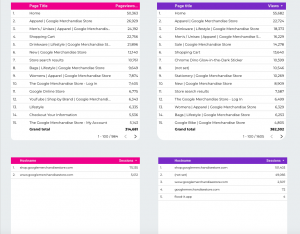
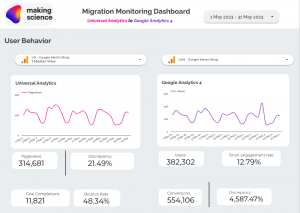
Illustrated below is a comparison of key metrics across the two implementations, providing insight into disparities and analyzing trends to gauge whether variations are evolving over time. This serves as our primary level of investigation, aiming to ensure consistency or at least provide reasons for any discrepancies. Discrepancies might stem from differing metric calculation methodologies or implementation-specific complications.

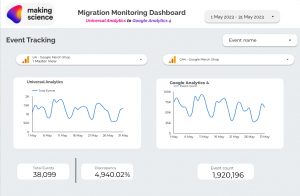
Furthermore, we delve into device categories, pages, events, and channel data to unravel potential sources of discrepancy. Automated reporting frees up your team to delve deeper into the “why”, reducing the time spent on data collection and consolidation for the platform.


Following industry standards, we recommend a thorough comparison of every metric and dimension, facilitated by automation. Our approach to reporting usually includes custom metrics, dimensions, and events to ensure alignment between platforms. This aspect often improves validation efforts as implementation grows more comprehensive over time.

Conclusion

Embarking on the transition from UA to GA4 can be made significantly less daunting with Making Science. Whether you choose automated reporting through Making Science or opt for an in-house approach, having a foundation of summary metrics will prove beneficial.

Remember, a treasure trove of insights awaits you, and it’s just a click away. Hit the “submit” button at the end of this page to explore a world of data insights, offering a seamless transition experience, entirely free of charge!

Compare them automatically in our dashboard

Privacy Solutions for a New Data Era: Are We Truly Ready?

Shifts in data collection regulations have left digital marketing professionals, such as data analysts, performance specialists, and e-commerce managers, grappling with the implications for their daily activities.

Therefore, it’s essential for companies and service providers alike to embrace this transformation, seeking optimal privacy solutions for digital marketing to address data loss while respecting user privacy.

Privacy solutions for digital marketing

  1. Google Analytics 4 (GA4): This offers a fresh perspective on data collection, replacing the Universal Analytics. It introduces a renewed method of gauging data from both apps and websites. Key benefits of the platform include tracking by userID, offering a holistic user traceability, and utilizing Google Signals for user registration based on their Google account login. GA4 is set to be the leading privacy solution, particularly in a cookie-less world.
  2. GDPR-compliant Cookie Banners (if you have European customers): These should feature an ‘accept’ button, without pre-ticked default consent. Users should be able to indicate preferences and be well-informed about cookie usage. To minimize data loss or prevent collecting data without consent, it’s vital to consistently optimize and make the ‘accept’ button more visible and accessible, always within the legal framework.
  3. Consent Mode: It’s designed to counteract data loss from campaigns. It allows Google tag behavior (analytical and promotional) to be modified based on user consent, transmitting standard information with consent and a cookie-less ping without.
  4. First-Party Data Strategies: Consider incorporating these to compensate for the phasing out of third-party cookies and to continue delivering tailored user experiences. This strategy offers comprehensive user insights.
  5. Data Quality: Given the vast amounts of data available today, discrepancies can arise between our marketing tools and registered data. Regular data quality checks ensure accurate measurements on your website.

All these privacy solutions for digital marketing will equip you to tackle privacy and measurement challenges, minimizing business impact.

If you’re still navigating the intricacies of integrating these solutions or unsure which ones you need to align with new user privacy regulations, Making Science boasts a team focused on these challenges, ready to assist. We’re here to help!

Get in touch

Server Side and Facebook CAPI: Data Governance and Accuracy of Collected Data

Accurate data is essential for precise marketing strategy decisions. Server Side tracking and the Facebook Conversion API (CAPI) offer many advantages that can significantly enhance your marketing performance. Yet, there are nuances between these two methods…

What is Server Side Tracking?

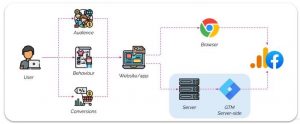
Server Side is a data collection method that sends tracking information from your website’s server to advertising platforms, instead of directly from the user’s browser. This ensures more accurate data collection and sidesteps issues like ad-blockers and browser restrictions.

Server side tracking in a nutshell

Benefits of Server Side Tracking

  • Data Accuracy: Up to 30% more accurate data as ad-blockers and ITP/ETP technologies can’t block server-side tracking. When combined with CAPI, you get more comprehensive and reliable data, guiding smarter marketing decisions.
  • Load Time: Improved website load times.
  • Security: Enhanced security via the GTM server within cloud projects.
  • Data Privacy: Strengthened user data protection. Direct data transfer from your server gives you more control over processing and storage.
  • Data Governance: Better data control and management. Data is collected on the Google Cloud platform and distributed from there.
  • Real-Time: Enhanced real-time data activation using the GTM cloud server.
  • Quick Implementation: Utilizes the existing dataLayer, eliminating the need for new code.

What is the Facebook Conversion API (CAPI)?

Facebook’s CAPI is a powerful tool that sends conversion events directly from your server to Facebook. It complements the traditional Facebook pixel, capturing data when the pixel can’t, like mobile app purchases or conversions by users with cookies turned off. CAPI ensures more robust data collection, providing a clearer view of your Facebook ad performance.

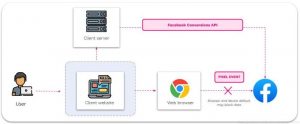
When Facebook gets a server event, it checks for a corresponding browser event. If the browser event is blocked (e.g., by ad-blockers), the server event is used instead.

CAPI supports various event types and parameters, giving businesses flexibility in tracking many conversion actions and customizing the data they send to Facebook.

Facebook CAPI in a nutshell

Benefits of FB CAPI

  • Data Control & Measurement: Greater control over data sharing and enhanced performance measurement throughout the customer journey.
  • Full Path Visibility: CAPI sends more detailed information than the pixel, such as CRM data or lower funnel events, targeting ads to those more likely to take desired actions.
  • Stronger Data Flow: CAPI data is less affected by browser loading errors, connectivity issues, and ad blockers.

Ready to harness the power of Server Side and Facebook CAPI?

Our expert team can tailor solutions to your needs. Don’t hesitate to get in touch!

Contact us


Lifetime Value (LTV) in GA4: Analysis and Reports

Today, let’s dive into Customer LifeTime Value (LTV), a critical metric used for evaluating user behavior and value. We’ve broached this topic before, but today we’ll focus on how to utilize LTV in Google Analytics 4 (GA4) to maximize its potential.

LTV serves as both a measure to calculate a customer’s economic value and a strategy for customer management. Harnessing LTV aids us in multiple ways:

  1. Crafting retention and loyalty strategies: LTV tracks the customer journey from the point of conversion to the end of their lifecycle – when they cease being our customer.
  2. Driving active acquisition campaigns: These campaigns leverage predictive measures to forecast purchasing probability, churn rate, or even higher average values per user purchase.
  3. Gaining unique user data: It provides a wealth of information, such as user interactions with our brand, their latest interaction or purchase, their last active moment, user ID-based deduplication, predictive metrics that learn from user behaviors, and more.

Continuous tracking and analysis of LTV over time enable us to detect trends and alterations in customer behavior. This valuable insight allows us to refine strategies and make clear decisions to boost the profitability and overall performance of your business. And all this is made possible with Google Analytics 4.

However, when calculating LTV, we need to consider:

  • The calculation of LTV can fluctuate depending on the type of business and the industry sector. For instance, in sectors where recurring purchases are less frequent, like car sales, LTV is calculated over a longer period, perhaps several years.
  • It’s crucial to understand that there’s a limit to LTV because it’s impossible to obtain data for clients prior to August 15, 2020.

Connection to Google Analytics (GA4)

Accessing Google Analytics (GA4) provides a powerful toolkit for analyzing and understanding user behavior. Along with LTV, GA4 furnishes invaluable insights into the customer journey, conversion events, audience segmentation, and much more, allowing a more comprehensive and detailed view of customer activity.

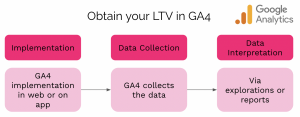
Graphic showing 3 steps to obtain Lifetime Value in GA4, including implementation, data collection, and data interpretation.

To gain access to this rich data, we need a connection to GA4 from our website or app to collect and interpret them via explorations and reports.

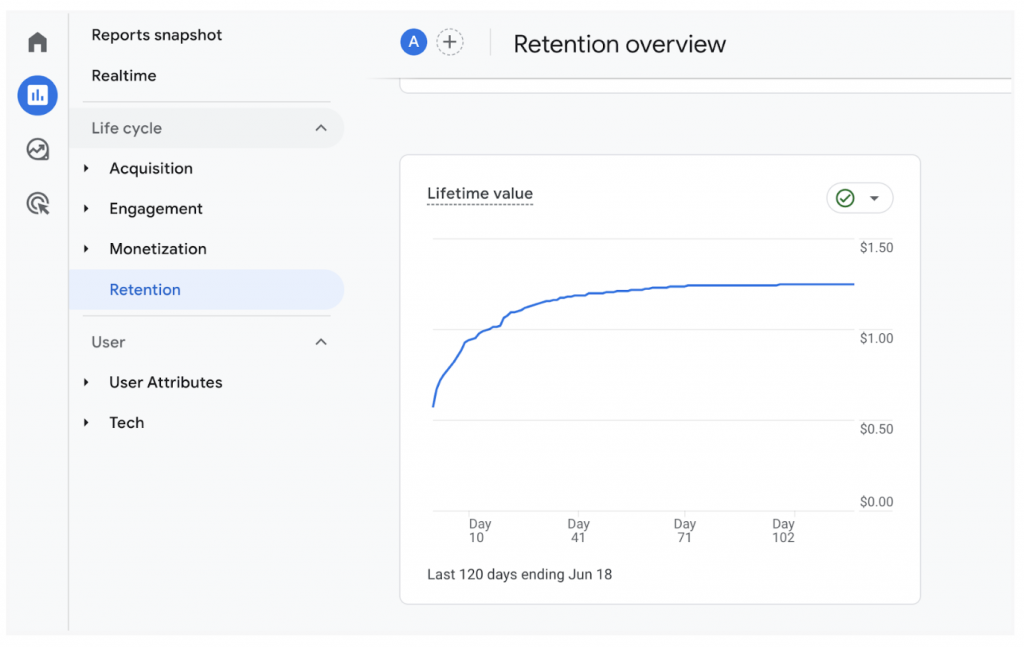
Where to find the Lifetime Value reports in GA4

Screenshot showing where to find Lifetime Value reports in GA4, under reports snapshot via retention overview

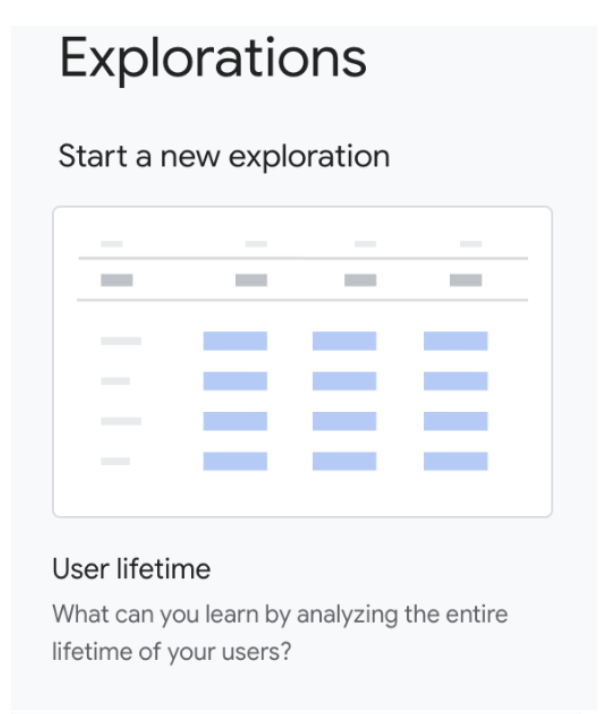
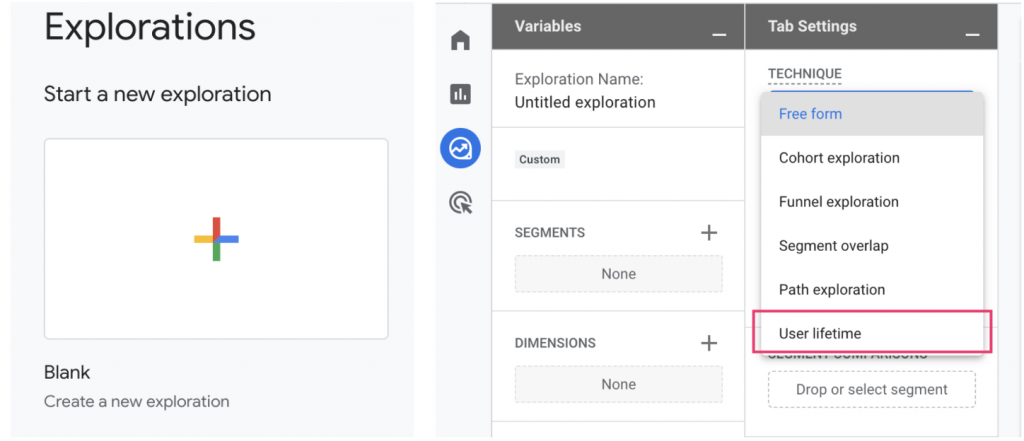
You can find LTV reports in GA4 in various ways:

  • Directly starting a new exploration.
  • From a blank report.
  • By selecting Technique → User Lifetime.Image showing that under "start a new exploration", you can select "user lifetime" to see a report of user lifetime value.

Two methods for user identification and reporting

  1. User ID and device: This method employs more accurate data to identify the user and unify all related events in the reports and analysis. If no user ID is collected, Analytics uses a device ID to identify the user.
  2. Device ID: It uses the device ID to identify the user via the client_id event of GA cookies for web and the instance ID for the app.

At Making Science, we strongly recommend using the User ID option for more accurate results.

Are you eager to learn more about Conversion Rate Optimization (CRO), optimizing the user journey, or simply analyzing which tools are best suited for your business? Our team is ready to help. Don’t hesitate to reach out. 🚀

Get in touch

Or, check out our other Google Marketing Platform solutions.

Keep Your Google Universal Analytics History Using BigQuery

GA4 is now the present of Analytics, emphasizing full implementation. But, what about the Universal Analytics work and data? Both Google and we ensure you won’t lose your Universal Analytics historical data.

UA will sunset in July 2023, but Google allows data export till year-end. Also, the sunset for Universal Analytics 360 accounts is postponed to July 2024.

How to handle Universal Analytics data?

360 Users should act promptly despite the extended sunset. We at Making Science offer a solution to export and enhance data processing via BigQuery, a pivotal tool in GA4. Linking both will elevate your digital asset data processing. This is applicable only for Universal Analytics 360 accounts.

What if I don’t have a 360 account? Can I still recover my Universal Analytics data?

Non-360 account holders, there are solutions for accounts without BigQuery access. At Making Science, we can assist with data export even without a Cloud account, as per these Google Support articles:

For the 360 users, here’s our solution; BigQuery export.

Requirements for Data Export to BigQuery?

Start by creating a Cloud account, if you don’t have one. Don’t worry, we can set it up for you. To simplify the process, we’ll handle all the necessary configuration on both platforms. Be aware, in BigQuery certain permissions and configurations need to be in place for Universal Analytics to send data to Cloud. This includes specific export settings. Rest assured, we manage all.
This solution stands out as it extracts all historical data automatically, unlike other manual solutions. With BigQuery, you don’t need to select data or reports to export, as all your Universal Analytics history will be stored in the cloud.

Note, BigQuery charges for storage, but these costs are manageable, given the significance of preserving Universal Analytics data.

How can I view my Universal Analytics data?

BigQuery’s role in digital analysis is growing, hence Google now connects BigQuery with GA4 for free and 360 accounts. This means BigQuery unifies Universal Analytics history with GA4 data, displayed in a Looker Studio dashboard. Check this article for linking GA4 with BigQuery to generate Looker Studio reports, conserving quota.

Benefits of BigQuery Export?

Let’s delve deeper into BigQuery export benefits:

  1. Preserve historical data: Linking BigQuery with UA ensures all historical data remains intact.
  2. Data unification: BigQuery’s GA4 connection allows combining historical and new GA4 data for improved comparison and comprehensive reports.
  3. Automated process: Data export is fully automated, eliminating manual exports or other forms of automation.
  4. Enhanced data processing and visualization: With BigQuery and Looker Studio, data processing and visualization surpass UA capabilities.

At Making Science, we provide guidance and solutions for any challenges. Our proposed solution for the Universal Analytics sunset is BigQuery data export, which helps maintain, process, and visualize your data. Don’t hesitate to contact us for assistance with this or any other issue. We’re here to help!
Remember, prepare for the sunset—don’t get caught unready!

How to Fix Trouble Loading Data in Looker

If you’re reading this, you’ve likely spent entire afternoons experiencing trouble loading data in Looker. Let me reassure you, this is not an issue with the unification of Data Studio and Looker, misconfiguration of your data sources, or improper data blending. The problem lies beyond Looker Studio. But don’t worry, we have a simple and effective solution that can bring many long-term benefits to your visualization tool. Keep reading! 🤓

What’s Happening with Looker Studio?

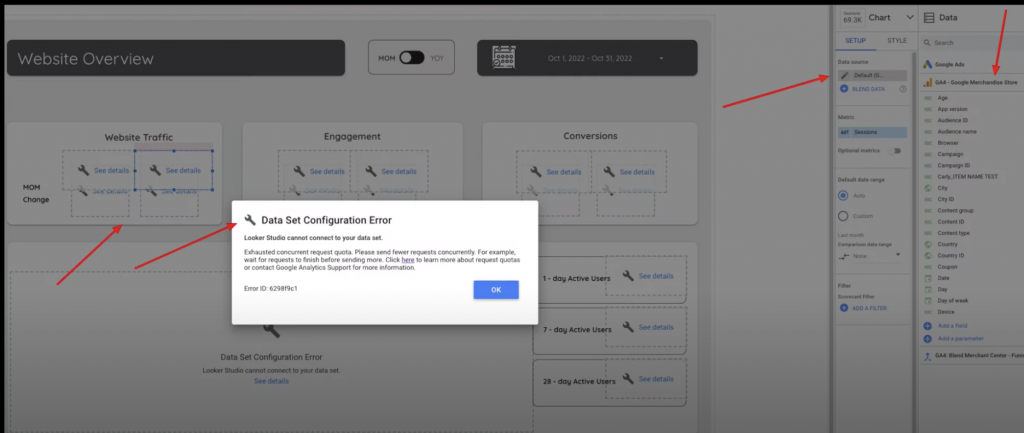
Since Looker’s integration with Data Studio was announced, many updates were expected to improve the tool. However, the new update on November 7 led users to a disappointing surprise: recurrent “Data Set Configuration Error” messages. This raised alarms, making us think that integrating Looker into Data Studio was a total misstep and that it had broken our dashboards and deprived us of our custom reports. But that’s not the case.

data set configuration error dashboard inside Looker

Why Aren’t My Data Showing Up?

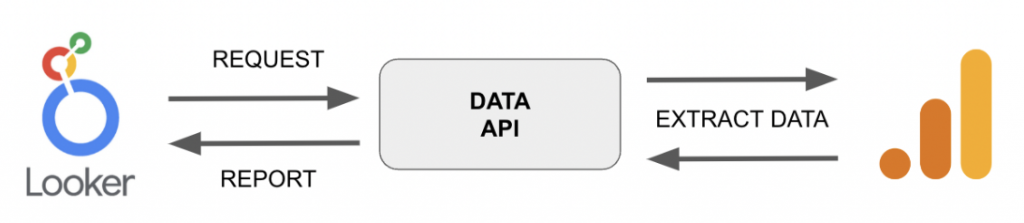
As we mentioned at the beginning of this post, the problem isn’t Looker Studio; it’s the connection with GA4: the GA4 Data API. Every time we enter our Dashboard, apply a date filter, a sources and media filter, etc., we’re making a query to GA4, and the Data API is responsible for extracting this data from our analytics tool and sending it to Looker Studio for visualization.

data flow from looker to data API to Google analytics and back

Until now, we had free rein when making queries. However, with this new update in early November, GA4 has established Quotas (Quotes), i.e., query limits. These limits are set by “virtual coins” called tokens, and each Looker Studio has a maximum of 1250 tokens per hour. Each table, scorecard, or chart consumes certain tokens when we make a query. So, if we use them all, we can’t make the query, resulting in the dreaded wrench icon on our charts:

Google Support has mainly dealt with this problem in November due to the severity of the issue. Google has proposed several solutions, but in the short term we can:

  • Reduce the number of shared users.
  • Decrease the number of charts.
  • Upgrade the account to Analytics 360.

These solutions may cause us to lose some information or incur an unaffordable extra cost, like upgrading our Analytics account to 360. Therefore, we bring you a solution that will allow you to maintain your dashboards as you want and also improve your data handling in Looker Studio: linking Looker Studio with BigQuery.

What’s the Best Solution for Trouble loading data in Looker?

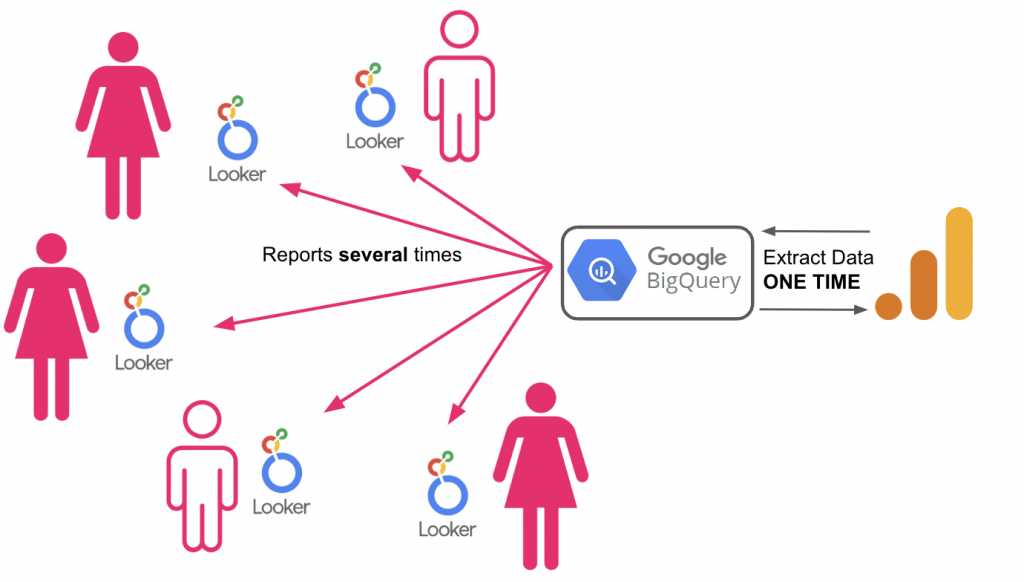
Linking Looker Studio to BigQuery is an effective solution since both the free version of GA4 and the 360 version can connect to BigQuery. This connection avoids constant query sending to GA4 and thus the consumption of tokens set by the Quotas. Considering that BigQuery will store the necessary data for our dashboard only once, tokens will be consumed when data is stored, not with each query.

data flow showing data extraction only one time to BigQuery before sending to Looker

In this way, queries are made directly to the data stored in BigQuery, and more efficiently.

BigQuery is not only a solution to our problem, but it’s also an excellent opportunity to improve the treatment of data collected from your digital assets. Some benefits of the connection with BigQuery are:

  • Faster queries: Data will appear sooner every time we use the filter or enter the dashboard, saving us time and giving us more immediate reports.
  • Reports without samplings: Thanks to BigQuery’s raw data extraction from Analytics, queries made to BigQuery will lack sampling, providing more accurate information.
  • Greater flexibility in reports: BigQuery allows us to create customized reports in the true sense of the word, with the ability to add as many dimensions as desired, avoid the 90-day limit of segments… With BigQuery, your imagination sets the limit.

Is BigQuery Free to Use?

All these benefits aren’t free, but the cost is manageable. Google primarily charges for storing your data and running queries or searches within the database:

  • For storage: The price is $0.02 per GB, but the first 10 GB are free.
  • For query: The price is $5 per TB, but the first TB is free.
  • Although prices can vary depending on the database, there are also flat rates: BigQuery prices.

In conclusion, the November 7 update forced us to partially adapt our way of using Looker Studio. But hasn’t that always been the case since GA4 was introduced? The adaptation process since GA4’s launch has been significant: adapting to a new way of measurement, a new interface, different types of reports… all with the sole purpose of obtaining more detailed, useful information, and allowing better analysis of our digital assets.

That’s why at Making Science, we offer help in connecting your Looker Studio with BigQuery, providing the solution everyone is seeking, and letting you enjoy the benefits BigQuery offers.

Want to Learn More about Looker and BigQuery?

Don’t hesitate to contact our team of experts, we would be happy to discuss your specific case. We look forward to hearing from you!

Get in touch