
Integrating Google Analytics attribution reports in Google Data Studio

One of the main advantages of Google Data Studio as a reporting tool is its native integration with other Google tools. One of the most widely used integrations is the Google Analytics connector. Data Studio can collect data directly from the platform.

With this integration, we can see and edit reports similar to audiences, acquisition, behavior and conversions, for Universal Analytics or GA4.

We do not have the same luck, however, with the MCF (Multi-Channel Funnels) reports, since these are calculated differently, and are not available from the same API.

Here, we’ll discuss setting up a Multi-Channel Attribution Funnel. Read on to learn more.

Integrating Attribution Reports in Google Data Studio

MCF reports are located under the “Conversions” section of Universal Analytics. They include assisted conversion data, top conversion paths, or path length or time.

These reports can be used to answer questions like 

  • How many times did search campaigns help in conversions?
  • Which channel is most valuable when it is the last interaction?
  • How many days/touchpoints does it take for the average customer to convert?

Learn more about multi-channel funnels
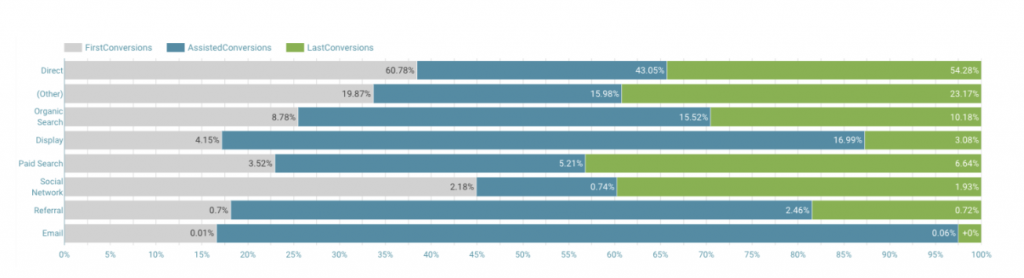
Data for channel starters, helpers, and finishers

In the future, we may be able to create them automatically. Until then, to view attribution reports, you can use the following steps.

Note: This integration is exclusively for Universal Analytics properties.

Integration Steps

  1. Install the Google Analytics extension for Google Sheets

This Sheets plugin takes analytics reporting a step further. It offers the capabilities of the Google Analytics API combined with data manipulation in Google spreadsheets.
The API that we will call from here will be the one that will return the data you need. More advanced details of the extension.

  1. Connect a report through the extension via API

Once the plugin is installed, you will have to launch it from the Extensions menu: in the top bar -> Google Analytics -> Create new report.

Once you do, you’ll need to give the report a name, and select the account, property, and view to apply these settings to.

Leave the rest of the fields empty.

Now you will have a series of fields available, for each of the rows, in which you’ll be able to request information from Analytics.

Start by typing mcf for Report Type, to indicate the Multi-Channel Funnels API.

The minimum fields you will need are:

  • Report Name
  • View ID
  • Start Date
  • End Date
  • Limit
  • Report Type
  • Metrics
  • Dimensions

You should already have the first 5 ready.

  1. Choose the appropriate dimensions and metrics and add them to the report

In our custom report, we will need to indicate that the request is to the MCF Reporting API, using the appropriate dimensions and metrics.

To do this, we have to go beyond the ones available in the drop-down list (that’s why we didn’t fill them in before) and look for the ones we’re looking for within all dimensions and metrics available.

Note: These fields, in addition to not being in the drop-down list of the extension, are also not found in the UA dimensions and metrics explorer.

Copy and paste all the searched metrics and dimensions, separated with a comma and without spaces.

Some important dimensions you can use:

  • mcf:basicChannelGrouping: Basic channel grouping, automatic from Google Analytics.
  • mcf:timeLagInDaysHistogram: Length of conversion paths in number of days. In other words, the days needed to achieve each conversion.
  • mcf:pathLengthInInteractionsHistogram: Length of conversion paths in number of interactions. That is, the number of touchpoints needed on each channel to result in a conversion.
  • mcf:basicChannelGroupingPath: Sequence of most successful channels along conversion paths.

And some important metrics:

  • mcf:totalConversions: Total conversions. Including goal achievements and transactions.
  • mcf:totalConversionValue: Total value of conversions. This metric includes goal achievements and transactions.
  • mcf:firstInteractionConversions: Number of conversions in which the channel has appeared in the first interaction.
  • mcf:lastInteractionConversions: Number of conversions in which this channel has appeared in the last interaction of the conversion. This metric includes goal achievements and transactions.

Launch the report

We can run the reports from the Google Analytics extension menu -> run reports. If all is well, a new tab will be created with the name you have chosen.

For example, with the following metrics and dimensions we will have the following reports:

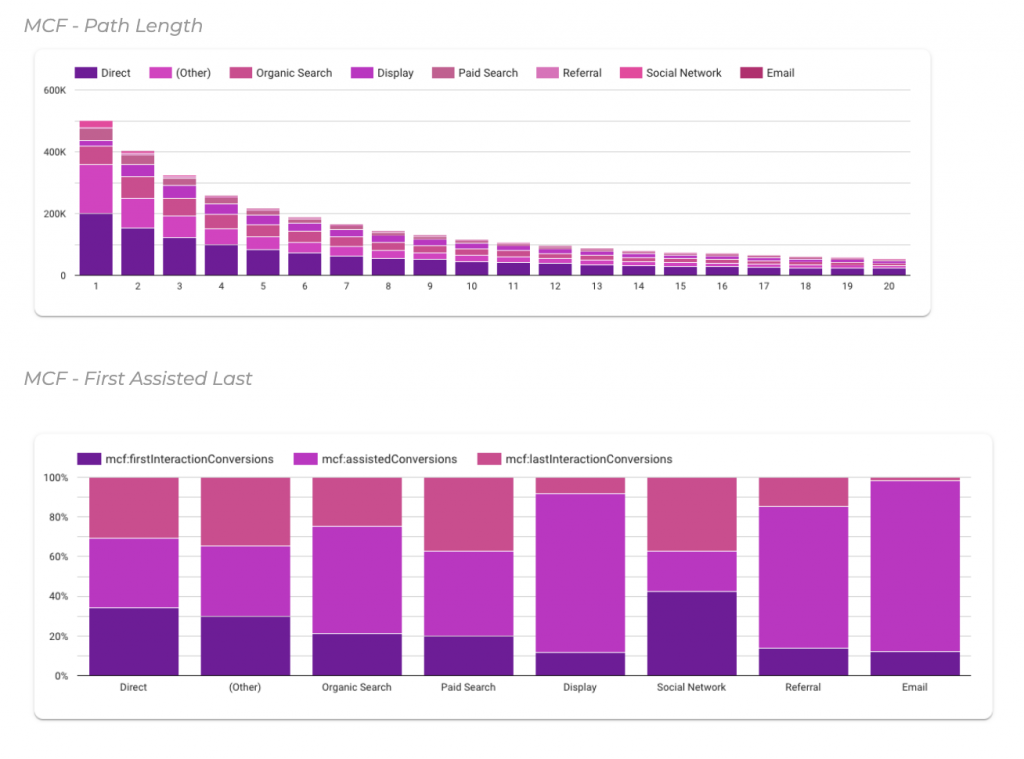
  • MCF – Path Length: Example report of the length of touchpoints per channel
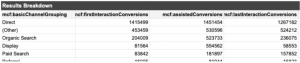
  • MCF – First Assisted Last: Example report of the conversions of each channel as initiator, assistant and finisher
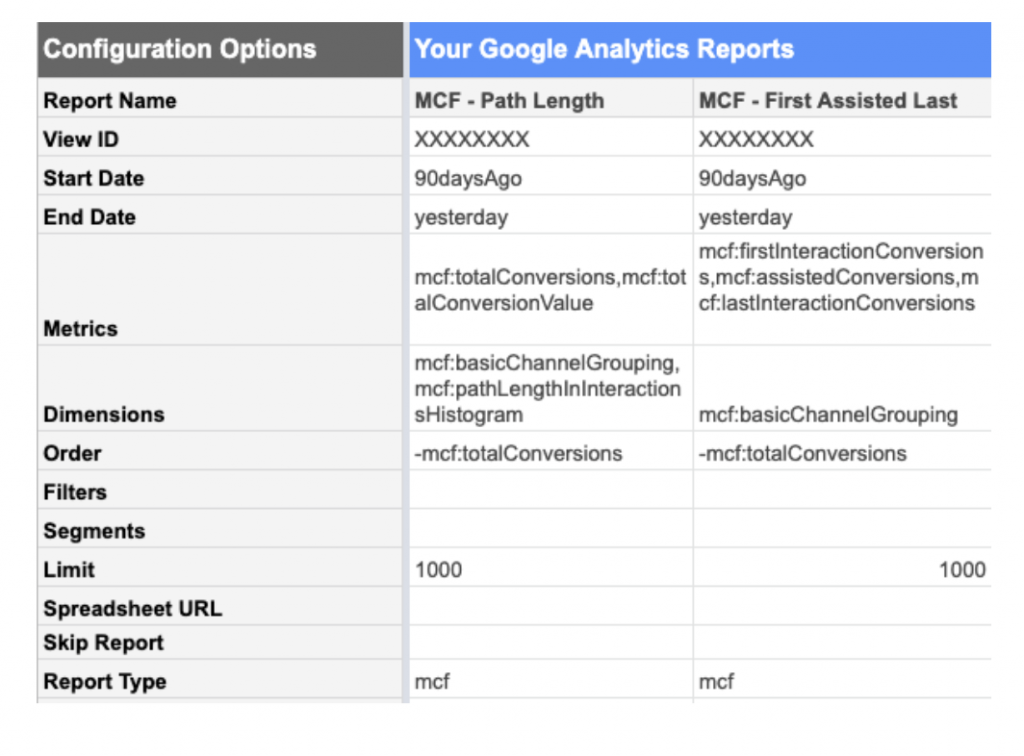
In the first example, we’d see information like this:
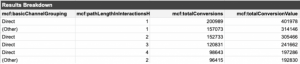
And in the second example, we’d see information like this:
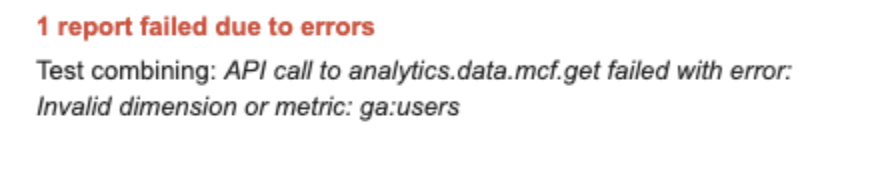
Note: MCF reports can only be run with mcf dimensions and metrics. If we combine these with standard metrics or dimensions, the report will give an error like the following:
Connect the reports with Data Studio

To connect the reports and view the information from Google Data Studio, it is as easy as creating a new report, or opening an existing one, and connecting a data source from Google Sheets.

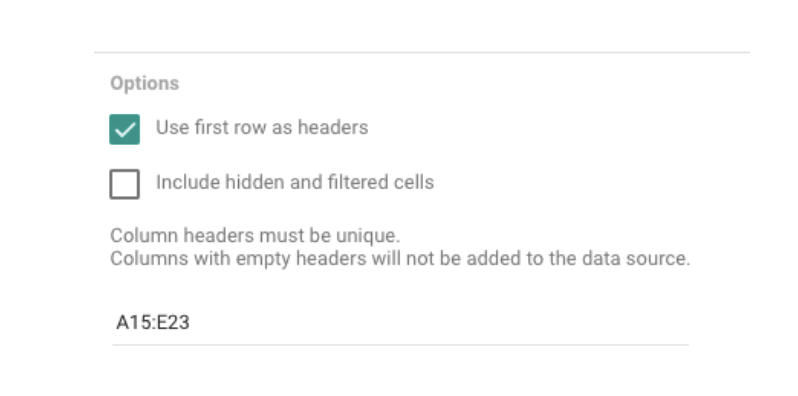
First, find the report you have created. Then, connect each of the tabs (reports) that you have requested to the Google Analytics API.

Note: the reports do not appear in the first row, so you must choose a specific range in the options to connect the document and view the information (example: A15:D1015).
Following the previous examples, these are the visualizations that we could create with the previous information:
Updating and scheduling reports

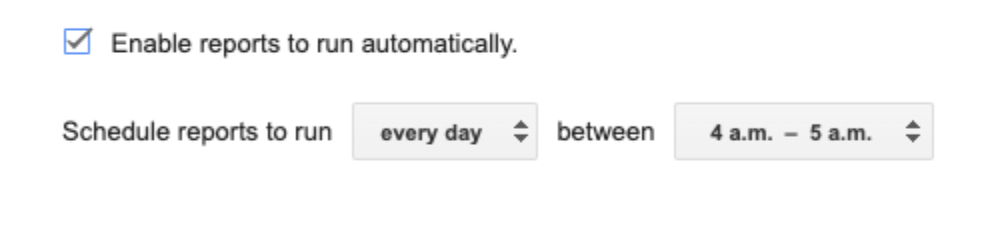
Whenever you want to run the report again, you can do it manually. But the extension also allows you to schedule reports to run automatically, so your data is always up to date.

To do this, just go to the Google Analytics extension menu -> Schedule reports. Here you’ll choose the interval of the execution.
Change existing reports

If we want to edit an existing report (for example, change from the last 30 to 90 days, or add a new metric), we must do it by editing the reports table directly.

Now you know how to connect attribution reports in Data Studio! Enjoy and take advantage of this functionality to get useful information from all your campaigns.

Bookmark these links to finish

Need help getting started?

If you need help implementing reports in Google Data Studio (or, let’s be honest, ANY type of data-based reporting) don’t hesitate to reach out to our team.

Get in touch

Sub-properties of GA4: what they are and when to use them

One of the unique features recently released by Google Analytics 4 is sub-properties. This feature is unique to GA4 360. It allows organizations to break down data into more granular chunks, for example, into separate business units or brands. They are perfect for organizations that want to partition their data and assign highly customized permissions. However, there are several essential issues to consider before implementing sub-properties.

Why use sub-properties?

A sub-property is an advanced data management feature. Let’s say you work in a large and complex organization where data should not be shared beyond certain teams or work groups. This feature can ensure that people only see the data that is relevant to them. At the same time, you retain the ability to generate reports on a parent property.

We recommend analyzing each case to see if more granular data control is really needed. If it is, then it makes sense to invest in sub-properties. It’s important to note that sub-properties do not replace Views in Analytics.

How much do GA4 sub-properties cost?

Sub-properties are not a free feature. Even for businesses with 360 licenses, there is an additional data cost. That is, there is a cost per event equal to half the event cost of the source property. This is in accordance with the terms of your 360 contract.

So because they cost extra, you need to research and analyze where those sub-properties are really needed and where this feature may be frivolous.

Again: we do not recommend using it as the replacement for Views in Universal Analytics.

What alternatives are there to sub-properties?

If what you need to do is replace Views, there are two options:

  • Use filters and/or segments in GA4: An exploration using filters can be easily and quickly created to achieve the same goal as Views in UA. Also, if you want more detailed information you can use segments in addition to filters.
  • Google BigQuery: This is another option for cases in which filters and segmentation are not enough, and you need reports of more complex features. Since there is native integration of GA4 and BigQuery, you will get a variety of more advanced solutions that BigQuery offers, such as data set filtering, segmentations based on sequences or audiences, and data modeling.

Both alternatives will likely help you save on your GA4 costs, but that’s not to say you won’t ever use sub-properties. This is because it’s a feature most organizations will need to ensure proper access (or lack of access) to data by different teams.

Haven’t upgraded to the new Google Analytics 4 (GA4) yet? Our team of experts can help you in this generational change of Analytics so that your organization takes full advantage of its data’s potential while respecting its users’ privacy. We’re waiting for you! 🚀

Get in touch

ProxySQL, a Google Cloud Platform alternative to SQL database management

In the world of DevOps, you must maintain an environment where your fellow developers can take full advantage of the technologies available, and those technologies must be used in a way that does not create security gaps. 

In this post, we will discuss how to safely and efficiently grant database access to users who need it using ProxySQL, a Google Cloud Platform (GCP) tool.

Data management is complicated

Cloud database management can be a headache for our programming friends. This is because having our database within a VPC that is only accessible from microservices with sufficient credentials is the de facto alternative to keep our valuable data safe. This implies that, if in non-production environments, developers need to perform SQL operations within the database, they will face the problem of not having direct access from their local environments.

To deal with this problem, three possibilities arise before us, each with a different level of security and complexity.

    1. Access by developers to one of the microservices and perform command line operations: this access can be granted by Kubernetes control tools such as Rancher, or from GCP itself. With this option we maintain security and apply the rule of least possible privilege. Unfortunately, performing database management from these microservices becomes too manual a task, especially when it comes to data.
    2. Create a microservice that runs a simple phpMyAdmin server with the necessary credentials to access the database: here we can also have control over the access credentials using an Identity Aware Proxy and guarantee a much friendlier environment than using MySQL in the Command line. One disadvantage of this method is that there are many more database management tools available and we are forcing all the management to be carried out from the same entity. This solution is close, but we can do better.
    3. Use ProxySQL: the proposal is quite simple a priori, ProxySQL will be used as a kind of tunnel between the developer and the database. It is enough to have the database with the public IP address option provided by GCP for CloudSQL and perform the local installation of ProxySQL depending on the operating system in question. If you want to know a little more about this process you can see it here.

With all these steps ready, it is enough to execute the following set of commands which creates the connection with the database through ProxySQL proprietary encryption and, in our local port-to-port, we will already have access to the database from which we can pull the thread to do SQL operations.

First of all, we need the instance ID, which we can get from the GCP CLI or from the console:

gcloud sql instances describe <SQL instance name>

Then we use this command to create the connection. Remember that you must have sufficient permissions to access. This is done by enabling the Cloud SQL Client role for the IAM user that we are using.

./cloud_sql_proxy -instances=<instance Id>=tcp:0.0.0.0:<port to expose>

Just like that, you can get hold of your favorite database management software on that port.

The need for greater security

One compliance and security hurdle is that, although that public IP in CloudSQL is restricted, in the end, it is an IP that we have to manage and take care of. In many scenarios, and depending on the internal rules of the company, this is not allowed. That’s a big hurdle for our current setup since ProxySQL needs it to work. 

Fortunately, there is a configuration in Kubernetes that we can enable so that our deployment works without much problem, albeit making the deployment a little more complicated.

The savior in this case is our friend PortForward, which allows you to create a port mapping between a remote Kubernetes cluster and the computer of a subject with sufficient access credentials.

In this case, we can create a pod in our deployment, which already has access to the same private VPC within GCP. There are ready-made ProxySQL images provided and maintained by Google (https://github.com/GoogleCloudPlatform/cloudsql-proxy), which, with a few configuration parameters, is ready to operate as a microservice. As additional data, ProxySQL can also serve as access for the rest of the microservices in the cluster. Once this is done, we simply enable the PortForward option and run this command to access our Port Mapping.

Here the point is that, for our architecture to work, developers must be granted access to the Kubernetes cluster. If we do it this way, we will not be respecting the principle of Less Privileges, since we will be giving access to all the underpinnings that support the applications running. The developer should not have access to Ingress or cache microservices.

The solution again is relatively simple: we use a different namespace for the microservice that contains the ProxySQL. That is, we grant permissions to developers ONLY to said namespace through a service account, a role created in IAM and a role binding.

In conclusion…

We cannot stress enough the importance of securing data and meeting security requirements. Of course, to have the luxury of not having a private IP, the deployment can be a bit complicated, adding more hoops between the local environment and the database, in addition to the configuration parameters.

But we have to say that this is worth it, because it only has to be done once and we will have everything ready and insured.

The tools that exist are many and the interactions make the possibilities infinite, so we can find other solutions that are more suitable for other cases.

Whether you need a security audit, a custom security solution, or help to install turnkey services, our team can help. Send us a message (info@makingscience.com) or click the button below to get in touch. 

Get in touch

How Consent Mode adds value to your analytics in GA4

Due to recent changes in privacy regulations and user consent requirements in force, data modeling is a great way to help ensure we are not missing out on valuable data insights in a world where online signals are becoming increasingly scarce. Otherwise, we will not be able to completely measure site interactions, nor answer questions like:

  • How many daily active users are on my site?
  • How many new users have I attracted with my last campaign?
  • What journey do users take, from landing on the web to making a purchase (or other type of conversion)?

With the implementation of Consent Mode, you can have a much more realistic understanding of how your business is operating because you can model the behavior of users who reject cookies, based on the behavior of those who accept them.

As you can see in the image below, for a few days we started tracking the modeled data of users who rejected cookies in Google Analytics 4. The data quality is clearly enhanced when using Consent Mode. 

Moving forward, we will be able to obtain higher quality insights since we will not only have the results of the users who consent to cookie tracking, but also modeled information of those who do not, and therefore, our volume of measurable users grows.

Usually, around 20-30% of users do not accept cookies. So, we can expect to see the volume of data gathered by around 20%.

Reference image:

What are the requirements to be able to see the conversions modeled in GA4?

In short, Consent Mode and GA4 can help us continue to add value to our business, even in a cookieless environment.

If you want to implement Consent Mode in your business, or even migrate to the new GA4, our team of experts can help you with a custom solution. We can’t wait to hear from you!🚀

Get in touch

6 tips to future-proof your travel business

During our most recent webinar, we had the chance to speak with 2 key industry stakeholders about the biggest challengers digital marketers are facing in the travel industry. Read on to learn about Costanza Ghelfi (Co-founder and COO of ad-machina, a Making Science company) and Miquel Trias (Sr. Data Industry Manager at Google) had to say about the top 3 things they’d recommend any travel organization focus on. 

Costanza’s recommendations

1. Personalization

I see it every day, it really makes an enormous difference. If you go with a customized message to the user, you can connect with the user much better than with a generic message.

2. Data Activation – using all the data

These days, a company’s competitive advantage is data. You need to capture as much data as possible but you must do so intelligently. Data that is not activated correctly is a huge opportunity lost.

Personalization and data are very related. You can learn from the data of your existing clients and apply it to prospective clients. And, more importantly, you can personalize better with all the data you collect.

3. Mindset

Marketings teams need to adapt to win in this new context… They should lean into a mindset of letting go, of losing control. We are so used to controlling everything in digital marketing, down to the specific message that we showed each user at a particular time of day. But machine learning and automation have shown us that this doesn’t work anymore. It is inefficient – so we have to trust the technology. We have to give the technology all the information about our business & target that are relevant and let the technology do the magic. This doesn’t mean that the marketing team doesn’t have anything to do! Quite the opposite – it gives us the time/opportunity to strategically differentiate ourselves from our competitors. 

It is about feeding the technology with the best resources, best assets… Regarding search campaigns specifically: you should feed Google Search Ads with the best copy you can generate about your hotels.

Miquel’s recommendations

1. Be privacy ready

We mentioned the new privacy regulations (like GDPR and the CCPA) – and if we don’t have the privacy basics right, the rest of our efforts will fail. We need to be able to track the conversions and the actions that happen on our site properly. This means doing it legally for people who accept to have their data collected, and extrapolating data for the ones that don’t.

2. Set clear objectives

It might seem obvious, but you should establish clear business objectives that you want to maximize. Then, given a budget, what is the KPI that you want to maximize? In this way, you can enable your company to have the data available to calculate those KPIs… You need to know what is important for the business, and be able to measure and track it.

3. Embrace automation

If you have the basics right (privacy ready with clear business objectives), there is no way that a manual strategy can beat a target ROAS straegy. There is no way that an old-fashioned, complex campaign structure works better than one using responsive Search Ads. Companies must embrace automation. 

We’ve tested it with over 100 customers in our office, and I have not sen a single classic campaign work better… if you are running a non-automated campaign, you are losing money every day. Quite simply, it’s an unfair battle – that’s why I can say who will win. Smart bidding offers a number of signals that manual campaigns can’t collect. Sure, you can put a bid modifier for device, but these are very big segments compared to auction time bidding. They are not able to put bid modifiers that Target ROAS puts on modifiers… In my experience, smart bidding always wins. 

Conclusions

When it comes to digital marketing in the travel sector, you really can’t beat insights from Google and ad-machina. Whether you’re looking to personalize your campaigns, activate your data, be privacy ready, or even set (or modify) business objectives, Making Science can help bring you the best of all worlds. 

Follow us on LinkedIn to keep up with our latest viewpoints. Or, get in touch with our team today by visiting makingscience.com/contact.

Boost Campaigns with CAPI: Unlock High-Value Audiences via Offline Conversion Data

Are you wasting your data?

We live in a time of major change in the world of advertising due to the imminent disappearance of third-party cookies, as announced by Google almost two years ago. This new context is characterized by a shift in the strategy of how we use data. Before, using third-party data was pervasive, and practically a given. Now, strategies must revolve around first-party data and have a customer-centric orientation. Today, our capacity for data collection and activation determines our competitiveness as advertisers.

Using this first-party data to feed our campaigns and audience generation is essential if you want to succeed on advertising platforms like META, where AI is key in optimizing your results. It’s more important than ever to understand and integrate your offline conversion data because that’s where the most valuable information is actually generated. 

The current challenge: Moving from a third-party to a first-party data strategy

One of the main challenges marketers face is being able to measure all the steps of our funnel, both those that occur in our online environment and those that occur offline. Another optimization cornerstone is to correctly attribute conversions and understand the journeys users take to convert. 

The trend is clear: every day, there are fewer third-party options in the market. Facebook is no exception, with its latest updates. Many of its former segmentation options have been limited to give greater weight to the automatic optimization of the AI itself in addition to the activation of customer data (first-party data).

Take the plunge: Implement a secure Server-to-Server connection across your funnel

In the race to be a profitable and successful advertiser, you must include offline business data in your calculations. By using Meta’s Conversions API, you can upload your offline data and thus monitor campaigns through actual conversions. In this way, we can generate high-value audiences based on users who complete the process and reach the desired conversion phase of our funnel.

The difficulty here is the need to update this data in real-time so that Facebook’s AI can learn from this information throughout our campaigns. Manual upload can be an operational challenge for most businesses that have to pull data from different sources and sort it for activation. For this reason, Facebook’s API can generate a direct connection with the different data sources such as your CRM, so that the information about your offline conversions is automatically updated with the Meta platform. In this way, Meta is optimized with the information of your actual clients and will allow you to:

  • Optimize lower funnel events.
  • Create audiences of real conversions that we can use to generate lookalike audiences
  • Create audiences with high lifetime value to activate cross- and up-selling campaigns
  • Improve the attribution capacity of our campaigns on Social

At Making Science, we offer multiple solutions for integrating your offline data into your digital marketing strategy. Discover our proprietary technology, Gauss Offline Conversions, or our direct Server-to-Server integration with CAPI. Write us at info@makingscience.com to learn more

GA4: a new solution for solving companies’ current and future data challenges

Technological trends and innovations mean companies must constantly evolve. The market demands growth in a globalized and even more deeply digital world. Making the most of these technological improvements involves understanding and capturing data to make better decisions based on customer preferences. 

Speaking of major tech innovations

Google recently launched Google Analytics 4. This tool aims to provide a tool capable of adapting and meeting the new needs of a more digital world. Additionally, it overcomes many technical challenges associated with:

  • Integrating models of artificial intelligence
  • New regulations about the use of information
  • Structuring and management of large volumes of data, among others.

Implementing GA4 makes it possible to overcome the difficulties that arise in the digital and data world. According to Harvard Business Review*, there are several main challenges that arise in digital business today. First, only 26.5% of organizations consider themselves “data-driven,” so this is still an aspiration for many. Second, it has been argued that 80% of all new data is unstructured, meaning that it cannot be easily captured and quantified. Increasingly, companies must come to appreciate that data is a business asset that flows through an organization. Third, this year’s survey* reflects and highlights the depth of corporate concern regarding data ethics and accountability. Currently, only 21.6% of data leaders say the industry has done enough to address data and AI (Artificial Intelligence) ethics issues and standards.

What do these issues mean for today’s organizations?

It is important to understand that these issues play a key role in organizations. As such, the latest version of Google Analytics (GA4) aims to address these issues by providing a framework for improvements to artificial intelligence, cookieless improvements, and others. Here, we will take a closer look at these improvements and the impact they have on these business issues with data. 

  • From the first perspective of achieving a data-driven organization, the GA4 format allows for better integration with all Google tools for data collection, achieving information in function. Additionally, it offers the generation of reports based on the customer lifecycle. This allows us to understand each stage traveled by the customer on our website or e-commerce platform. In turn, this tool allows us to have a broader view of the interaction of customers with our products or services across devices and channels. 
  • The second perspective is about unstructured data. GA4 presents many competitive advantages for data tracking and analytical predictions based on artificial intelligence models. Also, the tracking of events without code implementation allows us to generate real-time information associated with our website. Likewise, we’ll have the ability to provide a level of detail of the data on websites and mobile applications. Similarly, it generates a new set of more accurate metrics on user tracking and product engagement. Moreover, it can be connected to BigQuery for storing and querying large volumes of data as well as enhanced data visualization capabilities. Such solutions can overcome these unstructured data barriers and allow for organizational improvements.
  • The third perspective refers to the ethics and accountability of data with AI. GA4 also complies with the regulations such as the General Data Protection Regulation (GDPR) and the California Consumer Privacy Act (CCPA). So with this tool, we can have a more specific user data control. Also, it helps combat the future loss of third-party cookies. These will become less common in the future, so machine learning tools will become more important, based on additional legislative standards and ethical criteria. 

How to proceed

Therefore, we can conclude that the Google Analytics GA4 tool presents a wide set of elements, tools and metrics that allow companies to overcome these barriers in their organizations. As such, they’ll be able to generate added value, better decision making, growth in KPIs, revenue, and positioning of brands in a digital market increasingly immersed in artificial intelligence models, data management, and its regulation. 

If you’re not sure how to get started, we can help. Get in touch with our team today! You can reach us by email at info@makingscience.com. Or, fill our contact form at www.makingscience.com/contact.

*Source of article taken from Harvard Business Review: https://hbr.org/2022/02/why-becoming-a-data-driven-organization-is-so-hard

Datativity: How is data related to creativity?

Big Data is a term that describes the data, both structured and unstructured, that floods businesses every day. The importance of big data lies not in the quantity that’s gathered, but in what organizations do with it.

The advertising industry is constantly evolving. New platforms, technologies, and innovations become opportunities that are important to consider when you’re working on a new creative. Big data is no exception. Since its appearance, the advertising industry has relied more and more on data to satisfy the needs of its clients. This fusion between creativity and data serves to produce more precise results. Data can be used to enhance creative processes, which allows us to develop excellent marketing strategies. However, to achieve a perfect fusion, there needs to be harmony between data and creativity.

Spotify + Data = The perfect combo

Let’s dive into the success story of Spotify (the great master of data) to better understand how this harmony can be achieved. Everything is better understood with examples, which is why we are going to analyze the success story of Spotify.

Spotify is well known for harnessing the power of data and using it to drive creative campaigns in an original and effective way. In one example, it took advantage of available user data and statistics to create outdoor billboards in which user behaviors were reflected. They mixed data with a touch of humor, with very positive results. 

“Dear person who played “Sorry” 42 times on Valentine’s Day, What did you do? “

Spotify Wrapped

“Wrapped” is another great example of Spotify making the most of its data. Every year they use our data to make us feel special. They create personalized videos in which they show us, in a fun and relaxed way, who our favorite artists have been, plus which songs and genres we listened to the most. This has created an annual trend in which users organically participate by posting their annual summaries on different networks. The best way to build a brand image is through advertising where the user feels unique and part of something. It is not forced and flows naturally with the behaviors and trends of the audience in question. Like Spotify, agencies shouldn’t wait any longer to fuse data with creativity.

Is all data good data?

However, it’s not all “sunshine and rainbows” when it comes to user data collection. These days, society has become wary of massive quantities of data collection, since it has frequently been misused for commercial purposes. Thus, projects like “The Cookie Factory” have been created. This campaign by UNESCO consists of technology that bombards AI with false data in order to mislead and confuse it about our habits and preferences. Once again, creativity makes its way using big data, although in this case, it is to combat it.

In the end, data complements creativity but it cannot replace it. Data is only useful if you know how to use it. Data can help to uncover certain human truths, needs, habits, and behaviors in a more precise way. It can also lead you to territories, connections, or interesting thoughts that you may have overlooked or not even considered.

The possibilities of big data are limitless and open up a whole new universe for creatives and marketers to explore.

Conclusion

Does your company tend to be more data-driven or creative? If you need to swing the pendulum one way or the other, Making Science can help. Visit www.makingscience.com/contact to get in touch with our team today.

Google sets July 2023 as the end date for Universal Analytics

Recently, Google announced in their that Universal Analytics will stop working as of July 2023, as it will be replaced by Google Analytics 4 (GA4). This new version was designed to adapt to a digital ecosystem that is more respectful of user privacy – cross-platform and cross-device.

In a recent post on the company blog, Russell Ketchum, director of product management for Google Analytics, explained:

“Universal Analytics was designed for a generation of online measurement anchored in desktop websites, separate sessions, and data tracking via cookies. But this form of measurement has become obsolete. Google Analytics 4 operates across platforms, does not rely exclusively on cookies, and uses event-based data models for user-centric measurement.”

Here are the main changes and advantages provided by GA4 compared to the current Universal Analytics:

  • New privacy controls to minimize data collection at the user level.
  • More integrations and metrics.
  • A complete view of the customer lifecycle, with an event-based measurement model that is not divided by platform.
  • Use of machine learning to generate predictive insights on user behavior and conversions. Audiences can be created of users who are likely to buy or abandon.
  • Default data-driven attribution model and the option to obtain predictive insights on user behavior and conversions.
  • GA4 will no longer store user IP addresses; instead, it will switch to using anonymized IP addresses.

It’s time (as it has been for a few months!) to configure Google Analytics 4 as soon as possible. In this way, you can generate the necessary historical data before Universal Analytics stops processing new hits.

Don’t get left behind! If you still haven’t migrated to Google Analytics 4, our team of experts can help. Get in touch with us at info@makingscience.com or by visiting makingscience.com/contact. We’ll be waiting to hear from you! ?

Improve Customer Relationships through Salesforce’s Customer Data Platform

The era of the Customer Data Platform (CDP) is upon us. Marketers finally have a purpose-built database to centralize all of their marketing needs.

CDPs bring a wealth of opportunities to marketers. A CDP combines customer data from different sources in one place. In this way, you can get much more comprehensive view of your customers’ wants and needs.

The relationships you form with your customers are built on a series of touchpoints. Specifically, the Salesforce CDP lets you collect and unify all your customer data so you can humanize every moment of the customer journey with the trust and consent of your customers. Start by connecting data from all your systems (for example, marketing, sales, service, or e-commerce). You can also add external sources through MuleSoft, Google Cloud Platform, AWS, or AppExchange. Consider that each system might have a different way of identifying the same customer.

Implementing a CDP

First, you must map your data to the industry standard Cloud Information Model, so no matter what format it comes in it can be harmonized. Then Salesforce CDP matches and merges billions of identities to form unified profiles, creating a single source of truth for each customer. You can enrich your customer profiles with partner data or by adding metrics like lifetime value score so you can make the most of each segment. Then, you can build audiences, letting AI suggest the most powerful segments to target. You can also run segment analytics to understand your reach.

Now that you know your customers better, you can easily take action. You can reach them on any advertising, messaging, or engagement platform with the content that’s most relevant in that exact moment, based on their engagement with your brand. You can even connect your audiences to thousands of apps in the salesforce AppExchange to create meaningful moments across web, mobile, connected TV ads, and more.

Finally, get actionable insights from across your organization in any business intelligence tool like Datorama or Tableau. In this way, your marketing perform is at its best: building trusted customer relationships and growing revenue.

Create a single source of truth to humanize every moment with Salesforce CDP.

Get started today!

If you have doubts about how to bring all your data together, let us help. Our team of Salesforce experts is standing by to add value to your strategies. Click here to get in touch.