
Google says goodbye to the familiar SA360 interface! Everything you need to know about the migration and the new interface

Google has announced that at the beginning of 2024, the Search Ads 360 interface that we all know (one of the most popular tools of the Google Marketing Platform (GMP) marketing suite) will cease to exist for good and be replaced by a new one. The new interface was created to improve the experience for advertisers and to help achieve better results with better management of search campaigns across multiple channels.

While it may seem straightforward, not migrating to the new interface can affect advertisers. Keep reading to find out how to avoid potential conflicts!

What conflicts can arise from not migrating to the new SA360 interface?

If advertisers do not migrate, these are the issues that will arise:

  • Disconnection of the SA360 API with reporting platforms.
  • The loss of custom columns
  • Misconfiguration of conversion goals and Smart Bidding
  • Forced synchronisation issues with search engines

What are the differences between the current and new Search Ads 360 interface?

With a modern infrastructure, the new Search Ads 360 can offer better support across multiple advertising channels and search engines, including third-party partners. This means advertisers can access more features from other search engines.

  • Current Search Ads 360 has limited search engine functionality, conversion goal setting at the bid strategy level and automatic daily search engine synchronisation with manual forcing for instant updating.
  • The new Search Ads 360 interface offers expanded coverage of other search engine features, campaign/account level conversion targeting and actions, and the ability to create rules to adjust the value of conversions. In addition, it will allow us to differentiate between campaign conversion targeting, bidding strategies and budgeting strategies and automatically synchronise real-time changes to search engines.

When should you migrate to the new Search Ads 360 interface?

Before you consider this migration, we recommend that you take a look at Google’s timeline:

  • Up until January 2024, we recommend scheduling the migration of your bidding and budget management strategies to the new Search Ads 360 experience.
  • During February 2024, we recommend to proceed with the migration to ensure continuity of service.
  • Between February and April 2024, the old Search Ads 360 interface will no longer be available to all users. Google will notify all advertisers at least 60 days in advance.

Need support migrating? Our Google Marketing Platform team can help you with this migration and advise you on how to approach the new interface. 🚀

[button color=”accent-color” hover_text_color_override=”#fff” size=”medium” url=”www.makingscience.co.uk/contact” text=”Contact us” color_override=”#f00067″]
Salesforce & Google Analytics 360: business advantages of the integration

Salesforce & Google Analytics 360: business advantages of the integration
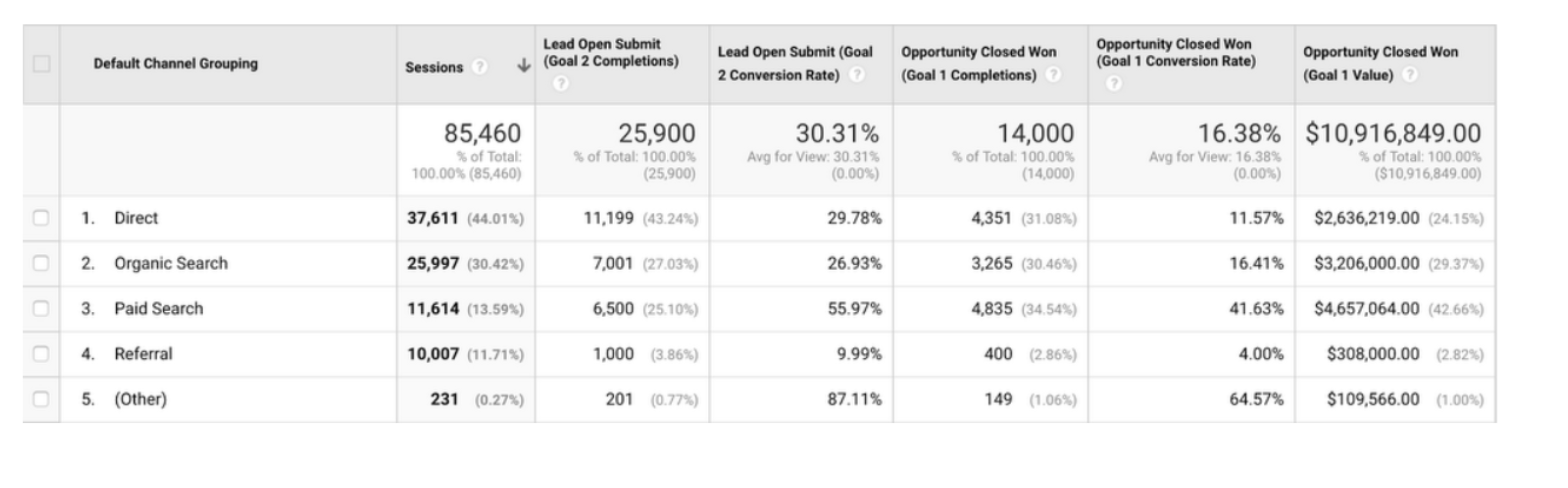
The web channel has more relevance and weight in the generation of potential customers for companies in which the final sale/conversion occurs in the offline environment. This generates a significant increase in digital advertising investment in different channels and strategies that we have identified in Google Analytics. But not all leads are the same, some can be much more valuable than others. Do you know what they are? Have you identified the channels and strategies that generate the most qualified leads? The integration of Salesforce and GA360 can answer all these questions.  

Why integrate Salesforce and GA360?

Basically, without this integration you will not be able to have a 360 vision of the actual sales conversion of each channel, strategies, keywords, etc. This will allow you to optimize your campaigns by adjusting budgets and bids that will translate into an improvement in ROI. In addition, having this information will also allow you to optimize the time and efficiency of the sales push or call center.

How to do the integration?

Google Analytics 360 has a native connector with Salesforce that will allow you to connect both tools by importing the data of each lead and opportunity. To execute this connection, a web implementation and configuration work is required on both platforms to pass the clientId (GA cookie) to the CRM tool, which will be the reference field to execute the integration.  

Benefits of the integration

  • Audience generation: Thanks to the integration, you will be able to generate audiences based on the offline data of your potential customers. This will allow you to generate audience lists to carry out remarketing campaigns or lookalikes of the most qualified users, improving performance and optimizing the online investment cost.
  • Audience exclusion: With offline data you can generate audiences to exclude converted users from your online campaigns.
  • Defining audiences for A/B tests and customizations: Define audiences with Salesforce data to share them with Optimize 360 ​​allowing you to run different A/B tests of potential customers, as well as customizations that improve the experience of potential users on your website.
  • Generation of custom funnels: Thanks to the integration with Salesforce you will be able to build custom funnels in Google Analytics, which will allow you to visualize the performance of your digital strategy from start to finish. You will be able to identify deviations in the funnel and take actions that contribute to improving the efficiency and performance of your campaigns.
  • Unified reporting in Salesforce: The integration will also allow you to create a report in Salesforce that contains complete information on campaigns and products, monitoring the ones that are having the best results and providing very valuable information to the sales push, which without the integration would not you could have.
  • Campaign forecasting: Thanks to the end-to-end visualization we will be able to identify which products or services are completing the objectives set and which are not. This will allow you to adjust your digital investment by moving your budget to those products that are not meeting the objectives, which will improve the effectiveness of your digital investment by optimizing the performance of the online channel.

At Making Science we have teams specialized in Salesforce and Google Analytics with experience in the integration of these two platforms, which will help your marketing teams to be more competitive by facilitating this integration work in order to make decisions based on the end-to-end data. If you are interested in starting to exploit the possibilities of this integration, get in touch with us and we will accompany you in the development and process so that you can begin to understand the performance and weight of your investment in digital campaigns in the final conversion of clients.

What is Ads Data Hub?

What is Ads Data Hub?
Ads Data Hub is the new Google tool that allows to bring together advertisers’ data with Google’s own data, which allows personalized analyzes adjusted to specific business objectives while respecting the privacy of users (GDPR).  

How does Ads Data Hub works?

Ads Data Hub sits between media attribution, BigQuery, and GMP. ADH allows you to bring in your media data from Display & Video 360, Campaign Manager, Google Ads, and YouTube, as well as other data sources. This data is contained in ADH within BigQuery, where all the data is available in one place and accessible to query. By doing this, we can answer questions about the purchase or consumer journey, and tie customer behavior from ad impressions to web behavior, conversion and retention. Google even provides template queries for common reports and metrics like Active View impressions, clicks, conversions, and statistics. This leads to ADH’s primary benefit, which is user privacy. With ADH we cannot look at user data individually, protecting user privacy (GDPR). The tables consulted by ADH will have the user ID assigned by Google, on the other hand, the results will show aggregated data, eliminating the possibility of identifying users in a unique way but being able to carry out specific analysis in the queries.  

Practical Cases

Before using ADH, you should have a good use case, as there is a lot of analysis you can already do within GMP with the help of BigQuery. Here are some use cases where ADH could come into play:

  • End-to-end customer journey: What are the steps our customers take from ad impression to conversion? How do our ads affect user navigation? ADH can be used to link campaigns with web or CRM data to understand and analyze routes.
  • Impression performance: What is the optimal ad frequency to drive conversions? ADH can help us determine the frequency and effectiveness of ads for online and offline conversions. Also, we can consider how the ads contribute to brand awareness or building a custom attribution model.
  • Audiences: For each of my target audiences, how often do I need to work on the ads to get them to come back to my website and convert? Use ADH to identify potential customer audiences or brand loyal customers.

There are other considerations as well. As mentioned, we cannot work with individual users in ADH, at least for now, so you need to have enough data (50+ users) to generate audiences. ADH can also be useful for those who invest in GMP. The GMP tools already work well together, but ADH can help structure a more complete picture between data from DV360, Search Ads 360, and Google Analytics 360. In short, Ads Data Hub is a very valuable tool that helps us understand our digital ecosystem while respecting current legislation. If you need more information or advice about how to exploit the tool in Making Science we have a team specialized in this tool that will be happy to help you. We wait for you!

How to boost your campaigns in a world without cookies

How to boost your campaigns in a world without cookies
2020 has been the year in which there has been an acceleration in the digitization of all sectors and the population. The confinement experienced in the first part of last year has led to an increase in the traffic of all companies with a presence on the internet and, in addition, audiences have come into play that until now were not so protagonists of the online strategies of our campaigns. A clear example of the latter are people aged 45 to 65 years, since since March 2020 there has been a growth in traffic in this segment: The hyperdigitalization of the population comes at a time of changes in the digital sector. Surely you have heard of a world without cookies. Well, it’s not exactly how you imagined them. Of course, any company that intends to continue growing digitally needs to prepare today if it wants to continue working as they have done so far with their campaigns, getting this type of insights to develop strategies seeking the highest profitability thanks to personalization. Within a year Google will disable third-party cookies in your Chrome browser. In this way, it will join what Apple is already doing today with Safari, Mozilla with Firefox and Microsoft with Internet Explorer, or Facebook. The final countdown begins. Blocking these cookies alters the landscape of digital advertising, which currently relies on third-party cookie data for personalization. But do not spread panic. There are other solutions prepared to avoid these ‘problems’. One of Google’s answers is Ads Data Hub. This product, which respects the GDPR guidelines, is a data lake/warehouse where all third-party data that Google owns is stored at the user level, anonymized and consolidated. This technology enables advertisers to merge data from various Google platforms, such as Campaign Manager (DV360), Google Ads, and YouTube. As the data does not provide any identification at the user level, Google can legally store it and agencies can use it to impact on it. This solution not only allows you to bypass a world without cookies, it also adds very powerful extra solutions thanks to the cloud and BigQuery: · Attribution models with data on + off and more advanced (Markov or Shapley). · Real Time activation of audiences with data on + off in Search Ads 360 and DV360. · Much more advanced analysis by having the raw data of the users. · Matching of users between different media (on campaigns, Google Analytics 4 (app + web), clients, etc.). At Making Science we have a team specialized in this kind of technology. If you want to know more about the different solutions do not hesitate in contact us at info@makingscience.com
What is Custom Bidding?

What is Custom Bidding?
New functionalities emerge every day that allow us to automate processes, save time and improve the quality of information through machine learning. Custom Bidding is a mixture of these characteristics, since unlike standard or automatic bids, with Custom Bidding we can customize the algorithm based on real business objectives. Through a script created in DV360, we will provide more knowledge to the algorithm to apply machine learning in an optimal and unique way for each client and campaign.  

What is Custom Bidding and how does it contribute to our campaigns?

Custom Bidding is able to combine our business insights with the Google algorithm. This union between our knowledge of the campaign and its objectives, added to Google’s machine learning, will allow us to align our goals with the advertiser’s business objectives.  

How does it work?

Very simple, the first thing we must do is ask ourselves two questions:

  • What is our goal? If our objective is a standard CPM, CB is not necessary. On the contrary, if we want to optimize towards other goals and KPIs we can consider CB as a solution,
  • Do we want to manage the campaign manually? In case our priority is not to manually configure bids and we prefer that Google’s algorithm maximize the effectiveness of our campaigns, we recommend applying CB.

Second, we identify the signals, we must set our objectives (KPIs), what we are measuring and how we are going to optimize based on it. This takes us to step three, the design of the script, to develop it it is not necessary to be a code expert, in the help center we can find information and practical examples about it. These are the 3 main aggregate models, each of them is applicable to the different use cases that we will discuss below:

  • Sum-aggregate: In all cases, add all the weights.
  • Max_Aggregate: In all cases, it only takes into account the maximum weight.
  • First_match_aggregate: All conversions, find the first interaction that occurs within the script sequence.

Once the script has been created in DV360, and assigned as a bid algorithm to our test insertion order (replacing the non-personalized options offered by the platform), the algorithm will optimize based on the rules established in our script. If we have already completed the previous steps, it is time to select our script as the bid algorithm within our insertion order and start checking results between the test Insertion Order and the new Insertion Order with the custom algorithm.  

Use cases

To help us better understand each possible scenario, we have 6 previously defined use cases:

  • Weighted Conversions: All goals contribute to the achievement of the final objective. We can give weights for each step of the conversion funnel, prioritizing those actions that have the most value for the advertiser.
  • Activity Value: Unlike weighing only based on specific events such as floodlights, this model allows us to optimize based on custom u-variables. That is, we can give different weights to our custom variables collected in Campaign manager to increase the profit.
  • Transaction ROAS: We can use the value of each product or service to adjust the value of sales. The advantage is in differentiating the sales values ​​by product, not all sales are worth the same.
  • Google Analytics: with GA360 we can weight based on different events within our site, as long as we have a premium account and we have all those goals configured. For example, users who have placed an order are more valued, or those who have spent more time browsing our website.
  • Brand Signals: We use branding signals such as viewability, full video, and others, to make the most of this knowledge in our campaigns.
  • Unified Conversions: With the help of Campaign Manager and Google Analytics we are able to collect all that information that we cannot measure only with floodlights. Example: in a case of weighted conversions, with offline conversion we give more weight to the one that has the most value. In this case, we can unify online and offline conversions under the same algorithm, being able to give them the same value.

Each of them is unique and will vary depending on the weighting we give to each step, action or sales values.  

Case of success

Currently, we have active several cases of advertisers with Custom Bidding, so we already have a base with which to move towards new projects. The most recent example is a banking client in which we have implemented the case of “weighted conversions”, where we weigh the steps prior to the conversion. We can ensure that the above premises are met, based on the results obtained to date. Real data:

  • With a lower investment and half the impressions issued, the Custom Bidding test is having overall CTRs 0.10 percentage points higher.
  • The most important fact is that the CPA of Custom Bidding is 30% lower than the CPA of the standard campaign.
  • The number of conversions in CB is 39% higher than in the standard insertion order.

GMP in cookieless 2.0

GMP in cookieless 2.0
Earlier this year, Google announced that it will remove Third Party Cookies from its Chrome browser. From Making Science, just a few months ago, we clarified in our blog “The future of cookies” that what Google really wants to carry out is the limitation of these cookies and not their elimination. After a year of technological and regulatory advances in this area, it is important to give a pill on the updates that have been developed in this context. Apple communicates to its community that, with the IOS 14 update, it will be mandatory to indicate to users what type of data they are collecting and in turn request permission to be able to track them. In September, however, he sent a communication delaying the implementation of these new privacy measures. This announcement has caused a stir among companies such as Facebook, which are already starting up to be prepared when this functionality is activated. On the other hand, very much in line with Apple, Google Chrome announced that the implementation deadline could be extended in time, despite setting 2022 as the deadline. Likewise, it highlights a very important point for them, Google will not limit third-party cookies until they ensure that the market can continue to work their ads, targeting, frequency and brand safety in a qualified way. In general, all the solutions proposed in the previous blog have evolved along with the digital environment. Of the solutions that we already knew related to media and campaign activations, Google has included two very significant improvements:

  • As for Google Audiences, Google has incorporated a new functionality that consists of automatically expanding the targeting incorporated in our campaigns, a functionality called Auto Targeting Expansion.
  • Google has enabled the ability to trigger HTML5 creatives with customer match audiences.

Regarding new solutions related to the collection of audiences and measurement:

  • Google has included Campaign Manager within the 360 and with this update they incorporated a functionality called Conversion Modeling into the platform .This new functionality has the ability to analyze attributed and unattributed conversions, taking into account impressions and clicks not measured by different browser restrictions. In summary, based on this analysis, it is able to attribute conversions based on the history of the campaigns.
  • Consent Mode is the most relevant solution regarding the issue we are addressing. The main problem with asking for express consent is that it can lead to the loss of measurement of conversions and paths of those users who reject it. That is why Google has implemented two variables in the configuration that are analytics and personalized advertising. By entering these (ad_storage and analytics_storage) it will be possible to inform our GMP tags, analytics and Google ads about the status of the user’s consent. It is because of that:
  1. If the user has accepted the Consent then the tag will be executed as normal.
  2. If the user rejects it, the tag will be executed collecting basic and aggregated information but eliminating the collection of cookie information to respect the user’s privacy. We do not lose the measurement of conversions but it does not allow us to rework those cookies.

The rest of the solutions that we already have available and that we can implement are the following:

  • Ads Data Hub
  • Server 2 Server
  • Offline conversions
  • Data managers: CDPs, 1st party data prevails
  • Programmatic Deals
  • Non-cookies devices: Smart TV & Mobile

Thanks to the GMP environment and the integration that exists between all its platforms, we are able to implement solutions safeguarding the user’s privacy and without losing the user’s qualification. Among the benefits that the GMP environment offers us in relation to this matter, the following stand out:

  • Constant technological advance: Ads Data Hub, Tag Manager Server 2 Server, Campaign Manager 360
  • Audience Volume and Qualified Segmentations – DV360 Audience module
  • The native integration that exists between platforms makes it easier for us to measure and attribution of conversions: CM 360, SA360, GA360, DV360, ADH, GTMS2S

Consent Mode: Google’s new solution to continue measuring conversions while respecting the consent rules

Consent Mode: Google’s new solution to continue measuring conversions while respecting the consent rules
The need to ask the user for express consent before installing cookies on their browser may lead to the loss of conversion measurement for those users who reject this consent. Google, with its new “Consent Mode” functionality, seeks to mitigate this impact. Therefore, it is important that we know how it works. Consent Mode focuses on two types of consent; analytics and advertising personalization. Introducing two new variables, ad_storage and analytics_storage in the configuration, allows you to inform your tags (Google Analytics, GMP and Google Ads) of the status of the user’s consent, adjusting their behavior accordingly. It should be clarified that Consent Mode is not a CMP (Consent Management Platform), but complements the system or solution that is installed to collect the consent of the users. The tags will always be executed, regardless of whether you have the consent of the user or not. The real change comes in the information they collect: If the user has given their consent, the tag will be executed normally, while if they have rejected it, the tag will be executed without collecting or sending cookie information. In this way, it is possible to continue having a basic and aggregated measurement instead of completely losing this information. With the information collected from users who have accepted consent, Google platforms will also be able to model conversions for those users who have not accepted it. Currently, this modeling is not active but it is planned in your roadmap. An additional functionality that can be activated with Consent Mode is the so-called “URL Passthrough”. This option will allow you to send the identifier of the click in the url to be able to continue associating it with a conversion in the absence of cookies. The implementation requires that you are using GTM or gtag, and consists of the inclusion of some lines of code for the configuration. If you want more information on this specific topic, do not hesitate to contact us. On the other hand, to facilitate the process, some CMPs (Consent Management Platforms) such as Cookiebot or OneTrust, among others, already have direct integration developed and facilitate activation. To end this article and summarizing the previous points:

  • Consent Mode arises from the need to comply with the user’s consent without completely losing the measurement. Such a basic and necessary element to allow us to analyze, improve and optimize the activation of advertising.
  • It is currently a beta tool that continues to be developed and will progressively include more features and options, such as the conversion modeling mentioned above.

If you want to know more about Consent Mode, don’t hesitate to contact Making Science and our experts.

We introduce you to the new generation of Google Analytics: GA4

We introduce you to the new generation of Google Analytics: GA4
We welcome the latest version of Google Analytics! Called Google Analytics 4 , this new type of property (yes, there are no views as we are used to) provides, among other things: much more expanded predictive information, a deeper integration with Google Ads, more measurement capabilities between devices, and more specific data controls. The launch announced on Wednesday, October 14, is actually an expansion and renaming of the well-known App + Web property launched last year, and marks an important first step in the evolution of Universal Analytics.   We are going to analyze some of its improvements:

  • On the one hand, it will provide us with new knowledge and predictions based on artificial intelligence. While knowledge – based machine learning Analytics have been available for some time, new knowledge and predictions that reach Google Analytics 4 can automatically alert the marketers of some trends, such as growing demand of a product. It will also be used to predict results such as churn rates and potential revenue a business could earn from a specific customer segment. All this information can help us anticipate the actions that our clients could take in the future and thus focus on higher value audiences.


  • Improved integration with Google Ads. Now we can generate and maintain audiences of our users on the web and in the application. For example, if a user is qualified for an audience list due to an action performed on the web and was removed from a list because they made an in-app purchase, the list would automatically update to remove the user and not be impacted. with ads. In addition, Google Analytics 4 will report on the actions of the YouTube involved views that occur both in the application and on the web.


  • One of the most notable differences between Analytics 4 and Universal Analytics is the organization of the reports based on the customer lifecycle. These reports will help us delve into specific aspects of the customer journey. For example, we can see which channels are generating new customers in the user acquisition report, and then use the engagement and retention reports to understand the actions these same customers take and whether or not they stay after conversion. The new Analytics experience also aims to offer us a more complete view of how customers interact with your business across devices and channels. We can also provide your own user ID or enable Google signals to deduplicate users across devices, both in reporting and ad targeting.


  • Another benefit is event tracking without code implementation. This makes it easier for us to monitor and measure the actions that are important on the site and in the app, and also in real time (in Universal Analytics, events usually arrive with some latency). For example, we can measure a scroll event or the playback of a video, without having to add code or configure event tracking in GTM.


  • We are also going to have a more specific user data control. Analytics 4 also includes options to help advertisers comply with data regulations like GDPR and CCPA. The consent mode is designed for sites that must have end-user consent to collect analytics data, and this new mode provides us with separate consent options for analytics and for ads. Data deletion options have also been improved, allowing companies to fulfill user deletion requests without having to delete more data than is necessary. In addition, it includes a preview mode so that companies can verify the data they are about to delete.


  • How will it affect our analytics in the future without cookies? Well, as third-party cookies are removed , Google already anticipates that data scarcity will become the new norm. It will rely on machine learning to repopulate data gaps.

  In conclusion, the new property of Google Analytics 4 provides a more complete cross-channel view of the customer life cycle and uses that information with predictive marketing functions, providing us with more information, and more efficient ways to act based on those discoveries. Our recommendation is that when you have to configure a new property, do so with this new version. The previous one, Universal Analytics, will continue to be available but we recommend activating GA4, since it will be the focus of improvements and news within Google, and keep both measurements in parallel. From Making Science we can help you get it started! You dare? Ask for information at info@makingscience.com.

Google Analytics Web + App: Data Revolution

Google Analytics Web + App: Data Revolution
If you work in a Data department and you have read the title of this article, surely a little tickle has gone through your body and thousands of possibilities go through your head in these moments. Well indeed, this functionality has just landed in our little great digital world to try to offer a joint vision of the multiplatform world .

What is Google Analytics: Web + App?

Well, as its name indicates, it is a property that allows us to have a joint view of users and their behavior through the web and the app in a single report. At the moment it is in its initial phase and, therefore, in the full learning and optimization curve. And what are the main advantages that it will offer us? There is a world of possibilities, but if we must highlight some, they would be these two:

  • Cross platform measurement

Unified and consistent reports of the web and app to have a global and unique view of the data.  

  • More complete Customer Journey

Finally, we will be able to know in more detail the path followed by that high percentage of users who start their navigation in the app and end it on the web and vice versa.  

Limitations and points for improvement

I am sorry to reduce the euphoria to those of you who have reached this point in the article, but like all new functionality that is in Beta phase it has many limitations, and therefore, a lot of room for improvement. Here are some of the most important:

  • Impossibility of integration with DV360, SA360, BigQuery, etc.

Currently there is no possibility of integrating it with other tools in the Google Marketing Platform world, but we know that it is on its Road Map for 2020.  

  • E-commerce (App + Web)

It is one of the features that we miss the most in this new property, since right now we do not have any visibility of this type of reports.  

  • Limited Attribution Reports

This section is currently quite limited (if not null) and is one of the main points of improvement that they have planned for 2020.   And it is that, this functionality has yet to grow and mature to exploit all its possibilities, and if Google puts the love that we anticipate, added to the undoubted potential of this new feature, we may be talking about a revolution in the world of digital analytics.  So we have to be patient and, although in the Data world we are used to constant evolution and progress without time to settle, we are going to be forced to wait for updates. And as the saying goes, we don’t want to run before we learn to walk. What is certain is that it opens a new path full of possibilities that will allow the Data departments of any company a deeper knowledge of the behavior of its users and customers in order to adapt more efficiently to their needs.

If you work in a Data department and you have read the title of this article, surely a little tickle has gone through your body and thousands of possibilities go through your head in these moments. Well indeed, this functionality has just landed in our little great digital world to try to offer a joint vision of the multiplatform world.

What is Google Analytics: Web + App?

Well, as its name indicates, it is a property that allows us to have a joint view of users and their behavior through the web and the app in a single report. At the moment it is in its initial phase and, therefore, in the full learning and optimization curve. And what are the main advantages that it will offer us? There is a world of possibilities, but if we must highlight some, they would be these two:

  • Cross platform measurement

Unified and consistent reports of the web and app to have a global and unique view of the data.  

  • More complete Customer Journey

Finally, we will be able to know in more detail the path followed by that high percentage of users who start their navigation in the app and end it on the web and vice versa.  

Limitations and points for improvement

I am sorry to reduce the euphoria to those of you who have reached this point in the article, but like all new functionality that is in Beta phase it has many limitations, and therefore, a lot of room for improvement. Here are some of the most important:

  • Impossibility of integration with DV360, SA360, BigQuery, etc.

Currently there is no possibility of integrating it with other tools in the Google Marketing Platform world, but we know that it is on its Road Map for 2020.  

  • E-commerce (App + Web)

It is one of the features that we miss the most in this new property, since right now we do not have any visibility of this type of reports.  

  • Limited Attribution Reports

This section is currently quite limited (if not null) and is one of the main points of improvement that they have planned for 2020.   And it is that, this functionality has yet to grow and mature to exploit all its possibilities, and if Google puts the love that we anticipate, added to the undoubted potential of this new feature, we may be talking about a revolution in the world of digital analytics.  So we have to be patient and, although in the Data world we are used to constant evolution and progress without time to settle, we are going to be forced to wait for updates. And as the saying goes, we don’t want to run before we learn to walk. What is certain is that it opens a new path full of possibilities that will allow the Data departments of any company a deeper knowledge of the behavior of its users and customers in order to adapt more efficiently to their needs.

Main connections between Google Marketing Platform (GMP)

Main connections between Google Marketing Platform (GMP)
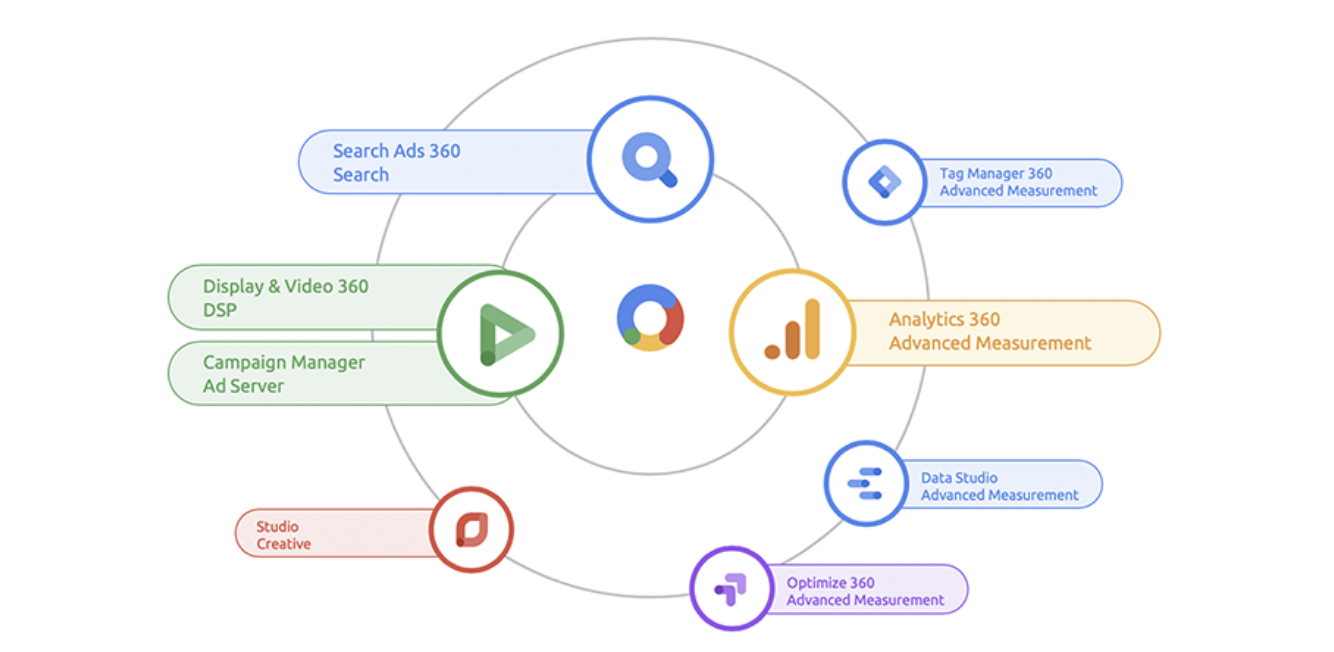
Each and every day more companies are starting to use the platforms and technology of the Google Marketing Platform (GMP) environment, which includes the following tools: One of the main advantages of GMP is the easy connection between the platforms. If all the technologies seen in the previous image are used, the connection between them is made in a few simple clicks and the data circulates like in no other type of ecosystem. However, although making the connections is something simple, you have to understand what those connections really are like and know how the data should be seen in each of them, which is usually the biggest problem that all companies encounter when using GMP . Below I will explain the main connections that exist, starting with clarifying the importance of the GMP measurement pixels, the Floodlights:

  • The connection of the Floodlights : The difference of the Floodlights with the rest of the pixels of other tools is that they will be common to four platforms: Campaign Manager (CM), Display & Video 360 (DV360), Search Ads 360 (SA360) and Studio. Although Floodlights are generally managed from CM, the 3 platforms have access to all the conversion information collected on them. This has 2 main advantages:
    1. Deduplication: The most important feature of GMP. As the floodlights are linked to the 3 platforms and therefore store all the information from the Search, Display and other traffic campaigns, the results seen on the platforms are deduplicated results, that is, REAL.
    2. Although the results that are seen in SA360 and DV360 are deduplicated, both platforms have access to all the information of the floodlights. In this way, the full path of the users is optimized and not only the assigned conversions.
  • CM – GA360 (Google Analytics) : It is one of the main connections within the GMP environment. To do it you need GA360, it is not possible to establish a connection with the free version.

This connection is one-way, only the CM data is sent to GA360. By making this connection, we start to stop using the utms in our urls. Everything is trafficked in CM and all the information will be sent to GA360 with a very important addition; It will include the information of all the impressions of the campaigns and we will be able to see it in GA360. The information will be sent in two ways:

  1. Primary dimensions: From CM the dimensions “source”, “medium” and “campaign” will be sent automatically. “Source” will always be sent as “dfa” and “medium” as “cpm”, they will be fixed values ​​from now on. Instead the “campaign” will be a dynamic field and therefore the most important of this connection. Automatically, the name of the different campaigns that are added in CM will be sent to the dimension “campaign” of GA360 and it will be treated as a primary dimension.
  2. Secondary dimensions: All other dimensions seen in CM will appear in GA360 with the prefix “DCM”. For example, we can see “DCM Placement”, “DCM Site”, “DCM creative”, etc.


  • CM – DV360 : By connecting these platforms we have different advantages:
    • The placements that we traffic in CM under the associated DV360 Site, will appear as creatives in DV360 without the need to send the tags.
    • DV360 will begin to report and optimize in deduplicated conversions with the rest of the Sites trafficked in CM, having visibility in addition to the entire path of the users. This greatly improves the performance of the tool and the results. 

This is a big difference from the DV360 over other display platforms, even with GDN, which do not have the ability to optimize to deduplicated results.

    • In CM we will see all the DV360 metrics as secondary dimensions. We can then incorporate information divided by Line Items or Insertion Orders (among others) and even include the DV360 investment in our CM results reports.
    • Audiences can be sent from CM to DV360.


  • CM-SA360 : By making this connection, without the need to traffic them, we will have all the information in CM of the campaigns stored in SA360.

All the information from SA360 will arrive in CM as a primary dimension in a single campaign that is generated automatically called “Dart Search”. However, in the CM reports we will also have all the information broken down from SA360 in secondary dimensions such as “Paid Search Campaign”, “Paid Search Ad Group”, “Paid Search Keyword”, etc. Also, as in the CM-DV360 connection, when connecting these two platforms SA360 will begin to optimize for deduplicated conversions, having the complete information of all the users registered by the Floodlights.  

  • CM-Studio : By connecting these platforms, all creatives generated in Studio can be sent to CM.

You can also use the information collected in the variables of the Floodlights and tags to generate dynamic creatives in Studio.  

  • GA360-DV360 : The premium version of Google Analytics is required. By having the CM-GA360 link, we would already have the information of the DV360 results on the GA360 platform.

However, if you want to see the information on Line Items and Insertion Orders in GA360, you need to make this link. Furthermore, by making this connection, audiences can be sent from GA360 to DV360.  

  • GA360-SA360 : Since there is a direct connection between Google Analytics and Google Ads, the GA360-SA360 connection may be the least exploited.

The premium version of Google Analytics is also required for this link.  What is gained by making this connection is including the information from the rest of the search platforms, such as Microsoft Advertising, and also audiences can be sent from GA360 to SA360.  

  • Google Analytics – Optimize : With this link we can measure the results of Optimize experiments on the GA platform.

If you have the premium version of both platforms, you can experiment in Optimize based on GA360 audiences.  

  • Data Studio : It is the platform for displaying data in real time and can be linked to Google Analytics, CM, SA360 and DV360. 

  To end the article, I would like to clarify the importance of the difference between primary and secondary dimensions when making these connections. We have seen that, when the connection between two GMP platforms is made, on many occasions the information from one platform is seen in another with secondary dimensions. Although those secondary dimensions are seen in the platforms, if we link them with another third tool those dimensions will not be sent. For example, in linking CM with DV360, we can see in CM how Line Items or Investment secondary dimensions. So if we only link CM to GA360 or Data Studio, those dimensions won’t show up on these platforms. In order to view them, they must also be linked to the DV360 platform, where they are stored as primary dimensions.