

Protect your websites and applications with Google Cloud Armor WAF

Web application security is crucial for protecting organisational and client data. In 2021, cyber ​​attacks caused approximately 5 trillion GBP in damage, which is expected to increase by 15% annually over the next five years. Thus, it is essential to use all possible tools to reduce the risk of these cyber attacks.

Google Cloud Armor is a web-application level “firewall” (WAF) capable of protecting companies from a wide variety of cyberattacks simply and efficiently. To use this tool, we will have to use Google Cloud Platform’s load balancers since that is where Cloud Armor can be enabled on the backend services.
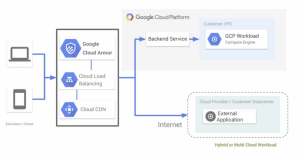
 

Once the load balancer has been configured, and a security policy has been activated for a backend service, it is time to adjust which WAF rules should be applied. There is a wide variety available depending on our needs. The following table shows a list of some of these preconfigured rules grouped by categories:

Name of the rule  Name of the ModSecurity rule
sqli-stable SQL injection
xss-stable Cross-site scripting
lfi-stable Local file inclusion
rfi-stable Remote file inclusion
rce-stable Remote code execution
scannerdetection-stable Scanner detection

Each of these rules contains dozens of signatures compiled from ModSecurity v3.0.2. Google Cloud Platform (GCP) provides a controlled way to debug these rules with real traffic.

The best part is that users are not affected since we can select them in “preview only” mode. This means that every time one of these rules is triggered, it will be logged and let the traffic through. Obviously, by activating preview mode, we will not be securing our platform in any way. Still, in this way, we can avoid false positives and gradually add these rules. 

In addition to the preview-only mode, GCP uses verbose logging capabilities. What does this mean? For each request blocked by these rules, we will see detailed information in the log on which signature and what part of the request has caused the block. As previously mentioned, each of the rules listed in the previous table contains several signatures, so some of these may cause false positives and should thus be disabled.

With this protection, we can avoid the following attacks:

  • SQL injection
  • Cross-site scripting
  • Local file inclusion
  • Remote file inclusion
  • Remote code execution
  • Method enforcement (public preview)
  • Scanner detection
  • Protocol attack
  • PHP injection attack
  • Session fixation attack


Do you want to know more about how to secure your websites and applications? The Making Science Cloud team can help. Get in touch at info@makingscience.com. We look forward to hearing from you!
Learn how Consent Mode can add value to your GA4 analytics

With new consent requirements in force, we must integrate data modelling to overcome data loss from our analytics tools. Otherwise, we will not be able to measure site interactions nor answer questions like:

  • How many daily active users are there?
  • How many new users have I attracted with my last campaign?
  • What journey does the user take, from landing on the web to making a purchase or conversion?

However, with the implementation of Consent Mode, we can have a much more realistic vision of our business because we can model the behaviour of users who reject cookies based on the behaviour of those who accept them.

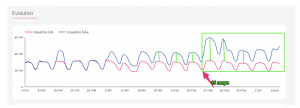
As you can see in the image below, for a few days, we started tracking the modelled data of users who rejected cookies in Google Analytics 4. The data quality is enhanced when using Consent Mode. 

Moving forward, we will obtain higher quality insights since we will have the results of the users who consent to cookie tracking and model information of those who do not. Therefore, our volume of users will grow.

Usually, around 20-30% of users do not accept cookies. So, we can expect to see the volume of data gathered by approximately 20%.

Reference image:

What are the requirements to see the conversions modelled in GA4?


  • You must implement Consent Mode.
  • You should have at least 1,000 daily events with analytics_storage=’denied’ for at least seven days.
  • You should have at least 1,000 daily users submitting events with analytics_storage=’granted’ for at least 7 of the previous 28 days. 

In short, Consent Mode and GA4 can help us continue to add value to our business, even in a cookieless environment.

If you want to implement Consent Mode in your business, or even migrate to the new GA4, our team of experts can help you with a custom solution. We can’t wait to hear from you!🚀

Contact us today!

Companies can lose up-to 25% of their Data if they do not implement new privacy solutions

In early 2020, Google announced that it would remove Third Party Cookies from its Chrome browser by 2022. Chrome will not be the first or the last browser to remove these cookies, but in this specific case, it will have a major impact on the campaigns we run. In this sense, Google has communicated a very important point for all of us who operate digital marketing campaigns: they will not limit third-party cookies until they ensure that the market can continue to work in a qualified manner.

That is why, taking into account the current and upcoming situation, and having the horizon of a #cookielessworld in 2022, brands should start looking for a plan B to carry out their digital activity without being affected by the disappearance of third-party cookies.

At Making Science, we help our clients tackle these major changes and we work every day on what we consider to be the key component of their strategies: Which is basing the strategy on their first-party data, every company possesses proprietary data and with this, we can accurately profile groups of users that we are going to impact with our campaigns.

Failure to change the philosophy of our digital strategy can be very costly and if we do not adapt we will not be able to operate or measure our campaigns properly, losing efficiency, data, and revenue. In fact, according to an internal study conducted by Making Science, we estimate that companies that do not adapt to the current changes in privacy,  specifically in relation to the disappearance of third-party cookies, will lose up to 25% of their data they should be getting if they do not implement the new Privacy solutions.

Among the multitude of current solutions in relation to these privacy updates, we are mainly committed to one, Google’s Consent Mode. Which will allow you to continue measuring your ROI while respecting the consent of your users.


Consent Mode: Google’s new solution to continue measuring conversions while respecting consent rules

Asking users for explicit consent before installing cookies in their browser may lead to the loss of conversion measurement for those users who refuse to give permission.

Google’s new “Consent Mode” functionality, seeks to mitigate this impact. Therefore, it is important that we understand.

Consent Mode currently focuses on two types of consent; analytics and advertising personalization. Introducing two new variables, ad_storage and analytics_storage in the configuration will allow you to inform your tags (Google Analytics, GMP, and Google Ads) of the user’s consent status, adjusting their behavior accordingly.

It should be clarified that Consent Mode is not a CMP (Consent Management Platform), but complements the system or solution installed to collect the user’s consent.

The tags will always be executed, regardless of whether the user consents or not. The real change comes in the information they collect:

If the user has given consent, the tag will run normally, while if the user has refused consent, the tag will run without collecting or sending cookie information. In this way, you can still have basic, aggregated measurements instead of losing this information completely.

With the information collected from users who have consented, Google’s platforms will also be able to model conversions for those users who have not consented. This modeling is currently not active but is planned in their roadmap.

Additionally, functionality that can be activated with Consent Mode is the so-called “URL Passthrough”. This option enables the process of sending the click identifier in the URL so that it can still be associated with a conversion in the absence of cookies.

The implementation requires GTM or gtag to be in use and consists within the inclusion of some lines of code for the configuration.

Consent Mode arises because of the need to comply with the user’s consent without completely losing the measurement. Such a basic and necessary element allows us to analyze, improve and optimize ad activation. It is currently a beta tool that is still being developed and will progressively include more functionalities and options, such as the aforementioned conversion modeling.