Learn how Consent Mode can add value to your GA4 analytics

With new consent requirements in force, we must integrate data modelling to overcome data loss from our analytics tools. Otherwise, we will not be able to measure site interactions nor answer questions like:

  • How many daily active users are there?
  • How many new users have I attracted with my last campaign?
  • What journey does the user take, from landing on the web to making a purchase or conversion?

However, with the implementation of Consent Mode, we can have a much more realistic vision of our business because we can model the behaviour of users who reject cookies based on the behaviour of those who accept them.

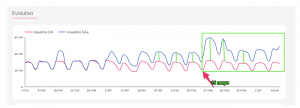
As you can see in the image below, for a few days, we started tracking the modelled data of users who rejected cookies in Google Analytics 4. The data quality is enhanced when using Consent Mode. 

Moving forward, we will obtain higher quality insights since we will have the results of the users who consent to cookie tracking and model information of those who do not. Therefore, our volume of users will grow.

Usually, around 20-30% of users do not accept cookies. So, we can expect to see the volume of data gathered by approximately 20%.

Reference image:

What are the requirements to see the conversions modelled in GA4?


  • You must implement Consent Mode.
  • You should have at least 1,000 daily events with analytics_storage=’denied’ for at least seven days.
  • You should have at least 1,000 daily users submitting events with analytics_storage=’granted’ for at least 7 of the previous 28 days. 

In short, Consent Mode and GA4 can help us continue to add value to our business, even in a cookieless environment.

If you want to implement Consent Mode in your business, or even migrate to the new GA4, our team of experts can help you with a custom solution. We can’t wait to hear from you!🚀

Contact us today!

The new generation of Google Analytics: GA4

We welcome the latest version of Google Analytics!

 Google Analytics 4 , Google’s new type of property (yes, there are no views as we are used to) provides, among other things: much more expanded predictive information, deeper integration with Google Ads, more measurement capabilities between devices, and more specific data controls.

The launch is an expansion and renaming of the well-known App + Web property launched last year and marks an important first step in the evolution of Universal Analytics.


We are going to analyse some of its improvements:

  • On the one hand, it will provide us with new knowledge and predictions based on artificial intelligence. While knowledge-based machine learning Analytics has been available for some time, new knowledge and predictions that reach Google Analytics 4 can automatically alert the marketers of trends, such as the growing demand for a product. It will also predict results such as churn rates and potential revenue a business could earn from a specific customer segment. All this information can help us anticipate our clients’ actions in the future and thus focus on higher-value audiences.


  • Improved integration with Google Ads. Now we can generate and maintain audiences of our users on the web and in the application. For example, if a user is qualified for an audience list due to an action performed on the web and were removed from a list because they made an in-app purchase, the list would automatically update to remove the user and not be impacted with ads. In addition, Google Analytics 4 will report on the actions of the YouTube involved views that occur both in the application and on the web.


  • One of the most notable differences between Analytics 4 and Universal Analytics is the organization of the reports based on the customer lifecycle. These reports will help us delve into specific aspects of the customer journey. For example, we can see which channels generate new customers in the user acquisition report and then use the engagement and retention reports to understand the actions these same customers take and whether or not they stay after conversion. The new Analytics experience also aims to offer us a complete view of how customers interact with your business across devices and channels. We can also provide your user ID or enable Google signals to deduplicate users across devices, both in reporting and ad targeting.


  • Another benefit is event tracking without code implementation. This makes it easier for us to monitor and measure the important actions on the site, in the App, and in real-time (in Universal Analytics, events usually arrive with some latency). For example, we can measure a scroll event or the playback of a video without adding code or configuring event tracking in GTM.


  • We are also going to have a more specific user data control. Analytics 4 also includes options to help advertisers comply with data regulations like GDPR and CCPA. Consent mode is designed for sites that must have end-user consent to collect analytics data, and this new mode provides us with separate consent options for analytics and ads. Data deletion options have also been improved, allowing companies to fulfil user deletion requests without having to delete more data than is necessary. In addition, it includes a preview mode so that companies can verify the data they are about to delete.


  • How will it affect our analytics in the future without cookies? Well, as third-party cookies are removed, Google already anticipates that data scarcity will become the new norm. It will rely on machine learning to repopulate data gaps.


In conclusion, the new property of Google Analytics 4 provides a complete cross-channel view of the customer life cycle and uses that information with predictive marketing functions, providing us with more information and more efficient ways to act based on those discoveries.

We recommend that you configure a new property with this new version when you have to configure a new property. The previous one, Universal Analytics, will continue to be available, but we recommend activating GA4 since it will focus on improvements and news within Google and keep both measurements in parallel.

Our team of experts here at Making Science can help you accelerate digitally! Ask for information at info@makingscience.com.

Drive your marketing intelligence strategy with advanced marketing analytics

Businesses can achieve digital transformation and make data-driven decisions that generate results by advancing their marketing analytics. With the current privacy climate gripping our digital realm, data quality is more important than ever when using customer analytics to improve strategic business decisions and gain a competitive edge.  

Research suggests that even though businesses have endless amounts of localised data, less than 15% believe that developing your data and maturing your analytical strategy will improve your marketing. Advanced marketing Analytics is data or analysed content that uses statistical methods and computational techniques to discover insights about customer behaviour which helps businesses make predictions or generate recommendations. 

The digital footprint left by users reveals a lot about their profiles, preferences, needs and purchasing behaviour. Today’s technology allows us to store vast volumes of data from multiple  sources, such as :

  • Social media platforms
  • Transactional sites
  • Company databases
  • Public data 

To achieve your business objectives and drive your marketing efforts into performing better, all the collected data should be safely geolocated and analysed accurately. The analysed data provides a better understanding of how efficient your marketing efforts are and how your users react to your marketing actions.

The impact of data quality 

AMA is a tool that runs on algorithms and partially automated processes that analyse data. These automatically controlled proceedings simplify complex business processes that are backed up by actionable metrics. Marketers must have a certain volume of quality data and clear objectives to select actionable metrics.

How accurate, complete, and relevant your data is will impact the implementation of new technologies, tools and any results obtained by your strategy. To produce the best results, you must have a powerful data management tool and provide the platform with clear and quality data. Google Marketing Platform (GMP) is a suite of tools that embody the concept of how advanced analytics can drive your marketing intelligence. GMP provides a holistic view of how marketing actions perform and the impact on the business.

Benefits of an advanced marketing analytics strategy

With the implementation of an advanced analytical marketing strategy, brands can open the door to a series of competitive advantages. Advanced analytical strategies provide the insights that will assist in designing customised offers and discounts that will meet each customer’s specific needs and achieve conversions at scale. Businesses can be constantly monitored and respond to customer requests, complaints and queries in real-time. The more details you have on the profile of your customers, the greater the potential for personalisation and a better journey for the customer.

Maturing your data analysis can also help businesses achieve improved operational efficiency, increased customer satisfaction, and more revenue.  Google states that “Marketing analytics can help your business grow by understanding ROI with data-driven marketing insights, build predictive and advanced audience segments & Enhance customer experiences & brand measurement.”

Advancing your strategy

 To help understand the different levels of data analysis, we have pieced together a map to showcase the different business’s stages of data analysis.

By levelling up your analytics, you can identify new business opportunities, interact with new markets, and attract more customers. An advanced strategy will allow your business to act faster whilst making strategic and beneficial business decisions. If you want to learn more about advanced marketing analytics, don’t hesitate to write to us at info@makingscience.com and send us your doubts or questions on this topic.

Building an automated strategy with Google Ads

Google has been releasing a lot of automated solutions to help marketers manage Google Ads campaigns more efficiently. You can automate your bids, your ads and even let the algorithm add negative keywords and new ads with new auto-applied recommendations.
So, let’s talk about smart bidding – and some of the things you could do to shift your campaigns to work better with new smart biddings and machine learning.

What is smart bidding?

It’s Google’s tool that will automatically adjust bids at keyword level, location level, and more, based on real-time data. It uses user signals to know when a click is most likely to lead to a conversion and will adjust the bids accordingly. Previously, using manual bidding, you would need to manually pull reports for ‘time of day’, work out which time or day produces the best CPA and manually decide if you want to add a bid adjustment to bid higher or lower for the time of the day. You’d then have to manually do this in every single campaign for each audience, location, device and even keywords, making managing campaigns very time-consuming!

The usual best practice builds that we are used to won’t work optimally for smart bidding – why? The over-segmentation of campaigns hinders the algorithm, giving poor learnings, missed opportunities and lots of time that you won’t get back.

How should my new structure look? It’s simple, simplify it.

Giving the algorithm as many data points as possible is key. So grouping your campaigns and ad groups by match type, placement, audience or more isn’t necessarily needed now and could be a little overkill. Instead, choose to segment campaigns by the country, the intent, or the targets.

Let’s look at an example of an old manual strategy. It might look like this:

Campaign Brand BMM Brand Exact Products BMM Products Exact Research BMM Research Exact
Ad Group Brand Name Products Products  Top Products  Queries Top Queries

But we could simplify it.  Grouping keywords by user intent (like a funnel) and it might look like this example:

Campaign Brands (1) Products (2) Research (optional) (3)
Ad Group Brand Name Products DSA
Bid Strategy Target Impression Share 100% tCPA or tROAS tCPA or Max Conversions

With fewers campaigns and a simplified structure, here we have grouped campaigns and ad groups by where they might ‘fit’ in the user journey. This allows you to still have some manual intervention on budgets and bidding strategies, but also gives the algorithm the freedom to optimise bids where it feels right and works with new machine learning effectively.

Depending on your budget, you might want to skip out on campaign 3, but these can be traffic drivers. They will drive lower cost traffic to your site, building your retargeting lists for when they are ‘warmer’, but also increasing brand awareness at the top of the funnel. By grouping all of your top of funnel keywords into the same campaign, and setting a lower target CPA you will have some control over the bids and budget spent on these terms.

Campaign 2 would be your consideration phase – they know about the brand, the colour, the type they want and likely to be in a purchasing mindset so you are happy to bid a little higher for these users. Set your Target CPA a little higher than you want to achieve to encourage higher spending.

Campaign 1 represents the bottom of the funnel – they know about the brand and are likely looking to purchase. This would use a 100% target impression share strategy – where you want to achieve maximum visibility on your brand terms – which is highly likely to lead to a conversion.

Choosing the right account structure, bidding strategy and keyword list can be a daunting task, so I would recommend using historical data if you have any to work out the best intent-based keyword grouping for you. In real time, it might not be as simple as this – so if you’re looking to optimise your campaigns for Google smart bidding please get in touch – info@makingscience.com


Salesforce & Google Analytics 360: business advantages of the integration

Salesforce & Google Analytics 360: business advantages of the integration
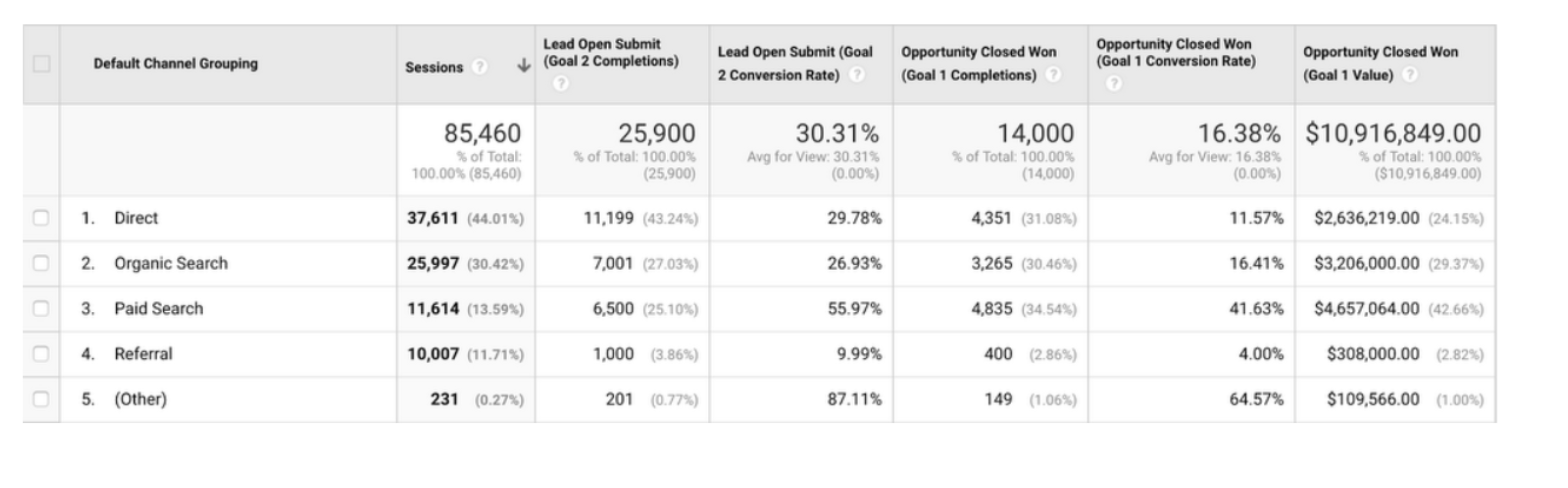
The web channel has more relevance and weight in the generation of potential customers for companies in which the final sale/conversion occurs in the offline environment. This generates a significant increase in digital advertising investment in different channels and strategies that we have identified in Google Analytics. But not all leads are the same, some can be much more valuable than others. Do you know what they are? Have you identified the channels and strategies that generate the most qualified leads? The integration of Salesforce and GA360 can answer all these questions.  

Why integrate Salesforce and GA360?

Basically, without this integration you will not be able to have a 360 vision of the actual sales conversion of each channel, strategies, keywords, etc. This will allow you to optimize your campaigns by adjusting budgets and bids that will translate into an improvement in ROI. In addition, having this information will also allow you to optimize the time and efficiency of the sales push or call center.

How to do the integration?

Google Analytics 360 has a native connector with Salesforce that will allow you to connect both tools by importing the data of each lead and opportunity. To execute this connection, a web implementation and configuration work is required on both platforms to pass the clientId (GA cookie) to the CRM tool, which will be the reference field to execute the integration.  

Benefits of the integration

  • Audience generation: Thanks to the integration, you will be able to generate audiences based on the offline data of your potential customers. This will allow you to generate audience lists to carry out remarketing campaigns or lookalikes of the most qualified users, improving performance and optimizing the online investment cost.
  • Audience exclusion: With offline data you can generate audiences to exclude converted users from your online campaigns.
  • Defining audiences for A/B tests and customizations: Define audiences with Salesforce data to share them with Optimize 360 ​​allowing you to run different A/B tests of potential customers, as well as customizations that improve the experience of potential users on your website.
  • Generation of custom funnels: Thanks to the integration with Salesforce you will be able to build custom funnels in Google Analytics, which will allow you to visualize the performance of your digital strategy from start to finish. You will be able to identify deviations in the funnel and take actions that contribute to improving the efficiency and performance of your campaigns.
  • Unified reporting in Salesforce: The integration will also allow you to create a report in Salesforce that contains complete information on campaigns and products, monitoring the ones that are having the best results and providing very valuable information to the sales push, which without the integration would not you could have.
  • Campaign forecasting: Thanks to the end-to-end visualization we will be able to identify which products or services are completing the objectives set and which are not. This will allow you to adjust your digital investment by moving your budget to those products that are not meeting the objectives, which will improve the effectiveness of your digital investment by optimizing the performance of the online channel.

At Making Science we have teams specialized in Salesforce and Google Analytics with experience in the integration of these two platforms, which will help your marketing teams to be more competitive by facilitating this integration work in order to make decisions based on the end-to-end data. If you are interested in starting to exploit the possibilities of this integration, get in touch with us and we will accompany you in the development and process so that you can begin to understand the performance and weight of your investment in digital campaigns in the final conversion of clients.
We introduce you to the new generation of Google Analytics: GA4

We introduce you to the new generation of Google Analytics: GA4
We welcome the latest version of Google Analytics! Called Google Analytics 4 , this new type of property (yes, there are no views as we are used to) provides, among other things: much more expanded predictive information, a deeper integration with Google Ads, more measurement capabilities between devices, and more specific data controls. The launch announced on Wednesday, October 14, is actually an expansion and renaming of the well-known App + Web property launched last year, and marks an important first step in the evolution of Universal Analytics.   We are going to analyze some of its improvements:

  • On the one hand, it will provide us with new knowledge and predictions based on artificial intelligence. While knowledge – based machine learning Analytics have been available for some time, new knowledge and predictions that reach Google Analytics 4 can automatically alert the marketers of some trends, such as growing demand of a product. It will also be used to predict results such as churn rates and potential revenue a business could earn from a specific customer segment. All this information can help us anticipate the actions that our clients could take in the future and thus focus on higher value audiences.


  • Improved integration with Google Ads. Now we can generate and maintain audiences of our users on the web and in the application. For example, if a user is qualified for an audience list due to an action performed on the web and was removed from a list because they made an in-app purchase, the list would automatically update to remove the user and not be impacted. with ads. In addition, Google Analytics 4 will report on the actions of the YouTube involved views that occur both in the application and on the web.


  • One of the most notable differences between Analytics 4 and Universal Analytics is the organization of the reports based on the customer lifecycle. These reports will help us delve into specific aspects of the customer journey. For example, we can see which channels are generating new customers in the user acquisition report, and then use the engagement and retention reports to understand the actions these same customers take and whether or not they stay after conversion. The new Analytics experience also aims to offer us a more complete view of how customers interact with your business across devices and channels. We can also provide your own user ID or enable Google signals to deduplicate users across devices, both in reporting and ad targeting.


  • Another benefit is event tracking without code implementation. This makes it easier for us to monitor and measure the actions that are important on the site and in the app, and also in real time (in Universal Analytics, events usually arrive with some latency). For example, we can measure a scroll event or the playback of a video, without having to add code or configure event tracking in GTM.


  • We are also going to have a more specific user data control. Analytics 4 also includes options to help advertisers comply with data regulations like GDPR and CCPA. The consent mode is designed for sites that must have end-user consent to collect analytics data, and this new mode provides us with separate consent options for analytics and for ads. Data deletion options have also been improved, allowing companies to fulfill user deletion requests without having to delete more data than is necessary. In addition, it includes a preview mode so that companies can verify the data they are about to delete.


  • How will it affect our analytics in the future without cookies? Well, as third-party cookies are removed , Google already anticipates that data scarcity will become the new norm. It will rely on machine learning to repopulate data gaps.

  In conclusion, the new property of Google Analytics 4 provides a more complete cross-channel view of the customer life cycle and uses that information with predictive marketing functions, providing us with more information, and more efficient ways to act based on those discoveries. Our recommendation is that when you have to configure a new property, do so with this new version. The previous one, Universal Analytics, will continue to be available but we recommend activating GA4, since it will be the focus of improvements and news within Google, and keep both measurements in parallel. From Making Science we can help you get it started! You dare? Ask for information at info@makingscience.com.

Google Analytics Web + App: Data Revolution

Google Analytics Web + App: Data Revolution
If you work in a Data department and you have read the title of this article, surely a little tickle has gone through your body and thousands of possibilities go through your head in these moments. Well indeed, this functionality has just landed in our little great digital world to try to offer a joint vision of the multiplatform world .

What is Google Analytics: Web + App?

Well, as its name indicates, it is a property that allows us to have a joint view of users and their behavior through the web and the app in a single report. At the moment it is in its initial phase and, therefore, in the full learning and optimization curve. And what are the main advantages that it will offer us? There is a world of possibilities, but if we must highlight some, they would be these two:

  • Cross platform measurement

Unified and consistent reports of the web and app to have a global and unique view of the data.  

  • More complete Customer Journey

Finally, we will be able to know in more detail the path followed by that high percentage of users who start their navigation in the app and end it on the web and vice versa.  

Limitations and points for improvement

I am sorry to reduce the euphoria to those of you who have reached this point in the article, but like all new functionality that is in Beta phase it has many limitations, and therefore, a lot of room for improvement. Here are some of the most important:

  • Impossibility of integration with DV360, SA360, BigQuery, etc.

Currently there is no possibility of integrating it with other tools in the Google Marketing Platform world, but we know that it is on its Road Map for 2020.  

  • E-commerce (App + Web)

It is one of the features that we miss the most in this new property, since right now we do not have any visibility of this type of reports.  

  • Limited Attribution Reports

This section is currently quite limited (if not null) and is one of the main points of improvement that they have planned for 2020.   And it is that, this functionality has yet to grow and mature to exploit all its possibilities, and if Google puts the love that we anticipate, added to the undoubted potential of this new feature, we may be talking about a revolution in the world of digital analytics.  So we have to be patient and, although in the Data world we are used to constant evolution and progress without time to settle, we are going to be forced to wait for updates. And as the saying goes, we don’t want to run before we learn to walk. What is certain is that it opens a new path full of possibilities that will allow the Data departments of any company a deeper knowledge of the behavior of its users and customers in order to adapt more efficiently to their needs.

If you work in a Data department and you have read the title of this article, surely a little tickle has gone through your body and thousands of possibilities go through your head in these moments. Well indeed, this functionality has just landed in our little great digital world to try to offer a joint vision of the multiplatform world.

What is Google Analytics: Web + App?

Well, as its name indicates, it is a property that allows us to have a joint view of users and their behavior through the web and the app in a single report. At the moment it is in its initial phase and, therefore, in the full learning and optimization curve. And what are the main advantages that it will offer us? There is a world of possibilities, but if we must highlight some, they would be these two:

  • Cross platform measurement

Unified and consistent reports of the web and app to have a global and unique view of the data.  

  • More complete Customer Journey

Finally, we will be able to know in more detail the path followed by that high percentage of users who start their navigation in the app and end it on the web and vice versa.  

Limitations and points for improvement

I am sorry to reduce the euphoria to those of you who have reached this point in the article, but like all new functionality that is in Beta phase it has many limitations, and therefore, a lot of room for improvement. Here are some of the most important:

  • Impossibility of integration with DV360, SA360, BigQuery, etc.

Currently there is no possibility of integrating it with other tools in the Google Marketing Platform world, but we know that it is on its Road Map for 2020.  

  • E-commerce (App + Web)

It is one of the features that we miss the most in this new property, since right now we do not have any visibility of this type of reports.  

  • Limited Attribution Reports

This section is currently quite limited (if not null) and is one of the main points of improvement that they have planned for 2020.   And it is that, this functionality has yet to grow and mature to exploit all its possibilities, and if Google puts the love that we anticipate, added to the undoubted potential of this new feature, we may be talking about a revolution in the world of digital analytics.  So we have to be patient and, although in the Data world we are used to constant evolution and progress without time to settle, we are going to be forced to wait for updates. And as the saying goes, we don’t want to run before we learn to walk. What is certain is that it opens a new path full of possibilities that will allow the Data departments of any company a deeper knowledge of the behavior of its users and customers in order to adapt more efficiently to their needs.

How use Google Analytics on media publishers?

How use Google Analytics on media publishers?
If one media publisher hire you to be a Data Analytics, you need understand the specification of this market. Google Analytics is a very good tool to start.  

What are different on media publishers?

The biggest difference between media publishers and other website is monetization. On media the most important revenue source are sell ads, with this we don´t have the traditional Funnel to one goal, the goal is increase the amount of ads we can show to user. Other big difference are the content, the amount of content and their lifetime. Media publishers are a lot of content and is impossible to analyze all pages, we need to group the pages and their life-time is very short, this depend of type of content, if the content are a news, normally the life-time is 2 days or less, if is about famous people or a investigate, can have 7 days of lifetime. The Platforms where uses see content are different, in most cases have website and/or Apps, this moment media publishers need be website, Apps, Accelerated mobile pages (AMP) and Facebook Instant Articles (FBIA).  

Most important metrics

The most important metrics to media publishers are Page views and Visits, this because this 2 metrics are related with ads. In some publishers, we can need one more metrics, the Video Play. We don´t have the Video Plays on Google Analytics but we have one type of metrics that we can use, the events. In this case we need collect when the player start the video to send one event to google analytics with specific category and we use the category to filter this data. We need count Video Plays on publisher that produced video because this are related with ads, the pre-roll.  

The analyses that we need to do

The publisher need the big numbers, daily and/or monthly Pageviews, Visits and Video Plays for all pages on project (first difficulty, how to consolidate data of all platforms if Apps have different metrics?). To resolve this I use DataStudio, I collect all data in one Google Analytics propriety and on DataStudio I create new metrics and dimensions to see all data. The source of visit, one of most important job is analyze the source of visit because this tell us where user came from. Media publishers don´t spend money to increase visits because their revenue is less that the cost and with this we need to understand what free source work better and what type of content work on this source to do more and try understand what have less traffic and if we can increase this.

  • Social – We need understand what pages generate more visits and what content work on each page.
  • Organic and Google News – We analyze if the content are good for SEO.
  • Direct – Is very important source because this is a loyal users
  • Email and Notifications – Is a direct communication between publisher and user and we need analyze if we alert user about correct content.
  • Group traffic – Very publisher don’t have only 1 product, and have a widget with content from other project.

  The content, publisher normally have a lot of content and we need group this content to understand what works better. One form is with page path or we can create a content group. Most time we need sent more dimension that google analytics collect to understand better the user behavior.

  • Platform
  • Type of page
  • Multimedia
  • Video Information


The properties and views

My approach is have one property for each project and views by platform or specific content. Is very important have one view with all data to can see consolidate number. First we create one view for each platform, website, APP, AMP and FBIA, with this we can create alert to see if have problem in one platform. After this we need understand if the newspaper have a subdomain, folder or partner that content are different and we need separate to analyze individual but on big number are included. One problem on this is if the project are a lot of website with different content, in this case we need understand the historical evolution, for exempla if we have only 5 active subdomain with different content but after a few months they change to other but the target audience is similar we create only one view for each type of target audience.

Analytics goals to measure your online business – Go to the next level with the implementation of eCommerce.

Analytics goals to measure your online business – Go to the next level with the implementation of eCommerce.
Google Analytics, the number one web measurement and analysis tool in the market, incorporates endless possibilities to customize the measurement of your site. Great! If you are a marketing manager who is committed to configure all the options offered by this tool to receive maximum insights, but are you still measuring the macro conversions of your online business with Analytics objectives? In this post we are going to tell you how we carry in Making Science the data of our clients to a step further with the implementation of the electronic commerce of Google Analytics. Today there are three different ways to measure conversions on your website, whether they are micro-conversions such as registering in the newsletter, attending an event or playing a video, or macro-conversions such as making a purchase, a reservation or leaving a Lead.  These three measurement options are:

  • Electronic commerce
  • Events
  • Goals

If you have not yet had the luck or the budget to be able to acquire Google Analytics 360 or dont have a free version and therefore are limited to sampling when viewing your data and your measurements you will find the best means to get metrics that reconcile with your CRM will be via Google’s eCommerce.   In general terms all you need to do is include a goal based on the url of the “thank you” page or an event by clicking on the button just prior to the conversion. It is important to make some notes before continuing. If you have decided to measure your macro-conversion of the site by configuring a destination target in the thank you page you should know that if a user arrives at this page via either a reload or the user had stored the URL in favourites with the intention of seeing their order number again in the coming days, this url will be reloaded and will send GoogleAnalytics a new conversion when in fact there has been no conversion event. On the other hand, if you decide to implement an event in an account such as buying or booking prior to arrival on the thank you page , there is always the possibility that this button is clicked and the user has filled in all the fields of the “check-out”, but for some reason does not load the Thank You page, sending an event to Google Analytics without a conversion having occurred. Google’s e-commerce can assist you to manage through these exception cases to keep your metrics accurate. Additionally, if your online business is based on the capture of leads being the macro-conversion of your website, of course you can measure this conversion with the e-commerce of Google Analytics as well even though it may not be a “true” e-commerce conversion. Do not be confused by the name and think the solution can ONLY be used for e-commerce  conversions. The implementation of electronic commerce either through the web code or via Google Tag Manager is based on a series of variables that are collected; from the thank you page, the information of the transaction that has just been produced, as well as articles, Reserved rooms or request for information that may make up a transaction.  This data is sent to Google Analytics. The variables are the following:

With this implementation there will be many improvements that you can see in your Analytics view,

  • More complete reports when you export your data to Data Studio,
  • e-commerce is more accurate than measuring with objectives and therefore Google prepare  more functionalities for e-commerce.
  • One of the most important analysis you can do now will be the result of crossing the Google Analytics data with your CRM, enriching information to this through the variable transactionId that offers a common value that is found on both platforms.

Do not waste more time, improve your measurement to double that conversion rate that worries you so much and make more money for your company.  We can help you, ask Making Science for more information without commitment and how our data experts can assist you in meeting your digital marketing  challenges.