
Enterprise AI Agents: Transforming Business with Intelligence and Autonomy

As Artificial Intelligence continues to reshape business landscapes, Making Science and Google Cloud recently brought together industry leaders at Google’s Madrid headquarters to explore the transformative power of Enterprise AI Agents. This event highlighted how companies are moving beyond basic automation to adopt intelligent, autonomous systems that redefine customer engagement and operational efficiency.

The Strategic Evolution of Enterprise AI: From Tools to Autonomous Entities

The evolution of AI in enterprise settings has been remarkably rapid. Businesses have progressed from experimental AI in 2023 to real-world implementations in 2024. Now, in 2025, the emergence of AI agents is driving the next stage of transformation. These intelligent systems are no longer just tools but autonomous decision-makers capable of optimising operations, automating complex workflows, and accelerating business growth.

Key Themes & Insights:

From White Box to Black Box AI: Embracing Agility over Algorithmic Detail

Enterprises are moving away from the need to understand every algorithmic detail (white box AI) toward testing AI-driven outcomes (black box AI). As Large Language Models (LLMs) become more advanced, the focus is shifting to “trusting” the LLM while applying the required prompting, grounding and testing; leveraging AI’s agility, rather than dissecting every aspect of each neural network supporting each LLM in an AI Agent.. This approach allows businesses to prioritise adaptability, performance, and user experience over algorithmic transparency.

Understanding the Difference between AI Assistants and AI Agents

AI Assistants support customer interactions and internal processes but still require human supervision. AI Agents function independently, making decisions and taking actions without direct human input. However, effective governance is essential to ensure reliability and trust in fully autonomous systems.

AI Adoption: Bridging Innovation and Practical Implementation

Despite the rapid advancements in generative AI, widespread adoption in business remains in its early stages. Organisations seeking to maximise AI’s potential must focus on:

  • Seamless integration with business processes and APIs
  • High-quality, structured data to improve AI-driven insights
  • Interconnected platforms to enhance automation and decision-making

A case study presented at the event illustrated how Conversational AI and Retrieval-Augmented Generation (RAG) are transforming real estate searches. With over 30,000 successful AI-driven interactions with improved conversion rates, this solution has significantly improved customer engagement while reducing operational costs. AI-powered chatbots in real estate now maintain conversation context, understand user needs, and provide personalised recommendations. One of the key propositions of the AI Agent was the continuous incorporation of new real estate inventory and the enrichment of the data applying points of interest such as schools, hospitals, metro stops, police stations, airports, etc from Google Maps.

Expanding AI Applications Across Industries
  • Predictive Analytics – AI detects fraud and prevents network abuse by analysing suspicious activity patterns.
  • Legacy System Migration – Generative AI evaluates risks, costs, and timelines for transitioning outdated IT systems.
  • Data Integration – AI enhances cross-platform data consistency, improving analytics and business intelligence.
Security and Compliance in AI: Ensuring Responsible Deployment


As AI adoption scales, data security, privacy, and compliance remain critical priorities. Discussions at the event underscored the importance of:

  • Regulatory alignment to meet evolving data privacy laws
  • Ethical AI governance to ensure responsible decision-making
  • Robust security frameworks to prevent misuse and protect sensitive information

A well-structured approach to AI governance will be essential to maintain trust and unlock AI’s full potential.

Google Cloud’s Innovations for Enterprise AI Agents


Google Cloud continues to lead enterprise AI innovation, equipping businesses with powerful tools to integrate AI Agents effectively into their operations.

Customer Engagement Suite (CES): Gemini 2.0 and the Future of Multimodal AI

One of the key announcements at the event was the introduction of Customer Engagement Suite’s (CES) integration of Gemini 2.0, a multimodal AI solution integrated into the. This advancement enables businesses to facilitate seamless interactions across voice, text, and visual inputs, ensuring a fluid and personalised customer experience.

For example, a customer support system powered by Gemini 2.0 can interpret a mix of text-based queries, voice commands, and image uploads, all while maintaining contextual understanding. This level of interaction enhances customer satisfaction and streamlines service efficiency.

The adoption of multimodal AI represents a major leap forward in enterprise AI, providing organisations with an intuitive and adaptable engagement platform.

Revolutionising Workplace Efficiency with AgentSpace

The introduction of Google’s AgentSpace platform addresses a critical challenge in modern enterprises: the fragmentation of information and tools. By integrating advanced search capabilities with AI-powered assistance, AgentSpace transforms how employees interact with enterprise systems. This integration reduces the time spent switching between applications while enhancing decision-making through improved access to organisational knowledge. 

Employees are no longer bound by siloed data or the need to navigate multiple interfaces. AgentSpace intelligently connects relevant information, allowing for faster, more informed decisions and a more productive work environment.

NotebookLM: Advancing Enterprise Intelligence

A significant advancement in enterprise tools, NotebookLM Enterprise demonstrates the power of AI in research and information synthesis. The platform’s ability to process diverse content types – from documents to video content – while maintaining context and generating actionable insights represents a new paradigm in enterprise information management. Imagine being able to analyse a complex research paper, a lengthy video presentation, and a series of internal reports, all within a single interface. 

NotebookLM not only processes these diverse formats but also identifies key themes, synthesises information, and generates actionable insights, effectively turning raw data into strategic knowledge. This tool empowers professionals across various sectors to accelerate research, enhance analysis, and ultimately, make more informed decisions.

Looking Ahead: The Future of Enterprise AI

Enterprise AI is advancing at an unprecedented pace. The integration of intelligent AI agents marks not just an evolution in technology but a fundamental shift in how businesses operate, engage with customers, and drive innovation.

As a strategic Google Cloud partner, Making Science continues to play a pivotal role in guiding organisations through AI adoption, implementation, and optimisation. For businesses looking to leverage AI-driven transformation, our team of experts is ready to support their journey toward greater efficiency, agility, and intelligence.

The future of enterprise AI is here, and organisations that embrace it today will define the market leaders of tomorrow.

[button color=”accent-color” hover_text_color_override=”#fff” size=”large” url=”https://www.makingscience.co.uk/contact/” text=”Contact us!” color_override=”#ff0067″]
Making Science Achieves Google Cloud DevOps Services Specialization in EMEA

  • This is the consultant’s sixth specialization, solidifying its leadership and unique partnership with Google Cloud.
  • This recognition validates Making Science’s ability to optimize the development, deployment, and management of cloud applications for clients in sectors such as Retail, Telecoms, and E-commerce.

London, 17 February 2025 — Making Science, a technology consultancy specializing in business digital acceleration, has achieved the Google Cloud DevOps Services Specialization in the EMEA region. This recognition strengthens the strategic alliance between the two companies and positions Making Science as a leading partner in optimizing the development, deployment, and management of cloud applications for projects ranging from software optimization to advanced AI-based solutions.

The certification recognizes Making Science’s ability to improve the speed, quality, and resilience of software development on Google Cloud, enabling businesses to modernize their processes with advanced tools that facilitate the automation and operation of applications more efficiently. Implementing DevOps strategies helps reduce deployment times, improves application reliability, operational efficiency, and security, and enables organizations to respond more agilely to market demands while ensuring business continuity and reducing the time-to-market for new services.

In business environments where stability and response time are critical, the implementation of DevOps methodologies on Google Cloud has made it possible to maintain uptime exceeding 99.99%, minimize unforeseen downtime, and improve responsiveness during periods of increased traffic.

Businesses that implement DevOps solutions on Google Cloud with Making Science can accelerate software development by automating key tasks such as continuous integration and continuous delivery (CI/CD). At the same time, they gain agility and reduce the time to market for new products and services, ensuring the stability and optimal performance of applications. In addition, adopting advanced monitoring practices makes it possible to detect and correct incidents in real time, preventing interruptions and improving the user experience.

Its extensive experience in digital transformation projects with companies from all sectors enables Making Science to develop customized and scalable solutions. From cloud migration or application modernization to the implementation of infrastructures and the management of multi-cloud environments.

“This sixth Google Cloud specialization confirms our commitment to technological excellence and strengthens our relationship with a key strategic partner. In an environment where operational efficiency and speed of development are essential, having this certification allows us to offer our clients cutting-edge solutions that drive their digital transformation,” emphasizes Álvaro Verdeja, COO – Cloud, AI, Cybersecurity & Software at Making Science.

“The Google Cloud DevOps specialization strengthens our value proposition for clients in industries such as Retail, Telecommunications, or E-commerce. We have a highly trained team with experience in implementing advanced solutions, designed to improve the scalability, efficiency, and security of our clients’ technological infrastructures,” explains Rubén López, VP of Cloud Services and Cybersecurity at Making Science.

Making Science has an ecosystem of advanced Google Cloud tools, including Cloud Build, SecOps, Cloud Deploy, Cloud Logging, Artifact Registry, Gemini, and Cloud Monitoring. It also has expert professionals who implement advanced solutions to facilitate the automation of the software lifecycle, from development to production.


Making Science brings its proprietary technology ad-machina to Google Cloud Marketplace

With Google Cloud Marketplace, Making Science will be able to bring this innovative solution to new customers worldwide who want to optimise their Google Ads campaigns.

Madrid, Feruary 13, 2024 – Making Science, a Premier Partner of Google Cloud, is strengthening its commitment to excellence by bringing  for the first time its proprietary technology ad-machina in the Google Cloud Marketplace. Further reaffirming the technological consultancy’s expertise and abilities in using Google Cloud solutions, this long-term agreement also offers companies a tool for personalising and optimising Google Ads campaigns with Generative Artificial Intelligence (GenAI).

Through this agreement, any global Google Cloud customer can benefit from fast and efficient access to ad-machina. This multilingual technology, developed by Making Science, adapts to the market’s needs and can generate unique and personalised ads for each user based on their behaviour, which translates into an improvement in the effectiveness of advertising campaigns.

Personalisation and AI: The Key to Multiplying Conversion Rates in Response to New Market Needs

ad-machina is powered by Artificial Intelligence to learn continuously in real-time, which increases the efficiency in detecting and adapting to changes in consumer buying behavior.

On the other hand, its innovative technology allows ads to be modulated to the company’s commercial strategies, such as offers, internal policies, or social programs so that it generates new ads automatically during the periods of validity of the same.

The milestone further strengthens Making Science’s partnership with Google Cloud for advanced cloud-based solutions that drive digital transformation and advertising effectiveness.

“At Making Science, we are delighted to continue enhancing our strong alliance with Google Cloud by incorporating a tool like ad-machina into its Marketplace for the first time. Without a doubt, a tool that adds value to those companies that operate their Google Ads campaigns and want to optimise the functioning of their algorithms” explains Eduardo Sarciat, ad-machina Managing Director at Making Science.

Google Cloud Marketplace: Consolidating a Long-Term Relationship

The collaboration is founded on a solid relationship between the two companies, with over 90 Google Cloud certifications and specialisations in areas such as Infrastructure, Marketing Analytics, and Machine Learning. Google Cloud Marketplace provides enterprise-grade cloud solutions integrated with Google Cloud Platform, making it easy to find, buy, and deploy third-party software.

“Bringing Making Science to Google Cloud Marketplace will help customers quickly deploy, manage, and grow ad-machina on Google Cloud’s trusted, global infrastructure,” said Dai Vu, Managing Director, Marketplace & ISV GTM Programs at Google Cloud. “Making Science can now securely scale and support customers on their digital transformation journeys.”

About Making Science

Making Science has a team of over 1,200 experts across 15 markets, including Spain, Portugal, Mexico, Colombia, France, Italy, the UK, Ireland, Sweden, Denmark, Norway, Finland, Germany, Georgia, and the USA. As a proud consulting partner of Local Planet — the world’s premier network of independent media agencies — we deliver a suite of digital, technology, and performance marketing services to a global clientele. Our expertise spans digital marketing and MarTech, software and cloud solutions, artificial intelligence, and SaaS, all underscored by a relentless pursuit of innovation.

As part of its commitment to innovation, Making Science offers its clients end-to-end capabilities required for consulting, development, integration, and maintenance of advanced IT solutions. Our global network of delivery hubs not only fosters job growth but also serves as an incubator for cultivating top-tier tech talent, fueling projects that accelerate transformation and modernisation.

Committed to making a positive impact, Making Science actively engages in various ESG initiatives. We’ve joined forces with the Climate Pledge, the United Nations Global Compact, and Pledge1%, dedicating resources and efforts to support non-profit organisations. Through these endeavours, we are committed to driving meaningful change for a brighter, more sustainable future.

Enhancing Terraform Security: The Crucial Role of TFSec

As cloud infrastructure and automation continue to evolve, Terraform has emerged as a powerful tool for provisioning and managing resources. With more organisations relying on Terraform to deploy and manage their Infrastructure as Code (IaC), it’s become essential to ensure the security of these configurations. TFSec, a specialised static analysis tool for Terraform configurations, plays a pivotal role in fortifying the security posture of cloud environments.

This article delves into the significance of incorporating TFSec into the Terraform workflow and how it contributes to a robust and secure infrastructure.

Proactive Security Measures

TFSec isn’t just a security tool—it’s a proactive security partner. It aids in identifying and addressing security vulnerabilities in Terraform configurations before deployment. By analysing the code statically, before uploading it to the repository, TFSec can pinpoint potential misconfigurations, insecure settings, and adherence to best practices.

This proactive approach enables development and operations teams to mitigate security risks at an early stage, preventing the deployment of vulnerable infrastructures that could lead to serious consequences such as data breaches, service disruptions, or compliance violations.

Compliance and Governance

In regulated industries, compliance standards are non-negotiable. TFSec is a valuable ally in this regard, offering checks and validations against industry-specific compliance standards and best practices. Whether it’s PCI DSS, HIPAA, or CIS benchmarks, TFSec ensures that Terraform configurations align with the prescribed security guidelines.

Maintaining a secure and compliant infrastructure helps organisations avoid regulatory fines and reputational damage, and TFSec is instrumental in this process.

Customisable Security Policies

One of the standout features of TFSec is its flexibility. Organisations can tailor TFSec to enforce specific security standards and policies that align with their unique requirements. This ensures that the tool becomes an integral part of the organisation’s security and compliance strategy, adapting to the dynamic nature of its infrastructure and evolving security landscape.

Collaboration and DevSecOps Integration
TFSec fosters collaboration between development, operations, and security teams by integrating seamlessly into the DevSecOps pipeline. By incorporating TFSec into the CI/CD process, security checks become an automated and integral part of the development lifecycle.

This not only accelerates the identification and remediation of security issues but also promotes a culture of shared responsibility where security is embedded throughout the development process rather than treated as an afterthought.

Continuous Improvement

TFSec contributes to the ongoing improvement of Terraform configurations by providing actionable insights into security vulnerabilities. The tool not only identifies issues but also offers guidance on remediation, empowering teams to enhance their understanding of security best practices. This continuous feedback loop fosters a culture of learning and improvement, ensuring that security remains a priority as infrastructure evolves over time.

Conclusion

In conclusion, TFSec stands as a crucial component in the arsenal of tools dedicated to ensuring the security of Terraform configurations. Its proactive approach, compliance enforcement, customisable policies, seamless integration into DevSecOps workflows, and contribution to continuous improvement make it an indispensable asset for organisations navigating the complexities of cloud infrastructure security.

As the reliance on Terraform continues to grow, the adoption of TFSec becomes not just a choice but a strategic imperative for organisations committed to building and maintaining secure and resilient cloud environments. At Making Science, we’re committed to helping our clients navigate these complexities and ensure robust security in their cloud infrastructures. Interested to learn more about how Making Science can help enhance your Terraform security with TFSec?


[button color=”accent-color” hover_text_color_override=”#fff” size=”large” url=”www.makingscience.co.uk/contact” text=”Contact us” color_override=”#ff0067″]

Google Cloud Next ’23: Unveiling the AI Revolution | Part 2

In our previous blog post, we explored the new exciting announcements from Google Cloud Next ’23 regarding AI-Optimised Infrastructure and the Vertex AI Platform. Today, we’re continuing our journey through the AI landscape, exploring how artificial intelligence shapes Google Workspace, Google Cloud, and cybersecurity. Let’s dive in!

Duet AI: Powering Productivity and Collaboration in Workspace and Google Cloud

Duet AI, a dynamic GenAI collaborator introduced at Google I/O in May, is at the heart of Google’s AI revolution. Duet AI seamlessly integrates with a wide range of products and services, promising to enhance productivity, foster collaboration, and uphold the highest standards of security and privacy.

Workspace features have been significantly upgraded, including content creation in Gmail and Google Docs and image generation in Google Slides. As a result of integrating Duet AI with Google Meet, meeting notes and summaries are now available in 18 languages, allowing everyone to be heard, seen, and understood during video calls. Meanwhile, Google Chat takes on the role of a Chatbot, assisting with content-related queries, document summaries, and more, all within a redesigned user interface with enhanced search functionality.

However, Duet AI’s capabilities aren’t confined to Workspace alone. It extends its support across a plethora of Google Cloud products and services:

  • Software Development: Duet AI serves as a coding assistant, expediting development and aiding in code refactoring throughout the software development lifecycle. Thanks to Apigee integration, developers can now build APIs using natural language prompts.
  • Application and Infrastructure Operations: Operators can directly interact with Duet AI within the Google Cloud Console, receiving guidance on infrastructure configurations, deployment best practices, and recommendations for optimising costs and performance.
  • Data Analytics: BigQuery now boasts enhanced AI features, providing contextual assistance for SQL queries and Python code, code generation, and schema-based recommendations. This empowers data teams to focus on achieving their business objectives.
  • Database Modernisation: Duet AI steps in to generate code for data management using natural language, covering Cloud Spanner, AlloyDB, Cloud SQL, and Database Migration Service (DMS), streamlining the conversion of database code.
  • Security Operations: In the security realm, Duet AI integrates with a suite of security products, empowering professionals to proactively prevent threats, streamline workflows, and fortify overall organisational protection.

Unifying Data and AI for Limitless Insights

Efficiency and productivity are paramount when unlocking new insights with data at the core of GenAI. Google Cloud is committed to simplifying analytics at scale by expanding its ecosystem of partnerships with various data providers. Key innovations in this domain include:

  • BigQuery Studio: A unified solution for data engineering, analytics, and predictive analysis, seamlessly integrated with Vertex AI foundation models. Implementing AI capabilities into data lakehouses enhances cross-cloud analytics, strengthens governance, and facilitates secure data sharing.
  • AlloyDB AI: Offering a comprehensive set of capabilities for building high-performance GenAI apps, whether on-premises, within the Google Cloud ecosystem, AWS, Azure, or through the versatile Google Distributed Cloud infrastructure.

AI: Your Ultimate Security Guardian

In today’s ever-evolving digital landscape, staying one step ahead of cyber threats is non-negotiable. Google Cloud recognises this imperative, introducing Mandiant Hunt for Chronicle alongside the groundbreaking Duet AI. This addition provides the latest insights into attacker behaviour by seamlessly integrating Mandiant’s frontline expertise with Chronicle Security Operations’ robust data analysis and search capabilities. It’s elite-level support without the burdens of hiring, tooling, or training.

Security is not solely about protection; it’s about equipping yourself with the right tools to respond effectively. Google Cloud’s modern SecOps platform, fortified by GenAI, brings you Chronicle Security Operations and Security Command Center, offering a comprehensive solution to centralise security data, detect threats, and coordinate a unified response.

Join us on this transformative journey as we anticipate even more groundbreaking developments in cloud computing and GenAI. With our strong partnership with Google Cloud, a pioneer in shaping the future of technology, we are thrilled to offer our support across a spectrum of technology expertise, including cloud infrastructure, data analytics, GenAI, Predictive AI, cybersecurity, and much more.

[button color=”accent-color” hover_text_color_override=”#fff” size=”large” url=”www.makingscience.co.uk/contact” text=”Contact Us” color_override=”#ff0676″]

We can’t wait for Google Cloud Next ’24 announcements!

Save the date: April 9-11, 2024 – in Las Vegas, NV.

Looker Studio & Looker Studio Pro: Which version suits your needs?

Just a month ago, Google announced the immediate integration of its BI tool, Looker, and Data Studio, its dashboard and reporting tool, combining the best of both to create Looker Studio (formerly Data Studio) – a tool capable of unleashing the power of your data with interactive and visually appealing dashboards that will enable you to make smarter business decisions.

This isn’t the first time we’ve discussed Looker Studio on the Making Science blog, nor will it be the last. Google is diligently working on its BI tool to offer businesses the opportunity to activate their data and gain visibility that can drive their business growth on a global, efficient, and scalable level. Furthermore, with the introduction of Looker Studio, we’ve also seen the launch of Looker Studio Pro, the paid version of Looker Studio, which provides access to all Looker Studio features, along with enhanced enterprise functions and technical support.

Today, we’ll talk about both versions and which one best aligns with the needs of certain businesses. Let’s get started! 🚀

Looker Studio (formerly Data Studio)

In the free version, you can explore the tool and extract its value:

  • Extracting and harnessing the full value of your data: With Looker Studio, you can leverage your data by easily creating interactive panels and reports from a wide variety of sources, enabling you to make much smarter business decisions.
  • Looker Studio API: The Looker Studio API allows Google Workspace or Cloud Identity organizations to automate the management and migration of Looker Studio resources quickly and effortlessly.
  • Connecting Looker Studio with all your data sources limitlessly: Yes, you read that right! You’ll be able to access a wide range of data sources through over 600 partner connectors that allow you to instantly connect with nearly any type of data, without the need to write code or use software.
  • Share reports with your team: Share reports with anyone you want and collaborate in real time on them, or embed them in your website or intranet.

Looker Studio Pro

As we mentioned in this article, Looker Studio Pro is the current paid version of Looker Studio. In addition to possessing Looker Studio’s features, it differs in some key aspects of its use, such as:

  • Tailored content access management: Looker Studio Pro allows you to easily manage access to your reports and data sources at scale with two new features: group workspaces and linking with Google Cloud projects.
  • Group workspaces: Group workspaces enable Looker Studio Pro users to manage access and share Looker Studio content as needed for team collaboration. You and your team will automatically have access to the content, and you can assign specific permissions to these workspaces based on the role assigned to each member: administrator, content manager, or collaborator.
  • Linking Looker with a Google Cloud project: Your company can manage Looker Studio Pro resources through a linked Google Cloud project. The reports and data sources of Looker Studio Pro will belong to your organization rather than specific users within it. With this, essential resources will continue to function even if the user who created them leaves the organization. Additionally, Cloud administrators can configure project-level permissions with identity and access management to control access to these resources.
  • Cloud Customer Care: With Looker Studio Pro, you’ll have access to Google Cloud Customer Care’s scalable and flexible support services.

Ready to unlock the full potential of Looker Studio?✨ 🖥

Feel free to share your specific case with us – our team of experts will be delighted to assist you. Get in touch! 🚀🚀

Customer Data Platform (CDP): how best to manage first-party data

In a context where first-party data has become the primary source of information about its users, it becomes essential for companies to understand how to manage this data to achieve business objectives.

The customer is increasingly omnichannel, and tracking them by obtaining proper measurements for their digital strategies is as important as it is complex. This is confirmed by data from recent Making Science research, in which just under half of UK companies do not integrate data, thus losing the global customer view needed to make informed decisions. 

This is where various solutions for multi-channel data collection, such as the Customer Data Platform (CDP), come into play.

What is a Customer Data Platform (CDP)

A CDP is a tool that allows all of a company’s proprietary data from multiple sources to be collected in one place. This technology is becoming increasingly important in corporate marketing ecosystems because it allows companies to build a complete, fast and convenient view of their users.

In addition to creating a complete and consolidated pool of customer data, CDPs allow individual profiles to be made and continuously enriched with new information from the different channels used by users. Furthermore, integrating with other systems means CDPs seamlessly fit into a broader data management infrastructure.

Privacy and First-Party Data

The digital environment is constantly and rapidly evolving, but some key trends have shaped the path of companies in recent years. These include: 

  • Regulatory changes: regulations such as GDPR have had a significant impact on how data is collected and used, so much so that, according to research by Making Science, by 2022, less than half of the marketers in Italy will be fully aware of GDPR requirements.
  • Privacy controls: Users increasingly demand greater control and transparency over the collected data used to personalise ads.
  • Updates: increased controls affect the collection of traditional data (e.g. third-party cookies and device identifiers).

The primary and direct consequence in today’s digital ecosystem is obvious:

  • Cookieless and third-party data: with the imminent end of cookies and third-party data, companies have to update their strategies to continue to have data that best inform their marketing activities.

Faced with this scenario, there are several solutions, from the initial collection of data based on the user’s explicit consent with solutions such as Consent Mode and Google Analytics 4 to mitigating any loss of information from our users with data modelling, to using a ServerToServer measurement to collect data as first-party data and own it.

With this concept of first-party data, CDP fits in as a technological solution for data management and its subsequent activation. 

That said, the CDP must be understood as a solution, not a stand-alone tool. 

How a CDP works

Here is an example of how a CDP works in a very simplified way:

Suppose we currently have much information (much more than we analyse and activate), and this information is located in different sources, which are independent and rarely talk to each other. What does this mean for the company? Data in separate silos causes common mistakes, such as duplication of communication, makes it difficult to get a clear picture of our users’ journey, generates problems in sales attribution, and, above all, does not help in deciding how to allocate budget in the marketing mix and optimise investments.

With CDP, we have a shared space for all data, the initial purpose of which is to standardise and unify information to get a single picture of our customers across all the touch points we generate. This will allow us to activate the data based on each customer and effectively respond to their needs based on where they are in their purchasing journey for a particular product.

How to choose a CDP

When thinking about introducing a CDP in your company, one of the first things to ask yourself is what problem(s) you want to solve.

Subsequently, the type of CDP also depends on the level of digitisation a company is at.

For technology-intensive companies, it may be helpful to create a customised CDP from their tool stack or with the help of a partner. Less technologically advanced companies may prefer to turn to the market for existing solutions.

In each of these cases, we suggest four factors to take into account in making this decision strategically:

  • Operationality: when will the CDP be operational? For market solutions, the operation timing will depend on the options for connection to the tools of one’s digital ecosystem. For an ad hoc connection, one must first check the existing connection options and the effort required to create them. This brings us to the second point.
  • Connections: which option will connect best with the current tools in use? This should be easier if you are already working with a market solution for other devices. Otherwise, you will have to consider the effort of generating such connections from scratch.
  • Scalability: which will give more flexibility to adapt to changes in the future? Market solutions will depend on the evolution of their adaptations. An ad hoc system should facilitate this.
  • Cost: which is the most cost-effective solution? At this point, it is essential to consider the initial monetary cost and the cost of evolving the CDP with its objectives and tools in use.

These are just a few hints at what a CDP entails as a solution in today’s digital landscape. It is not an easy decision, which is why it is important to use solutions that align with the market and one’s own specific needs.

From data collection to activation

The next step is to adopt technology that can extract and combine all marketing data with helping create insights that drive strategic choices. Employing the right technologies and processes is another crucial factor in exploiting the full potential of first-party data.

Discover the state of data maturity of UK companies in the latest Making Science research and our recommendations for getting the most out of your data and marketing efforts.

Protect your websites and applications with Google Cloud Armor WAF

Web application security is crucial for protecting organisational and client data. In 2021, cyber ​​attacks caused approximately 5 trillion GBP in damage, which is expected to increase by 15% annually over the next five years. Thus, it is essential to use all possible tools to reduce the risk of these cyber attacks.

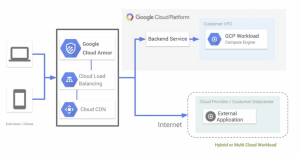
Google Cloud Armor is a web-application level “firewall” (WAF) capable of protecting companies from a wide variety of cyberattacks simply and efficiently. To use this tool, we will have to use Google Cloud Platform’s load balancers since that is where Cloud Armor can be enabled on the backend services.


Once the load balancer has been configured, and a security policy has been activated for a backend service, it is time to adjust which WAF rules should be applied. There is a wide variety available depending on our needs. The following table shows a list of some of these preconfigured rules grouped by categories:

Name of the rule  Name of the ModSecurity rule
sqli-stable SQL injection
xss-stable Cross-site scripting
lfi-stable Local file inclusion
rfi-stable Remote file inclusion
rce-stable Remote code execution
scannerdetection-stable Scanner detection

Each of these rules contains dozens of signatures compiled from ModSecurity v3.0.2. Google Cloud Platform (GCP) provides a controlled way to debug these rules with real traffic.

The best part is that users are not affected since we can select them in “preview only” mode. This means that every time one of these rules is triggered, it will be logged and let the traffic through. Obviously, by activating preview mode, we will not be securing our platform in any way. Still, in this way, we can avoid false positives and gradually add these rules. 

In addition to the preview-only mode, GCP uses verbose logging capabilities. What does this mean? For each request blocked by these rules, we will see detailed information in the log on which signature and what part of the request has caused the block. As previously mentioned, each of the rules listed in the previous table contains several signatures, so some of these may cause false positives and should thus be disabled.

With this protection, we can avoid the following attacks:

  • SQL injection
  • Cross-site scripting
  • Local file inclusion
  • Remote file inclusion
  • Remote code execution
  • Method enforcement (public preview)
  • Scanner detection
  • Protocol attack
  • PHP injection attack
  • Session fixation attack


Do you want to know more about how to secure your websites and applications? The Making Science Cloud team can help. Get in touch at info@makingscience.com. We look forward to hearing from you!

Gain centralised visibility and control over your cloud’s infrastructure with Google Cloud Platform Security Command Centre

When migrating your infrastructure to the cloud, one of your main concerns can be: is the cloud secure? And how can I maintain control of all that happens in my cloud infrastructure? 

Hopefully, Google Cloud Platform’s Security Command Center is here to help answer those questions on centralising the visualisation of all your organisation’s assets and their possible vulnerabilities or misconfiguration.

You have to activate the Security Command Center in your organisation with an account with a few privileged roles in order to start using it. Luckily you can try the standard tier free of charge.

We want to highlight some of the several useful features this standard tier comprises, like:

  • Security Health Analytics scans Google Cloud assets looking for vulnerabilities and misconfigurations like:
    • MFA is not active for an account (we know how risky this is in a privileged account)
    • Members outside the organisation have access to resources as they are included in a group with permissions.
    • Dangerous open ports in the perimetral firewall.
    • Public buckets to the internet and many more.
  • With predefined rules against the most common attacks and the possibility to create custom rules like IP filtering, Cloud Armor acts as a WAF, adding another layer of security to all your deployments. We love and use this feature profusely in all our website deployments, and the Security Command Center helps us visualise all the incidents detected by it and to adapt our rules accordingly.
  • You can detect security anomalies in your VMs like potentially leaked credentials and crypto mining.
  • All this information can be exported to BigQuery or your favourite third-party SIEM to be processed.

Please check the official documentation for a more detailed rundown of all the features.

There are additional features in the Security Command Center premium tier, such as:

  • Container Threat Detection: this service continuously monitors the state of the deployed container images, alerting if there was an added binary to the image that was not in the original one or the execution of malicious scripts or reverse shells.
  • Using threat intelligence and machine learning, Malware, brute force ssh and outgoing DoS anomalies are added to the Event Threat Detection. It also detects changes to MFA, SSO, or leaked passwords to the user’s account protection.
  • One of this tier’s big features is the possibility to create compliance dashboards and reports following the most used standards in the industry like CIS, NIST, PCI or ISO27001. You can view and export those compliance reports to help ensure all your resources meet their compliance requirements.
  • If you enable VM Manager, you can detect vulnerabilities in the operating systems installed on Compute Engine virtual machines.
  • Create SMS alerts, mails, or to your favourite chat application with Pub/Sub notifications.

We use the Security Command Center extensively for its defensive security features like Cloud Armor and its health monitoring of the organisation’s users and assets, but we are integrating more of its features as we discover its real potential.

Here we have just detailed some of the capabilities of the Security Command Center, but there are many more that can suit your specific needs.

If you would like to find out more information on Google Cloud Platform Security Command Centre and how it can help your business, get in touch with us at info@makingscience.com. 

Version Control in BI Dashboard tools: Looker, Power BI and Data Studio

Version Control in BI Dashboard tools: How many times have you just shared access to a new dashboard with your boss and just when your boss is having their first look,  a team member just happens to be making an esthetic change…We have all been there!

Nowadays the use of Business Intelligence tools are being more widely employed as data driven companies make these tools available for self-service analytics by business units.   This is empowering more analysts to publish dashboards and driving more rapid publication cycles to executives and decision makers.

The BI tools vary in their capabilities and strengths but one functional area that most fail to offer adequate coverage is in a software version control capability.

At Making Science we have numerous customers using Data Studio, Looker, MicroStrategy, PowerBi and Tableau.  In today’s BLOG we will do a comparative analysis of DataStudio, Looker and PowerBi regarding their software version control capabilities.


What is software version control?

Taking a look at the definition in Wikipedia:

“In software engineering, version control (also known as revision control, source control, or source code management) is a class of systems responsible for managing changes to computer programs, documents, large web sites, or other collections of information. Version control is a component of software configuration management.[1] Wikipedia Version control definition. At Making Science we apply methodology to ensure that version control is applied to software, sql, data definitions, views, reports and dashboards.

The software version control functionality allows dashboard developers/analysts to work on new versions without disrupting the stability of dashboards currently in use by business executives/users.  Additionally the software version control allows multiple developers/analysts to work on the same dashboard at the same time without stepping on the changes of each other’s work, and when ready merging the changes of the work done into a new version of the dashboard.

As dashboards and underlying data metrics and KPI calculations will continue to evolve at a more rapid pace with the incorporation of more technical talent publishing the necessity of strong version control becomes critical to the business to maintain a well functioning data driven business.

In the following paragraphs we will take a brief look at some of the dashboarding tools in use by many Making Science analysts working with our customers.


Version control in Power BI and Data Studio

Microsoft’s PowerBI is extremely rich in capabilities to create feature rich dashboards including dashboards that can accept streaming data sources allowing real-time visualization. Additionally PowerBI has a Desktop component allowing report/dashboard developers to create new versions without impacting business users until they PUBLISH their report/dashboard.  Unfortunately PowerBI doesn’t have an integrated version control system for the PowerBI objects (reports/dashboards) that are created.  The lack of the version control complicates the effort and activities of dashboard developers.  The best work around is to

  1. Ensuring that each report/dashboard has a label to indicate the version number of the report and that the version number is updated.
  2. Export and save the report/dashboard manually, giving it a version number.
  3. Saving the object new version into any Git repository, such as GitHub, Bitbucket…
  4. Publishing the revised report/dashboard.

These steps can be slow, tedious and prone to errors since it is not automatic. Additionally, this work around does not offer a transparent means to ensure visibility on the version of software being worked on in PowerBI desktop nor does the end user have visibility of a newly published version of a dashboard.


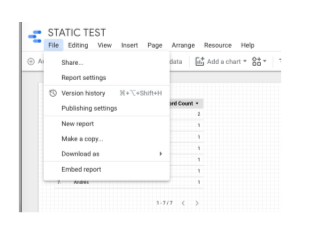
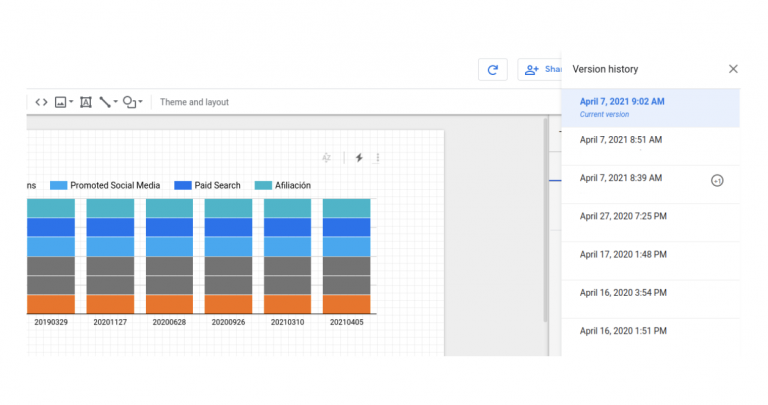
Google’s DataStudio is known as one of the easiest BI tools to work with in the market.  DataStudio version control system, called Version History and Publishing.

The version history allows us to see the modifications that the dashboard has undergone, who has made the modifications, and revert to a prior version as in case it is needed.


The Publishing allows a dashboard developer to take an active action to publish the dashboard to their user community.  The first step is to activate the publishing button.


Once the Publishing option is enabled the developer will see a status indicator of (yellow bullet) Draft version when the Dashboard is under editing or (green bullet) Published when already published to the user community.  Lastly the developer has a publish button to make the dashboard available to users, the dashboard is not visible by the users until the publish button is clicked.

Google’s Looker

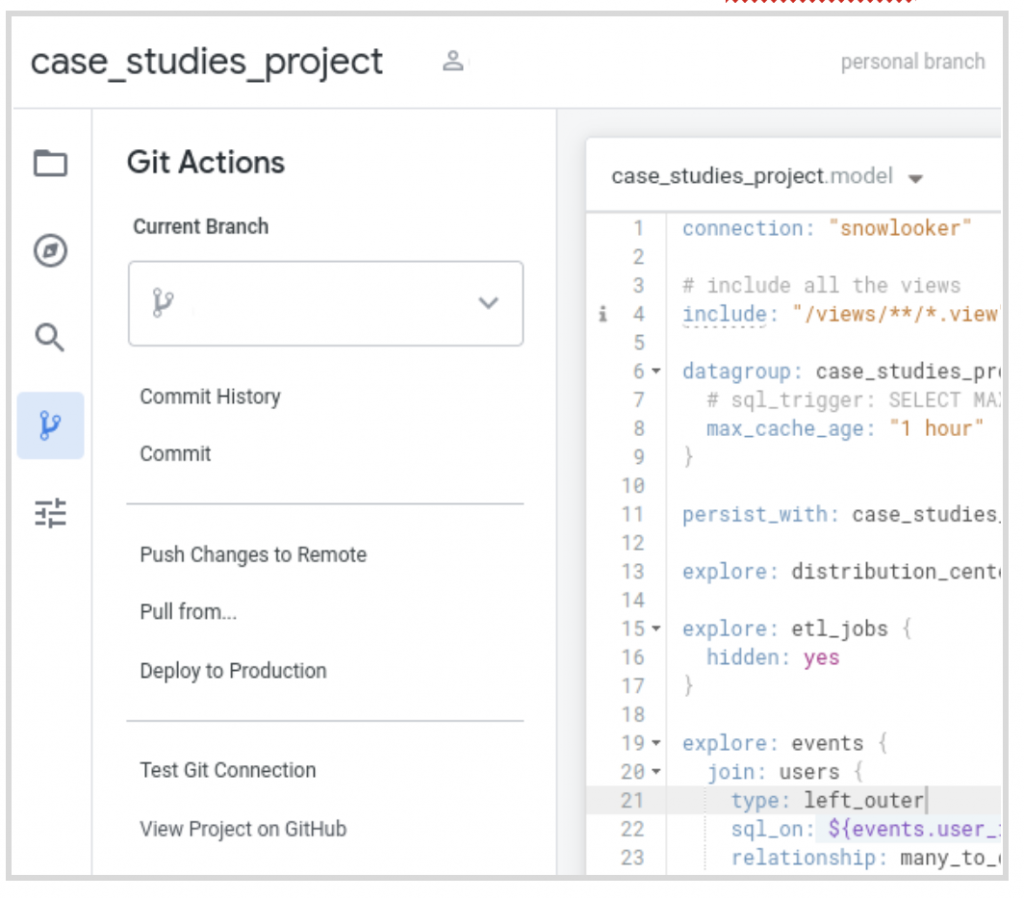
Looker goes beyond the traditional BI tools and offers extensive functionality in the area of data governance.  Additionally Looker delivers a welcomed surprise for those that come from a software development background in the area of version control. Looker has a version control system fully integrated with GIT, one of the most widely used version control systems.

So for each project we have in Looker we can assign an online GIT repository to be able to save the changes as we are working in new LookML and dashboard versions. The GIT functionalities are available directly from the Looker interface, which helps people who are not yet familiar with the GIT tool to simplify its use.

For example, changing the branch we are working on, branches in GIT would be a copy of any version of the project to be able to work on a new feature without affecting the production one, checking the list of modifications we have made. And once we are satisfied with the result, we can merge the results from other team members if desired and we can publish a newly tagged version into production.


An additional benefit of this GIT integration in Looker is we can also install new plug-ins into our Looker platform offering the team new dashboarding capabilties. All we need is the link to the GIT repository where the plug-in is stored.  Once the plug-in is installed we can use new visualization graphs to create better dashboards in any of our projects.


Conclusion

As you can see, using version control systems and controlled publishing has many advantages when it comes to managing the perceived stability of your reporting/dashboard  projects.  The benefits can also be seen in:

  • Better teamwork
  • More autonomy for developers
  • Faster problem diagnosis and tracking bugs
  • Ease of continuous deployment
  • Access to a world of opensource extensions