

Shopify Checkout Extensibility

Installing GTM on Shopify’s Checkout Extensibility


What’s happening?

Shopify has changed how its checkout manages third-party scripts. Historically Shopify ecommerce sites have used Checkout.liquid and added scripts to the code for measurement. However, Shopify is moving towards a new feature called Checkout Extensibility. To quote Shopify:

“In February 2023 we announced that checkout.liquid is deprecated, and that we’re moving to Checkout Extensibility, a new foundation for checkout that is more secure, performant, upgrade-safe, and customized using apps. Relying on obsolete checkout.liquid code past the deadlines below poses risks that may impact your business.”

Important Dates

August 13, 2024: Deadline to upgrade your Information, Shipping, and Payment pages. Automatic upgrades begin on January 6, 2025, and all checkout.liquid customizations for these pages will be lost.

August 28, 2025: Deadline to upgrade Thank you and Order status pages, including your apps using script tags and additional scripts.

Custom Pixels

Checkout Extensibility forces Google Tag Manager (GTM) to be implemented in a custom pixel. These can be created in the Settings section of your Shopify Plus account.
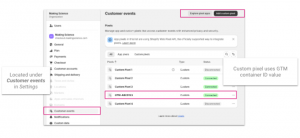
Adding Google Tag Manager

Firstly, copy the container snippet from GTM. Then to add the GTM container script to Shopify, select the ‘Add custom pixel’ button and past the code into the pixel.
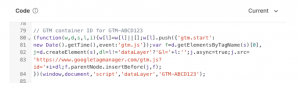
Starting a custom pixel with console.log message will enable you to confirm the script is being loaded.
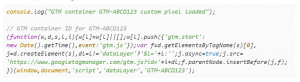
With that the foundation of GTM on Shopify is complete. We still need to cover a few topics to complete the setup.

  • Add Consent Mode
  • Enable debugging
  • Subscribe to events

Configure Consent Mode for GTM on Shopify’s Checkout Extensibility

One of the bigger challenges for Checkout Extensibility is configuring Consent Mode in GTM. For Consent Mode to work the values need to be sent within the custom pixel. Setting default values is easy enough, Consent Mode default values can be passed above the GTM container snippet. This is simple to do but implies the User’s consent is denied. Shopify’s official document sets granted as default – this is bad practice. The better approach is to set denied and then check for the user’s current consent state. To do this we need to accomplish two things:

  1. Set consent as denied
  2. Retrieve the user’s consent
  3. Set the Consent Mode consent update functionality

Set Default Consent Mode Status

Set the default Consent Mode status, this is placed above the GTM script. Adjust the settings to suit your operating requirements.

Retrieve User’s Consent Status

The user’s consent status can be retrieved from a cookie, it must be in a cookie. Shopify’s sandbox environment means that Consent Management Platforms (CMPs) using localStorage cannot be read. Secondly the cookie value must be sent to the domain, rather than each subdomain. The consent cookie should be set to .example.com rather than www.example.com.

With this in place the consent can be retrieved from within the custom pixel.
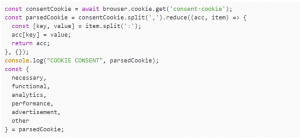
Update Consent Mode Status

Having retrieved the consent values from the cookie, the final step of the consent process can be completed and the Consent Mode gtag update values can be set.

With the GTM script already in place, it is now possible to check that Consent Mode is working correctly by reviewing the console.log and checking the gcs parameter value in the GA4 network requests.

Configure an E-Commerce Datalayer for Shopify’s Checkout Extensibility

Part three of our Checkout Extensibility masterclass is to add the ecommerce object and dataLayer to our custom pixel GTM script.

How Shopify provides data

Shopify has an Analytics API that has a number of events that can be subscribed to. When first using the API, subscribing to all events is useful to see what fires and when during the checkout process. It is good to make a note of this for your internal analytics documentation.
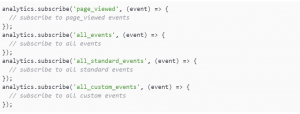
Each Shopify event has a data object containing data about the event, the page, etc. It is good to review these to see how Shopify builds its data structure and the values that are being passed for products, etc. Adding a variable called shopify.data and logging it to the console.

The output of which will be in the console when each event fires.

Calling Events

Events can be set up in two ways. There is “the way” but having experienced problems with the purchase event in the past, there is also an alternative. The preferred approach is to request only the event you require.

The alternative is to request all events and then use an if function to work with the event you need.

Configuring Page Views

The checkout is a single-page application (SPA) – it doesn’t send page views itself and needs either History Change enabled or a page_view event to be sent to the dataLayer. Fortunately there is a page_viewed event that can be subscribed to via the API that also contains all the details needed to create your own page_view event.

This unfortunately leads to a mess as page_views during the checkout don’t necessarily match the displayed URL and are not useful for humans.

Creating your own page views

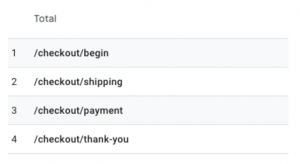
A useful approach to get a full picture of the checkout funnel and user journey is to write your own and send them with the checkout events. For example:

SHOPIFY EVENT GA4 EVENT PAGE PATH
checkout_started begin_checkout /checkout/begin
checkout_shipping_info_submitted add_shipping_info /checkout/shipping
payment_info_submitted add_payment_info /checkout/payment
checkout_completed purchase /checkout/thank-you

These can then be sent as part of each ecommerce event. The output will be 2 dataLayer pushes per ecommerce event – 1 sending the page view, 1 sending ecommerce data.
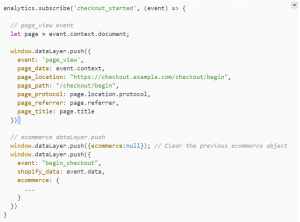
This will result in nice clean page_views appearing in your analytics account and be easy to understand for all users.
Locating Product Data

The first challenge when creating an ecommerce dataLayer in Checkout Extensibility is understanding the products object. This varies depending on the event that has been fired.They are split by:

  • collection_viewed
  • cart_viewed
  • Checkout events (checkout_started, purchase, etc.)

There is an element of sifting through the data to find the value you require but it is important to get a consistent ID for each step that can try each item together across the checkout process.

Shopify Event Item data location Notes
collection_viewed collection.productVariants
cart_viewed cart.lines Item data is split across different sections. cart.lines.merchandise.product contains product ID and name. Price is found under cart.lines.cost.totalAmount.amount
Checkout events checkout.lineItems Item data is stored under the variant. checkout.lineItems.variant.product. Price data is found item.variant.price.amount

Building a Products Array

The most efficient way to pull in products is to create a function that will map the products data to your liking. This is done outside of the analytics subscribe events and will then be called from each event. A function is needed for each source data type:

  • collection_viewed => createCollectionItemsArr
  • cart_viewed => createCartItemsArr
  • Checkout events => createCheckoutItemsArr

The function is just mapping existing data. Using a GA4 ecommerce dataLayer as the template, a checkout items function will look like:
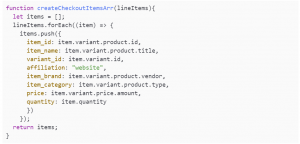
The values for each variable will need updating for each function but the format will stay the same.

Using the Items Array Function in your Event

The final part is to call the items array as part of your function and map the remaining ecommerce attributes that are not item specific, e.g. currency, order_id, etc.

This will produce an analytics subscribe event that looks like:
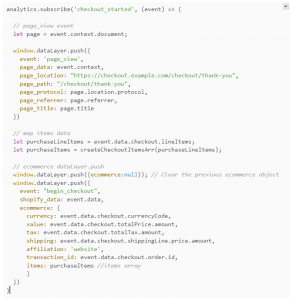
Review the console logs, network requests and analytics data to confirm everything is being collected correctly.

Summary

Getting the Shopify Checkout Extensibility GTM pixel set up correctly can be a challenge. The key is to enable logging to make troubleshooting easier and remember the order of code snippets:

  • Consent Mode default values
  • Cookie consent values
  • Consent Mode update values
  • GTM container snippet
  • Items array functions
  • Analytics.subscribe events

Happy tagging!


How to Prepare Your E-commerce Business for the Holiday Rush

The holiday season is not just about festivities and celebrations. For businesses, it’s a period of heightened activity, increased customer demand, and fierce competition. With key shopping events like Black Friday, Cyber Monday, and Christmas sales on the horizon, the success of your season depends on your preparedness.

In this guide, curated by the Making Science team, we blend various critical aspects of business operations to help equip businesses with a comprehensive, well-rounded approach to tackle the peak season rush.

1. Scalability: The Backbone of Your Online Store

We all know time is money. According to Gartner, based on industry surveys, network downtime can cost $5,600 per minute on average. This figure equates to well over $300K per hour.

Your online store’s infrastructure serves as the foundation for your digital presence. An influx of shoppers can place immense stress on your infrastructure, making it crucial to predict traffic patterns and scale your resources accordingly. Regular stress tests will help identify and rectify weak points. This proactive approach ensures your systems can handle the increased load, preventing slow loading times, crashes, or dreaded virtual queues keeping your digital storefront open and inviting.

2. Process Monitoring: Make checking out simple!

Don’t let a glitchy shopping cart or an overloaded payment gateway hinder your sales. Monitor the purchasing process every step of the way – from product discovery to payment confirmation for a smooth and efficient shopping experience. With the increase in traffic during peak season, your e-commerce processes, especially payment solutions, should be capable of absorbing traffic spikes so transactions are processed without any issues.

3. Digital Security: Protecting Your Business and Customers

Over half (56%) of Black Friday spam emails received between October 26 and November 6, 2022, were scams, based on research from Bitdefender. Furthermore, small businesses in the retail sector are 50% more likely to be targeted by cybercriminals, leading to a loss of around $6.9 billion due to online scams.

The primary threats include social engineering scams, phishing attacks, fraudulent websites, unsecured financial transactions, ransomware attacks, and data breaches. Given these risks and the heightened digital activity during peak season, businesses must reinforce their digital channels by auditing their website security to safeguard their systems and customer data.

4. Inventory and Logistics: Meeting Demand Efficiently

Handling the increased demand during peak season requires efficient management of inventory and logistics. A sold-out product or delayed delivery can lead to disappointed customers. Keep a close eye on your stock levels, plan for increased shipping and delivery times, and consider liaising with third-party logistics providers to manage the increased demand.

5. Proactive Marketing Strategy: Engaging Your Customers

Stand out from your competitors with well-planned outreach to significantly increase your brand’s visibility and customer engagement. Use a mix of channels like email, targeted ads, and social media to reach your audience with impactful messages. Maximise your outreach impact with an omnichannel strategy that mixes and matches channels to deliver your message to the right audience at the right time. Most importantly, start planning at least 4 weeks in advance, allowing yourself ample time to refine and perfect your messages.

6. AI Integration: Enhancing Performance and Efficiency

Artificial Intelligence has become a game-changer in the digital space. From creating better SEO descriptions to automating repetitive processes, AI technologies can boost your business performance and efficiency. Consider integrating AI-powered tools into your operations, like Gauss AI, our proprietary technology that allows you to automate processes and improve ad performance, reaching customers more effectively.

7. Customer Experience: Prioritising Satisfaction

A positive customer experience extends beyond a user-friendly interface and streamlined checkout process. It’s about providing timely and effective support. Incorporating FAQ and Feedback sections on your site can help customers find information quickly and share their experiences. To take it a step further, consider implementing AI-based chatbots ensuring help is just a click away, at any time.

8. Contingency Planning: Preparing for the Unexpected

Despite the best preparations, unexpected issues can occur. Having robust contingency plans helps your business respond quickly and effectively to potential system crashes, payment gateway failures, or unexpected traffic spikes, minimising disruption and maintaining customer satisfaction.

This guide forms a solid foundation for your business as you gear up for the peak holiday season. Remember, preparation is key to turning these challenges into opportunities for growth.

The time to start is now! As always, The Making Science team is here to guide you every step of the way. Let’s make this holiday season a resounding success together!

Overcoming the cookieless challenge in E-commerce marketing

It’s the end of the road for third-party cookies. The final death knell will ring when Google stops supporting third-party cookies on its Chrome browser in 2022. Given that over 85% of online browsing is carried out on these browsers – and that cookies are the foundational blocks of tracking, targeting and measurement in digital marketing – significant change is to surely come.

The breadth and depth of the implications will be felt across the industry. But how will the impact be felt specifically by E-commerce marketers?

The current state of E-commerce marketing

In the last decade, E-commerce has boomed. Low barriers to entry in operations and marketing has given rise to a never-ending collection of smaller brands looking to capitalise on the abilities of the likes of Facebook and Google to find valuable audiences. Larger brands, eager to broaden their reach and play a larger part in the customer journey, have also refocused efforts to maximise their E-commerce presence.

Highly targeted and personalised advertising has delivered enormous efficiency in customer acquisition cost (CAC). But E-commerce marketers have been given more than a glimpse of what is to come if they cannot figure out how to adapt to the imminent demise of the cookie.

Earlier this year, Apple enhanced privacy rules for advertisers with iOS 14.5. The result has been smaller addressable audiences, increased media costs and greater CAC. Without a solution for web browsing, the time of efficient customer acquisition is over. 

So now is when E-commerce marketers need to act. But what should be done?

Cookies are out, first-party data is in

It will clearly be harder for E-commerce marketers to identify people as they navigate their digital buying journeys. But it won’t be impossible. Rather than relying on third-party cookies, marketers should look to develop a first-party data strategy. 

Give your audience a significant reason to opt-in to your marketing and start to build on-going ‘relationships’ with them. Work to improve your user experience on your owned and earned assets, test your messaging when asking for consent on your website or app. 

For one client, we have been able to increase ‘consent conversion rate’ by 20% through testing different approaches.

You will likely need to build a sophisticated data tech stack. Your brand likely already has a decent CRM function, but this needs to become filled with more than just customer sales data. Incorporate all sources of first party data into it and understand the full breadth of outputs that a CRM tool can offer. 

Customer Data Platforms

Using a Customer Data Platform (CDP), you can augment your powerful first party data to create a holistic view of your customer. In the past, 2nd and 3rd party data played a huge role in this. These types of data have been hit very hard by recent privacy changes, and their efficacy is clearly diminished. But there is still value in bringing these datasets into a CDP to complement your valuable 1st party data. 

CDPs help businesses get a 360 view of their customers. It brings together all sources of data and uses that information for better targeting, optimisation and reporting of your marketing communications. They are reactive – updating customer profiles continuously as people alter their behaviour and engage in different ways. This allows for comprehensive segmenting of your customers, enabling you to personalise your marketing communications to increase relevance:

  • Product recommendations based on previous purchase behaviour and web browsing history
  • Customer intelligence for support teams
  • Increasing retention by spotting common challenges per segment
  • Acquiring new customers based on a holistic understanding of your buyers.

Diversify your sales channels

By looking beyond just your owned sales channels you can grow sales in a way that bypasses the need for cookies entirely – although this often comes at the expense of insight. Steps are being made in marketers’ ability to tie together offline purchases with online marketing activity. 

Additionally, most of the main social media channels are building in features that let their audience buy products from brands on their platforms. The benefits here are:

  • A simple user experience
  • Joined up journey from comms to purchase that makes cross-site tracking irrelevant and improves the ability of the platforms’ algorithms to learn and improve. 

But E-commerce businesses are exposed to the risks of losing control of the UX (such as less ability to upsell), as well as losing transparency of behavioural data.

Technical challenges lies ahead

However you look at it, the days of ‘easy E-commerce’ are numbered. Marketers at such businesses need to plan an approach for how to use data and technology so they still create aligned, personalised customer experiences.

Control vs. automation: Conquering privacy-centric personalisation to improve eCommerce journeys

The foundation of personalisation is data. Personalisation has greatly impacted the eCommerce industry, but privacy changes will affect how we create personalised content across all our channels. 80% of consumers are more likely to purchase when brands offer personalised experiences, so companies must create and run marketing campaigns that comply with privacy regulations but target the right users. 

Finding the right privacy-centric solutions that continue to drive performance can be difficult, especially with many platforms offering assistance.  The restrictions on data contribute to marketers having less control over targeting users effectively. The over-saturation of marketing emails and texts to consumers and the continuous decline in consumer trust makes personalization a much harder task for marketers. New regulations and tracking barriers made by tech companies are obstructing the effectiveness of personalization, especially advanced forms of personalization such as hyper-personalization as they require users to disclose personal information, such as purchase and browser history, demographics and preferences.


Personalised marketing in a privacy-centric climate 

The latest privacy changes to our marketing realm will affect how e-marketers target their customers. The GDPR isn’t preventing marketers from collecting data, these new policies are in place to protect users who do not want their information monitored without their consent. Marketers should focus on using 1st Party Data and machine learning to release personalised content and effectively target the right consumer.  Machine learning and algorithms play a huge role in how we target our customers.  Instead of using personal data, marketers should process aggregated data. These regulations mean that personal data should not be used to measure or make decisions about a particular person without permission.

Artificial intelligence plays a major role in removing privacy-based obstructions by compensating for the lack of data by making predictions that allow businesses to personalise their strategy. These algorithms determine which customers are more likely to buy and when. Predictive algorithms track the user’s information and then provides insights and suggestions.   

The first step in approaching a privacy-focused personalization strategy is by understanding your goals and implementing a strategy that uses personalization as a method of hitting that goal. To achieve greater results and obtain more data, implementing an omnichannel strategy will also be beneficial as you will be able to see how your targeted audiences respond to different channels, using your own channels to learn what is working well and what isn’t. 

One of the most effective yet simple tools to tackle this privacy obstruction is ‘Consent mode’, a banner or message asking the user if they accept cookies and are not opposed to sharing useful information that contributes to receiving relevant adverts. This banner displays your brand’s transparency to your consumer and eradicates the idea that data is used maliciously but rather for the user’s good. Those users who accept the cookies will increase the data you have stored and will be useful for optimising your e-commerce strategy. 

Understanding your customer’s lifecycle and how your marketing efforts will affect their journey will also benefit your strategy. Do not bombard them with messaging and force them to turn away before completing any CTA or even dropping an email. This can restrict your chances of gaining the user’s insight. Algorithms work out the best placements for your messaging and the most effective structure that compliments their journey.  Improving the onboarding experience for new customers and providing them with a benefit, such as a discount, can sway them into providing contact information which can be later used to send personalised messages. 


 What personalised adverts are, what they achieve and how they use data

Personalised adverts ( also known as interest targeting) is a marketing tool that places a particular ad before a user with a specific interest, depending on what sites and apps they have previously visited. Personalised ads improve the advertising relevance for users and increase ROI for advertisers by displaying the right ad in front of the right user increases the chances of conversion. Personalised adverts have played a major role in eCommerce advancement and have helped many businesses drive performance and increase their ROI throughout the pandemic. 

Data enables retailers and eCommerce businesses to establish the most effective strategies to target their customers. The insights provided by Machine learning-based programs, such as Guass Smart Advertising, help brands establish any trends and re-occurring patterns made by their page visitors. This will help map out the most effective promotional activity to the users who are most likely to engage, which additional or add-on products they are likely to purchase and the best time for the specific messaging to be shown. 

Personalised ads enhance the customer’s experience. Similarly to a sales assistant recommending products in-store, personalised messaging assists in recommending products to the right users. These ads can be placed in particular touchpoints of a user’s journey, stimulating them to finalise a purchase. Another benefit of incorporating personalised messaging into a user’s journey is determining where they are being halted from completing their purchase and building a bridge over it. 

This strategy contributes to driving performance at scale by targeting a specific audience with a specific message, rather than spending money targeting all the users with a message that supposedly applies to all but will only be effective on a small amount. 


 Balancing automation and control to drive results

As much as we can depend on machine learning to provide insights, we cannot simply depend on these tools. Marketers must also control the content and strategies that are decided after analysing the data.  An important factor that can be easily forgotten about is branding and building strategies that correlate with the objectives and values of your brand. Alongside driving sales, you want your brand to provide a unique experience that keeps your customers coming back. To do this, you must infuse your brand message into your strategies and incorporate it within your e-Commerce platform.


Discover how Guass can enhance your digital ecosystem and better your eCommerce strategy.

Gauss is our very own program that provides technological solutions and mitigates digital marketing processes. Offering a suite of solutions, the program assists in building a data-driven ecosystem that allows companies to anticipate changes, improve user journeys and create better experiences for customers using real-time data. Contributing to better decision making, faster!

If you have any questions email us at info@makingscience.com or , visit our products page – https://www.makingscience.co.uk/products/

Benefits of Smartly.io & how it can help your brand combat Ad fatigue

Creative Automation has changed the advertising landscape and has provided marketers with the ability to have their ads designed and automatically optimised to drive results at scale. Unifying creativity, media, and data, Smartly.io empowers brands to drive better performance across paid social advertising and help tackle ad fatigue. The platform helps marketers drive performance by creating automated adverts across different social media platforms. Requiring minimal human input, Smartly.io automatically creates a relevant ad depending on your target audience.


The silent performance killer – Ad fatigue

Many brands struggle because they have over-saturated their audience with their ads. Ad fatigue is when an audience has seen a brand’s ad so often that they stop reacting and completing the desired CTA. Brands must continuously optimize their ads to ensure they show the best ad to the right audience at the right time. Low click-through rates, less engagement, and fewer impressions are all telltale signs that you are dealing with ad fatigue. Manually designing and testing multiple creative ads can be time-consuming and a financial burden for marketers, even more so if their audience becomes uninterested.

Smartly.io removes the burden of designing and optimising your ads manually to maximise results by providing the tools, dynamic templates, and results that contribute to a better-performing ad. One of the best tools offered by Smartly.io to help fight ad fatigue is Ad Rotation. Marketers can define a rotation rule based on frequency or a performance metric such as CPA to ensure audiences see only the best, freshest ads. Another feature that helps prevent ad fatigue is Smartly.io’s dynamic templates, which offer the creative freedom to advertisers to include brand fonts, colours, logos, and more to ensure their ads stand out from competitors. Both solutions empower advertisers to serve their audience fresher ads.


Smartly.io + Creative Automation 

Creating, publishing, and optimising an advert adds speed and scale and can improve ad performance. Smartly.io’s Creative Automation allows advertisers to scale and test creative variations by connecting any product catalogue, data source, or API to create hundreds of adverts at once to a video or image template. Marketers can then customise adverts across different languages, customer segments, locations, weather changes, and more to ensure advertisers deliver the right message to the right audience at the right time. Another significant benefit of Creative Automation is the amount of time savings. Smartly.io eliminates the tedious, manual work so advertisers can focus on more value-adding work.


They offer brands:

  • Dynamic Image & Video Templates
  • Feed or Catalog-Based Creative Automation
  • Modular Creative Testing


Smarlty.io adjusts and optimises ads to test, improve results, and showcase clear oversight on ad spend. By making decisions backed by data, the platform provides:

  • Creative direction.
  • A clear campaign strategy to brands.
  • Customisations that fit the brand’s goals and resonate with audiences.


Benefits

Smartly.io leverages data to produce the most relevant ads, leading to better performance, improved rates, and increased sales. Creative Automation is based on data, but many marketers fail to associate data & creativity.


Personalisation 

With Smartly.io, marketers can reach unprecedented levels of personalisation. The platform permits brands to upload their data and adapt the ads to be compatible with the desired user’s taste. Personalisation is all about making ads more relevant to your target audience. It is vital to maximising performance, but it’s difficult to do at scale as personalising promotions often requires tedious manual work. Marketers can use data sourced from simple spreadsheets to internal business information to personalise adverts using Smartly.io. Advanced features allow marketers to use location-specific information and audience data to trigger, enrich, and target ads.


Time-efficiency 

Creative Automation enables marketers to create relevant ads with images and videos that use real-time data such as the weather, betting odds, and even language translations to facilitate the creation of seasonal or temporary ads. These ads also display offers or sales that also enforce a sense of urgency to the user to follow up on the ad or complete the desired CTA. Creating customised ads will save marketers hours by dynamically pulling real-time data such as price, discount, availability, and location. Creative Automation can lead brands to achieve optimal results in their social channels. Smartly.io also offers AI-based optimisation across budgets and bidding to ensure marketers reach the highest conversion rates. Automation is the key to aid marketers in focusing on other vital processes and invest more time in their marketing strategy.


Multi-platform performance

Multi-platform marketing is better than one, and Smartly.io uses the same marketing assets and strategies across multiple social platforms to ensure that all the social channels used by the brand consistently show engaging adverts. Advertisers easily distribute these ads from one platform, where the results are also displayed to ensure marketers can make actionable insights backed by data.


Conclusion

Smartly.io is an industry-leading automation engine for ad personalisation designed to deliver a compelling brand experience across social platforms using automated paid adverts. Unifying creative, media, and data empowers advertisers to unlock growth and drive performance across your social platforms.


What about you? Are you ready to give it a try? At Making Science, together with our partner Smartly.io, we have the experience and the team that can help you develop the full potential of your creative ads on social channels through Automation. So we are waiting for you!

Benefits of the Enhanced Ecommerce implementation

Benefits of the Enhanced Ecommerce implementation
As Internet consumers, we enter hundreds of web pages every day, whether to inform us about content, receive help, training or even to buy products or services online, a concept known as e-commerce. All these visits generate a lot of information to the owner of the page, from the channel of origin of the user to the abandonment of the final purchase or sale process through knowing all the route that the user makes during his visit to said page. Thanks to a correct measurement of the website we can extract all this information and based on it make decisions to improve the user experience that visits us, find out what are the possible vanishing points, and how to improve our main objective that will increase the income of the company. In articles published previously from the Making Science blog we talked about the importance of the implementation of e-commerce in Google Analytics . Closely related to this, we are going to explain to you what are the benefits of extending the measurement and going further. We must not only rely on the final behavior of the purchase that standard ecommerce allows us, but also carry out a more detailed analysis of consumer behavior along the conversion funnel. Google analytics with the implementation of the enhanced ecommerce plugin will allow you to access a set of reports that will facilitate the analysis of the user’s behavior in detail; visualization of the products, how the cart interacts to add or remove products, interaction with internal promotions … etc. What improvements does the enhanced ecommerce offer us? 1. Analysis of user behavior through the following reports:

  • “Shopping behavior” or “Behavior of the purchase”: this report is a funnel on the general evolution of the users since they land on the website.

  • “Checkout behaviour” or “Behavior of the payment process”: it allows us to see the number of visits that reached the different steps of the conversion funnel, detect where abandonment occurs and identify possible problems in the payment process.

2.Analysis of the performance of the products in the following reports:

  • “Product performance” or “Product performance”: include information on the performance of the products in terms of income, price and quantity. And on the other hand on the display and interaction of users with such products as add and remove products from the cart or complete payment processes.
  • “Product list performance” or “Product list performance”: the product lists represent a logical grouping of the products of your website. It allows to see the performance of these previously defined lists.

3. Analysis of the sales performance in the following report:

  • “Sales performance” or “Sales performance”: this report shows all the unique transaction identifiers, detailing the information of each transaction as income, number of items, amount of the shipment, etc. It also allows to evaluate sales by any of the two main dimensions: Transaction (date, time and transaction ID), Date (transaction data accumulated by date)

Unlike standard ecommerce, in this report we can see the amount reimbursed for each transaction. 4. Analysis of marketing performance within our website:

  • “Internal promotion” or “Internal Promotions”: include elements such as banners that can be displayed in a section of the website to advertise another section of the site. And it allows us to check the performance of these promotions.
  • “Coupon” or “Coupons”: we have two independent reports that allow us to see the performance of the order and / or product coupons, based on metrics such as: income, transactions, average value, unique purchases …
  • “Affiliate code” or “Affiliate Codes”: allows you to see how affiliate websites have contributed to the performance of electronic commerce. We can access each of these reports through the ecommerce section that is installed once we activate the ecommerce within the menu conversions.

All these reports are the key pieces to optimize our conversion. Do not wait any longer and start measuring everything that happens in your ecommerce. From Making Science we can help and support you with the whole definition, implementation and analysis process !!

Analytics goals to measure your online business – Go to the next level with the implementation of eCommerce.

Analytics goals to measure your online business – Go to the next level with the implementation of eCommerce.
Google Analytics, the number one web measurement and analysis tool in the market, incorporates endless possibilities to customize the measurement of your site. Great! If you are a marketing manager who is committed to configure all the options offered by this tool to receive maximum insights, but are you still measuring the macro conversions of your online business with Analytics objectives? In this post we are going to tell you how we carry in Making Science the data of our clients to a step further with the implementation of the electronic commerce of Google Analytics. Today there are three different ways to measure conversions on your website, whether they are micro-conversions such as registering in the newsletter, attending an event or playing a video, or macro-conversions such as making a purchase, a reservation or leaving a Lead.  These three measurement options are:

  • Electronic commerce
  • Events
  • Goals

If you have not yet had the luck or the budget to be able to acquire Google Analytics 360 or dont have a free version and therefore are limited to sampling when viewing your data and your measurements you will find the best means to get metrics that reconcile with your CRM will be via Google’s eCommerce.   In general terms all you need to do is include a goal based on the url of the “thank you” page or an event by clicking on the button just prior to the conversion. It is important to make some notes before continuing. If you have decided to measure your macro-conversion of the site by configuring a destination target in the thank you page you should know that if a user arrives at this page via either a reload or the user had stored the URL in favourites with the intention of seeing their order number again in the coming days, this url will be reloaded and will send GoogleAnalytics a new conversion when in fact there has been no conversion event. On the other hand, if you decide to implement an event in an account such as buying or booking prior to arrival on the thank you page , there is always the possibility that this button is clicked and the user has filled in all the fields of the “check-out”, but for some reason does not load the Thank You page, sending an event to Google Analytics without a conversion having occurred. Google’s e-commerce can assist you to manage through these exception cases to keep your metrics accurate. Additionally, if your online business is based on the capture of leads being the macro-conversion of your website, of course you can measure this conversion with the e-commerce of Google Analytics as well even though it may not be a “true” e-commerce conversion. Do not be confused by the name and think the solution can ONLY be used for e-commerce  conversions. The implementation of electronic commerce either through the web code or via Google Tag Manager is based on a series of variables that are collected; from the thank you page, the information of the transaction that has just been produced, as well as articles, Reserved rooms or request for information that may make up a transaction.  This data is sent to Google Analytics. The variables are the following:

With this implementation there will be many improvements that you can see in your Analytics view,

  • More complete reports when you export your data to Data Studio,
  • e-commerce is more accurate than measuring with objectives and therefore Google prepare  more functionalities for e-commerce.
  • One of the most important analysis you can do now will be the result of crossing the Google Analytics data with your CRM, enriching information to this through the variable transactionId that offers a common value that is found on both platforms.

Do not waste more time, improve your measurement to double that conversion rate that worries you so much and make more money for your company.  We can help you, ask Making Science for more information without commitment and how our data experts can assist you in meeting your digital marketing  challenges.