
Improving Customer Relationships through Salesforce’s Customer Data Platform

The era of the Customer Data Platform (CDP) is upon us. Marketers finally have a purpose-built database to centralize all of their marketing needs.

CDPs bring a wealth of opportunities to marketers. A CDP combines customer data from different sources in one place. You can get a much more comprehensive view of your customers’ wants and needs.

The relationships you form with your customers are built on a series of touchpoints. Specifically, the Salesforce CDP lets you collect and unify all your customer data so you can humanize every moment of the customer journey with the trust and consent of your customers. Start by connecting data from all your systems (marketing, sales, service, or e-commerce). You can also add external sources through MuleSoft, Google Cloud Platform, AWS, or AppExchange. Consider that each system might have a different way of identifying the same customer.

Implementing a CDP

First, you must map your data to the industry standard Cloud Information Model, so it can be harmonised no matter what format it comes in. Then Salesforce CDP matches and merges billions of identities to form unified profiles, creating a single source of truth for each customer. You can enrich your customer profiles with partner data or by adding metrics like lifetime value score so you can make the most of each segment. Then, you can build audiences, letting AI suggest the most powerful segments to target. You can also run segment analytics to understand your reach.

Now that you know your customers better, you can easily take action. You can reach them on any advertising, messaging, or engagement platform with the most relevant content at that moment, based on their engagement with your brand. You can even connect your audiences to thousands of apps in the Salesforce AppExchange to create meaningful moments across web, mobile, connected TV ads, and more.

Finally, get actionable insights from across your organization in any business intelligence tool like Datorama or Tableau. In this way, your marketing actions perform at their best: building trusted customer relationships and growing revenue.

Create a single source of truth to humanize every moment with Salesforce CDP.

Get started today!

If you have doubts about bringing all your data together, let us help. Our Salesforce experts are standing by to add value to your strategies. Click here to get in touch.

The world of activation – Customer Data Platform

A quick history of cookies

The digital marketing world is changing. If for better or for worse, we do not know yet, but we know that the death of the third-party cookie is here. Marketers need to be prepared for this new world, and the key factor needed in order to adapt is the ability to leverage your first-party data. Solutions such as Customer Data Platforms (CDPs) are essential in this context. 

The Past: 

We used to live in a world of third-party cookies. All the information we needed was grabbed through these cookies, and users were mega-identifiable. There was a very minimal portion of this data that was modelled.

The Future: 

There is no point in separating the present from the future as the future is already here. In the aftermath of GDPR(The aftermath caused by the GDPR compelled ), technology platforms such as Google and Apple started working on initiatives centred around user privacy. Many of these initiatives have already deployed or are set to start in the upcoming year. Browsers, for example, such as Safari and Firefox, are already blocking third-party cookies, and Chrome, the biggest browser, is set to get rid of this functionality this year. Another example is the release of IOS-14, an update filled with features that protect user privacy and affect campaign performance. 


The Paradigm of Privacy and Personalisation

“80% of Consumers say they are more likely to do business with a company if it offers personalised experiences” – (The power of me: The impact of personalisation on marketing performance” Epsilon, 2018) 

Consumers nowadays expect a personalised shopping experience. Marketers have been able to provide these personalised experiences because of the ability to identify users based on third-party cookies. As third party cookies disappear, a new way of activating user data to leverage personalisation is necessary. In order to succeed, you will need a first-party data strategy. Here is where CDPs come into play. 


What is a CDP?

A Customer Data Platform is a data tool that aggregates and organises user data across different touchpoints and a multitude of sources (such as social, search, offline conversions, call centre, CRM, etc) so that it can be used by other marketing tools, systems and techniques for activation. CDPs collect and structure data individually and into customer profiles. A CDP should be integratable, allowing you to activate your marketing and personalisation efforts easily and seamlessly.

Benefits of a CDP in the new marketing context

Customer Data Platforms are essential in the new privacy-focused marketing environment, some of the benefits include:

Capability to Recieve Data from Different Channels:

The ability to integrate with other platforms and channels is essential for a well functioning CDP. 

Unified View of Customer/ Visitor Stitching: 

Once the CDP is integrated with the different online and offline channels, one of the main benefits of a CDP comes into play. The ability to unify customer information from a multitude of channels into a centralised view of the customer allows marketers to create audiences and allows for hyper-personalised marketing strategies. 


This is done through visitor stitching, which is the process of unifying the different user identificators across sessions, devices, channels, and points of contact. 

Privacy and Consent

A good CDP in the privacy era has to adapt to the existent law. For example, it should allow for user information and data deletion requests.

Customer Segmentation and Audience Building

This 360 view of the customer that CDPs provide allows for audience segmentation and activation of these audiences throughout the whole martech stack. 


Conclusion

CDPs are a great solution to enable data activation and personalisation. Transform simple customer transactions to retained relations by developing your CDP strategy.

If you want to know more about CDPs or  you are wondering how we can help you implement a CDP strategy, let us know: info@makingscience.com

Companies can lose up-to 25% of their Data if they do not implement new privacy solutions

In early 2020, Google announced that it would remove Third Party Cookies from its Chrome browser by 2022. Chrome will not be the first or the last browser to remove these cookies, but in this specific case, it will have a major impact on the campaigns we run. In this sense, Google has communicated a very important point for all of us who operate digital marketing campaigns: they will not limit third-party cookies until they ensure that the market can continue to work in a qualified manner.

That is why, taking into account the current and upcoming situation, and having the horizon of a #cookielessworld in 2022, brands should start looking for a plan B to carry out their digital activity without being affected by the disappearance of third-party cookies.

At Making Science, we help our clients tackle these major changes and we work every day on what we consider to be the key component of their strategies: Which is basing the strategy on their first-party data, every company possesses proprietary data and with this, we can accurately profile groups of users that we are going to impact with our campaigns.

Failure to change the philosophy of our digital strategy can be very costly and if we do not adapt we will not be able to operate or measure our campaigns properly, losing efficiency, data, and revenue. In fact, according to an internal study conducted by Making Science, we estimate that companies that do not adapt to the current changes in privacy,  specifically in relation to the disappearance of third-party cookies, will lose up to 25% of their data they should be getting if they do not implement the new Privacy solutions.

Among the multitude of current solutions in relation to these privacy updates, we are mainly committed to one, Google’s Consent Mode. Which will allow you to continue measuring your ROI while respecting the consent of your users.


Consent Mode: Google’s new solution to continue measuring conversions while respecting consent rules

Asking users for explicit consent before installing cookies in their browser may lead to the loss of conversion measurement for those users who refuse to give permission.

Google’s new “Consent Mode” functionality, seeks to mitigate this impact. Therefore, it is important that we understand.

Consent Mode currently focuses on two types of consent; analytics and advertising personalization. Introducing two new variables, ad_storage and analytics_storage in the configuration will allow you to inform your tags (Google Analytics, GMP, and Google Ads) of the user’s consent status, adjusting their behavior accordingly.

It should be clarified that Consent Mode is not a CMP (Consent Management Platform), but complements the system or solution installed to collect the user’s consent.

The tags will always be executed, regardless of whether the user consents or not. The real change comes in the information they collect:

If the user has given consent, the tag will run normally, while if the user has refused consent, the tag will run without collecting or sending cookie information. In this way, you can still have basic, aggregated measurements instead of losing this information completely.

With the information collected from users who have consented, Google’s platforms will also be able to model conversions for those users who have not consented. This modeling is currently not active but is planned in their roadmap.

Additionally, functionality that can be activated with Consent Mode is the so-called “URL Passthrough”. This option enables the process of sending the click identifier in the URL so that it can still be associated with a conversion in the absence of cookies.

The implementation requires GTM or gtag to be in use and consists within the inclusion of some lines of code for the configuration.

Consent Mode arises because of the need to comply with the user’s consent without completely losing the measurement. Such a basic and necessary element allows us to analyze, improve and optimize ad activation. It is currently a beta tool that is still being developed and will progressively include more functionalities and options, such as the aforementioned conversion modeling.

Serverless data lakes are easy to create with Google BigQuery. But, how do you keep them running efficiently?

Serverless data lakes are easy to create with Google BigQuery. But, how do you keep them running efficiently?
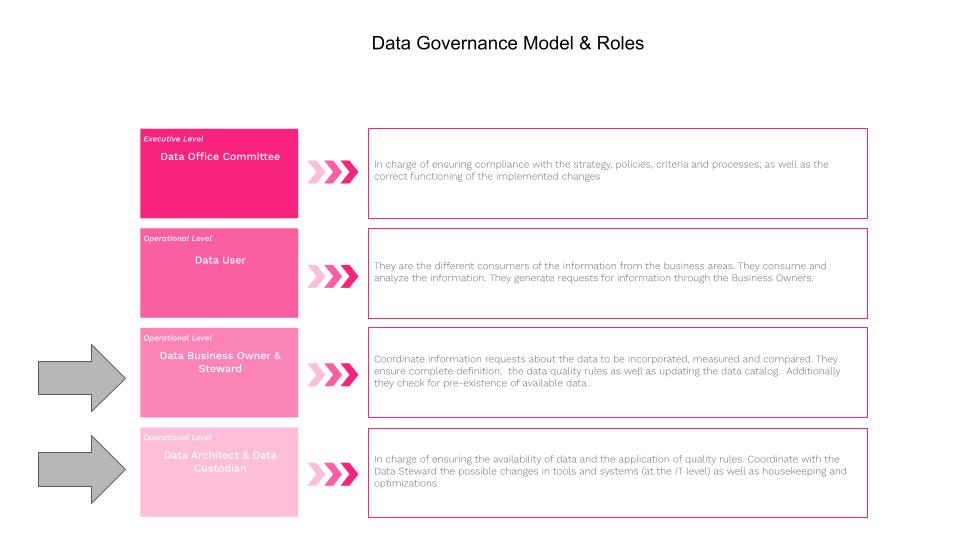
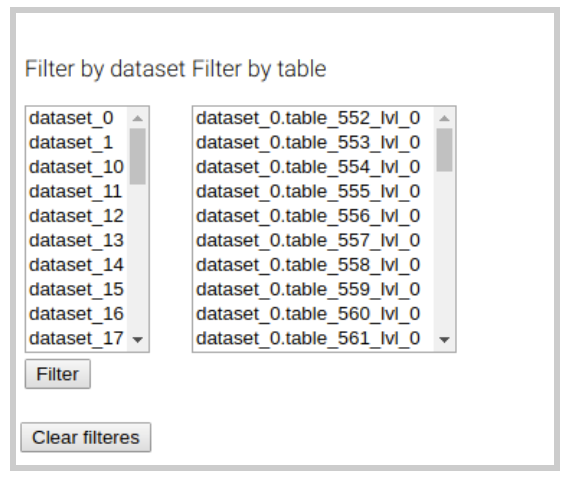
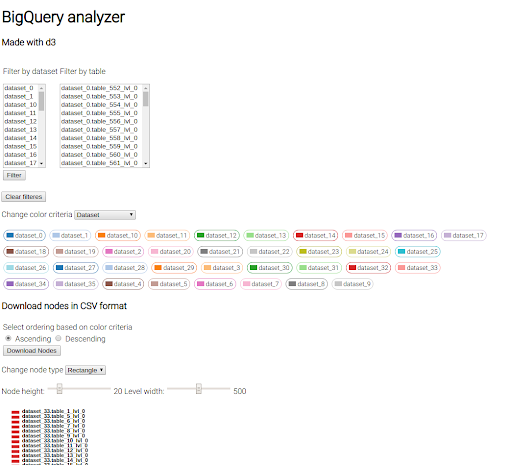
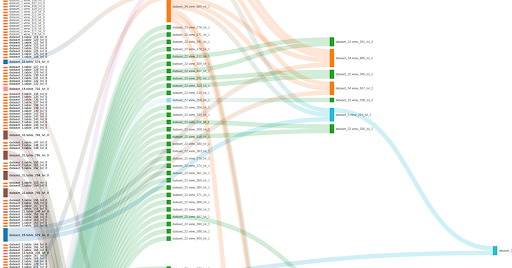
Google’s BigQuery serverless data warehouse makes life so much easier and so much safer in terms of having all the data in one location however, the house-keeping and data governance are left for you to administer and manage. At Making Science we work with numerous Google BigQuery customers, some small, some large and some very large corporate groups. Most of our experience shows that customers are rolling out data governance tools but most of our customers are typically still offering the “SQL knowledgeable/connected” departments direct access to BigQuery. This all in the spirit of self-service analytics moving their business to be more data driven. Even with the advances of Google’s data catalog and data governance capabilities, the data administrators are left with challenges keeping data lakes and data warehouses operating efficiently. The Making Science teams are always looking for ways to make themselves more effective at performing their work with the construction of methodologies and tools. Making Science has tools specifically for Data Quality projects, Data Discovery and a most recent addition is BigQuery Intelligence. The tool offers value to the roles presented in the data governance model below: The BigQuery Intelligence tool was built to help the data warehouse/lake architects/administrators/custodians manage house-keeping activities regarding datasets, tables and views and optimize these same objects. Many of our larger and very large customers have 100’s of datasets and 100’s of tables and 100’s of views within each dataset making it very challenging to keep on-top of house-keeping activities. BigQuery offers data lake administrators a simple visual interface to list datasets, tables and views. The BigQuery explorer panel interface allows you to collapse tables and views under their given dataset simplifying the visualization. But the BigQuery Explorer does not offer data lake administrators a simple visual interface to understand usage statistics regarding datasets, tables and views; this is where BigQuery intelligence collects underlying data previously collected by the GCP + BigQuery environment and offers visualizations to understand the usage patterns across the nodes in the data warehouse. The Data Scientists and Data Engineers at Making Science had a look and determined that a tremendous amount of data lake usage statistics are available in GCP but missing an easy means to retrieve the data and visualize the usage patterns in the data lake. The team decided to apply Sankey visualizations built using Python and D3 to the problem to facilitate understanding the usage patterns between the nodes (datasets, tables, views and jobs/queries) in the data warehouse. As the team worked with some very large data lakes they quickly found it necessary to allow data custodians to apply filters to limit views of the data lake to make the Sankey diagram more readable. Most typically they would select logical groupings of datasets to give a complete view but without making the visualization undecipherable. BigQuery Intelligence actually allows filtering both on datasets and tables. The team also found that by including the possibility to define color based on criteria; by default, the color criteria is “dataset” so that each dataset is distinguished by a specific color in the Sankey visualization. The team decided to include a “change color criteria” filter, where we can choose between additional criteria including: bytes, jobs, inherited jobs, recency and inherited recency. With this kind of plot, we can check if there exist inefficient nodes in the data lake.

HotSpots

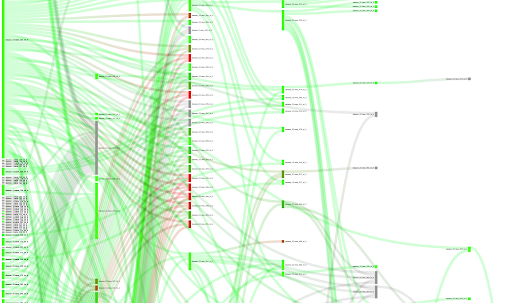
A couple of use cases helped by changing the color criteria is the location of “hot spots”, i.e. those nodes which process too many bytes or have too many jobs, and “cold spots” or those nodes that have not been used in a long time and hence could be be removed/deleted from the data lake. In the following screenshot we can see that the color indicates the volume of data each node has processed. Red indicates too much, and green indicates a reasonable volume. Grey indicates that we don’t have information about this particular node. It is interesting to see nodes that have a deep level and are very red. This usually means that those nodes could be optimized by creating aggregated/intermediate tables.

Unused nodes

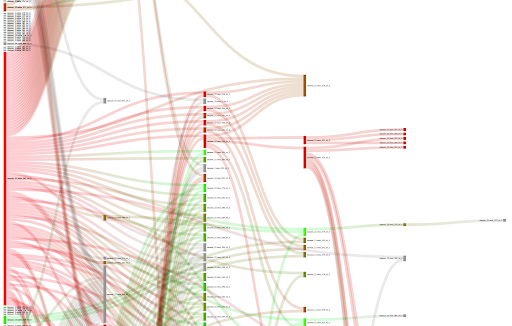
If we change the color criteria to “inherited recency”, we can search for nodes that have not received any query/job in a long time. The meaning of “inherited” is that we take the smallest recency among one node and its children, given that if one child node receives a job, in some way, the parent node also receives that job. Here, red indicates a very high inherited recency and green indicates very small inherited recency. Grey, indicates that we have no info about the particular node. We could analyze the plot to search for unused nodes (red and grey) and clean the data lake.

Metrics

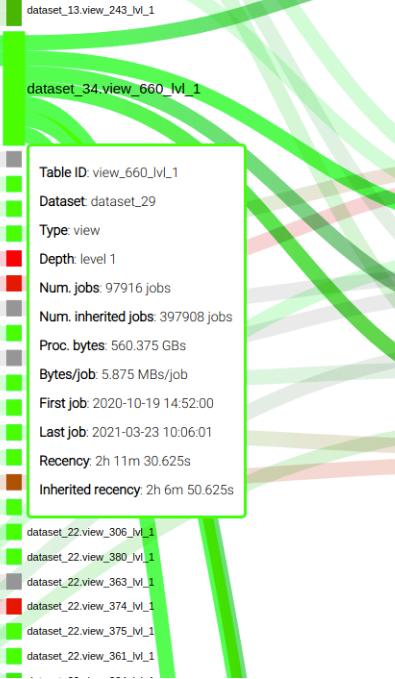
The team included a mouse over capability to display relevant metrics of a node, as you can see in the following screenshot:

The Conclusion

Making Science teams, acting as Data Custodians for some of our customers, have found is that conversations with Data Business Owners/Stewards regarding optimizations and housekeeping are greatly facilitated by the use of the BigQuery Intelligence tool. Sitting down with the Data Steward with data and visualizations in hand enables a transparent, data driven conversation. The value to the business from a tool such as BigQuery Intelligence comes in the form of improved performance for systems accessing/consuming the data and ensures a reduced GCP operating costs. The Making Science team members have feature additions already in the works and we will share some of the use cases and the corresponding benefits as they are available.

How does iOS 14 affect my business on Facebook

How does iOS 14 affect my business on Facebook
The rapid evolution and growth of digital ad ecosystems have led platforms to make changes to both consumer and business needs.

What does the new iOS 14 policy imply?

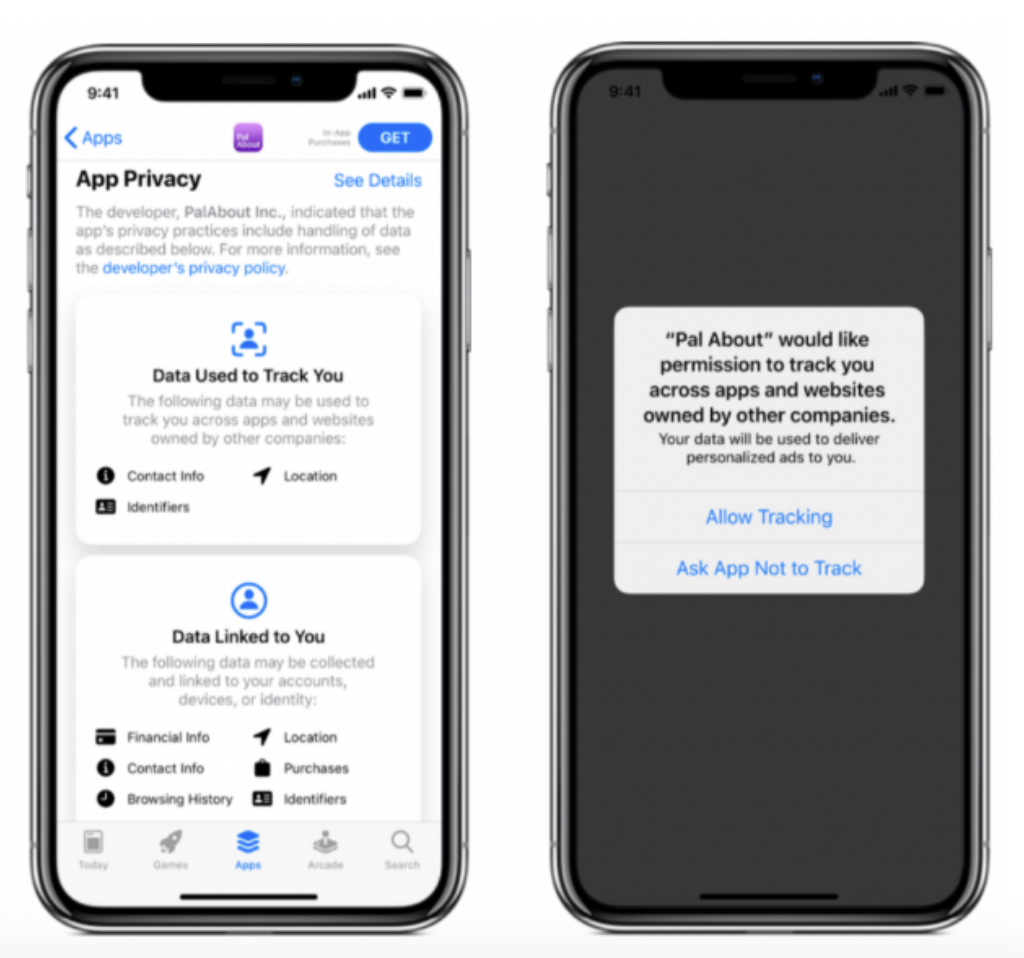
To understand how Facebook advertising will be affected, you need to understand exactly what will change with the iOS 14 update. Nutrition Label The data nutrition label will require all apps to submit how their app collects and uses their users’ data. App owners and developers will need to upload this disclosure clause to Apple’s App Store Connect. Tracking transparency notices All applications using the Apple App Store are required by the new policy to ask users for permission to track their data on third-party applications and websites. The tracking transparency notice will appear to the user and will give them the ability to accept or decline the tracking of their data, as shown below. Tracking via App / Browser APIs Facebook and other platforms will now have to use a new framework that imposes restrictions and could delay the notification of events. Previously instant reporting for app conversion campaigns could now be delayed up to three days with the newly adopted SKAdNetwork API (SKAN API).  

What is Facebook doing to mitigate these changes?

Adherence to the new ad guidelines Previously, the Facebook platform used transparency features for ads, such as a “Why am I seeing this?” Button, an option to hide the ad, and a switch to disable Facebook activity. Users will now be asked to decide whether they agree to their data being collected or not. Continued collection of device identifiers For those users who opt for Apple’s transparency notice, the device identifiers will be collected. Before the upgrade, device IDs were collected from all users. Application-based trading tools Facebook will continue to support app-based business tools for Apple’s limited metering solution, the SKAN API, for mobile apps. Aggregate Event Management (AEM) For advertisers using web-based business tools, Facebook will limit the measurement of some events for iOS 14 users through the new data sharing protocol. This new AEM system will change the way advertisers track conversions.  

Limitations on the platform

Ad creation For starters, the auction bid is now the only purchase option available when creating device ads on iOS14. Therefore, the scope and frequency bids are no longer available. Reports

  • The new iOS 14 update will limit advertisers’ ability to measure campaign performance on Facebook. Previous real-time reports will no longer be supported, and businesses could see a data lag of up to three days. Statistical models can be used to track conversions for iOS 14 users.
  • Delivery and stock breakdowns, including age, gender, region, and location, will not be supported.
  • Attribution windows will be set at the ad set level, rather than the account level, and will be limited to a seven-day click and one-day view window.

Targeting The size of audiences on the app and on the web will decrease as more people choose not to track on iOS 14 devices. This means that audiences may need to be expanded to capture the attention of potential customers.  

Changes and next steps for web advertisers

Facebook Aggregate Event Management (AEM) Facebook will implement Aggregate Event Management (AEM) to meet Apple’s requirement. This will not resolve all the impacts of Apple’s protocol and advertisers will continue to lose functionality with these changes, but it is your best option under the circumstances. AEM limits the transmission of user data while still supporting critical use cases for advertisers. Facebook hasn’t provided many details about AEM yet, but we’ll keep you posted as the information continues to emerge. Limitation of 8 events Your pixel can only track and optimize a maximum of eight conversion events for each domain. Facebook will initially configure the conversion events that it deems most relevant to your business. The rest of the events will be inactive for the optimization of the campaign and the elaboration of reports. You will be able to manage your event priority preferences in the Event Manager. To accommodate this new system, Facebook recommends setting up your eight conversion events to track the prospect at key points on their buying journey. For example, if a customer visits your website, adds items to their cart, but does not make the purchase, you will want a conversion event for both the “Add to cart” and the “Buy” events. Without the “Add to Cart” event, that customer’s data will not be tracked unless they complete a purchase on the first click of the ad. You may need to consider changes to your campaign measurement strategy. It may be necessary to optimize the events in the top funnel (visits to the landing page, clicks on links, etc.). Attribution and conversion windows Due to the limitations of the view-through signal, the default attribution setting for new campaigns after the ad application will be set to seven days of clicks and one day of views. Facebook will no longer be able to support 28-day click conversion windows, 28-day views, and seven-day views. In situations where limited data is available from iOS 14 users, statistical modeling will be used for certain attribution windows. There will be an annotation on the product to communicate when a metric is modeled. Conversion event breakdown Advertisers have already been able to break down conversion actions to better understand consumer behavior. By accepting Apple’s request, Facebook will no longer be able to display breakdowns of reported conversions. This includes breakdowns of deliveries and stocks, such as age, gender, religion, and location. Dynamic Ads For dynamic ads, it’s important to ensure that your catalog only uses one tracking pixel. The pixel will also only be able to report and optimize a maximum of eight conversions. All other conversions will be inactive for optimization and reporting. Changes and next steps for app advertisers Lastly, let’s review the changes and next steps regarding app advertisers. Limited attribution Conversion data shared through app business tools can be restricted, aggregated, and delayed by SKAN’s API. As for attribution windows for app install campaigns, Apple’s SKAN API will determine those windows. This change is expected to occur in mid-to-late January 2021. Initially, Facebook will default to a seven-day click attribution and one-day views setting. The new default attribution settings may lead to a decrease in the number of reported conversions. Limitations in campaign management If you plan to run app install campaigns, you will need to ensure that your app is associated with a single ad account. However, an ad account can host multiple applications. With the new iOS 14 update, you will only be able to run a maximum of nine campaigns at a time. Each of these campaigns must contain no more than five ad sets per campaign and the auction will be the only purchase type available. Once your campaign is published, you will not be able to toggle the iOS 14 campaign switch on or off. You will need to disable or delete your campaign. Demographic reports Demographic breakdowns for conversion events will no longer be available. Reports Real-time reporting will not be supported and data can be delayed for up to three days. For iOS 14 app install campaigns, conversion events will be reported based on when the SKAN API communicates them to Facebook. The results will be aggregated at the campaign level and statistical models can be used to account for the results at the ad set level.  

Recommendations from Making Science

  • Prepare for post-press attribution data to disappear. Download your historical data for both windows (28 and 7 days) and also for 28-day clicks. Compare 28-day click conversions to 7-day click conversions to understand how your reported conversions will be affected if you currently use that 28-day window.
  • If you use automatic rules with a custom attribution, remember to review them just in case and adapt them to the new attribution. Remember that it disappears: 28 days post click, 20 days post view and 7 days post view.
  • Review the campaign structure and current audiences.
  • The events chosen for the measurement can be modified later, but then it is necessary to wait three days to see the data again, so it is better to make sure to choose the ones we really want from the beginning, whenever this is possible.

If you want to be up to date with the news about iOS 14 in relation to Facebook, don’t miss our articles on the Making Science blog. And if you have questions about how this change will affect your campaigns, write to us at info@makingscience.com

What is Ads Data Hub?

What is Ads Data Hub?
Ads Data Hub is the new Google tool that allows to bring together advertisers’ data with Google’s own data, which allows personalized analyzes adjusted to specific business objectives while respecting the privacy of users (GDPR).  

How does Ads Data Hub works?

Ads Data Hub sits between media attribution, BigQuery, and GMP. ADH allows you to bring in your media data from Display & Video 360, Campaign Manager, Google Ads, and YouTube, as well as other data sources. This data is contained in ADH within BigQuery, where all the data is available in one place and accessible to query. By doing this, we can answer questions about the purchase or consumer journey, and tie customer behavior from ad impressions to web behavior, conversion and retention. Google even provides template queries for common reports and metrics like Active View impressions, clicks, conversions, and statistics. This leads to ADH’s primary benefit, which is user privacy. With ADH we cannot look at user data individually, protecting user privacy (GDPR). The tables consulted by ADH will have the user ID assigned by Google, on the other hand, the results will show aggregated data, eliminating the possibility of identifying users in a unique way but being able to carry out specific analysis in the queries.  

Practical Cases

Before using ADH, you should have a good use case, as there is a lot of analysis you can already do within GMP with the help of BigQuery. Here are some use cases where ADH could come into play:

  • End-to-end customer journey: What are the steps our customers take from ad impression to conversion? How do our ads affect user navigation? ADH can be used to link campaigns with web or CRM data to understand and analyze routes.
  • Impression performance: What is the optimal ad frequency to drive conversions? ADH can help us determine the frequency and effectiveness of ads for online and offline conversions. Also, we can consider how the ads contribute to brand awareness or building a custom attribution model.
  • Audiences: For each of my target audiences, how often do I need to work on the ads to get them to come back to my website and convert? Use ADH to identify potential customer audiences or brand loyal customers.

There are other considerations as well. As mentioned, we cannot work with individual users in ADH, at least for now, so you need to have enough data (50+ users) to generate audiences. ADH can also be useful for those who invest in GMP. The GMP tools already work well together, but ADH can help structure a more complete picture between data from DV360, Search Ads 360, and Google Analytics 360. In short, Ads Data Hub is a very valuable tool that helps us understand our digital ecosystem while respecting current legislation. If you need more information or advice about how to exploit the tool in Making Science we have a team specialized in this tool that will be happy to help you. We wait for you!

How to boost your campaigns in a world without cookies

How to boost your campaigns in a world without cookies
2020 has been the year in which there has been an acceleration in the digitization of all sectors and the population. The confinement experienced in the first part of last year has led to an increase in the traffic of all companies with a presence on the internet and, in addition, audiences have come into play that until now were not so protagonists of the online strategies of our campaigns. A clear example of the latter are people aged 45 to 65 years, since since March 2020 there has been a growth in traffic in this segment: The hyperdigitalization of the population comes at a time of changes in the digital sector. Surely you have heard of a world without cookies. Well, it’s not exactly how you imagined them. Of course, any company that intends to continue growing digitally needs to prepare today if it wants to continue working as they have done so far with their campaigns, getting this type of insights to develop strategies seeking the highest profitability thanks to personalization. Within a year Google will disable third-party cookies in your Chrome browser. In this way, it will join what Apple is already doing today with Safari, Mozilla with Firefox and Microsoft with Internet Explorer, or Facebook. The final countdown begins. Blocking these cookies alters the landscape of digital advertising, which currently relies on third-party cookie data for personalization. But do not spread panic. There are other solutions prepared to avoid these ‘problems’. One of Google’s answers is Ads Data Hub. This product, which respects the GDPR guidelines, is a data lake/warehouse where all third-party data that Google owns is stored at the user level, anonymized and consolidated. This technology enables advertisers to merge data from various Google platforms, such as Campaign Manager (DV360), Google Ads, and YouTube. As the data does not provide any identification at the user level, Google can legally store it and agencies can use it to impact on it. This solution not only allows you to bypass a world without cookies, it also adds very powerful extra solutions thanks to the cloud and BigQuery: · Attribution models with data on + off and more advanced (Markov or Shapley). · Real Time activation of audiences with data on + off in Search Ads 360 and DV360. · Much more advanced analysis by having the raw data of the users. · Matching of users between different media (on campaigns, Google Analytics 4 (app + web), clients, etc.). At Making Science we have a team specialized in this kind of technology. If you want to know more about the different solutions do not hesitate in contact us at info@makingscience.com
How is it possible to measure fairly (statistically) the impact of your campaigns?

How is it possible to measure fairly (statistically) the impact of your campaigns?
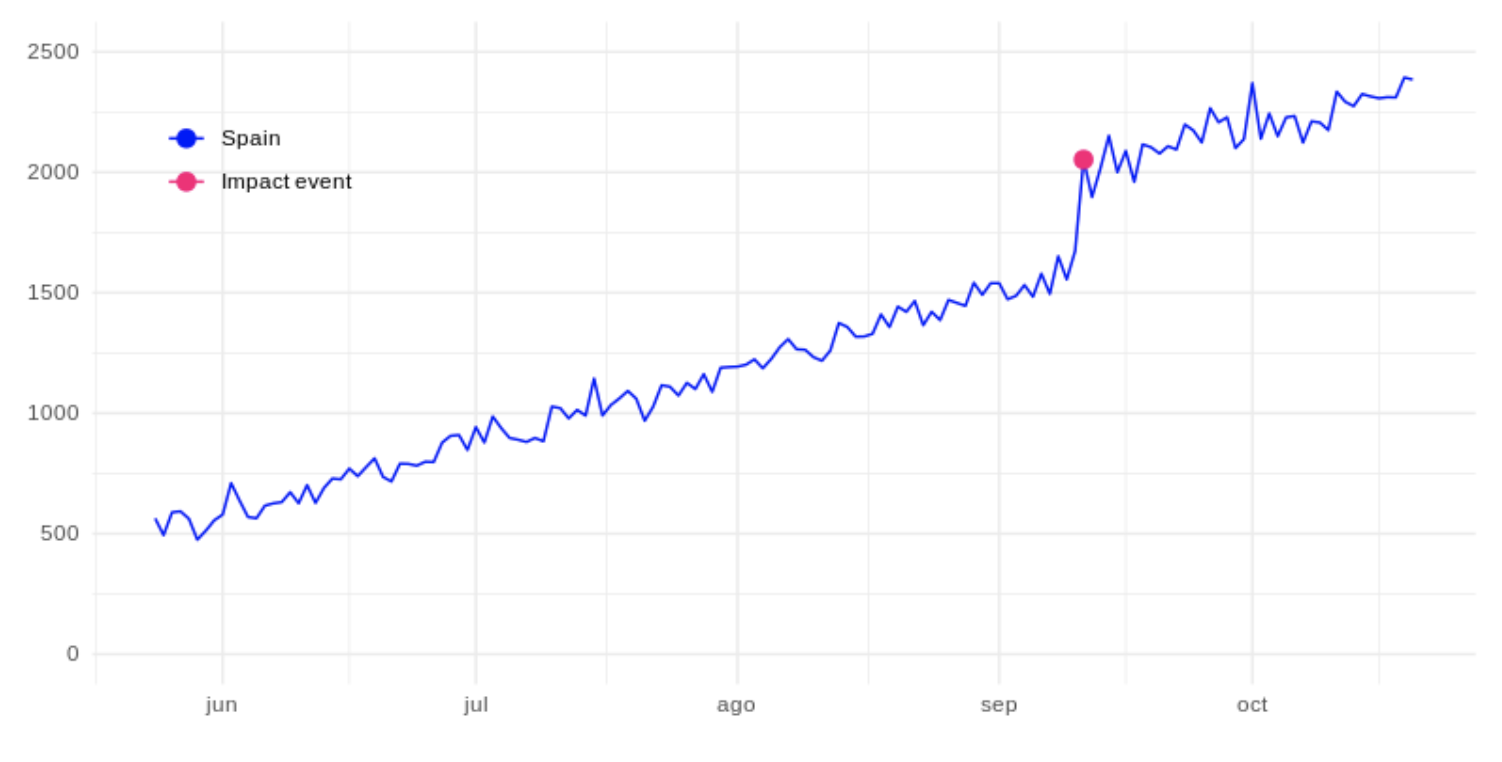
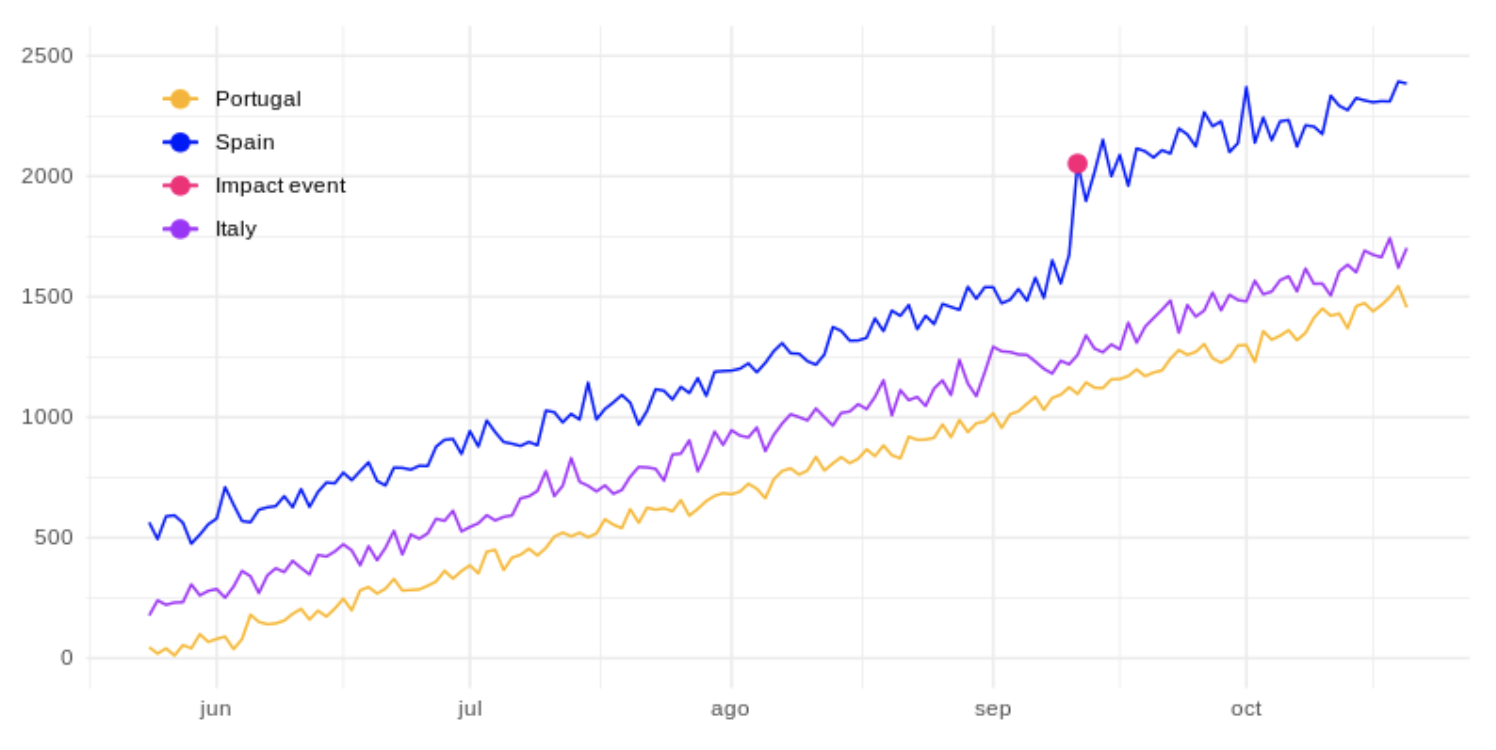
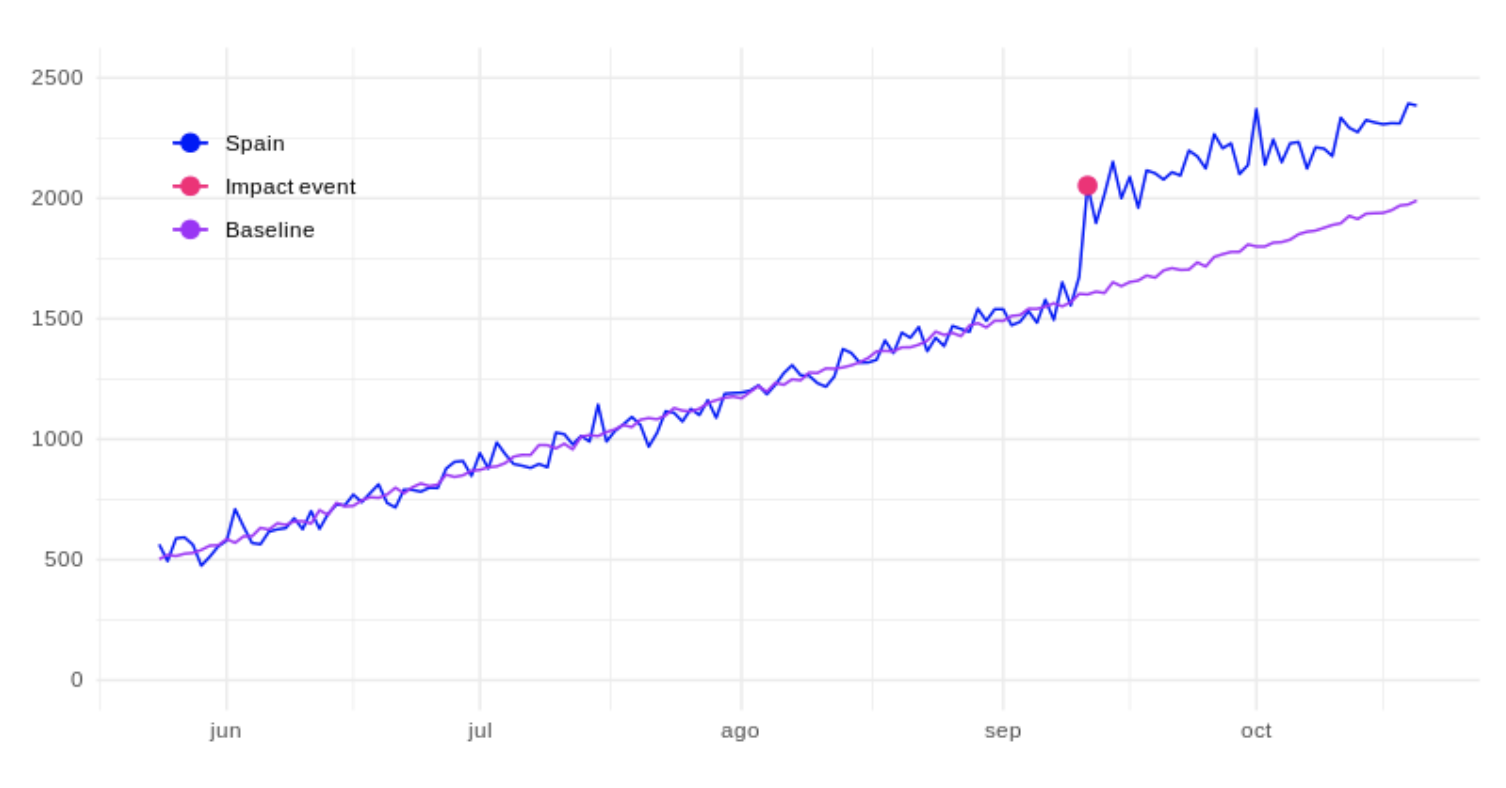
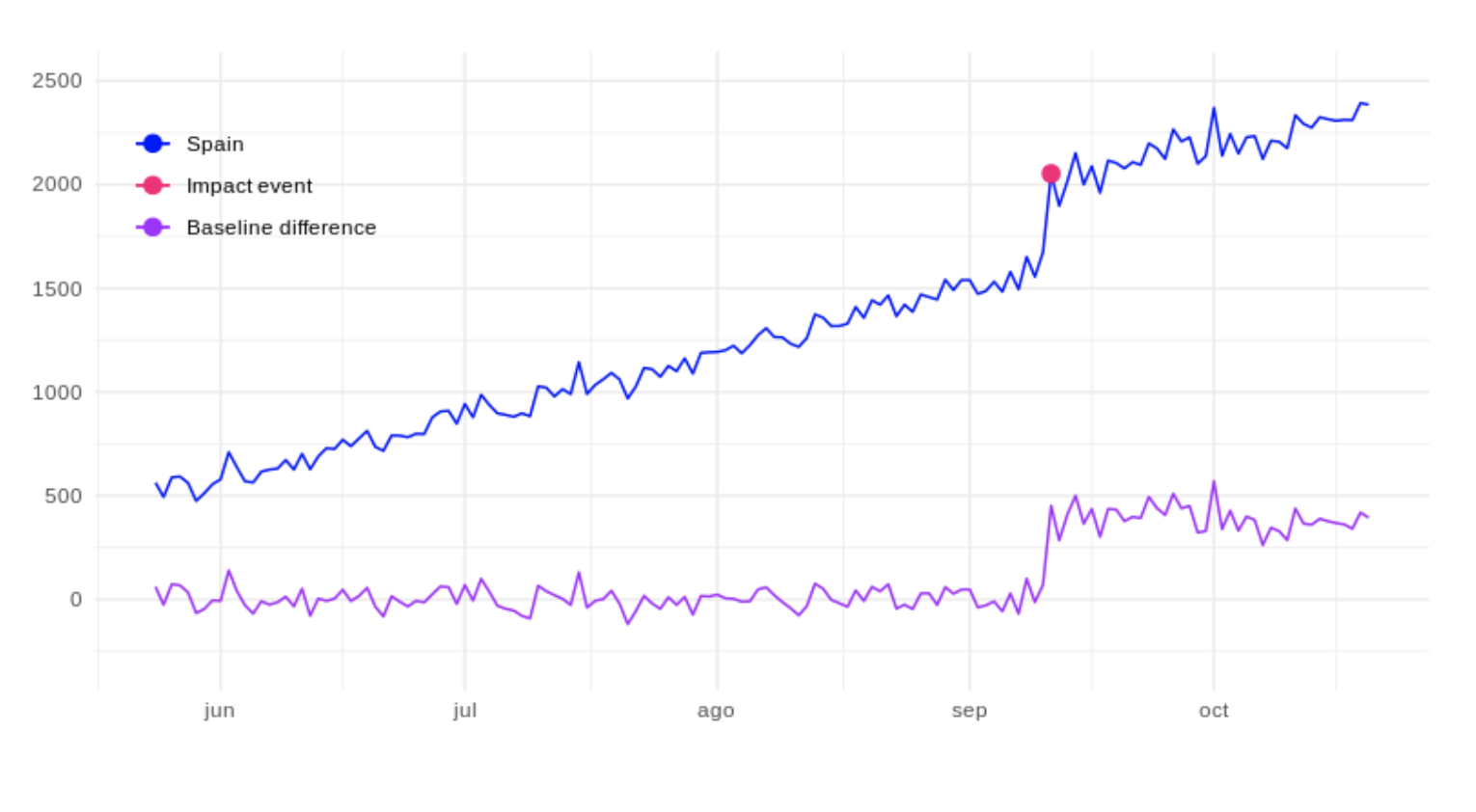
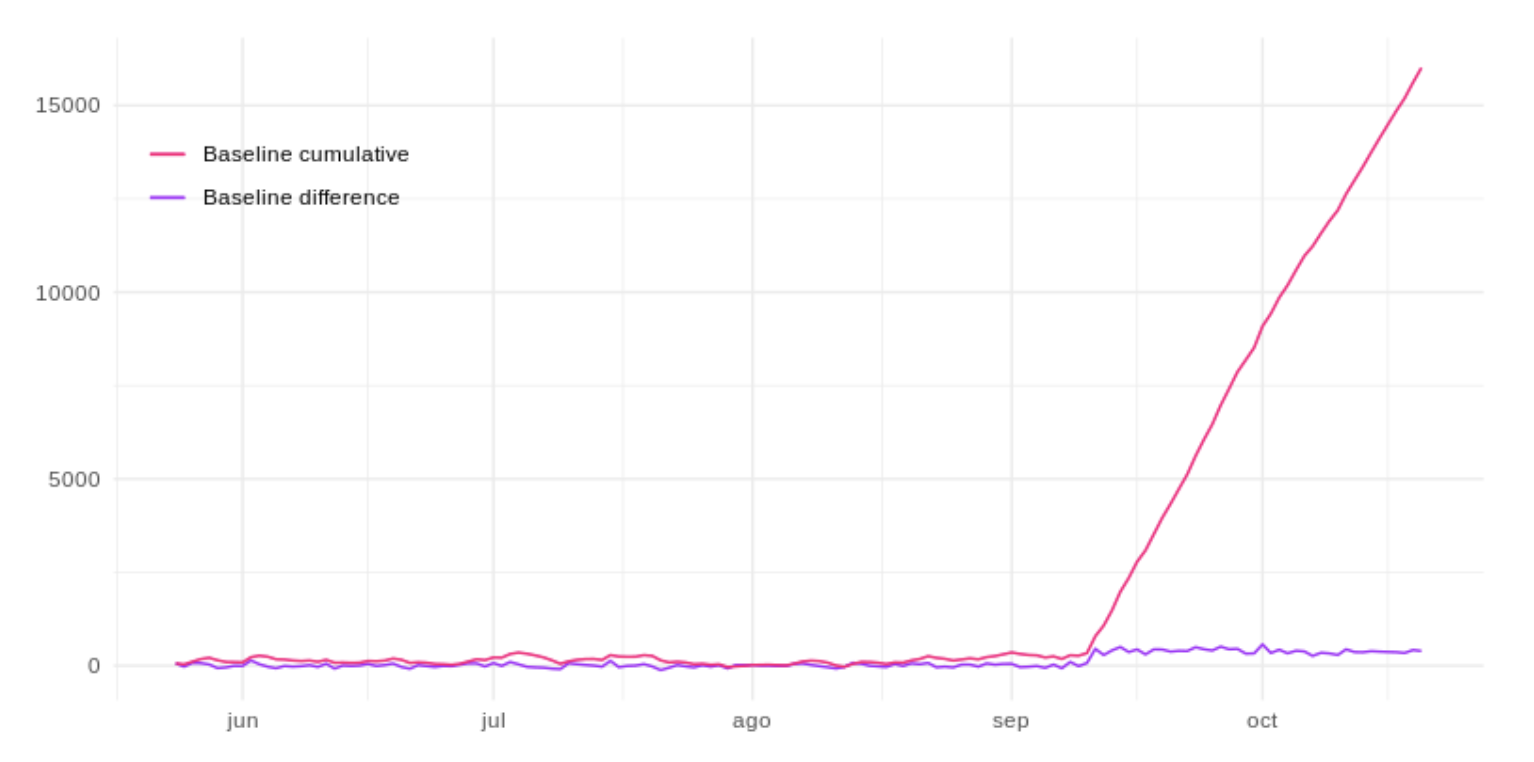
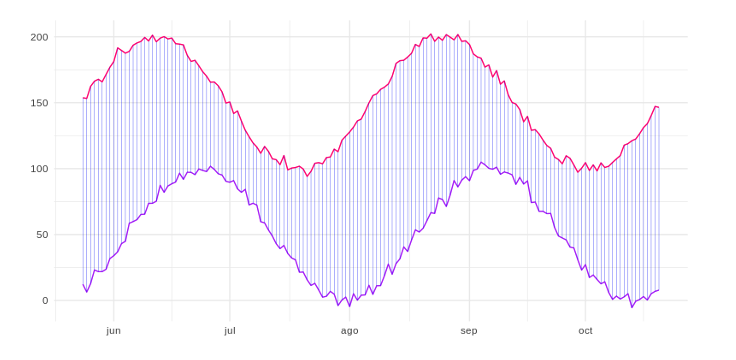
Let’s say you run a marketing campaign. You want to know how the campaign has helped increase your website traffic, registrations or conversions. It sounds simple, because you could compare the measurements before and after the campaign, or compare the measurements of two groups by performing an A/B test. But in reality, it is difficult to measure that impact in the real world, because there are many variables that can influence the result. Google had the same problem, so Kay Brodersen and the Google team built the Causal Impact algorithm to address this challenge. The main idea of ​​the algorithm is to build a time series based on multiple control groups and use this series to project how the time series where the campaign was carried out would evolve, if it had not been carried out. Let’s analyze this algorithm using an example. Let’s suppose that on our website in Spain we have an evolution of unique visitors in the following way: The fuchsia dot represents the number of unique visitors on the day that, for example, a certain marketing campaign started, which we will refer to as an impact event. Suppose we have our same website in other countries such as Italy and Portugal (control groups), where the impact event has not occurred: With the Causal Impact algorithm we could create a model based on the data of unique visitors from these countries to project the expected values ​​in the same period of time in Spain. Acting as a base series and indicating the number of unique visitors that we would have expected in Spain, in case the campaign had not been carried out. Shown as the purple line below: Once we obtain this base series, we can calculate the differences between the two time series, the real values ​​for Spain and the estimated values ​​if the impact event had not occurred. And so, consider the difference as the real impact of the event, as represented by the purple line in the following figure: Or on the other hand, accumulate the series to be able to see the total impact up to any given date. The fuchsia line below represents this: In this way, we can measure the ROI (return on investment) of said campaign in a much more fair way, even when we are not sure if the event was the only source of impact. The Causal Impact algorithm helps to obtain this information quickly so that you can adjust any action in a timely manner with confidence.
The Causal Impact algorithm

The main idea of ​​the algorithm is to construct a Bayesian time series based on multiple control groups (in the previous example, Italy and Portugal), and to adjust for differences in size between the control groups and the test group (Spain) to obtain a synthetic base series. Control groups are those in which we did not have the impact event. Therefore, no changes in the series produced by this event are expected. The test group is the one where the impact event occurred, and we hope that this has produced some change in the time series.

What is the synthetic base series?

Basically, it is a series of values ​​that we would have expected in the test group without the impact event. Unlike other algorithms based on time series, where the predictions are made with the past values ​​of the test group, this algorithm builds the model through the control groups for a time after the impact event. This means that the control groups, or the combination between them, must have correlation with the test group for the algorithm to make confidence predictions.

How to choose correlated control groups?

The Causal Impact algorithm automatically selects the most correlated control group or groups using the Bayesian technique of selection of spike-and-slab variables. But the technique proposed by Kim Larsen complements the Causal Impact algorithm to obtain the most correlated groups. This technique is known as Dynamic time warping (DTW).

DTW

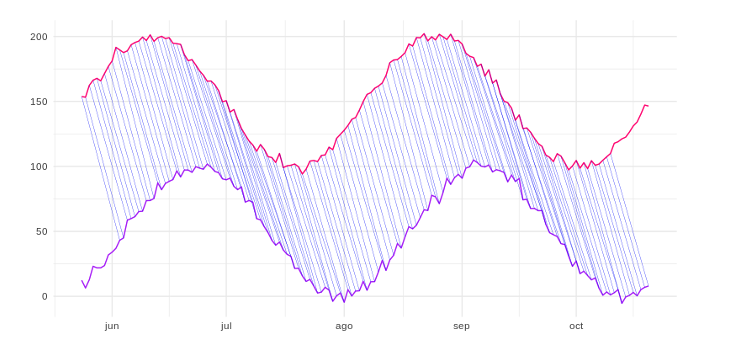
Obtaining the correlation without more, between two time series, ignores a phenomenon that usually occurs in the series, which is the temporal displacement: The two previous series do not have the modes positioned at the same moment, but just by observing them you can see that there is a high “correlation” between them. The highs and lows of the purple line come a little later than those of the fuchsia line. Therefore, calculating the distances one by one along the time axis would ignore the offset and could label these two series as different rather than similar. The DTW technique allows one-to-many mapping to be carried out, calculating the distances of one time series with respect to another, taking into account the possible temporal displacements that could exist between the two (cross correlation). As shown in the following figure: By using this algorithm we can calculate the distance between these two lines even if there is a time shift, and therefore we can consider that they are more similar or “correlated” than they could have been without it. Other cases that DTW corrects is to determine that there is a correlation between two series, even if one is contracted or dilated with respect to the other. We can basically use the DTW algorithm to find the control groups most similar to the test group and pass them to the Causal Impact algorithm as predictors, and then let the algorithm do its work!
What is Custom Bidding?

What is Custom Bidding?
New functionalities emerge every day that allow us to automate processes, save time and improve the quality of information through machine learning. Custom Bidding is a mixture of these characteristics, since unlike standard or automatic bids, with Custom Bidding we can customize the algorithm based on real business objectives. Through a script created in DV360, we will provide more knowledge to the algorithm to apply machine learning in an optimal and unique way for each client and campaign.  

What is Custom Bidding and how does it contribute to our campaigns?

Custom Bidding is able to combine our business insights with the Google algorithm. This union between our knowledge of the campaign and its objectives, added to Google’s machine learning, will allow us to align our goals with the advertiser’s business objectives.  

How does it work?

Very simple, the first thing we must do is ask ourselves two questions:

  • What is our goal? If our objective is a standard CPM, CB is not necessary. On the contrary, if we want to optimize towards other goals and KPIs we can consider CB as a solution,
  • Do we want to manage the campaign manually? In case our priority is not to manually configure bids and we prefer that Google’s algorithm maximize the effectiveness of our campaigns, we recommend applying CB.

Second, we identify the signals, we must set our objectives (KPIs), what we are measuring and how we are going to optimize based on it. This takes us to step three, the design of the script, to develop it it is not necessary to be a code expert, in the help center we can find information and practical examples about it. These are the 3 main aggregate models, each of them is applicable to the different use cases that we will discuss below:

  • Sum-aggregate: In all cases, add all the weights.
  • Max_Aggregate: In all cases, it only takes into account the maximum weight.
  • First_match_aggregate: All conversions, find the first interaction that occurs within the script sequence.

Once the script has been created in DV360, and assigned as a bid algorithm to our test insertion order (replacing the non-personalized options offered by the platform), the algorithm will optimize based on the rules established in our script. If we have already completed the previous steps, it is time to select our script as the bid algorithm within our insertion order and start checking results between the test Insertion Order and the new Insertion Order with the custom algorithm.  

Use cases

To help us better understand each possible scenario, we have 6 previously defined use cases:

  • Weighted Conversions: All goals contribute to the achievement of the final objective. We can give weights for each step of the conversion funnel, prioritizing those actions that have the most value for the advertiser.
  • Activity Value: Unlike weighing only based on specific events such as floodlights, this model allows us to optimize based on custom u-variables. That is, we can give different weights to our custom variables collected in Campaign manager to increase the profit.
  • Transaction ROAS: We can use the value of each product or service to adjust the value of sales. The advantage is in differentiating the sales values ​​by product, not all sales are worth the same.
  • Google Analytics: with GA360 we can weight based on different events within our site, as long as we have a premium account and we have all those goals configured. For example, users who have placed an order are more valued, or those who have spent more time browsing our website.
  • Brand Signals: We use branding signals such as viewability, full video, and others, to make the most of this knowledge in our campaigns.
  • Unified Conversions: With the help of Campaign Manager and Google Analytics we are able to collect all that information that we cannot measure only with floodlights. Example: in a case of weighted conversions, with offline conversion we give more weight to the one that has the most value. In this case, we can unify online and offline conversions under the same algorithm, being able to give them the same value.

Each of them is unique and will vary depending on the weighting we give to each step, action or sales values.  

Case of success

Currently, we have active several cases of advertisers with Custom Bidding, so we already have a base with which to move towards new projects. The most recent example is a banking client in which we have implemented the case of “weighted conversions”, where we weigh the steps prior to the conversion. We can ensure that the above premises are met, based on the results obtained to date. Real data:

  • With a lower investment and half the impressions issued, the Custom Bidding test is having overall CTRs 0.10 percentage points higher.
  • The most important fact is that the CPA of Custom Bidding is 30% lower than the CPA of the standard campaign.
  • The number of conversions in CB is 39% higher than in the standard insertion order.

GMP in cookieless 2.0

GMP in cookieless 2.0
Earlier this year, Google announced that it will remove Third Party Cookies from its Chrome browser. From Making Science, just a few months ago, we clarified in our blog “The future of cookies” that what Google really wants to carry out is the limitation of these cookies and not their elimination. After a year of technological and regulatory advances in this area, it is important to give a pill on the updates that have been developed in this context. Apple communicates to its community that, with the IOS 14 update, it will be mandatory to indicate to users what type of data they are collecting and in turn request permission to be able to track them. In September, however, he sent a communication delaying the implementation of these new privacy measures. This announcement has caused a stir among companies such as Facebook, which are already starting up to be prepared when this functionality is activated. On the other hand, very much in line with Apple, Google Chrome announced that the implementation deadline could be extended in time, despite setting 2022 as the deadline. Likewise, it highlights a very important point for them, Google will not limit third-party cookies until they ensure that the market can continue to work their ads, targeting, frequency and brand safety in a qualified way. In general, all the solutions proposed in the previous blog have evolved along with the digital environment. Of the solutions that we already knew related to media and campaign activations, Google has included two very significant improvements:

  • As for Google Audiences, Google has incorporated a new functionality that consists of automatically expanding the targeting incorporated in our campaigns, a functionality called Auto Targeting Expansion.
  • Google has enabled the ability to trigger HTML5 creatives with customer match audiences.

Regarding new solutions related to the collection of audiences and measurement:

  • Google has included Campaign Manager within the 360 and with this update they incorporated a functionality called Conversion Modeling into the platform .This new functionality has the ability to analyze attributed and unattributed conversions, taking into account impressions and clicks not measured by different browser restrictions. In summary, based on this analysis, it is able to attribute conversions based on the history of the campaigns.
  • Consent Mode is the most relevant solution regarding the issue we are addressing. The main problem with asking for express consent is that it can lead to the loss of measurement of conversions and paths of those users who reject it. That is why Google has implemented two variables in the configuration that are analytics and personalized advertising. By entering these (ad_storage and analytics_storage) it will be possible to inform our GMP tags, analytics and Google ads about the status of the user’s consent. It is because of that:
  1. If the user has accepted the Consent then the tag will be executed as normal.
  2. If the user rejects it, the tag will be executed collecting basic and aggregated information but eliminating the collection of cookie information to respect the user’s privacy. We do not lose the measurement of conversions but it does not allow us to rework those cookies.

The rest of the solutions that we already have available and that we can implement are the following:

  • Ads Data Hub
  • Server 2 Server
  • Offline conversions
  • Data managers: CDPs, 1st party data prevails
  • Programmatic Deals
  • Non-cookies devices: Smart TV & Mobile

Thanks to the GMP environment and the integration that exists between all its platforms, we are able to implement solutions safeguarding the user’s privacy and without losing the user’s qualification. Among the benefits that the GMP environment offers us in relation to this matter, the following stand out:

  • Constant technological advance: Ads Data Hub, Tag Manager Server 2 Server, Campaign Manager 360
  • Audience Volume and Qualified Segmentations – DV360 Audience module
  • The native integration that exists between platforms makes it easier for us to measure and attribution of conversions: CM 360, SA360, GA360, DV360, ADH, GTMS2S