
Enhancing CX/UX Research with Synthetic Users: The Future of Design Testing

Today, user research is a fundamental part of designing digital experiences. It helps us better understand users’ needs, behaviors, and expectations to create more intuitive and functional products. However, traditional research methods, such as interviews and usability testing, are often costly, time-consuming, and difficult to scale. This is where synthetic user research comes into play, an innovation that uses artificial intelligence and autonomous agents to create virtual user profiles and simulate their interactions.

In this article, we explore how synthetic users are changing the way we conduct CX/UX research, their current limitations, and how Making Science is addressing these challenges with its own advanced synthetic user model.

What Are Synthetic Users? 

Synthetic users are profiles generated by AI that simulate the characteristics, needs, and behaviors of real users. These profiles can be created automatically, using data and AI algorithms that mimic the diversity and complexity of a real audience. Tools like Delve AI and Synthetic Users allow anyone to generate detailed personas with information about their background, frustrations, goals, and psychological characteristics. Through these platforms, design teams can quickly create profiles representing a diverse sample of users without the need to recruit real individuals.

Advantages of Research with Synthetic Users

Scalability and Efficiency The main advantage of synthetic users is their ability to simulate multiple profiles in a short period. By eliminating the need to manage and coordinate groups of real users, design teams can quickly obtain relevant data from a wide variety of people. This makes research much more scalable and efficient, especially when fast results are needed.

Cost Reduction Recruiting real users, conducting interviews, and performing usability testing can be costly and logistically challenging. With synthetic users, these costs are significantly reduced, as there is no need to compensate participants or manage the logistical aspects of research sessions.

Simulating Controlled Scenarios With synthetic users, teams can simulate very specific scenarios and observe how virtual users interact with a product or service. This flexibility allows for usability testing with different types of users in controlled contexts, making it easier to identify problems before launching a product to the market.

Limitations of Synthetic Users

While synthetic users offer great advantages, they are not a complete solution. There are some important limitations to consider:

Lack of Real Empathy Although synthetic profiles can be incredibly detailed, they cannot replace genuine interaction with real users. Interviews and usability testing provide an emotional connection that helps designers deeply understand the motivations, friction points, and emotions behind user behavior. Synthetic users, no matter how sophisticated, lack the human complexity necessary to simulate authentic emotional experiences.

Superficially Accurate Simulations Synthetic users can provide valuable feedback, but they often lack the complexity that real users can provide. The insights generated by AI may be overly optimistic or simplistic, making it necessary to complement them with real-world research to obtain a more comprehensive view.

Reliance on Previous Data Synthetic users rely on previous data to create profiles, meaning their accuracy depends on the quality of that data. If this information is limited or outdated, the resulting profiles and insights may not reflect actual user behavior.

How Making Science is Redefining Synthetic Users

Understanding these limitations, at Making Science we have developed our own advanced synthetic user model designed to overcome many of these challenges. Unlike conventional solutions that focus mainly on demographic data, our model integrates multiple layers of information, including:

  • Market behavior
  • Technological context
  • Socioeconomic aspects
  • Behavioral trends
  • Customer journey insights

Additionally, we enrich our model with sectorial and brand insights—incorporating information about the sector, competitive landscape, and brand-specific elements such as product offerings, pricing strategies, and positioning. This approach allows us to simulate more realistic user experiences that account for industry-specific dynamics and brand perception.

But what truly sets our model apart is its ability to incorporate real data from various sources, such as user interviews, focus groups, and client reports. It can even be enriched with call center data, ensuring a deeper and more authentic understanding of user behavior.

Moreover, our model excels in early-stage validation. It can test redesign proposals at the sketch or wireframe stage, providing actionable insights to determine whether the new approach improves the user experience. This capability accelerates decision-making and enhances design outcomes, helping teams iterate with greater confidence.

Use Cases in CX/UX Research

While synthetic users should not fully replace real-user research, they have an important role in the lifecycle of CX/UX research. Some of the most relevant use cases include:

Exploratory Research: Synthetic users are ideal for the early stages of research, where the goal is to explore potential issues and generate hypotheses. By creating synthetic personas based on demographic and behavioral data, designers can gain an initial understanding of their audience before diving into more costly and complex studies.

Concept and Prototype Testing: Before conducting tests with real users, design teams can use synthetic users to evaluate design ideas, prototypes, and features. This allows for quick validation of concepts and adjustments before rolling out prototypes to real users.

Feature Validation: Synthetic users can be used to validate new features or changes in a product. Through simulations, designers can observe how different user segments interact with the product and whether the new features meet their needs.

AI and the Validation of Interface Affordance One of the most exciting advancements that AI already enables is the validation of the affordance of our interfaces. Simply put, affordance refers to an interface’s ability to indicate how an element should be used intuitively. AI can analyse and predict how users will interact with certain interface elements, helping us improve accessibility, clarity, and usability in our designs. Thanks to simulations with synthetic users, we can observe and adjust interactions before implementing changes in a real product, allowing us to optimise the user experience more efficiently.

The Future of Synthetic Users in CX/UX Research

The field of synthetic user research continues to evolve. At Making Science, our advanced synthetic user model not only integrates complex layers of demographic and behavioral data but also enriches profiles with real user feedback from interviews, focus groups, client reports, call center interactions, and sector-specific insights. This unique approach allows for more nuanced and realistic simulations.

Additionally, our model’s ability to test wireframes and sketches sets it apart, enabling early detection of design challenges and quicker iteration cycles.

However, it is essential to remember that research with real users should always be the foundation of any design strategy. Synthetic users are a powerful tool to complement research, but they should not replace a deep analysis of users’ needs, expectations, and emotions.

TL;DR 

Synthetic user research is opening up new opportunities for design and product development teams. While it doesn’t replace real-user work, it provides a scalable and cost-effective alternative to obtain preliminary insights and validate ideas quickly. The key is knowing when and how to use this technology effectively, integrating it into a broader and balanced research approach.

At Making Science, we support our clients in implementing these innovative technologies to improve their user research processes. Our proprietary synthetic user model stands out by integrating both demographic insights and real user data, even from call centers, and enriching the analysis with sector-specific and brand insights. Additionally, we validate redesign concepts at the wireframe stage, optimsing user experiences from the earliest phases. The future of CX/UX research is promising, and we are ready to lead this change.

[button color=”accent-color” hover_text_color_override=”#fff” size=”large” url=”https://www.makingscience.co.uk/contact/” text=”Contact us!” color_override=”#ff0067″]
Level Up Your VWO Experiments: QA Best Practices for Success

There is nothing worse than planning an experiment from scratch, having your team create an immaculate mockup and develop a test, only to realize a week later – after it has been launched that your secondary metrics were not tracking any conversions. Perhaps you notice that a potentially successful hypothesis was wasted because your cookie consent notification overlapped your new pop-up or, even worse, that your checkout funnel is now broken.

Quality assurance testing is frequently overlooked, as it is the last stage of the development process, and on-time delivery is frequently prioritized over quality. Yes, your stakeholders might be pleased with your punctuality, but final users will be disappointed by a bad experience.

Making Science has been helping out clients with their CRO efforts for the last 5 years and have realized that running successful A/B tests requires meticulous planning and execution, and validating the quality of your experiments is paramount for accurate results and meaningful insights. Over the years, we have found in VWO a powerful testing and personalization platform, equipped with useful tools for QA and pre-launch validations.

Here are some key QA best practices to incorporate into your VWO workflow:

1. Pre-Launch Checks:

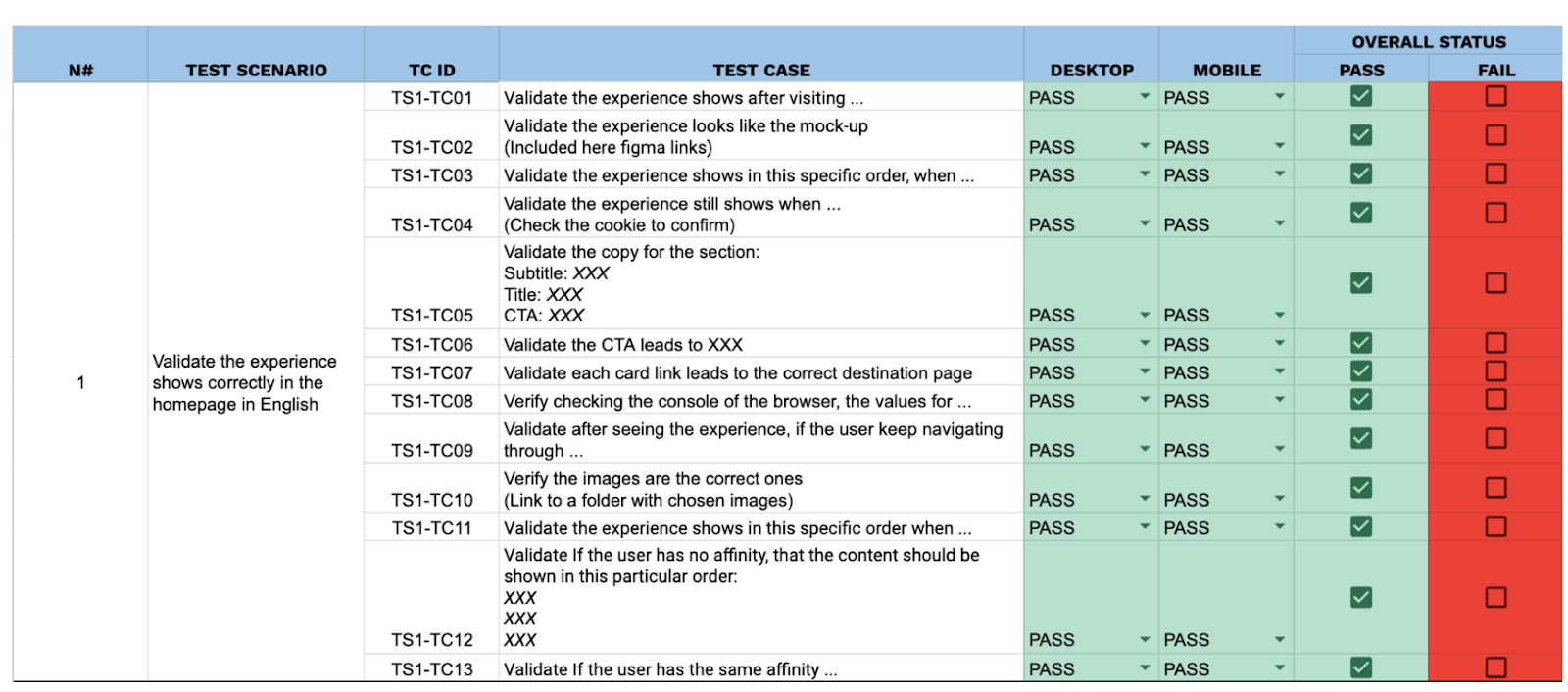
Documenting pre-launch QA is key, as you’ll have evidence and be able to map and visualize all the possible scenarios and actions a user could perform when interacting with the experience. Creating a detailed test plan file also helps optimize the bug reporting and fixing process, as you share your findings with the development team in a centralized report.

Img. 1. Test plan example

  • Thorough Visual Inspection:
    ○  Cross-browser/device testing: Verify consistent appearance and functionality across different browsers (Chrome, Firefox, Safari, Edge), operating systems (Windows, macOS, iOS, Android), and screen sizes (desktop, tablet, mobile).
    ○  Check for broken images, misaligned elements, and unexpected CSS/JavaScript conflicts.
  • Functional Testing:
    ○  Test all variations thoroughly: Ensure all elements within each variation function as expected (e.g., buttons click, forms submit, animations play correctly).
    ○  Test all user flows: Simulate user journeys within each variation to identify any roadblocks or unexpected behavior.

  • Data Layer Validation:
    ○  Confirm that all relevant events and data are being captured correctly in the dataLayer to ensure accurate tracking of conversions and other key metrics.
    ○  Use browser debugging tools (e.g., Chrome DevTools) to inspect the dataLayer and verify its contents.

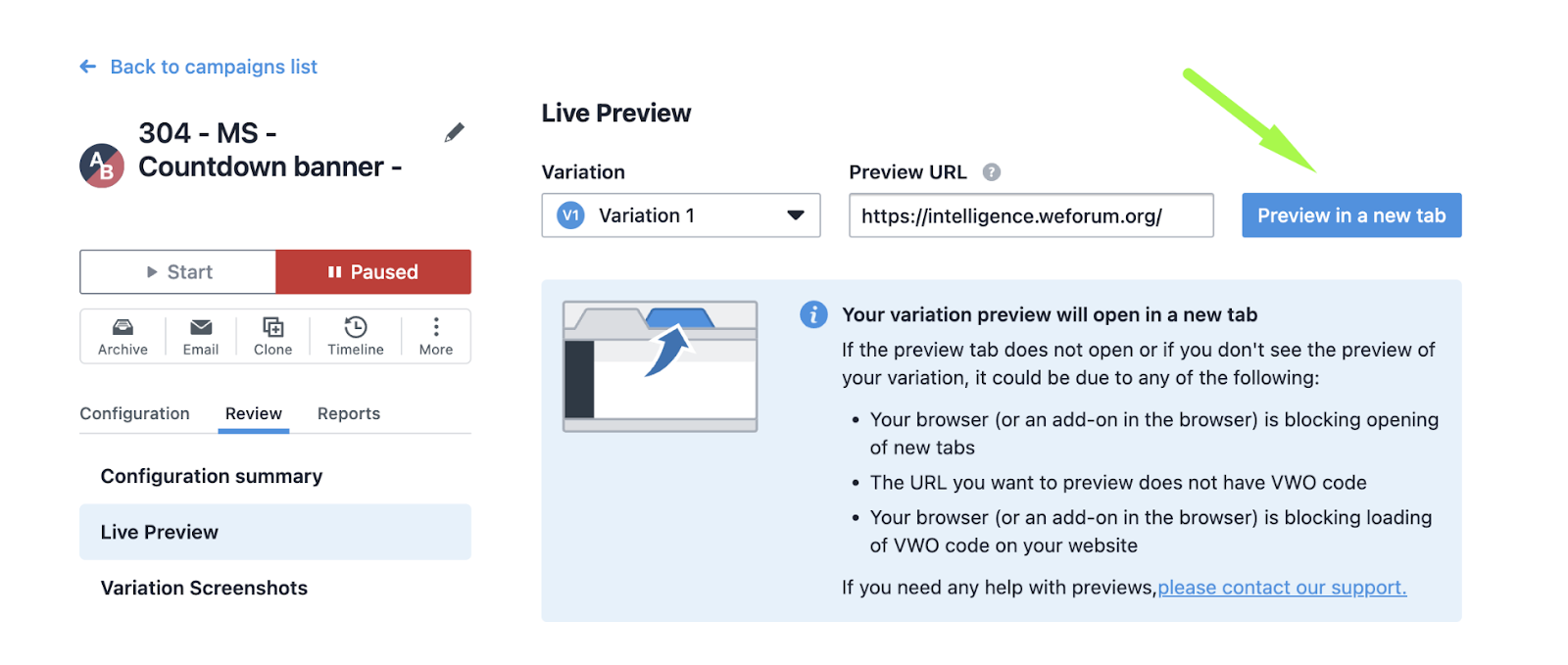
    VWO offers a Live Preview feature, offering a safe way to test and pre-visualize an experience, just by adding the URL you want to preview:

Live Preview feature location in VWO

2. During Experiment Run:

  • Regular Monitoring:
    ○  Monitor key metrics closely: Track conversion rates, traffic distribution, and other relevant metrics daily to identify any anomalies or unexpected trends. With VWO, you can use existing metrics or create new ones as guardrails. When you choose a metric as a guardrail, it’s automatically added as a secondary metric in your campaign. This lets you track it along with your main success metrics.
    ○  Use VWO’s built-in reporting and analytics features to analyze experiment performance.
  • Address Issues Promptly:
    ○  If any issues are identified (e.g., technical errors, unexpected traffic fluctuations), address them immediately to prevent data contamination.
    ○  Make necessary adjustments to the experiment setup or targeting rules.

3. Post-Launch Analysis:

  • Data Validation:
    ○  Scrutinize the collected data for any inconsistencies or outliers (e.g., Verify your 50/50 split A/B test is actually delivering each variation to half of the traffic)
    ○  Verify that the data accurately reflects user behavior and experiment performance.
  • Statistical Significance:
    ○  Ensure that the statistical significance of the results is sufficient to draw meaningful conclusions.
    VWO’s SmartStats uses Bayesian sequential testing to give you more flexibility in running A/B tests. You can adjust the statistical settings to suit your business goals and get faster, reliable results that you can confidently act on. With VWO, you can set an MDE value to ensure your tests focus on finding meaningful improvements. This is especially useful for low-traffic pages, as it provides efficient use of resources without spending time on tiny, unimportant changes. VWO’s stats engine also uses ROPE to recommend stopping a test early if the variation won’t make a big enough difference, saving you time and effort.
  • Documentation:
    ○  Document all aspects of the experiment, including hypotheses, setup, results, and learnings.
    ○  This documentation will be valuable for future reference and optimization efforts.
  • Tools and Resources:
    ○ VWO’s built-in testing tools: Utilize VWO’s features for visual testing, browser compatibility testing, and dataLayer debugging.
    ○ Browser developer tools: Leverage browser developer tools (e.g., Chrome DevTools) for inspecting elements, debugging JavaScript, and analyzing network requests.

By implementing these QA best practices, you can significantly improve the quality of your VWO experiments, increase the reliability of your results, and maximize the impact of your CRO efforts. 

Shopify Checkout Extensibility

Installing GTM on Shopify’s Checkout Extensibility


What’s happening?

Shopify has changed how its checkout manages third-party scripts. Historically Shopify ecommerce sites have used Checkout.liquid and added scripts to the code for measurement. However, Shopify is moving towards a new feature called Checkout Extensibility. To quote Shopify:

“In February 2023 we announced that checkout.liquid is deprecated, and that we’re moving to Checkout Extensibility, a new foundation for checkout that is more secure, performant, upgrade-safe, and customized using apps. Relying on obsolete checkout.liquid code past the deadlines below poses risks that may impact your business.”

Important Dates

August 13, 2024: Deadline to upgrade your Information, Shipping, and Payment pages. Automatic upgrades begin on January 6, 2025, and all checkout.liquid customizations for these pages will be lost.

August 28, 2025: Deadline to upgrade Thank you and Order status pages, including your apps using script tags and additional scripts.

Custom Pixels

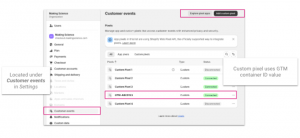
Checkout Extensibility forces Google Tag Manager (GTM) to be implemented in a custom pixel. These can be created in the Settings section of your Shopify Plus account.

Adding Google Tag Manager

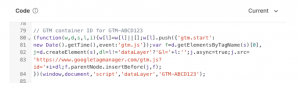
Firstly, copy the container snippet from GTM. Then to add the GTM container script to Shopify, select the ‘Add custom pixel’ button and past the code into the pixel.

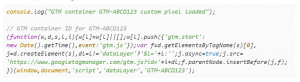
Starting a custom pixel with console.log message will enable you to confirm the script is being loaded.

With that the foundation of GTM on Shopify is complete. We still need to cover a few topics to complete the setup.

  • Add Consent Mode
  • Enable debugging
  • Subscribe to events

Configure Consent Mode for GTM on Shopify’s Checkout Extensibility

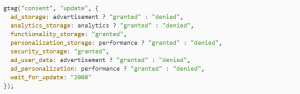
One of the bigger challenges for Checkout Extensibility is configuring Consent Mode in GTM. For Consent Mode to work the values need to be sent within the custom pixel. Setting default values is easy enough, Consent Mode default values can be passed above the GTM container snippet. This is simple to do but implies the User’s consent is denied. Shopify’s official document sets granted as default – this is bad practice. The better approach is to set denied and then check for the user’s current consent state. To do this we need to accomplish two things:

  1. Set consent as denied
  2. Retrieve the user’s consent
  3. Set the Consent Mode consent update functionality

Set Default Consent Mode Status

Set the default Consent Mode status, this is placed above the GTM script. Adjust the settings to suit your operating requirements.

Retrieve User’s Consent Status

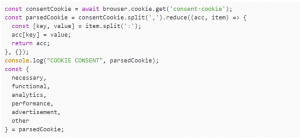
The user’s consent status can be retrieved from a cookie, it must be in a cookie. Shopify’s sandbox environment means that Consent Management Platforms (CMPs) using localStorage cannot be read. Secondly the cookie value must be sent to the domain, rather than each subdomain. The consent cookie should be set to .example.com rather than www.example.com.

With this in place the consent can be retrieved from within the custom pixel.

Update Consent Mode Status

Having retrieved the consent values from the cookie, the final step of the consent process can be completed and the Consent Mode gtag update values can be set.

With the GTM script already in place, it is now possible to check that Consent Mode is working correctly by reviewing the console.log and checking the gcs parameter value in the GA4 network requests.

Configure an E-Commerce Datalayer for Shopify’s Checkout Extensibility

Part three of our Checkout Extensibility masterclass is to add the ecommerce object and dataLayer to our custom pixel GTM script.

How Shopify provides data

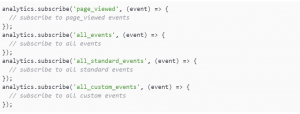
Shopify has an Analytics API that has a number of events that can be subscribed to. When first using the API, subscribing to all events is useful to see what fires and when during the checkout process. It is good to make a note of this for your internal analytics documentation.

Each Shopify event has a data object containing data about the event, the page, etc. It is good to review these to see how Shopify builds its data structure and the values that are being passed for products, etc. Adding a variable called shopify.data and logging it to the console.

The output of which will be in the console when each event fires.

Calling Events

Events can be set up in two ways. There is “the way” but having experienced problems with the purchase event in the past, there is also an alternative. The preferred approach is to request only the event you require.

The alternative is to request all events and then use an if function to work with the event you need.

Configuring Page Views

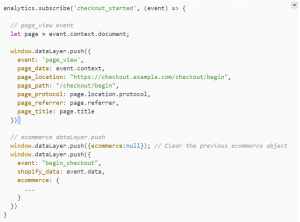
The checkout is a single-page application (SPA) – it doesn’t send page views itself and needs either History Change enabled or a page_view event to be sent to the dataLayer. Fortunately there is a page_viewed event that can be subscribed to via the API that also contains all the details needed to create your own page_view event.

This unfortunately leads to a mess as page_views during the checkout don’t necessarily match the displayed URL and are not useful for humans.

Creating your own page views

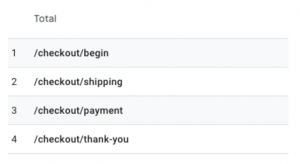
A useful approach to get a full picture of the checkout funnel and user journey is to write your own and send them with the checkout events. For example:

SHOPIFY EVENT GA4 EVENT PAGE PATH
checkout_started begin_checkout /checkout/begin
checkout_shipping_info_submitted add_shipping_info /checkout/shipping
payment_info_submitted add_payment_info /checkout/payment
checkout_completed purchase /checkout/thank-you

These can then be sent as part of each ecommerce event. The output will be 2 dataLayer pushes per ecommerce event – 1 sending the page view, 1 sending ecommerce data.

This will result in nice clean page_views appearing in your analytics account and be easy to understand for all users.

Locating Product Data

The first challenge when creating an ecommerce dataLayer in Checkout Extensibility is understanding the products object. This varies depending on the event that has been fired.They are split by:

  • collection_viewed
  • cart_viewed
  • Checkout events (checkout_started, purchase, etc.)

There is an element of sifting through the data to find the value you require but it is important to get a consistent ID for each step that can try each item together across the checkout process.

Shopify Event Item data location Notes
collection_viewed collection.productVariants
cart_viewed cart.lines Item data is split across different sections. cart.lines.merchandise.product contains product ID and name. Price is found under cart.lines.cost.totalAmount.amount
Checkout events checkout.lineItems Item data is stored under the variant. checkout.lineItems.variant.product. Price data is found item.variant.price.amount

Building a Products Array

The most efficient way to pull in products is to create a function that will map the products data to your liking. This is done outside of the analytics subscribe events and will then be called from each event. A function is needed for each source data type:

  • collection_viewed => createCollectionItemsArr
  • cart_viewed => createCartItemsArr
  • Checkout events => createCheckoutItemsArr

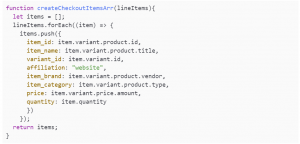
The function is just mapping existing data. Using a GA4 ecommerce dataLayer as the template, a checkout items function will look like:

The values for each variable will need updating for each function but the format will stay the same.

Using the Items Array Function in your Event

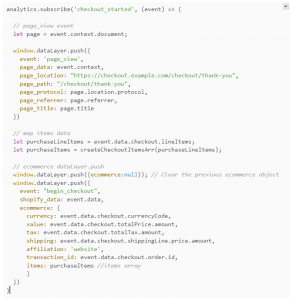
The final part is to call the items array as part of your function and map the remaining ecommerce attributes that are not item specific, e.g. currency, order_id, etc.

This will produce an analytics subscribe event that looks like:

Review the console logs, network requests and analytics data to confirm everything is being collected correctly.

Summary

Getting the Shopify Checkout Extensibility GTM pixel set up correctly can be a challenge. The key is to enable logging to make troubleshooting easier and remember the order of code snippets:

  • Consent Mode default values
  • Cookie consent values
  • Consent Mode update values
  • GTM container snippet
  • Items array functions
  • Analytics.subscribe events

Happy tagging!