

Level Up Your VWO Experiments: QA Best Practices for Success

There is nothing worse than planning an experiment from scratch, having your team create an immaculate mockup and develop a test, only to realize a week later – after it has been launched that your secondary metrics were not tracking any conversions. Perhaps you notice that a potentially successful hypothesis was wasted because your cookie consent notification overlapped your new pop-up or, even worse, that your checkout funnel is now broken.

Quality assurance testing is frequently overlooked, as it is the last stage of the development process, and on-time delivery is frequently prioritized over quality. Yes, your stakeholders might be pleased with your punctuality, but final users will be disappointed by a bad experience.

Making Science has been helping out clients with their CRO efforts for the last 5 years and have realized that running successful A/B tests requires meticulous planning and execution, and validating the quality of your experiments is paramount for accurate results and meaningful insights. Over the years, we have found in VWO a powerful testing and personalization platform, equipped with useful tools for QA and pre-launch validations.

Here are some key QA best practices to incorporate into your VWO workflow:

1. Pre-Launch Checks:

Documenting pre-launch QA is key, as you’ll have evidence and be able to map and visualize all the possible scenarios and actions a user could perform when interacting with the experience. Creating a detailed test plan file also helps optimize the bug reporting and fixing process, as you share your findings with the development team in a centralized report.
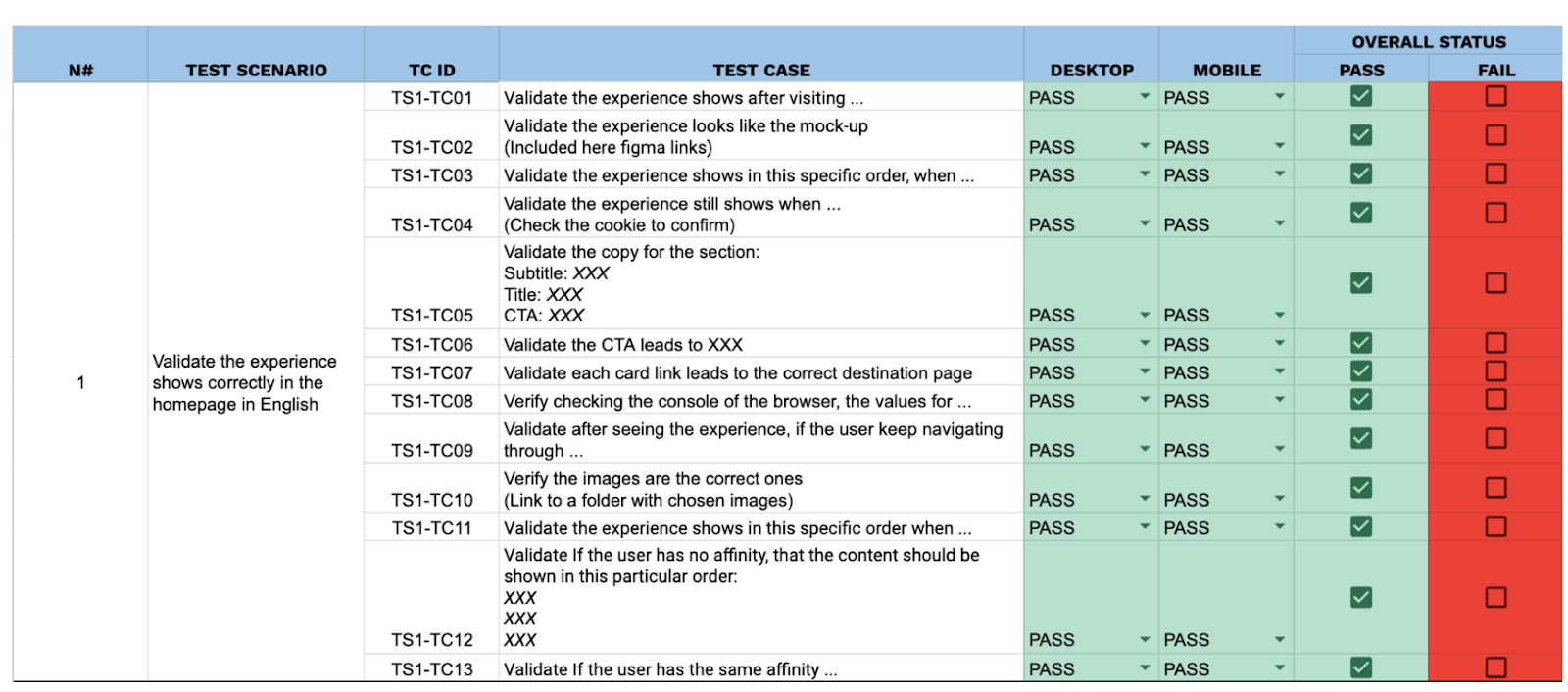
Img. 1. Test plan example

  • Thorough Visual Inspection:
    ○  Cross-browser/device testing: Verify consistent appearance and functionality across different browsers (Chrome, Firefox, Safari, Edge), operating systems (Windows, macOS, iOS, Android), and screen sizes (desktop, tablet, mobile).
    ○  Check for broken images, misaligned elements, and unexpected CSS/JavaScript conflicts.
  • Functional Testing:
    ○  Test all variations thoroughly: Ensure all elements within each variation function as expected (e.g., buttons click, forms submit, animations play correctly).
    ○  Test all user flows: Simulate user journeys within each variation to identify any roadblocks or unexpected behavior.

  • Data Layer Validation:
    ○  Confirm that all relevant events and data are being captured correctly in the dataLayer to ensure accurate tracking of conversions and other key metrics.
    ○  Use browser debugging tools (e.g., Chrome DevTools) to inspect the dataLayer and verify its contents.

    VWO offers a Live Preview feature, offering a safe way to test and pre-visualize an experience, just by adding the URL you want to preview:
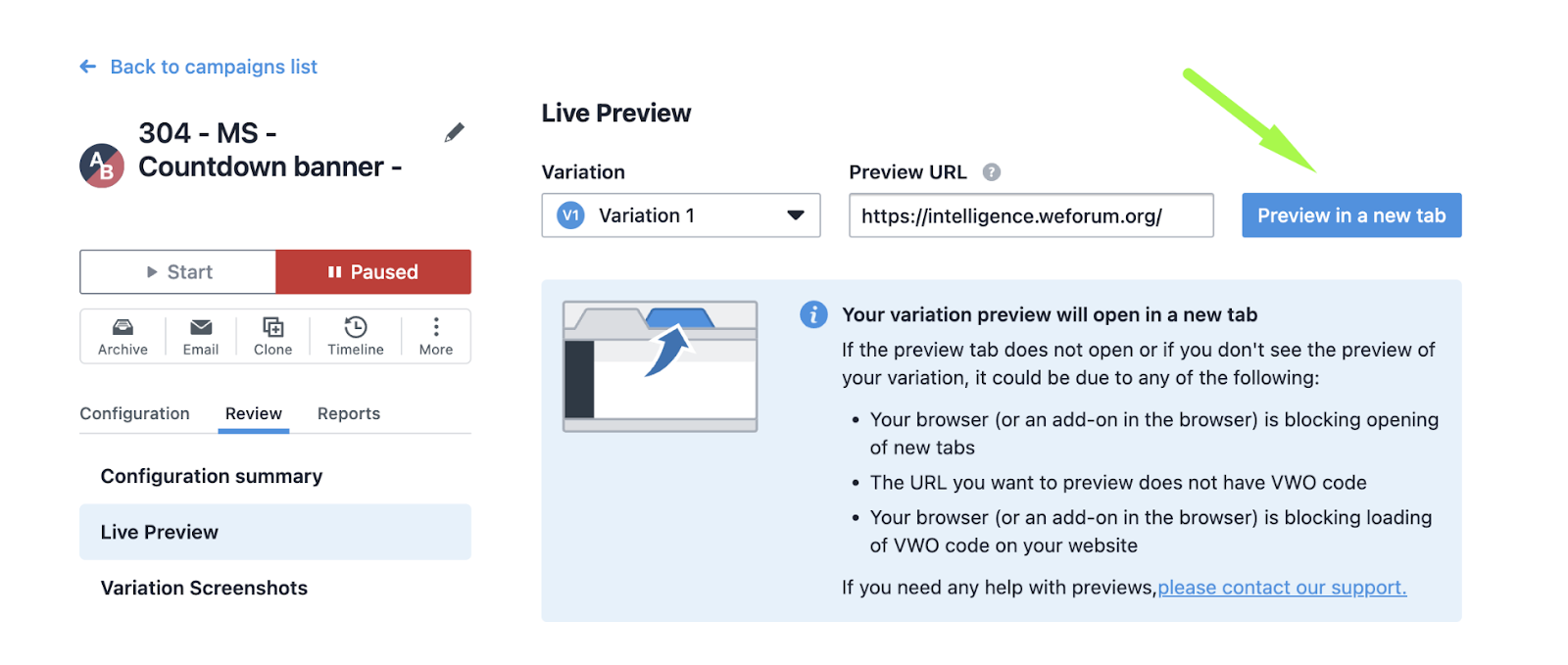
Live Preview feature location in VWO

2. During Experiment Run:

  • Regular Monitoring:
    ○  Monitor key metrics closely: Track conversion rates, traffic distribution, and other relevant metrics daily to identify any anomalies or unexpected trends. With VWO, you can use existing metrics or create new ones as guardrails. When you choose a metric as a guardrail, it’s automatically added as a secondary metric in your campaign. This lets you track it along with your main success metrics.
    ○  Use VWO’s built-in reporting and analytics features to analyze experiment performance.
  • Address Issues Promptly:
    ○  If any issues are identified (e.g., technical errors, unexpected traffic fluctuations), address them immediately to prevent data contamination.
    ○  Make necessary adjustments to the experiment setup or targeting rules.

3. Post-Launch Analysis:

  • Data Validation:
    ○  Scrutinize the collected data for any inconsistencies or outliers (e.g., Verify your 50/50 split A/B test is actually delivering each variation to half of the traffic)
    ○  Verify that the data accurately reflects user behavior and experiment performance.
  • Statistical Significance:
    ○  Ensure that the statistical significance of the results is sufficient to draw meaningful conclusions.
    VWO’s SmartStats uses Bayesian sequential testing to give you more flexibility in running A/B tests. You can adjust the statistical settings to suit your business goals and get faster, reliable results that you can confidently act on. With VWO, you can set an MDE value to ensure your tests focus on finding meaningful improvements. This is especially useful for low-traffic pages, as it provides efficient use of resources without spending time on tiny, unimportant changes. VWO’s stats engine also uses ROPE to recommend stopping a test early if the variation won’t make a big enough difference, saving you time and effort.
  • Documentation:
    ○  Document all aspects of the experiment, including hypotheses, setup, results, and learnings.
    ○  This documentation will be valuable for future reference and optimization efforts.
  • Tools and Resources:
    ○ VWO’s built-in testing tools: Utilize VWO’s features for visual testing, browser compatibility testing, and dataLayer debugging.
    ○ Browser developer tools: Leverage browser developer tools (e.g., Chrome DevTools) for inspecting elements, debugging JavaScript, and analyzing network requests.

By implementing these QA best practices, you can significantly improve the quality of your VWO experiments, increase the reliability of your results, and maximize the impact of your CRO efforts. 

The Get It Done Guide To CRO: Part 2

At Making Science, we are evangelists of Conversion Rate Optimization (CRO). That’s why we decided to write this guide. The guide is split into sections and will be released over the next few weeks. Keep an eye out for upcoming posts.

The CRO Process

The Conversion Rate Optimization Process is here to help us unlock our website’s possibilities, potential, and opportunities. Here at Making Science, our CRO Process involves two key steps:

  • Ensures that the change you want to make to your website is Analytically driven, i.e. Data-Driven decision-making to ensure we have facts. Data allows us to be sure we are not just making a decision on a gut feeling or based on the HIPPO (Highest Paid Person’s Opinion) many organizations have.
  • Ensures that our team steps into the user’s shoes to see how they feel, i.e. User Experience (UX) is a vital part of the change.

Once we understand the above two key areas, we can start to generate ideas about what to examine. These strategic ideas help us present recommendations for improving some aspects of your website, mobile site, or app. When we start experimenting, conversion rate optimization takes place.

Experimentation within Conversion Rate Optimization

As explained, CRO involves generating ideas or recommendations for elements on your site. They are validated through hypotheses. I know what you’re thinking… That seems more related to science than marketing. But we’re here to tell you otherwise!

Hypothesis = A suggested solution for the possibility, the potential problem, or the challenge found. It’s an opportunity to improve. 

The formula for creating a hypothesis is: “If ____, then ____, because ____.”

Here’s an example of a hypothesis we might form based on data:

Opportunity Identified

​​There is a 25% bounce rate on the search results page. 

Hypothesis

If we change the colour of the “Book Now” button to one that stands out more, people will be more likely to click it because it is more visible.

Methodology

Within our testing tools, we create a Test to see if our hypothesis improves the KPIs we track. For example, based on the above theory, we updated the colour of the book now button to green to draw more attention to it. Our primary metric to track was “clicks on book now” compared to the control (see example below). 

Using a testing tool like Google Optimize, for example, you can track which version is more likely to encourage users to click on book now (the metric specified above). In this case, the variant beat the control implemented for 100% of page visitors.

How to get started with Conversion Rate Optimization

Start by ensuring that you understand the basics of conversion rate optimization. Ensure you have a conversion rate optimization tool and a strategy in place. And, always be testing! Testing allows you to learn.

Talking to us at Making Science can also help you get started. Begin improving your conversion rate today by visiting makingscience.co.uk/contact.

Stay tuned for parts 3-6 in the coming weeks. In the following guide, we’ll discuss different types of testing (A/B Tests vs Multivariate Tests).

The Get It Done Guide To Conversion Rate Optimisation (CRO): Part 1

Conversion Rate Optimisation, also called CRO, often sounds mysterious to many. Especially to those who may not be in the world of digital. But here at Making Science, we believe it is imperative. That’s why we decided to write a guide. This guide will be published over the next few weeks, so keep an eye out for upcoming posts. 

To understand Conversion Rate Optimisation, we must first understand a conversion.

Part 1: What is a Conversion?


Simply put, conversion refers to the moment when a visitor completes a specific goal on a website. Particular plans might include:

  • Purchases – Booking a hotel, or a pair of shoes online
  • Newsletter signups – Receive up-to-date news or information
  • Shopping cart adds – I’ll come back later. I need to think about this purchase a little more
  • Form submissions – I’d like to learn more about your school courses.
  • App downloads 
  • Form/document downloads – I need more information about researching something. 

When the user takes action, that’s considered a conversion. Conversions are directly related to the goal or the purpose of the website.


So what exactly is Conversion Rate Optimisation (CRO)?


Wouldn’t it be great if we put up a website and everyone who visited bought something or we succeeded with our website goal? Absolutely! Well, Conversion rate optimisation helps us do that.

CRO refers to increasing the percentage of Conversions on a website, mobile device or app. Turning visitors into leads and leads into customers.

The idea behind conversion rate optimisation is to help you understand how users move through your website, what actions they take, and what stops them from completing your site’s goals.


How do you calculate Conversion to measure success?


We calculate conversion to help us understand how many people visiting your site convert into paying customers.

The formula is: Total Users That Converted / Total Users That Visited Our Website x 100

EXAMPLE:

  • I had 5,000 users buy beer on my site this month (caught your attention, didn’t I)
  • But I had 10,000 visitors to my site this month
  • x 100 (to get a percentage)

5,000 / 10,000 x 100 = 50% Conversion Rate of Beer!


Why is Conversion Rate Optimisation important


At this point, you should understand the basics of CRO. We know that when we have found an opportunity on our website, we should ensure it’s both data-driven and user-centric. At this point, we form a hypothesis and should test it. It is the same as when a doctor aims to determine his patient’s heart rate, blood pressure or how tired their body feels under certain levels of physical strain or activity. Our take on stress testing with Making Science is about ensuring your team, the tool you are using, and your organisation can pass a stress test! Knowing your limits will help you figure out how to plan. 

By introducing conversion rate optimisation into your business, you can quickly improve conversion rates on your website. You have facts that show you what to test, where and how. 


How to get started with Conversion Rate Optimisation


Start by ensuring that you understand the basics of conversion rate optimisation. Be sure you have a conversion rate optimisation tool and, of course, a strategy. And, always be testing! Testing allows you to learn.

Talking to us at Making Science can also help you get started! Start improving your conversion rate today by visiting makingscience.co.uk/contact.

Stay tuned for new editions 2-6 in the coming weeks.

The importance of On-boarding in the design of mobile applications

The importance of On-boarding in the design of mobile applications
There are currently 3.8 million apps available in the Google Play Store and another 2 million in the Apple Store. Undoubtedly, the creation of mobile applications is clearly an extremely competitive market. In addition to this infinite offer, another even bigger challenge is presented when designing a new app. An average smartphone user uses about 9 apps a day and about 30 a month. Which is equivalent to one third of the apps you have installed on your phone. So most users accumulate applications they do not use at all. In fact, some 25% does not reopen many of their applications after the first time. There are several reasons why one easily loses interest in a mobile application.

  • That the app does not attract enough interest after its first or second use.
  • A bad user experience. (With a little intuitive navigation, technical failures, errors, etc.)
  • The creation of expectations that are not met.
  • An On-boarding that is too long and complicated.

Designing an application with a high rate of downloads is not enough. The goal is in creating an app that is used on a regular basis. The first step to do this is to put special effort into the design of the application’s Onboarding process.

What is the Onboarding of a mobile application? Onboarding is the key process for the incorporation of a new user to our app. We can find several similarities between an Onboarding and a first date. Both can end in 5 minutes if one transmits a bad impression or crosses a given line, although in the case of applications this can happen after 20 seconds. The consumers of apps nowadays are more impatient and they look for to get hooked from the first moment. With an incessant growth of competition between applications, when creating a new app, it will be crucial for a design and development team to be up to date with user demands. These are some of the practices that a team must carry out when designing the Onboarding of a mobile application:

  1. Get out of the ordinary with animations in the introduction. The period of attention of the user when opening an app for the first time lasts between 5 and 8 seconds so it is important to start with an introduction that goes beyond the normal. A good illustration can help to achieve this and if it is animated, it increases the chances of engaging the user by showing clearly and visually what the app is for and offering a general idea of ​​how it works. It is best to include explanatory text in the animation to improve the understanding for the new user.
  2. Give the user the possibility to learn as they go. The user learns before interacting directly with the app,  instead of watching an explanatory video or reading a set of instructions. For more complex apps we can use the approach to include some instructions integrated in the on-boarding process in which the user briefly explores the application.
  3. Make the tutorials optional. There are users who want to know more information about the functions of the application, while others already know the functionality or feel they can learn it on-the-fly. It is convenient to keep both types of users happy by making the Onboarding tutorials optional. For example, including buttons to “start” or “skip” the tutorial.
  4. Do not overdo the coaching marks. Often used to let users quickly know how to navigate through the application, coach marks can help to know how to move better within an application. Even so, its use requires careful consideration to avoid an overloading or confusing screen. You should avoid using these marks for functions that have common sense.
  5. Let the elements breathe. The empty spaces are allies. The apps are seen on small screens. Therefore, it is logical to think that too many elements, either an image or a welcome statement, will create confusion. It is important to effectively use empty spaces and distribute the explanations on several screens. This will make it easier for users to assimilate the instructions.
  6. Offer a demo version of the app if it requires a subscription. Apps consumers today are willing to share personal information, but only if they know what they will get in return. When the app implies that the user creates an account and shares their personal data it is convenient to offer them a demo version to give them a “trial” option before asking them to commit to something else.
  7. Make the tutorials small games. If the application inevitably requires a tutorial, it must be avoided to impede the Onboarding process. One way to do that is to turn it into a mini game, with “rewards.” That the tutorial is a “treasure hunt”, using congratulations at the end, motivates the user to continue with the process if feeling frustrated.

In short, first impressions matter. Especially if it is intended that the designed application does not end up being one of many that are downloaded to be used only once. In a good Onboarding the simplicity and the protagonism of the brand must not be lacking. These are the basic pillars to keep the user connected to our app.

Psychology in digital product design

Psychology in digital product design

Design of user experience and Psychology

Nowadays, psychology is a fundamental factor when we talk about Design of user experience, since for product designers, knowing the cognitive and behavioral processes of users allows us to design recognizable, usable and differentiating contexts. Different psychological foundations are included in a digital hyperconnection era in which designers seek differential value by knowing direct and indirect factors related to our discipline. In this sense, psychology plays a fundamental role in the perception and behavior of the user. One of the maxims of user experience design is that the design passes from subjectivity to objectivity and this is achieved thanks to the endorsement of the data, of working with results and of the full knowledge of the behavior of the users to make decisions of design. Next, we show you different psychological foundations that allow users to perceive sensations such as ease of use, recognition, simplicity, usability, differentiation, etc.

Von Restorff Effect

The Von Restorff effect determines how, compared to several similar objects, the one that differs from the rest will suppose a greater degree of latency with the user. In other words: the different components generate an isolation effect by which it tends to be remembered. Techniques such as making an aesthetic treatment differentiating between components of the same type, isolating those with a greater degree of strategic importance and providing them with a design aspect.  

Here we see one of the many examples that we have today at Apple.
Serial position effect Also known as the effect of primacy and recent effect, determines how the user is prone to store in the long-term memory (episodic memory) those elements that lead or culminate a series, remembering them better and for longer. This principle is basic for the ordering of navigation menus: it reserves the first and last positions for the sections with the greatest strategic importance.
Instagram is a good example. The first element is Home (People) and the last element is Profile (You). The most important and core parts of the use of the application.
Hick’s Law: “The time it takes to make a decision increases as the number of options increases” So the time it takes a user to make a decision increases the more options you have included, the user tries to contemplate all the possible options and what it entails and then takes the one that they consider the best option.
Another of the real examples is the Airbnb website, where the cognitive load is reduced to limits to facilitate the decision-making process, helping and guiding the user in the process so as not to work on the memory of actions but in the recognition of the actions.

How to do UX design driven by DATA

How to do UX design driven by DATA
Today the consumption of digital products is growing exponentially, requiring companies to meet user demands is a priority task. This is one of the big reasons why design processes are changing; Design is no longer understood as a discipline subject to mere aesthetic criteria, since the functional and experience principles prevail over it. The first steps when designing a digital product begin with deepening the knowledge and understanding of our users, to finally empathize with the user and anticipate their needs and motivations.
Almost all the analysis tools (Google Analytics, Webtrends, Clicktale, etc.) provide quantitative data: where does your traffic come from? What did they visit? What information is relevant? In what process did they fall? ? Are they new or repeat users? What is the conversion rate? Much more complicated is obtaining information from the qualitative data that will give us information on how and why something happens. To obtain a qualified analysis, we will have to study both types of data and relate them in order to interpret them and thus obtain the broadest possible perspective.
How do we measure the behavior of users? There are two kinds of data that we can use:

  • The quantitative data, which are obtained by a deductive method and are characterized by being objective and numerical in nature. In practice, it is based on quantifying attitudes, opinions and behaviors.
  • On the other hand, the qualitative data come from inductive techniques, and their nature is subjective and descriptive. It consists of understanding the reasons and motivations of the users from their particular interactions with the website.
A very specific example, for a specific need, is the use of Card sorting, which will help us to validate the understanding of the terminology used in the navigation of a product; these data are usually represented in “similarity matrices” or in “dendrograms” they show how the users tested relate content.
Regarding the quantitative data part, we can look at the traffic of a page, the bounce rate, the route that a user follows to find the information or what type of information a user or another seeks to detect content problems of the page. When structuring the content of a page, it is necessary to analyze which is the most relevant information for the users and which are the interaction data of the users with the elements. This interaction data provides  help to understand the movement of these users by a page (scroll maps, hover maps and click maps)
Another of the most used methods for analyzing the structure of a web are the so-called “eye-tracking” though this technique is currently being replaced by AI tools; these tools generate hypotheses of vision patterns that users follow when entering a web. Observing this data we can decide where and how to place each element according to the desired objective. Designing from data strengthens innovative thinking, allows us to take the leap to the next level from solid pillars that backup our design decision making. There is no single model or methodology since each starting point is different and that leads us to use different techniques and resources depending on the particular nature of the website.All this is a small part of the ways in which we use the data when designing to achieve an increase in empathy with the user.